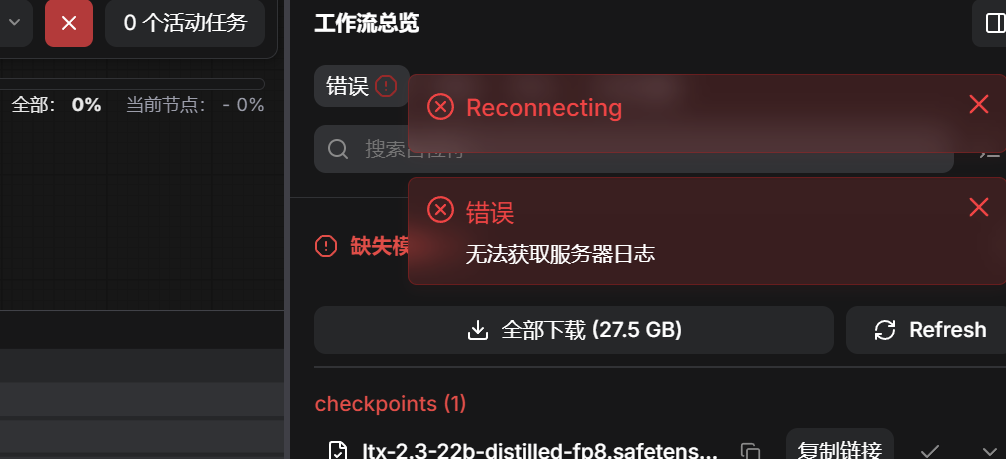
跳转至内容
  • 版块
  • 最新
  • 标签
  • 热门
  • 用户
  • 群组
皮肤
  • 浅色
  • Brite
  • Cerulean
  • Cosmo
  • Flatly
  • Journal
  • Litera
  • Lumen
  • Lux
  • Materia
  • Minty
  • Morph
  • Pulse
  • Sandstone
  • Simplex
  • Sketchy
  • Spacelab
  • United
  • Yeti
  • Zephyr
  • 深色
  • Cyborg
  • Darkly
  • Quartz
  • Slate
  • Solar
  • Superhero
  • Vapor

  • 默认(不使用皮肤)
  • 不使用皮肤
折叠
品牌标识

抡锤者

  1. 主页
  2. AI音视频画图
  3. 13700cpu 32g 1g 7900xtx

13700cpu 32g 1g 7900xtx

已定时 已固定 已锁定 已移动 AI音视频画图
23 帖子 3 发布者 333 浏览
  • 从旧到新
  • 从新到旧
  • 最多赞同
回复
  • 在新帖中回复
登录后回复
此主题已被删除。只有拥有主题管理权限的用户可以查看。
  • yongjun liuY yongjun liu

    @terry ## System Info
    OS: linux
    Python Version: 3.12.3 (main, Mar 23 2026, 19:04:32) [GCC 13.3.0]
    Embedded Python: false
    Pytorch Version: 2.5.1+rocm6.2
    Arguments: main.py --listen 127.0.0.1 --port 8188
    RAM Total: 31.08 GB
    RAM Free: 27.25 GB
    Templates Version: 0.9.73

    Devices

    • cuda:0 AMD Radeon RX 7900 XTX : native (cuda)
      VRAM Total: 23.98 GB
      VRAM Free: 23.88 GB
      Torch VRAM Total: 0 B
      Torch VRAM Free: 0 B
    terryT 在线
    terryT 在线
    terry
    编写于 最后由 terry 编辑
    #8

    @yongjun-liu 可以,开始实践吧!如果6.2的包有问题,你可以换6.3,更好一点,这是我测试过的稳定版,跑comfyUI非常稳。驱动我是Rocm7.2。

    yongjun liuY 1 条回复 最后回复
    0
    • terryT terry

      @yongjun-liu 可以,开始实践吧!如果6.2的包有问题,你可以换6.3,更好一点,这是我测试过的稳定版,跑comfyUI非常稳。驱动我是Rocm7.2。

      yongjun liuY 离线
      yongjun liuY 离线
      yongjun liu
      编写于 最后由 编辑
      #9

      @terry 是不是我这个模型用的不对?我就用的官方带的自带的那个,现在运行起来巨慢,一张图还没出过呢。

      terryT 1 条回复 最后回复
      0
      • yongjun liuY yongjun liu

        @terry 是不是我这个模型用的不对?我就用的官方带的自带的那个,现在运行起来巨慢,一张图还没出过呢。

        terryT 在线
        terryT 在线
        terry
        编写于 最后由 编辑
        #10

        @yongjun-liu 和模型无关,你贴下日志,肯定是降级到CPU了。

        1 条回复 最后回复
        0
        • yongjun liuY 离线
          yongjun liuY 离线
          yongjun liu
          编写于 最后由 编辑
          #11

          setup plugin alembic.autogenerate.schemas
          setup plugin alembic.autogenerate.tables
          setup plugin alembic.autogenerate.types
          setup plugin alembic.autogenerate.constraints
          setup plugin alembic.autogenerate.defaults
          setup plugin alembic.autogenerate.comments
          Found comfy_kitchen backend cuda: {'available': True, 'disabled': True, 'unavailable_reason': None, 'capabilities': ['apply_rope', 'apply_rope1', 'dequantize_nvfp4', 'dequantize_per_tensor_fp8', 'quantize_mxfp8', 'quantize_nvfp4', 'quantize_per_tensor_fp8']}
          Found comfy_kitchen backend eager: {'available': True, 'disabled': False, 'unavailable_reason': None, 'capabilities': ['apply_rope', 'apply_rope1', 'dequantize_nvfp4', 'dequantize_per_tensor_fp8', 'quantize_nvfp4', 'quantize_per_tensor_fp8', 'scaled_mm_nvfp4']}
          Found comfy_kitchen backend triton: {'available': True, 'disabled': True, 'unavailable_reason': None, 'capabilities': ['apply_rope', 'apply_rope1', 'dequantize_nvfp4', 'dequantize_per_tensor_fp8', 'quantize_mxfp8', 'quantize_nvfp4', 'quantize_per_tensor_fp8']}
          Checkpoint files will always be loaded safely.
          Total VRAM 24560 MB, total RAM 31825 MB
          pytorch version: 2.5.1+rocm6.2
          Set: torch.backends.cudnn.enabled = False for better AMD performance.
          AMD arch: gfx1100
          ROCm version: (6, 2)
          Set vram state to: NORMAL_VRAM
          Device: cuda:0 AMD Radeon RX 7900 XTX : native
          Using async weight offloading with 2 streams
          Enabled pinned memory 28642.0
          Using sub quadratic optimization for attention, if you have memory or speed issues try using: --use-split-cross-attention
          Python version: 3.12.3 (main, Mar 23 2026, 19:04:32) [GCC 13.3.0]
          ComfyUI version: 0.21.0
          comfy-aimdo version: 0.3.0
          comfy-kitchen version: 0.2.8
          ComfyUI frontend version: 1.43.18
          [Prompt Server] web root: /home/liuyong/ai/ComfyUI/venv/lib/python3.12/site-packages/comfyui_frontend_package/static
          Asset seeder disabled

          Import times for custom nodes:
          0.0 seconds: /home/liuyong/ai/ComfyUI/custom_nodes/websocket_image_save.py

          Context impl SQLiteImpl.
          Will assume non-transactional DDL.
          Starting server

          To see the GUI go to: http://127.0.0.1:8188
          got prompt
          VAE load device: cuda:0, offload device: cpu, dtype: torch.float32
          Found quantization metadata version 1
          Detected mixed precision quantization
          Using mixed precision operations
          model weight dtype torch.bfloat16, manual cast: torch.bfloat16
          model_type FLUX
          VAE load device: cuda:0, offload device: cpu, dtype: torch.bfloat16
          no CLIP/text encoder weights in checkpoint, the text encoder model will not be loaded.
          Requested to load VideoVAE
          loaded completely; 23236.80 MB usable, 1384.94 MB loaded, full load: True
          /home/liuyong/ai/ComfyUI/venv/lib/python3.12/site-packages/torch/nn/modules/conv.py:720: UserWarning: Attempting to use hipBLASLt on an unsupported architecture! Overriding blas backend to hipblas (Triggered internally at ../aten/src/ATen/Context.cpp:296.)
          return F.conv3d(
          Found quantization metadata version 1
          Using MixedPrecisionOps for text encoder
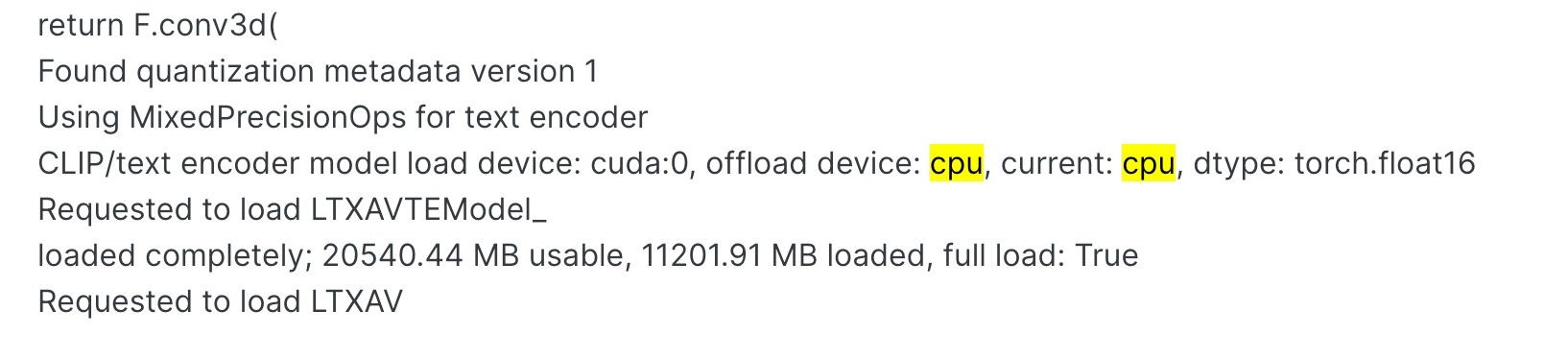
          CLIP/text encoder model load device: cuda:0, offload device: cpu, current: cpu, dtype: torch.float16
          Requested to load LTXAVTEModel_
          loaded completely; 20540.44 MB usable, 11201.91 MB loaded, full load: True
          Requested to load LTXAV

          1 条回复 最后回复
          0
          • terryT 在线
            terryT 在线
            terry
            编写于 最后由 编辑
            #12

            ffc90904-e26c-4d4a-b5b3-0f2cd15c33e3-image.jpeg
            CLIP启用了CPU,你发日志给Gemini,它会教你怎么做的。就是你不要设置lowvram模式就好。

            yongjun liuY 2 条回复 最后回复
            0
            • terryT terry

              ffc90904-e26c-4d4a-b5b3-0f2cd15c33e3-image.jpeg
              CLIP启用了CPU,你发日志给Gemini,它会教你怎么做的。就是你不要设置lowvram模式就好。

              yongjun liuY 离线
              yongjun liuY 离线
              yongjun liu
              编写于 最后由 编辑
              #13

              @terry 他说是加载了 Nvidia 的程序。

              1 条回复 最后回复
              0
              • terryT terry

                ffc90904-e26c-4d4a-b5b3-0f2cd15c33e3-image.jpeg
                CLIP启用了CPU,你发日志给Gemini,它会教你怎么做的。就是你不要设置lowvram模式就好。

                yongjun liuY 离线
                yongjun liuY 离线
                yongjun liu
                编写于 最后由 编辑
                #14

                @terry 跑 7% 就卡死了。

                1 条回复 最后回复
                0
                • terryT 在线
                  terryT 在线
                  terry
                  编写于 最后由 编辑
                  #15

                  我都给你标注了,它Current,就是当前设备时CPU,你去骂Gemini煞笔。

                  williamlouisW yongjun liuY 2 条回复 最后回复
                  0
                  • terryT terry

                    我都给你标注了,它Current,就是当前设备时CPU,你去骂Gemini煞笔。

                    williamlouisW 离线
                    williamlouisW 离线
                    williamlouis
                    编写于 最后由 编辑
                    #16

                    @terry 学习到了。驾驭 G mini大法了。
                    这是核心教程啊。

                    个人主页:xlkj.org Telegram https://t.me/xinlinlu

                    1 条回复 最后回复
                    0
                    • terryT terry

                      我都给你标注了,它Current,就是当前设备时CPU,你去骂Gemini煞笔。

                      yongjun liuY 离线
                      yongjun liuY 离线
                      yongjun liu
                      编写于 最后由 编辑
                      #17

                      @terry 他回答,CPU 正常,没问题。说是步数问题,操,指挥了半天,给我脑子指挥晕了。我休息两天吧。

                      yongjun liuY 1 条回复 最后回复
                      0
                      • yongjun liuY yongjun liu

                        @terry 他回答,CPU 正常,没问题。说是步数问题,操,指挥了半天,给我脑子指挥晕了。我休息两天吧。

                        yongjun liuY 离线
                        yongjun liuY 离线
                        yongjun liu
                        编写于 最后由 编辑
                        #18

                        我重装了Windows 11。comfyui 屏幕截图 2026-05-14 203519.png 结果是这个,晕死我了.

                        yongjun liuY 1 条回复 最后回复
                        0
                        • yongjun liuY yongjun liu

                          我重装了Windows 11。comfyui 屏幕截图 2026-05-14 203519.png 结果是这个,晕死我了.

                          yongjun liuY 离线
                          yongjun liuY 离线
                          yongjun liu
                          编写于 最后由 编辑
                          #19

                          这是我新装系统的启动日志啊
                          Adding extra search path custom_nodes C:\Users\cnbjy\Documents\ComfyUI\custom_nodes
                          Adding extra search path download_model_base C:\Users\cnbjy\Documents\ComfyUI\models
                          Adding extra search path custom_nodes C:\Users\cnbjy\AppData\Local\Programs\ComfyUI\resources\ComfyUI\custom_nodes
                          Setting output directory to: C:\Users\cnbjy\Documents\ComfyUI\output
                          Setting input directory to: C:\Users\cnbjy\Documents\ComfyUI\input
                          Setting user directory to: C:\Users\cnbjy\Documents\ComfyUI\user
                          [START] Security scan
                          [DONE] Security scan
                          ** ComfyUI startup time: 2026-05-14 20:40:00.306
                          ** Platform: Windows
                          ** Python version: 3.12.11 (main, Aug 18 2025, 19:17:54) [MSC v.1944 64 bit (AMD64)]
                          ** Python executable: C:\Users\cnbjy\Documents\ComfyUI.venv\Scripts\python.exe
                          ** ComfyUI Path: C:\Users\cnbjy\AppData\Local\Programs\ComfyUI\resources\ComfyUI
                          ** ComfyUI Base Folder Path: C:\Users\cnbjy\AppData\Local\Programs\ComfyUI\resources\ComfyUI
                          ** User directory: C:\Users\cnbjy\Documents\ComfyUI\user
                          ** ComfyUI-Manager config path: C:\Users\cnbjy\Documents\ComfyUI\user__manager\config.ini
                          ** Log path: C:\Users\cnbjy\Documents\ComfyUI\user\comfyui.log
                          [ComfyUI-Manager] Skipped fixing the 'comfyui-frontend-package' dependency because the ComfyUI is outdated.
                          [PRE] ComfyUI-Manager
                          Found comfy_kitchen backend cuda: {'available': True, 'disabled': True, 'unavailable_reason': None, 'capabilities': ['apply_rope', 'apply_rope1', 'dequantize_nvfp4', 'dequantize_per_tensor_fp8', 'quantize_mxfp8', 'quantize_nvfp4', 'quantize_per_tensor_fp8']}
                          Found comfy_kitchen backend eager: {'available': True, 'disabled': False, 'unavailable_reason': None, 'capabilities': ['apply_rope', 'apply_rope1', 'dequantize_mxfp8', 'dequantize_nvfp4', 'dequantize_per_tensor_fp8', 'quantize_mxfp8', 'quantize_nvfp4', 'quantize_per_tensor_fp8', 'scaled_mm_mxfp8', 'scaled_mm_nvfp4']}
                          Found comfy_kitchen backend triton: {'available': False, 'disabled': True, 'unavailable_reason': "ImportError: No module named 'triton'", 'capabilities': []}
                          Checkpoint files will always be loaded safely.
                          Total VRAM 24560 MB, total RAM 32506 MB
                          pytorch version: 2.9.1+rocm7.2.1
                          Set: torch.backends.cudnn.enabled = False for better AMD performance.
                          AMD arch: gfx1100
                          ROCm version: (7, 2)
                          Set vram state to: NORMAL_VRAM
                          Device: cuda:0 AMD Radeon RX 7900 XTX : native
                          Using async weight offloading with 2 streams
                          Enabled pinned memory 13002.0
                          Using pytorch attention
                          Python version: 3.12.11 (main, Aug 18 2025, 19:17:54) [MSC v.1944 64 bit (AMD64)]
                          ComfyUI version: 0.21.1
                          comfy-aimdo version: 0.3.0
                          comfy-kitchen version: 0.2.8
                          [Prompt Server] web root: C:\Users\cnbjy\AppData\Local\Programs\ComfyUI\resources\ComfyUI\web_custom_versions\desktop_app
                          Asset seeder disabled
                          [START] ComfyUI-Manager
                          [ComfyUI-Manager] Using GitPython backend
                          [ComfyUI-Manager] network_mode: public
                          [ComfyUI-Manager] The matrix sharing feature has been disabled because the matrix-nio dependency is not installed.
                          To use this feature, please run the following command:
                          C:\Users\cnbjy\Documents\ComfyUI.venv\Scripts\python.exe -m pip install matrix-nio

                          Import times for custom nodes:
                          0.0 seconds: C:\Users\cnbjy\AppData\Local\Programs\ComfyUI\resources\ComfyUI\custom_nodes\websocket_image_save.py

                          Context impl SQLiteImpl.
                          Will assume non-transactional DDL.
                          Starting server

                          To see the GUI go to: http://127.0.0.1:8000

                          1 条回复 最后回复
                          0
                          • terryT 在线
                            terryT 在线
                            terry
                            编写于 最后由 编辑
                            #20

                            不至于吧,我用xtx跑过啊,官方的包速度挺不错啊,你用的rocm7.2不至于慢。看你截图,你用的官方fp8模型,你想多了,你的卡跑不了这个模型,去换成社区的Q4量化的GGUF模型。

                            yongjun liuY 1 条回复 最后回复
                            0
                            • terryT terry

                              不至于吧,我用xtx跑过啊,官方的包速度挺不错啊,你用的rocm7.2不至于慢。看你截图,你用的官方fp8模型,你想多了,你的卡跑不了这个模型,去换成社区的Q4量化的GGUF模型。

                              yongjun liuY 离线
                              yongjun liuY 离线
                              yongjun liu
                              编写于 最后由 编辑
                              #21

                              @terry 刚才跑通了一段就用的是这个配置三秒钟720的视频用了13分钟.跑的鼠标都动不了。说的那个Q4的那个模型在哪啊您给个链接我去看看。多谢了啊哥们儿。

                              terryT 1 条回复 最后回复
                              0
                              • yongjun liuY yongjun liu

                                @terry 刚才跑通了一段就用的是这个配置三秒钟720的视频用了13分钟.跑的鼠标都动不了。说的那个Q4的那个模型在哪啊您给个链接我去看看。多谢了啊哥们儿。

                                terryT 在线
                                terryT 在线
                                terry
                                编写于 最后由 编辑
                                #22

                                @yongjun-liu 大哥都说了你模型太大,用CPU计算了,没用显卡,卡的和锤子一样。你问AI去哪里下,不行去B站下载刘悦的整合包,它包里就带模型。b站,刘悦的技术博客。还不会就直接把电脑格式化,你不适合玩AI。


                                williamlouisW 1 条回复 最后回复
                                0
                                • terryT terry

                                  @yongjun-liu 大哥都说了你模型太大,用CPU计算了,没用显卡,卡的和锤子一样。你问AI去哪里下,不行去B站下载刘悦的整合包,它包里就带模型。b站,刘悦的技术博客。还不会就直接把电脑格式化,你不适合玩AI。
                                  williamlouisW 离线
                                  williamlouisW 离线
                                  williamlouis
                                  编写于 最后由 编辑
                                  #23

                                  @terry 顶。我也不喜欢解释。浪费时间。

                                  个人主页:xlkj.org Telegram https://t.me/xinlinlu

                                  1 条回复 最后回复
                                  0

                                  你好!看起来您对这段对话很感兴趣,但您还没有一个账号。

                                  厌倦了每次访问都刷到同样的帖子?您注册账号后,您每次返回时都能精准定位到您上次浏览的位置,并可选择接收新回复通知(通过邮件或推送通知)。您还能收藏书签、为帖子顶,向社区成员表达您的欣赏。

                                  有了你的建议,这篇帖子会更精彩哦 💗

                                  注册 登录
                                  回复
                                  • 在新帖中回复
                                  登录后回复
                                  • 从旧到新
                                  • 从新到旧
                                  • 最多赞同


                                  • 登录

                                  • 没有帐号? 注册

                                  • 登录或注册以进行搜索。
                                  • 第一个帖子
                                    最后一个帖子
                                  0
                                  • 版块
                                  • 最新
                                  • 标签
                                  • 热门
                                  • 用户
                                  • 群组