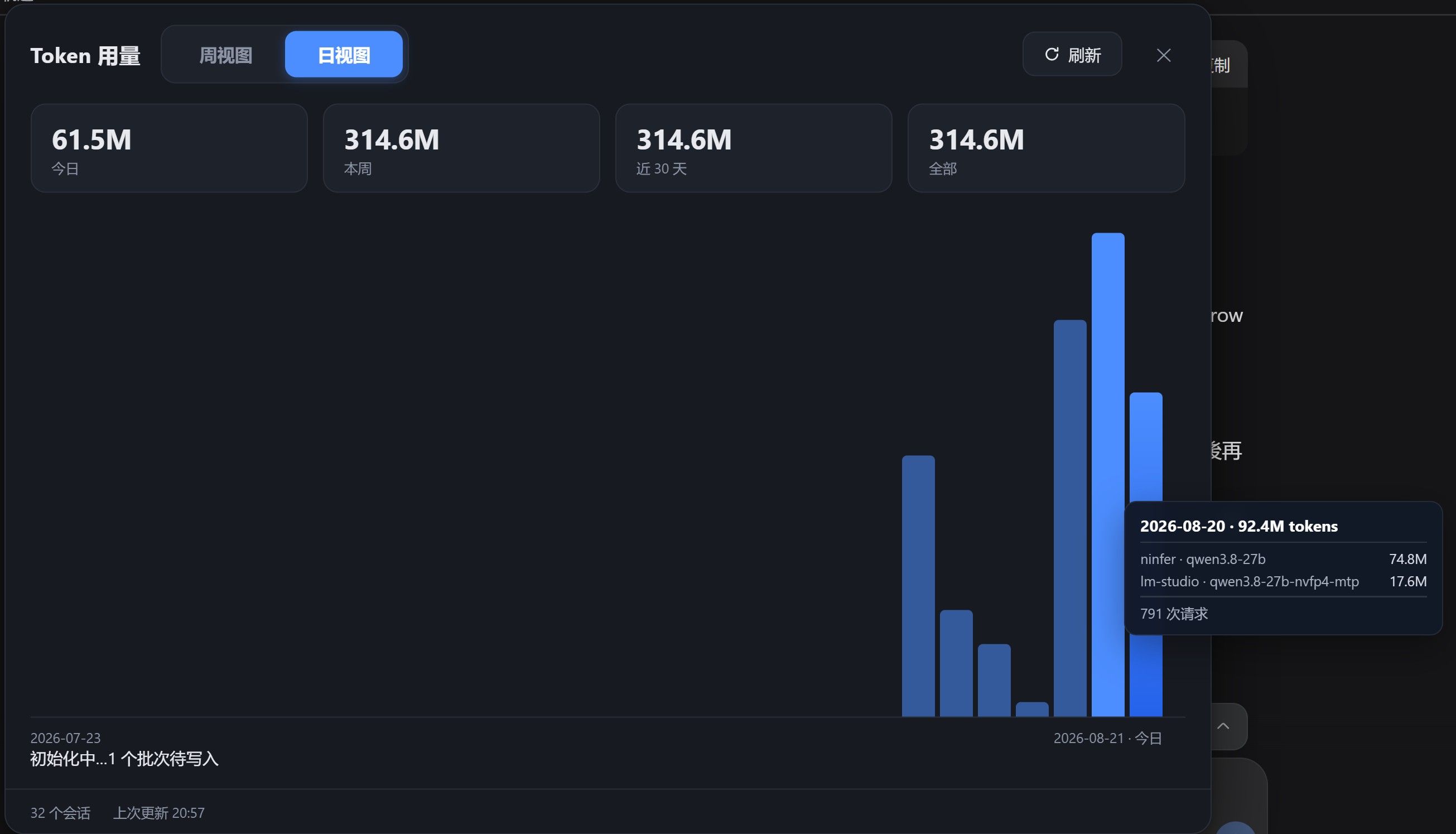
RTX 5090 Qwen3.8-27B dsh 全套實測:自寫推理引擎 NInfer × DeepSeek Harness × 開源編碼 agent 任務 —— 跑 13 小時真實編程任務的數據、6 個坑、以及「並發不是越大越快」
-
啟動腳本︰
# ninfer-serve.sh
#!/bin/bash
# NInfer host control: ninfer-serve.sh start | stop | status
# Binary reports usage.prompt_tokens_details.cached_tokens (OpenAI chat-completions),
# so DSH shows real KV prefix cache hit % instead of 0%.
# Default = text-only at 262K context (full int8 KV pool, ~10.45 GiB).
# Vision is optional: VISION=1 ninfer-serve.sh start switches to 192K context + --vision
# with media buffers trimmed from defaults (1G+2G) to 256M+512M so the fixed Vision
# buffers fit the ~10.4 GiB free after weights on the 5090 (at 262K they do not).
# C=2: median agent prompt scales to ~86K at 192K; two frontiers (~172K) fit the pool,
# so requests reuse their frontier (97-99% cached).
set -u
PORT=18080
LOG=/home/user/ninfer_serve.log
APP=/home/user/ninfer-build/apps/ninfer-serve
ART=/home/user/ninfer_artifacts/qwen3_8_27b_nvfp4.ninfer

if [ "${VISION:-0}" = "1" ]; then
  CTX=196608
  VISION_FLAGS="--vision --media-cache-mib 256 --media-live-mib 512"
else
  CTX=262144
  VISION_FLAGS=""
fi

is_running() { pgrep -f "ninfer-serve.*qwen3_8_27b" >/dev/null 2>&1; }

case "${1:-start}" in
  start)
    if is_running; then
      echo "already running (pid $(pgrep -of 'ninfer-serve.*qwen3_8_27b'))"
      exit 0
    fi
    export LD_LIBRARY_PATH=/home/user/ninfer_deps/prefix/usr/lib/x86_64-linux-gnu:${LD_LIBRARY_PATH:-}
    cd /home/eason || exit 1
    setsid nohup "$APP" "$ART" \
      --host 0.0.0.0 --port $PORT --device 0 \
      --max-context $CTX --prefill-chunk 1024 --kv-dtype int8 \
      $VISION_FLAGS \
      --max-concurrency 2 --pending-timeout-ms 600000 \
      --spec mtp --draft-tokens 3 --lm-head-draft >>"$LOG" 2>&1 &
    for i in $(seq 1 30); do
      sleep 5
      if curl -s http://127.0.0.1:$PORT/health | grep -q ok; then
        echo "NInfer up: pid $(pgrep -of 'ninfer-serve.*qwen3_8_27b'), ctx=$CTX vision=${VISION:-0}, log $LOG"
        exit 0
      fi
    done
    echo "server did not become healthy in 150s; last log lines:"; tail -5 "$LOG"; exit 1
    ;;
  stop)
    if ! is_running; then echo "not running"; exit 0; fi
    pkill -f "ninfer-serve.*qwen3_8_27b"
    for i in $(seq 1 10); do sleep 2; is_running || break; done
    if is_running; then echo "still running (try: fuser -k $PORT/tcp)"; exit 1; fi
    echo "stopped"
    ;;
  status)
    if is_running; then
      echo "running pid $(pgrep -of 'ninfer-serve.*qwen3_8_27b')"; curl -s http://127.0.0.1:$PORT/health; echo
    else
      echo "not running"
    fi
    ;;
  *) echo "usage: $0 start|stop|status (VISION=1 for vision mode)"; exit 2;;
esac
記得把
{ip}換掉:: start.bat @echo off setlocal title NInfer Start rem --- self-elevate (netsh portproxy + firewall need admin) --- net session >nul 2>&1 if %errorlevel% neq 0 ( echo Requesting administrator rights... powershell -NoProfile -Command "Start-Process '%~f0' -Verb RunAs" exit /b ) echo [1/4] Starting NInfer server in WSL Ubuntu (port 18080, MTP3 on)... wsl -d Ubuntu -- bash /mnt/c/Users/user/Desktop/ninfer-serve.sh start if errorlevel 1 goto :fail for /f "usebackq" %%i in (`wsl -d Ubuntu -- hostname -I`) do set WSL_IP=%%i echo [2/4] Repairing LAN portproxy: 0.0.0.0:18080 -> %WSL_IP%:18080 ... netsh interface portproxy delete v4tov4 listenaddress=0.0.0.0 listenport=18080 >nul 2>&1 netsh interface portproxy add v4tov4 listenaddress=0.0.0.0 listenport=18080 connectaddress=%WSL_IP% connectport=18080 echo [3/4] Ensuring firewall rule ... powershell -NoProfile -Command "if (-not (Get-NetFirewallRule -DisplayName 'NInfer serve 18080' -ErrorAction SilentlyContinue)) { New-NetFirewallRule -DisplayName 'NInfer serve 18080' -Direction Inbound -Protocol TCP -LocalPort 18080 -Action Allow -Profile Private,Public | Out-Null; Write-Host 'firewall rule added' } else { Write-Host 'firewall rule exists' }" echo [4/4] Verifying via LAN IP ... powershell -NoProfile -Command "try { $r = Invoke-RestMethod -Uri http://{ip}:18080/health -TimeoutSec 8; Write-Host ('LAN OK: ' + ($r | ConvertTo-Json -Compress)) } catch { Write-Host ('LAN FAIL: ' + $_.Exception.Message) }" echo. echo Done. Server URL for other devices: http://{ip}:18080 echo Model qwen3.8-27b (nvfp4), MTP3 on, no vision, KV int8. pause exit /b 0 :fail echo Start failed - check WSL log: wsl -d Ubuntu -- tail -20 /home/eason/ninfer_serve.log pause -
 T terry 于 将此主题固定
-
此主題已被删除!
-
系统 于 取消固定此主题
-
学习了,本地模型新入坑小白,跟大神学习。
-
,T terry 固定了此主题
-
Windows 原生能不能比 WSL 快,先分两句说:
-
瓶颈不同。WSL2 的 CUDA 走 /dev/dxg,GPU kernel 本身接近原生,吃亏的主要是 host
 device 的拷贝、pinned memory 和 WSL 的 VM 内存回收抖动,对 prefill 重、并发高的负载更明显。Windows 原生没有这层虚拟化,但受 WDDM 调度影响(消费卡只能用 WDDM,不能切 TCC),长 prefill/大 kernel 要防 TDR 超时重置,把 TdrDelay 调大一点更稳。
 -
别只比 decode。你这个场景 agent 负载基本是 prefill 主导,和 1228 楼里那个 98.6% prefill 的结论一致——要比就固定同一组参数(--max-context / --kv-dtype / --spec mtp / --draft-tokens / 并发)分别跑,prefill tok/s 和 decode tok/s 分开记,单看 decode 会误判。
实操上注意:CUDA runtime 与驱动版本要对齐;Windows 高性能电源计划、关掉硬件加速 GPU 计划(HAGS)和后台占用;显存里桌面和其他进程会先吃掉一块,KV capacity 要按实际可用显存留余量。
结论:单卡 27B、prefill 主导的 NInfer 场景,Windows 原生通常能小幅领先 WSL(几个点,配置脏了也可能持平或更差),不是代差。真正的天花板还是 5090 的算力和带宽,选哪个看你现有工具链顺手与否。
-
-
,系统 取消固定了此主题