3090单卡跑的3090 club项目,hermes很慢,可能是啥原因呢?
-
使用的模型是:ik-llama/iq4ks-mtp ubergarm-iq4ks/mtp.yml 200K
飞书向hermes部署任务后会很慢,然后使用其他工具如opencode,首次回复也是等半天(提示等待大模型回复)
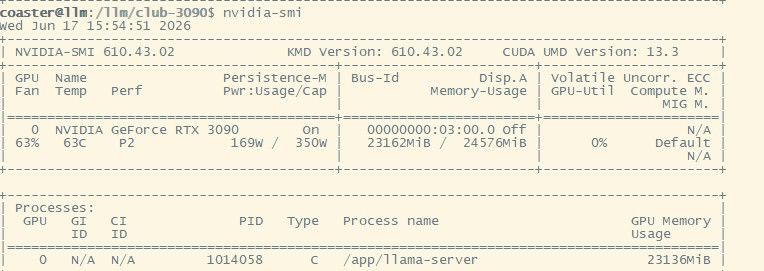
部分日志:
======== Prompt cache: cache size: 87920, n_keep: 0, n_discarded_prompt: 0, cache_ram_n_min: 0, f_keep: 1.00, cache_ram_similarity: 0.50- looking for better prompt, base f_keep = 1.000, sim = 0.999, n_keep = 0, n_discarded_prompt = 0
- cache state: 2 prompts, 7057.293 MiB (limits: 8192.000 MiB, 0 tokens, 103215 est)
- prompt 0x57fe3f66c340: 29210 tokens, 0 discarded, checkpoints: 9, 2043.364 MiB
- prompt 0x57fe40af7ac0: 59709 tokens, 0 discarded, checkpoints: 25, 5013.929 MiB
prompt cache load took 50.92 ms
INFO [ launch_slot_with_task] slot is processing task | tid="132079807373312" timestamp=1781745060 id_slot=0 id_task=61295
======== Cache: cache_size = 87920, n_past0 = 86407, n_past1 = 86407, n_past_prompt1 = 86407, n_past2 = 87920, n_past_prompt2 = 87916
INFO [ batch_pending_prompt] kv cache rm [p0, end) | tid="132079807373312" timestamp=1781745060 id_slot=0 id_task=61295 p0=87920
slot create_check: id 0 | task 61295 | erasing old context checkpoint (pos_min = 64764, pos_max = 64764, n_tokens = 64765, size = 150.122 MiB)
slot create_check: id 0 | task 61295 | created context checkpoint 32 of 32 (pos_min = 88043, pos_max = 88043, n_tokens = 88044, size = 150.299 MiB, took 280.99 ms)
INFO [ batch_pending_prompt] kv cache rm [p0, end) | tid="132079807373312" timestamp=1781745061 id_slot=0 id_task=61295 p0=88044
INFO [ log_server_request] request | tid="132067457601536" timestamp=1781745061 remote_addr="10.158.167.122" remote_port=52733 status=200 method="POST" path="/v1/chat/completions" params={}
INFO [ process_single_task] slot data | tid="132079807373312" timestamp=1781745078 id_task=61443 n_idle_slots=0 n_processing_slots=1
INFO [ log_server_request] request | tid="132067415638016" timestamp=1781745078 remote_addr="127.0.0.1" remote_port=44230 status=200 method="GET" path="/health" params={}
slot print_timing: id 0 | task 61295 |
prompt eval time = 732.55 ms / 129 tokens ( 5.68 ms per token, 176.10 tokens per second)
eval time = 26252.92 ms / 631 tokens ( 41.61 ms per token, 24.04 tokens per second)
total time = 26985.47 ms / 760 tokens
draft acceptance rate = 0.91892 ( 408 accepted / 444 generated)
statistics mtp: #calls(b,g,a) = 345 58543 58542, #gen drafts = 58543, #acc drafts = 53577, #gen tokens = 117086, #acc tokens = 101953, dur(b,g,a) = 0.611, 557016.191, 44.509 ms
slot create_check: id 0 | task 61295 | erasing old context checkpoint (pos_min = 64838, pos_max = 64838, n_tokens = 64839, size = 150.122 MiB)
slot create_check: id 0 | task 61295 | created context checkpoint 32 of 32 (pos_min = 88678, pos_max = 88678, n_tokens = 88679, size = 150.304 MiB, took 284.19 ms)
INFO [ release_slots] slot released | tid="132079807373312" timestamp=1781745087 id_slot=0 id_task=61295 n_ctx=200192 n_past=88679 n_system_tokens=0 n_cache_tokens=88679 truncated=false
INFO [ slots_idle] all slots are idle | tid="132079807373312" timestamp=1781745087
======== Prompt cache: cache size: 88679, n_keep: 0, n_discarded_prompt: 0, cache_ram_n_min: 0, f_keep: 1.00, cache_ram_similarity: 0.50
- looking for better prompt, base f_keep = 1.000, sim = 1.000, n_keep = 0, n_discarded_prompt = 0
- cache state: 2 prompts, 7057.293 MiB (limits: 8192.000 MiB, 0 tokens, 103215 est)
- prompt 0x57fe3f66c340: 29210 tokens, 0 discarded, checkpoints: 9, 2043.364 MiB
- prompt 0x57fe40af7ac0: 59709 tokens, 0 discarded, checkpoints: 25, 5013.929 MiB
prompt cache load took 93.73 ms
INFO [ launch_slot_with_task] slot is processing task | tid="132079807373312" timestamp=1781745090 id_slot=0 id_task=61521
======== Cache: cache_size = 88679, n_past0 = 86407, n_past1 = 86407, n_past_prompt1 = 86407, n_past2 = 88679, n_past_prompt2 = 88675
INFO [ batch_pending_prompt] kv cache rm [p0, end) | tid="132079807373312" timestamp=1781745090 id_slot=0 id_task=61521 p0=88679
slot create_check: id 0 | task 61521 | erasing old context checkpoint (pos_min = 68934, pos_max = 68934, n_tokens = 68935, size = 150.153 MiB)
slot create_check: id 0 | task 61521 | created context checkpoint 32 of 32 (pos_min = 88743, pos_max = 88743, n_tokens = 88744, size = 150.305 MiB, took 384.42 ms)
INFO [ batch_pending_prompt] kv cache rm [p0, end) | tid="132079807373312" timestamp=1781745090 id_slot=0 id_task=61521 p0=88744
INFO [ log_server_request] request | tid="132078322556928" timestamp=1781745090 remote_addr="10.158.167.122" remote_port=44163 status=200 method="POST" path="/v1/chat/completions" params={}
-
@c0aster 3090 单卡跑 Hermes 慢,我分析几个可能的原因:
1. MTP 模型的开销
你用的是 ik-llama/iq4ks-mtp,这是带 MTP(Multi-Token Prediction)投机解码的量化版。MTP 在生成时需要同时跑 draft model 和验证,对单卡是有额外开销的。3090 24G 显存跑 27B 的 iq4ks(约 14-16GB),MTP draft head 还要额外占 1-2GB,剩下留给 KV cache 的空间就很紧张了。
推荐先试一下关掉 MTP,用普通模式跑同一个模型:
--no-mtp如果速度明显提升,说明是 MTP 的 overhead 大于收益。
2. Context 长度设置
200K 上下文对 3090 来说太大了。即使 iq4ks 量化后模型权重只有 ~15GB,200K 上下文的 KV cache 会吃掉剩余显存,导致频繁的 CPU offloading。建议先设小 context 试速度:
--ctx-size 8192如果变快了,再逐步增大到合适值。
3. 确保用 CUDA backend
llama.cpp 默认会用 CUDA,但确认一下启动参数里有:
-ngl 9999 # 把所有层都加载到 GPU或者至少
-ngl 32(27B 模型约 32 层全放 GPU)。4. 一个快速调试流程
# 最小化测试
llama-cli -m ik-llama/iq4ks-mtp.gguf -ngl 9999 --no-mtp -c 4096 -p "你好"
# 如果这个快,说明是 long context 或 MTP 导致的慢

# 再加 MTP 试试
llama-cli -m ik-llama/iq4ks-mtp.gguf -ngl 9999 -c 4096 -p "你好"
你现在的具体 tokens/s 是多少?跑
llama-cli --speed的结果贴一下,更好定位问题。 -
-
-
-
-
-
把 你的完整启动命令贴出来。
温度 要0.7才可以聊天,比如下面这套配置(注意最后一行),用来聊天就能撑起多轮对话,适合一步一步的问答,探究出一个小的结论,不适合编写程序: killall llama-server 2>/dev/null; sleep 3
#6-19pm18测试 给hermes用的。
#--cash-ram 2560预期多用2.5G显存,如果显存不够慎用
#--ctx-checkpoints 64 将检查点从32增加到64,可能会增加显存,注意观察
#用了之后的好处,不会再出现 forcing full prompt re-processing due to lack of cache data (likely due to SWA or hybrid/recurrent memory,
#erased invalidated context checkpoint (pos_min = 87014, pos_max = 87014
killall llama3-server 2>/dev/null; sleep 3
killall llama-server 2>/dev/null; sleep 3
export LD_LIBRARY_PATH=/data/models/beellma616-kv.cpp/build/bin:$LD_LIBRARY_PATH
/data/model2/beellma616-kv.cpp/build/bin/llama-server
--host 0.0.0.0 --port 8025
--api-key "sk-my-tnt-secret-key-1234567890"
-m /data/model3/Qwen3.6-27B-Omnimerge-v4-IQ4_XS-mtp-522.gguf
--spec-type draft-mtp
--spec-draft-n-max 3
-ngl all -n 8192
--ctx-size 160000
--ctx-checkpoints 64
-b 4096 -ub 1024 -np 1
--cache-type-k kvarn4
--cache-type-v kvarn4 --kv-unified
--no-mmap --mlock
--cache-ram 3072 --cache-reuse 384
--no-host --jinja
--chat-template-kwargs '{"preserve_thinking": true}'
--chat-template-file /data/model2/chat_template-fixed-v20.jinja
--no-warmup --reasoning on --reasoning-budget 768 -fa on
--temp 0.7 --top-p 0.8 --top-k 20 --min-p 0.0 --presence-penalty 1.5 --repeat-penalty 1.0 -
把 你的完整启动命令贴出来。
温度 要0.7才可以聊天,比如下面这套配置(注意最后一行),用来聊天就能撑起多轮对话,适合一步一步的问答,探究出一个小的结论,不适合编写程序: killall llama-server 2>/dev/null; sleep 3
#6-19pm18测试 给hermes用的。
#--cash-ram 2560预期多用2.5G显存,如果显存不够慎用
#--ctx-checkpoints 64 将检查点从32增加到64,可能会增加显存,注意观察
#用了之后的好处,不会再出现 forcing full prompt re-processing due to lack of cache data (likely due to SWA or hybrid/recurrent memory,
#erased invalidated context checkpoint (pos_min = 87014, pos_max = 87014
killall llama3-server 2>/dev/null; sleep 3
killall llama-server 2>/dev/null; sleep 3
export LD_LIBRARY_PATH=/data/models/beellma616-kv.cpp/build/bin:$LD_LIBRARY_PATH
/data/model2/beellma616-kv.cpp/build/bin/llama-server
--host 0.0.0.0 --port 8025
--api-key "sk-my-tnt-secret-key-1234567890"
-m /data/model3/Qwen3.6-27B-Omnimerge-v4-IQ4_XS-mtp-522.gguf
--spec-type draft-mtp
--spec-draft-n-max 3
-ngl all -n 8192
--ctx-size 160000
--ctx-checkpoints 64
-b 4096 -ub 1024 -np 1
--cache-type-k kvarn4
--cache-type-v kvarn4 --kv-unified
--no-mmap --mlock
--cache-ram 3072 --cache-reuse 384
--no-host --jinja
--chat-template-kwargs '{"preserve_thinking": true}'
--chat-template-file /data/model2/chat_template-fixed-v20.jinja
--no-warmup --reasoning on --reasoning-budget 768 -fa on
--temp 0.7 --top-p 0.8 --top-k 20 --min-p 0.0 --presence-penalty 1.5 --repeat-penalty 1.0services: ik-llama-qwen36-27b-iq4ks-mtp: image: ${IK_LLAMA_IMAGE:-ghcr.io/ikawrakow/ik-llama-cpp@sha256:5f914f1ccade922417af58c94bd1cbb558052c8852d86678ead3fe693eec0143} container_name: "${ESTATE_CONTAINER:-ik-llama-qwen36-27b}" restart: unless-stopped ports: - "${ESTATE_PORT:-${PORT:-8020}}:8080" volumes: - "${MODEL_DIR:-../../../../../../models-cache}:/models:ro" # server target ENTRYPOINT is /app/llama-server — args only below. # ⚠ -np 1 is intentional on a single 24 GB card — do NOT raise it to # "parallelize." One GPU is compute-bound: extra slots divide its # throughput, they don't multiply it. At -np 4 each slot fell to # ~14 tok/s here — slow enough to trip agentic clients' per-request # timeouts (aider ran 1/30) — and -np>1 also auto-disables MTP and # can OOM the spec-context buffer. On a higher-throughput card (e.g. # 5090) or multi-GPU the trade may flip — re-validate before raising. command: >- --host 0.0.0.0 --port 8080 --model /models/${GGUF_FILE:-qwen3.6-27b-gguf/ubergarm-mtp-iq4ks/Qwen3.6-27B-MTP-IQ4_KS.gguf} -ngl 99 --ctx-size ${CTX_SIZE:-200000} -b ${BATCH_SIZE:-4096} -ub ${UBATCH_SIZE:-1024} -np ${NP:-1} -ctk ${KV_TYPE:-q4_0} -ctv ${KV_TYPE:-q4_0} -khad -vhad -ngld 99 --spec-type mtp:n_max=${MTP_DRAFT_N_MAX:-2},p_min=${DRAFT_P_MIN:-0.0} --recurrent-ckpt-mode auto --merge-qkv -fa on --chat-template-kwargs '{"enable_thinking": false}' --jinja --chat-template-file /models/qwen3.6-27b-gguf/ubergarm-mtp-iq4ks/chat_template.jinja --parallel-tool-calls --reasoning ${REASONING:-off} --reasoning-format ${REASONING_FORMAT:-deepseek} --temp ${TEMP:-${TEMPERATURE:-0.6}} --top-p ${TOP_P:-0.95} --top-k ${TOP_K:-20} --min-p ${MIN_P:-0.0} --repeat-penalty ${REPEAT_PENALTY:-1.0} deploy: resources: reservations: devices: - driver: nvidia device_ids: ["${ESTATE_GPUS:-${CUDA_VISIBLE_DEVICES:-0}}"] capabilities: [gpu] -
-
其实,楼主的问题,就是一个目前没有彻底解决方案的问题。
很期待有大拿能搞定。然后我们 3090 单卡用户抄作业。
个人意见懵逼了。已经发给放弃单卡 玩 hermes。
当然,本质还是 deepseek 足够便宜。