Qwen3.8 27B Q5_K_M + 7900xtx + DeepSeek Harness实战平均 52 t/s
-
是的,我上下文128k, 如我在一楼写的,修改现有的c++项目(大约 355595行代码),效果很好。 同样的任务比Deepseek flash慢 一半, 结合Harness一次性完成,效果一样。
在opencode中, DSF 一次完美完成, 本地Qwen需要多次修改。
-
,
 T terry 固定了此主题
-
,T terry 引用了 此主题
-
作业质量非常高!9700x、64G ddr5、R9700 跑QWen3.8-27b-Q4_K_M。没抄作业之前,接入Codex干活吐字只有3.1 t/s,还经常崩掉,完全不能忍。抄作业以后,接入Codex干活吐字能到50t/s,提升十多倍,感觉顺畅了。万分感谢!
-
看视频了。抄作业,已关注。请继续更新。
-
抄了作业,跑楼主参数,只有20tokens/s,比较尴尬,经过deepseek了一下,应该是我的CPU有点弱,我将--override-tensor blk.\d+.ffn_.*_exps.=CPU \注释掉了,并将--parallel改成了1,其他参数未动,现在能到60t/s了
-
@exllm 并行改为1后,预填充性能有接近5~10倍的提升(不同的任务变化很大),但生成token的性能提升不到10%。我也将“--override-tensor blk.\d+.ffn_.*_exps.=CPU \”注释掉进行过测试,性能反而有略微下降,可能跟我的硬件和跑的任务也有一定关系。
-
软硬件配置:
cpu: AMD Ryzen 5 5600
RAM: 32GB 3200
GPU: 7900xtx
OS: Ubuntu 26.04
软件 : llama.cpp + vulkan
版本:version: 9737 (67e9fd3b7) built with GNU 15.2.0 for Linux x86_64测试:
- llama.cpp 自带webui 创建打飞机游戏
提示词:
"Create a complete, fully functional 2D space shooter arcade game inside a single HTML file using HTML5 Canvas, CSS, and vanilla JavaScript.
**Requirements:**

1.  **Canvas & Layout:** Set up a centered 800x600 black canvas with a retro arcade UI showing the current score and remaining lives at the top.

2.  **Player Ship:** Draw a distinct player ship at the bottom center. Allow smooth movement left and right using the Arrow Keys or A/D keys, constrained within the canvas bounds.

3.  **Shooting Mechanics:** Pressing the Spacebar should fire a laser projectile upward from the player's position. Implement a brief cooldown between shots.

4.  **Enemies:** Spawn alien ships or asteroids at random X coordinates along the top, moving downward at varying speeds.

5.  **Collision Detection:** Write precise collision logic for bullets hitting enemies (destroying both and adding points) and enemies hitting the player or bottom screen (losing a life).

6.  **Game Loop & States:** Include smooth requestAnimationFrame logic, a 'Game Over' screen, and a 'Restart' button functionality. Clean, well-commented code only."
日志
1.47.020.662 I slot print_timing: id 1 | task 0 | n_decoded = 5409, tg = 89.47 t/s, tg_3s = 71.71 t/s 1.47.476.673 I slot print_timing: id 1 | task 0 | prompt eval time = 519.21 ms / 262 tokens ( 1.98 ms per token, 504.61 tokens per second) 1.47.476.677 I slot print_timing: id 1 | task 0 | eval time = 60909.77 ms / 5440 tokens ( 11.20 ms per token, 89.31 tokens per second) 1.47.476.677 I slot print_timing: id 1 | task 0 | total time = 61428.98 ms / 5702 tokens 1.47.476.681 I slot print_timing: id 1 | task 0 | graphs reused = 1480 1.47.476.684 I slot print_timing: id 1 | task 0 | draft acceptance = 0.87497 ( 3940 accepted / 4503 generated), mean acceptance length = 3.62, acceptance rate per position = (0.943, 0.875, 0.806)- 配合 Deepseek Harness 修改QT + C++ 项目 SimulIDE, 使其能在apple silicon上运行,并修改Qt 文本框输入bug
llama.cpp 日志中的一段
32.32.489.805 I slot print_timing: id  1 | task 10430 | prompt eval time =   17284.15 ms /  4098 tokens (    4.22 ms per token,   237.10 tokens per second)
32.32.489.807 I slot print_timing: id  1 | task 10430 |        eval time =    5461.48 ms /   277 tokens (   19.72 ms per token,    50.72 tokens per second)
32.32.489.808 I slot print_timing: id  1 | task 10430 |       total time =   22745.63 ms /  4375 tokens
32.32.489.808 I slot print_timing: id  1 | task 10430 |    graphs reused =       9929
32.32.489.811 I slot print_timing: id  1 | task 10430 | draft acceptance = 0.89333 (  201 accepted /   225 generated), mean acceptance length =  3.68, acceptance rate per position = (0.960, 0.893, 0.827)
DSH 摘要:
63歩ILLM 13m13S・工具週用 2m2s|首token 平均3.8s・52 tok/s|緩存命中98%1輸入 4.4M tok・輸出 29.2K tokllama.cpp运行参数:
-t 10 -b 512 -ub 256 --spec-draft-n-max 3 --fit off --no-context-shift --metrics --kv-unified --jinja --cache-type-k q8_0 --cache-type-v q8_0 -fa on --spec-type draft-mtp --ctx-size 131072 --parallel 2 -ngl -1 --host 0.0.0.0 --port 8080 --chat-template-kwargs {"enable_thinking": true, "preserve_think": false, "reasoning_effort": "medium"} --no-mmap --temp 0.6 --top-p 0.5 --top-k 15 --repeat-penalty 1.0 --override-tensor blk\.\d+\.ffn_.*_exps\.=CPU --alias qwen3.8-27b-q5@exllm @terry
根据楼主的测试了一下
cpu: AMD Ryzen 5 7500F
RAM:DDR5 32GB 6000
GPU: 7900XTX
OS: Ubuntu 24.04
软件 : llama.cpp + vulkan先说结果:
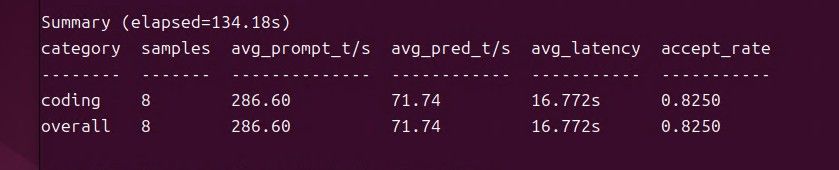
llama.cpp运行参数,spec-draft-n-max 3 速度最好:~/llama_vulkan/bin/llama-server \ -m ~/models/Qwen3.8-27B-Q5_K_M.gguf \ -t 10 \ -b 512 \ -ub 256 \ --spec-draft-n-max 3 \ --fit off \ --no-context-shift \ --metrics \ --kv-unified \ --jinja \ --cache-type-k q8_0 \ --cache-type-v q8_0 \ -fa on \ --spec-type draft-mtp \ --ctx-size 131072 \ --parallel 1 \ -ngl -1 \ --host 0.0.0.0 \ --port 8080 \ --chat-template-kwargs '{"enable_thinking":true,"preserve_think":false,"reasoning_effort":"medium"}' \ --no-mmap \ --temp 0.6 \ --top-p 0.5 \ --top-k 15 \ --repeat-penalty 1.0 \ --alias qwen3.8-27b-q5llama.cpp运行参数,spec-draft-n-max 2 :

llama.cpp运行参数,spec-draft-n-max 4 :
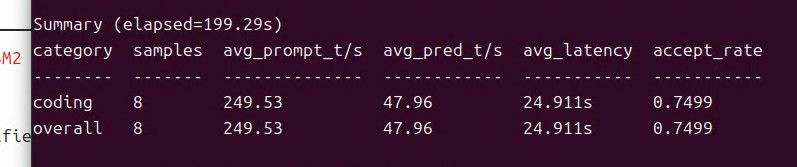
总结:
参数 Prompt速度 生成速度 平均延迟 MTP命中率 n=2 288.73 t/s 68.14 t/s 17.436 s 87.62% n=3 286.60 t/s 71.74 t/s 16.772 s 82.50% n=4 249.53 t/s 47.96 t/s 24.911 s 74.99% 这台电脑n=3最好。
注:修改这个参数是MTP speculative decoding(推测解码)一次最多提前“猜”多少个 token。 - llama.cpp 自带webui 创建打飞机游戏
-
为啥我的启动参数是这样:
-m "$SELECTED_MODEL" -t 10 -b 512 -ub 256
--spec-draft-n-max 3 --fit off --no-context-shift
--metrics --kv-unified --jinja
--cache-type-k q8_0 --cache-type-v q8_0
-fa on --spec-type draft-mtp
--ctx-size 131072 --parallel 1 -ngl -1
--host 0.0.0.0 --port $LLAMA_PORT
--chat-template-kwargs {"enable_thinking": true, "preserve_think": false, "reasoning_effort": "medium"}
--no-mmap --temp 0.6 --top-p 0.5 --top-k 15 --repeat-penalty 1.0
--alias qwen3.8-27b-q5
仍然速度很低,只有12左右
配置如下
cpu: AMD Ryzen 7 2700 Eight-Core Processor (8核16线程, 3.2GHz)
RAM: 64GB DDR4
GPU: AMD Radeon RX 7900 XTX 24GB (RADV NAVI31)
OS: Ubuntu 26.04 LTS (内核 7.0.0-29-generic)
软件 : llama.cpp Vulkan b10486 -
为啥我的启动参数是这样:
-m "$SELECTED_MODEL" -t 10 -b 512 -ub 256
--spec-draft-n-max 3 --fit off --no-context-shift
--metrics --kv-unified --jinja
--cache-type-k q8_0 --cache-type-v q8_0
-fa on --spec-type draft-mtp
--ctx-size 131072 --parallel 1 -ngl -1
--host 0.0.0.0 --port $LLAMA_PORT
--chat-template-kwargs {"enable_thinking": true, "preserve_think": false, "reasoning_effort": "medium"}
--no-mmap --temp 0.6 --top-p 0.5 --top-k 15 --repeat-penalty 1.0
--alias qwen3.8-27b-q5
仍然速度很低,只有12左右
配置如下
cpu: AMD Ryzen 7 2700 Eight-Core Processor (8核16线程, 3.2GHz)
RAM: 64GB DDR4
GPU: AMD Radeon RX 7900 XTX 24GB (RADV NAVI31)
OS: Ubuntu 26.04 LTS (内核 7.0.0-29-generic)
软件 : llama.cpp Vulkan b10486 -
为啥我的启动参数是这样:
-m "$SELECTED_MODEL" -t 10 -b 512 -ub 256
--spec-draft-n-max 3 --fit off --no-context-shift
--metrics --kv-unified --jinja
--cache-type-k q8_0 --cache-type-v q8_0
-fa on --spec-type draft-mtp
--ctx-size 131072 --parallel 1 -ngl -1
--host 0.0.0.0 --port $LLAMA_PORT
--chat-template-kwargs {"enable_thinking": true, "preserve_think": false, "reasoning_effort": "medium"}
--no-mmap --temp 0.6 --top-p 0.5 --top-k 15 --repeat-penalty 1.0
--alias qwen3.8-27b-q5
仍然速度很低,只有12左右
配置如下
cpu: AMD Ryzen 7 2700 Eight-Core Processor (8核16线程, 3.2GHz)
RAM: 64GB DDR4
GPU: AMD Radeon RX 7900 XTX 24GB (RADV NAVI31)
OS: Ubuntu 26.04 LTS (内核 7.0.0-29-generic)
软件 : llama.cpp Vulkan b10486 -
为啥我的启动参数是这样:
-m "$SELECTED_MODEL" -t 10 -b 512 -ub 256
--spec-draft-n-max 3 --fit off --no-context-shift
--metrics --kv-unified --jinja
--cache-type-k q8_0 --cache-type-v q8_0
-fa on --spec-type draft-mtp
--ctx-size 131072 --parallel 1 -ngl -1
--host 0.0.0.0 --port $LLAMA_PORT
--chat-template-kwargs {"enable_thinking": true, "preserve_think": false, "reasoning_effort": "medium"}
--no-mmap --temp 0.6 --top-p 0.5 --top-k 15 --repeat-penalty 1.0
--alias qwen3.8-27b-q5
仍然速度很低,只有12左右
配置如下
cpu: AMD Ryzen 7 2700 Eight-Core Processor (8核16线程, 3.2GHz)
RAM: 64GB DDR4
GPU: AMD Radeon RX 7900 XTX 24GB (RADV NAVI31)
OS: Ubuntu 26.04 LTS (内核 7.0.0-29-generic)
软件 : llama.cpp Vulkan b10486