
llama-swap多机多模型管理实践
-
目的
以低功耗或者长时间运行的设备作为访问入口, 按需启动模型服务、或者唤醒主机并启动相应的模型服务。
硬件环境
- nas 24x7 运行, 8600k + 32G DDR4 + RTX 2000 ADA 16G
- AI PC 按需要启动 5600 + 96G ddr4 + RX7900xtx 24G
软件环境
- nas: OMV 8.0
- AI PC: Ubuntu 26.04
llama-swap 部署
- 以nas作为访问入口, 安装llama-swap
- AI PC 安装 llama-swap, llama.cpp、comfyui、 strata 等等
运行方式
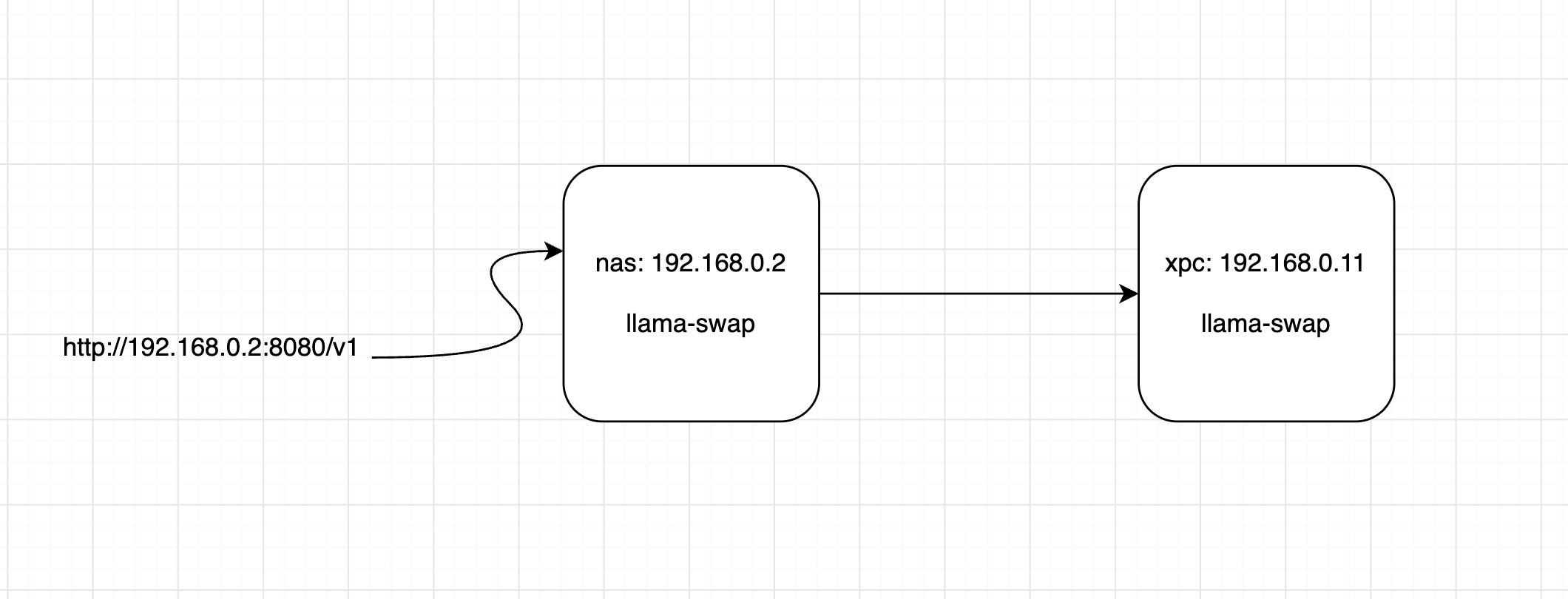
nas 上的llama-swap作为访问入口, 根据模型路由到目的主机, 如果主机支持网络唤醒, 则在关机/休眠状态下自动唤醒再启动模型
AI PC(设备名称xpc)设置
/etc/llama-swap/config.yaml
healthCheckTimeout: 300

includeAliasesInList: true

models:
  "qwen3.8-flash-next-iq3_s":
    cmd: >-
      sh -c 'exec /mnt/vllm/strata/Strata/run.sh --model iq3_s'
    proxy: http://127.0.0.1:8089
    checkEndpoint: /health
    capabilities:
      in:
        - text
      out:
        - text
  "qfn3.8-unsloth-ud-q4_k_xl":
    cmd: >-
      sh -c 'exec /mnt/vllm/strata/Strata/run.sh --model unsloth-ud-q4_k_xl'
    proxy: http://127.0.0.1:8089
    checkEndpoint: /health
    capabilities:
      in:
        - text
        - image
      out:
        - text
        - image


  "qwen3.8-27b-gsq-iq3-s":
     # docker-run 是在容器内启动、结束某个进程
     # start.sh 脚本 按照参数重构preset.ini 并启动llama-server
    cmd: >-
      /usr/local/bin/docker-run
      --container-name llama-vulkan
      --cmd /models/start.sh --auto-load qwen3.8-27b-gsq-iq3-s
    cmdStop: >-
      /usr/local/bin/docker-run
      --container-name llama-vulkan
      --cmd /models/start.sh
      --stop
    proxy: http://127.0.0.1:8081
    checkEndpoint: /health
    capabilities:
      in:
        - text
        - image
      out:
        - text
        - image


  "qwen-image-2.1-q5":
    cmd: >-
      /usr/local/bin/sd-run
      --diffusion-model /models/models/leejet/Qwen-Image-2.1/qwen_image_2.1-Q5_0.gguf
      --vae /models/models/leejet/Qwen-Image-2.1/qwen_image_2.1_vae_bf16.safetensors
      --llm /models/models/leejet/Qwen-Image-2.1/Qwen3VL-8B-Instruct-Q4_K_M.gguf
      --cfg-scale 4.0
      --sampling-method euler
      --steps 20
      --eager-load -v
    cmdStop: /usr/local/bin/sd-run --stop
    proxy: http://127.0.0.1:8079
    checkEndpoint: /
    capabilities:
      in:
        - text
      out:
        - image


  "qwen3-tts-1.7b":
    useModelName: Qwen/Qwen3-TTS-12Hz-1.7B-CustomVoice
    cmd: >-
      /usr/local/bin/docker-run
      --container-name omni
      --cmd /usr/local/bin/vllm
      serve
      /models/Qwen/Qwen3-TTS-12Hz-1.7B-CustomVoice
      --served-model-name "Qwen/Qwen3-TTS-12Hz-1.7B-CustomVoice"
      --omni
      --port 8091
    cmdStop: >-
      /usr/local/bin/docker-run
      --container-name omni
      --cmd /usr/local/bin/vllm
      --stop
    proxy: http://127.0.0.1:8091
    checkEndpoint: /health
    capabilities:
      in:
        - text
      out:
        - audio

  # 这里需要添加后缀_auto,这样访问 http://192.168.0.11:8080/comfyui/ 时才能正常工作
  "comfyui_auto":
    cmd: >-
      /usr/local/bin/docker-run
      --container-name comfyui
      --cmd /scripts/run.sh
    cmdStop: >-
      /usr/local/bin/docker-run
      --container-name comfyui
      --cmd /scripts/run.sh
      --stop
    proxy: http://127.0.0.1:8188
    checkEndpoint: /system_stats
    ttl: 0
    unloadTimeout: 40


groups:
  "gpu-workloads":
    swap: true  # 该组模型自动切换
    exclusive: true # 每次只有一个模型进程占用gpu
    members:
      - "qwen3.8-flash-next-iq3_s"
      - "qfn3.8-unsloth-ud-q4_k_xl"
      - "qwen-image-2.1-q5"
      - "qwen3-tts-1.7b"
      - "comfyui_auto"
      - "qwen3.8-27b-gsq-iq3-s"
/usr/local/bin/docker-run:
#!/usr/bin/env bash
set -Eeuo pipefail

# Defaults
CONTAINER=""
COMMAND=""
STOP=false
RESTART=false

# Runtime files on the host
RUNTIME_DIR="/tmp/docker-run"

# Command arguments
CMD_ARGS=()

usage() {
    cat <<'EOF'
Usage:
  docker-run --container-name NAME --cmd EXECUTABLE [ARGS...]
  docker-run --container-name NAME --cmd EXECUTABLE --stop

Examples:
  docker-run \
    --container-name sd \
    --cmd /sd.cpp/bin/sd-server \
    --diffusion-model '/models/my model.gguf' \
    --steps 20

  docker-run --container-name sd --cmd /sd.cpp/bin/sd-server --stop

Options:
  --container-name NAME   Docker container name
  --cmd EXECUTABLE        Executable path or command name inside container
  --stop                  Stop the managed process
  --restart               Restart the managed proces
  -h, --help              Show this help

Note:
  --stop must be the final argument when using this syntax.
  Each container has one managed process/PID file.
EOF
}

log() {
    printf '%s [%s] %s\n' \
        "$(date -Is)" "$CONTAINER" "$*" >> "$LOG_FILE"
}

die() {
    echo "Error: $*" >&2
    exit 1
}

# Parse wrapper options and preserve application arguments.
while (($#)); do
    case "$1" in
        --container-name)
            (($# >= 2)) || die "--container-name requires a value"
            CONTAINER="$2"
            shift 2
            ;;
        --cmd)
            (($# >= 2)) || die "--cmd requires an executable"
            COMMAND="$2"
            shift 2

            # Remaining arguments belong to the application.
            # A final --stop is reserved for the wrapper.
            if (($#)) && [[ "${!#}" == "--stop" ]]; then
                STOP=true
                set -- "${@:1:$(($# - 1))}"
            fi

            CMD_ARGS=("$@")
            break
            ;;
        --stop)
            STOP=true
            shift
            ;;
        --restart)
            RESTART=true
            shift
            ;;
        -h|--help)
            usage
            exit 0
            ;;
        *)
            die "Unknown wrapper option: $1"
            ;;
    esac
done

[[ -n "$CONTAINER" ]] || die "Missing --container-name"
[[ -n "$COMMAND" ]] || die "Missing --cmd"

mkdir -p "$RUNTIME_DIR"

# Container-specific runtime files.
# Hashing the container name avoids unsafe filename characters.
CONTAINER_KEY="$(printf '%s' "$CONTAINER" | sha256sum | cut -c1-16)"
LOCK_FILE="$RUNTIME_DIR/$CONTAINER_KEY.lock"
LOG_FILE="$RUNTIME_DIR/$CONTAINER_KEY.log"

# PID file lives inside the container, so a later invocation can find it.
PID_FILE="/tmp/docker-run-${CONTAINER_KEY}.pid"

acquire_lock() {
    exec 9>"$LOCK_FILE"
    flock 9
}

check_container() {
    docker inspect "$CONTAINER" >/dev/null 2>&1 ||
        die "Container '$CONTAINER' does not exist"
}

check_container_running() {
    [[ "$(docker inspect -f '{{.State.Running}}' "$CONTAINER")" == "true" ]]
}

stop_process() {
    acquire_lock
    log "STOP acquired lock"

    check_container

    if ! check_container_running; then
        log "STOP container is not running"
        return 0
    fi

    if ! docker exec "$CONTAINER" /bin/bash -lc '
        pidfile="$1"

        if [[ ! -s "$pidfile" ]]; then
            echo "No managed PID file found"
            exit 0
        fi

        pid="$(cat "$pidfile")"

        if [[ ! "$pid" =~ ^[0-9]+$ ]] || ! kill -0 "$pid" 2>/dev/null; then
            echo "Managed process is not running; removing stale PID file"
            rm -f "$pidfile"
            exit 0
        fi

        echo "Sending TERM to PID $pid"
        kill -TERM "$pid" 2>/dev/null || true

        for i in $(seq 1 30); do
            if ! kill -0 "$pid" 2>/dev/null; then
                echo "Process exited gracefully"
                rm -f "$pidfile"
                exit 0
            fi
            sleep 0.5
        done

        echo "Process did not exit; sending KILL"
        kill -KILL "$pid" 2>/dev/null || true

        for i in $(seq 1 10); do
            if ! kill -0 "$pid" 2>/dev/null; then
                echo "Process exited after KILL"
                rm -f "$pidfile"
                exit 0
            fi
            sleep 0.5
        done

        echo "ERROR: Process still appears to exist" >&2
        exit 1
    ' docker-run-stop "$PID_FILE" >> "$LOG_FILE" 2>&1; then
        log "STOP failed"
        return 1
    fi

    log "STOP completed"
}


start_process() {
    acquire_lock
    log "START acquired lock"

    check_container

    if ! check_container_running; then
        log "START starting container"
        docker start "$CONTAINER" >/dev/null
    fi

    log "START launching: $COMMAND"

    docker exec "$CONTAINER" /bin/bash -lc '
        set -u

        pidfile="$1"
        shift

        # Check for an existing managed process.
        if [[ -s "$pidfile" ]]; then
            oldpid="$(cat "$pidfile")"

            if [[ "$oldpid" =~ ^[0-9]+$ ]] &&
               kill -0 "$oldpid" 2>/dev/null; then
                echo "A managed process is already running (PID $oldpid)" >&2
                exit 1
            fi

            echo "Removing stale PID file"
            rm -f "$pidfile"
        fi

        # Start the command.
        "$@" &
        pid=$!

        printf "%s\n" "$pid" > "$pidfile"

        # Clean up the PID file when this shell exits.
        cleanup() {
            if [[ -s "$pidfile" ]] &&
               [[ "$(cat "$pidfile")" == "$pid" ]]; then
                rm -f "$pidfile"
            fi
        }

        trap cleanup EXIT

        echo "Started managed process PID $pid"

        set +e
        wait "$pid"
        rc=$?
        set -e

        echo "Managed process exited with status $rc"
        exit "$rc"
    ' docker-run-start "$PID_FILE" "$COMMAND" "${CMD_ARGS[@]}" 9>&- &

    SERVER_EXEC_PID=$!
    STARTED=false

    # Wait for the managed process to start.
    for i in $(seq 1 120); do
        if ! kill -0 "$SERVER_EXEC_PID" 2>/dev/null; then
            set +e
            wait "$SERVER_EXEC_PID"
            rc=$?
            set -e

            # Remove any stale PID file after startup failure.
            docker exec "$CONTAINER" rm -f "$PID_FILE" \
                >/dev/null 2>&1 || true

            log "START exited before confirmation; rc=$rc"
            return "$rc"
        fi

        if docker exec "$CONTAINER" /bin/bash -lc '
            pidfile="$1"

            [[ -s "$pidfile" ]] || exit 1
            pid="$(cat "$pidfile")"

            [[ "$pid" =~ ^[0-9]+$ ]] &&
                kill -0 "$pid" 2>/dev/null
        ' sd-run-confirm "$PID_FILE" >/dev/null 2>&1; then
            STARTED=true
            log "START process confirmed after $i checks"
            break
        fi

        sleep 0.25
    done

    if [[ "$STARTED" != "true" ]]; then
        log "START timed out waiting for process confirmation"

        kill "$SERVER_EXEC_PID" 2>/dev/null || true

        set +e
        wait "$SERVER_EXEC_PID"
        set -e

        # Ensure a failed launch doesn't block the next attempt.
        docker exec "$CONTAINER" rm -f "$PID_FILE" \
            >/dev/null 2>&1 || true

        return 1
    fi

    # Release the lock once startup has been confirmed.
    exec 9>&-
    log "START released lock; waiting for process"

    set +e
    wait "$SERVER_EXEC_PID"
    rc=$?
    set -e

    # Final cleanup in case the container-side cleanup didn't run.
    docker exec "$CONTAINER" rm -f "$PID_FILE" \
        >/dev/null 2>&1 || true

    log "START process exited; rc=$rc"
    return "$rc"
}

log "Invocation received; stop=$STOP; command=$COMMAND"

if [[ "$STOP" == "true" ]]; then
    stop_process
elif [[ "$RESTART" == "true" ]]; then
    stop_process
    start_process
else
    start_process
fi
nas llama-swap 设置
/etc/llama-swap/config.yaml:
healthCheckTimeout: 300

includeAliasesInList: true

models:
  "qwen2.5-coder:3b":
    cmd: >-
      /usr/local/bin/docker-run
      --container-name llama-coder
      --restart
      --cmd /models/start.sh
      --auto-load "qwen2.5-coder:3b"
    cmdStop: >-
      /usr/local/bin/docker-run
      --container-name llama-coder
      --cmd /models/start.sh
      --stop
    proxy: http://127.0.0.1:8077
    checkEndpoint: /health
    ttl: 0

  "qwen3.5-9b":
    cmd: >-
      /usr/local/bin/docker-run
      --container-name llama-cpp
      --cmd /models/start.sh
      --auto-load "qwen3.5-9b"
    cmdStop: >-
      /usr/local/bin/docker-run
      --container-name llama-cpp
      --cmd /models/start.sh
      --stop
    proxy: http://127.0.0.1:8079
    checkEndpoint: /health

  "qwen3-tts-1.7b":
    useModelName: Qwen/Qwen3-TTS-12Hz-1.7B-CustomVoice
    cmd: >-
      /usr/local/bin/docker-run
      --container-name omni
      --cmd /usr/local/bin/vllm
      serve
      /models/Qwen/Qwen3-TTS-12Hz-1.7B-CustomVoice
      --served-model-name "Qwen/Qwen3-TTS-12Hz-1.7B-CustomVoice"
      --omni
      --port 8091
    cmdStop: >-
      /usr/local/bin/docker-run
      --container-name omni
      --cmd /usr/local/bin/vllm
      --stop
    proxy: http://127.0.0.1:8091
    checkEndpoint: /health
    capabilities:
      in:
        - text
      out:
        - audio
      voices:
        - Vivian
        - Serena
        - Uncle_Fu
        - Dylan
        - Eric
        - Ryan
        - Aiden

  # 添加一个虚拟模型, 目的是为了自动启动wol-proxy实例
  "xpc-peer":
    cmd: /bin/bash -c 'pkill -TERM -x wol-proxy 2>/dev/null || true; for i in $(seq 1 10); do pgrep -x wol-proxy >/dev/null || break; sleep 1; done; exec /usr/local/bin/wol-proxy -mac 00:00:00:00:00:00 -upstream http://192.168.0.11:8080 -listen 0.0.0.0:8070 -timeout 300'
    ttl: 0
    proxy: http://127.0.0.1:8070
groups:
  "always-alive":
    persistent: true
    swap: false
    exclusive: false
    members: # qwen2.5-coder 主要为了做代码补全,所以全时运行,xpc-peer 虚拟模型也是全时运行
      - "qwen2.5-coder:3b"
      - "xpc-peer"
  "gpu-workloads":
    swap: true
    exclusive: true
    members:
      - "qwen3.5-9b"
      - "qwen3-tts-1.7b"

hooks:
  on_startup:
    preload: # llama-swap服务启动时,同时启动常驻模型
      - "qwen2.5-coder:3b"
      - "xpc-peer"


peers:
  xpc: # 二级llamap-swap实例, 这里由wol-proxy代理,目的是在主机休眠或者关机时,自动唤醒
    proxy: http://127.0.0.1:8070
    apiKey: "api_key"
    models:
      - "qwen3.8-flash-next-iq3_s"
      - "qfn3.8-unsloth-ud-q4_k_xl"
      - "qwen-image-2.1-q5"
      - "qwen3-tts-1.7b"
      - "qwen3.8-27b-gsq-iq3-s"
xpc自动休眠, 监测gpu使用功耗,如果在一定时期内功耗低于阈值,则认为是闲置状体,自动执行休眠指令。同时监测ssh会话输入,每次输入都会重置闲置状态计时器, 表示即使GPU不在工作但有其他任务在工作。
#!/usr/bin/env bash
set -Eeuo pipefail

# ==================== Configuration ====================

POWER_THRESHOLD=100       # Watts
LOW_POWER_DURATION=2700   # Seconds: 45 minutes
CHECK_INTERVAL=10         # Seconds between checks

SSH_IDLE_LIMIT=30
SSH_ACTIVITY_DIR="/run/gpu-power-monitor"

# Monitoring time window, using local system time (24-hour format).
START_TIME="00:00"
END_TIME="23:59"

# GPU index to monitor
GPU_INDEX=0

# Command to execute when the condition is met.
TRIGGER_COMMAND=(/usr/local/bin/safe-sleep -y)

# =======================================================

log() {
    echo "$(date '+%Y-%m-%d %H:%M:%S') $*"
}

low_power_since=0
triggered=false
was_in_window=false

has_recent_ssh_activity() {
    local file timestamp now

    now=$(date +%s)

    shopt -s nullglob

    for file in "$SSH_ACTIVITY_DIR"/ssh-*; do
        [[ -f "$file" ]] || continue

        timestamp=$(<"$file")

        [[ "$timestamp" =~ ^[0-9]+$ ]] || continue

        if (( now - timestamp <= SSH_IDLE_LIMIT )); then
            shopt -u nullglob
            return 0
        fi
    done

    shopt -u nullglob
    return 1
}

# Return success if current local time is inside the configured window.
in_monitoring_window() {
    local current start end

    current=$(date +%H%M)
    start=${START_TIME//:/}
    end=${END_TIME//:/}

    # Equal start/end means monitoring all day.
    if [[ "$start" == "$end" ]]; then
        return 0
    fi

    # Ordinary window, e.g. 01:00-08:00.
    if (( 10#$start < 10#$end )); then
        (( 10#$current >= 10#$start && 10#$current < 10#$end ))
    else
        # Overnight window, e.g. 22:00-06:00.
        (( 10#$current >= 10#$start || 10#$current < 10#$end ))
    fi
}

get_gpu_power() {
    amd-smi metric -g "$GPU_INDEX" --power 2>/dev/null |
        awk '
            /SOCKET_POWER:/ {
                for (i = 1; i <= NF; i++) {
                    if ($i == "SOCKET_POWER:") {
                        value = $(i + 1)

                        if (value ~ /^[0-9]+([.][0-9]+)?$/) {
                            print value
                            exit
                        }
                    }
                }
            }
        '
}

log "GPU power monitor started"
log "GPU=$GPU_INDEX threshold=${POWER_THRESHOLD}W duration=${LOW_POWER_DURATION}s interval=${CHECK_INTERVAL}s"
log "Monitoring window: ${START_TIME}-${END_TIME} (local time)"

while true; do
    now=$(date +%s)

    if ! in_monitoring_window; then
        if [[ "$was_in_window" == true ]]; then
            log "Monitoring window ended; resetting timer"
        fi

        low_power_since=0
        triggered=false
        was_in_window=false

        sleep "$CHECK_INTERVAL"
        continue
    fi

    if [[ "$was_in_window" == false ]]; then
        log "Monitoring window started"
        was_in_window=true
        low_power_since=0
        triggered=false
    fi

    if has_recent_ssh_activity; then
        if (( low_power_since != 0 )); then
            log "Recent SSH activity detected; resetting low-power timer"
        fi

        low_power_since=0
        triggered=false

        sleep "$CHECK_INTERVAL"
        continue
    fi

    if ! power=$(get_gpu_power) || [[ ! "$power" =~ ^[0-9]+([.][0-9]+)?$ ]]; then
        log "WARNING: Unable to read GPU power; resetting timer"
        low_power_since=0
        triggered=false
        sleep "$CHECK_INTERVAL"
        continue
    fi

    below_threshold=$(awk -v p="$power" -v t="$POWER_THRESHOLD" \
        'BEGIN { print (p < t) ? 1 : 0 }')

    if (( below_threshold )); then
        if (( low_power_since == 0 )); then
            low_power_since=$now
            triggered=false
            log "GPU power ${power}W: below threshold; timer started"
        fi

        elapsed=$((now - low_power_since))

        if (( elapsed >= LOW_POWER_DURATION )) && [[ "$triggered" == false ]]; then
            log "GPU power has remained below ${POWER_THRESHOLD}W for ${elapsed}s; executing command"

            if "${TRIGGER_COMMAND[@]}"; then
                log "Command completed successfully"
                triggered=true
            else
                rc=$?
                log "ERROR: Command failed with exit code ${rc}; will retry on the next check"
            fi
        fi
    else
        if (( low_power_since != 0 )); then
            log "GPU power ${power}W: threshold reached; resetting timer"
        fi

        low_power_since=0
        triggered=false
    fi

    sleep "$CHECK_INTERVAL"
done
自动休眠脚本, 在休眠前需要结束所有使用GPU的进程, 否则唤醒后GPU工作不正常
#!/usr/bin/env bash
set -Eeuo pipefail

LLAMA_SWAP_URL="http://127.0.0.1:8080"
TIMEOUT=180
INTERVAL=2
STEPS=4

# Parse arguments
AUTO_CONFIRM=false

while getopts ":y" opt; do
    case "$opt" in
        y) AUTO_CONFIRM=true ;;
        *)
            echo "Usage: $0 [-y]"
            exit 1
            ;;
    esac
done

echo "===================================="
echo "  Prepare AI workstation for sleep"
echo "===================================="

# Check llama-swap availability
if ! curl -fsS "$LLAMA_SWAP_URL/health" >/dev/null; then
    echo "ERROR: llama-swap is not responding."
    exit 1
fi

# Request unloading of all models
echo
echo "[1/$STEPS] Requesting unload of all models..."

if ! curl -fsS -X POST \
    "$LLAMA_SWAP_URL/api/models/unload"; then
    echo
    echo "ERROR: Failed to request model unloading."
    exit 1
fi

echo
echo
echo "[2/$STEPS] Waiting for models to stop..."

elapsed=0
running_count=-1

while (( elapsed < TIMEOUT )); do
    response=$(curl -fsS "$LLAMA_SWAP_URL/running") || {
        echo "ERROR: Cannot query running models."
        exit 1
    }

    running_count=$(printf '%s' "$response" | jq -er '.running | length') || {
        echo "ERROR: Invalid JSON response from /running."
        exit 1
    }

    if (( running_count == 0 )); then
        echo "No running models remain."
        break
    fi

    echo "Still waiting for $running_count running model(s) (${elapsed}s)..."
    sleep "$INTERVAL"
    elapsed=$((elapsed + INTERVAL))
done

if (( running_count != 0 )); then
    echo "ERROR: Timed out waiting for models to stop."
    echo "The computer will NOT be suspended."
    exit 1
fi

echo
echo "[3/$STEPS] All models unloaded successfully."

echo
echo "[4/$STEPS] Check and kill process is still running on gpu..."
TIMEOUT=10
INTERVAL=0.5

if command -v amd-smi >/dev/null 2>&1; then
    GPU_TOOL=amd-smi
elif command -v rocm-smi >/dev/null 2>&1; then
    GPU_TOOL=rocm-smi
else
    echo "ERROR: Neither amd-smi nor rocm-smi is available." >&2
    exit 1
fi

get_gpu_pids() {
    local output

    if [[ "$GPU_TOOL" == amd-smi ]]; then
        output=$(amd-smi process --general 2>/dev/null) || return 1
        printf '%s\n' "$output" |
            awk '/PID:/ && $2 ~ /^[0-9]+$/ { print $2 }' |
            sort -un
    else
        output=$(rocm-smi --showpids 2>/dev/null) || return 1
        printf '%s\n' "$output" |
            awk '/^[[:space:]]*[0-9]+[[:space:]]/ { print $1 }' |
            sort -un
    fi
}

get_entry_pid() {
    local pid="$1"
    local ppid pgid parent_pgid

    read -r ppid pgid < <(
        ps -o ppid=,pgid= -p "$pid" 2>/dev/null
    ) || return 1

    [[ -n "$ppid" && -n "$pgid" ]] || return 1

    while (( ppid > 1 )); do
        read -r parent_pgid < <(
            ps -o pgid= -p "$ppid" 2>/dev/null
        ) || break

        [[ -n "$parent_pgid" && "$parent_pgid" == "$pgid" ]] ||
            break

        pid="$ppid"

        read -r ppid < <(
            ps -o ppid= -p "$pid" 2>/dev/null
        ) || break
    done

    echo "$pid"
}

is_alive() {
    local state

    state=$(ps -o stat= -p "$1" 2>/dev/null) || return 1
    [[ -n "$state" && "$state" != *Z* ]]
}

echo "Using GPU utility: $GPU_TOOL"

pids=$(get_gpu_pids) || {
    echo "ERROR: Cannot query GPU processes." >&2
    exit 1
}

if [[ -z "$pids" ]]; then
    echo "No GPU processes found."
else

	declare -A targets=()

	echo "GPU processes:"
	while read -r pid; do
	    [[ "$pid" =~ ^[0-9]+$ ]] || continue

	    entry=$(get_entry_pid "$pid") || {
	        echo "WARNING: Cannot identify entry process for PID $pid."
	        continue
	    }

	    targets["$entry"]=1
	    printf '  GPU PID: %s -> Entry PID: %s\n' "$pid" "$entry"
	done <<< "$pids"

	if (( ${#targets[@]} == 0 )); then
	    echo "ERROR: No safe entry processes identified." >&2
	    exit 1
	fi

	for pid in "${!targets[@]}"; do
	    echo "Sending SIGTERM to entry PID $pid..."
	    kill -TERM "$pid" 2>/dev/null || true
	done

	deadline=$((SECONDS + TIMEOUT))

	while (( SECONDS < deadline )); do
	    remaining=0

	    for pid in "${!targets[@]}"; do
	        if is_alive "$pid"; then
	            remaining=1
	            break
	        fi
	    done

	    (( remaining == 0 )) && break
	    sleep "$INTERVAL"
	done

	for pid in "${!targets[@]}"; do
	    if is_alive "$pid"; then
	        echo "Timeout: sending SIGKILL to PID $pid..."
	        kill -KILL "$pid" 2>/dev/null || true
	    fi
	done

	sleep 1

	remaining=$(get_gpu_pids) || {
	    echo "ERROR: Final GPU verification failed." >&2
	    exit 1
	}

	if [[ -z "$remaining" ]]; then
	    echo "SUCCESS: No GPU processes reported."
	else
		echo "ERROR: GPU processes remain:"
		printf '  PID %s\n' $remaining
		exit 2
	fi

fi

# comfirm and sleep
if [[ "$AUTO_CONFIRM" == false ]]; then
    echo
    read -r -p "Suspend this computer now? [y/N] " answer

    if [[ ! "$answer" =~ ^[Yy]$ ]]; then
        echo "Cancelled. The computer will remain awake."
        exit 0
    fi
fi

echo "Suspending computer..."

echo "enter sleep on: $(date)..." > /tmp/safe-sleep.log

systemctl hybrid-sleep