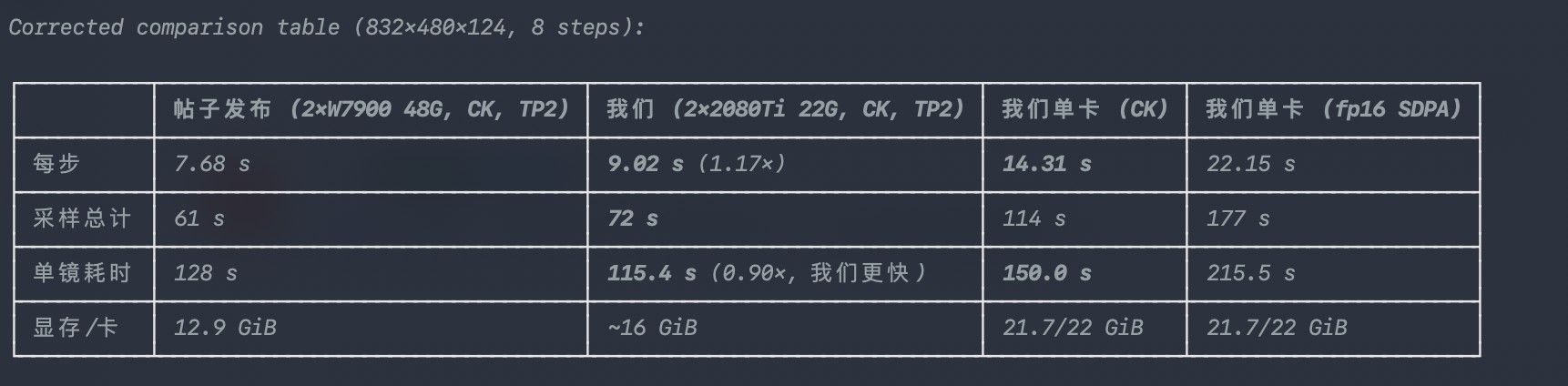
两张 7900 跑 MiniMax-H3 张量并行:每步 18.6 s → 8.3 s,每卡省 10 GiB
-
@懒人烘培
说实话优化空间依然很大,我就是抛砖引玉,后面劳烦大家群策群力TP2 代码全文(tp2-comfy v1.0.0)
直接可跑的最小实现;完整说明/排查清单见
README.md,包见tp2-comfy-v1.0.0.zip。依赖:ComfyUI + ComfyUI-INT8-Fast-ROCM(int8_convrot)+ comfy-kitchen(CK attention);
模型需为minimax_h3_*_pruned_int8_convrot(qkv 行数 21504、56 头 × 128、ffn 14336)。tp/core.py —— 权重重切 + 块级 all_reduce
"""TP2 共用:int8 权重切分 + 块级 all_reduce 补丁。

所属:tp2-comfy v1.0.0(双卡张量并行,ComfyUI + MiniMax-H3 int8_convrot)
环境变量:
  COMFY_ROOT  ComfyUI 根目录(默认 /home/ly/ComfyUI-ROCm)
  TP_UNET     仅 build_model() 独立探针用;生产路径从工作流里读模型
"""
import os
import sys
import importlib

import torch
import torch.distributed as dist

APP_VERSION = "1.0.0"
TP_DIR = os.path.dirname(os.path.abspath(__file__))
sys.path.insert(0, TP_DIR)
import tp_linear

ROC = os.environ.get("COMFY_ROOT", "/home/ly/ComfyUI-ROCm")
UNET = os.environ.get(
    "TP_UNET",
    "/home/ly/ComfyUI Tools/comfyui/models/diffusion_models/"
    "minimax_h3_fl2va_pruned_int8_convrot.safetensors")


def build_model():
    """独立探针:不起 ComfyUI,直接加载模型看结构(可选调试入口)。"""
    os.chdir(ROC)
    sys.path.insert(0, ROC)
    sys.path.insert(0, os.path.join(ROC, "custom_nodes"))
    import comfy.sd
    import comfy.model_management as mm
    q = importlib.import_module("ComfyUI-INT8-Fast-ROCM.int8_quant")
    mp = comfy.sd.load_diffusion_model(UNET, model_options={"custom_operations": q.Int8TensorwiseOps})
    mm.load_models_gpu([mp])
    return mp.model.diffusion_model


def _slice_rows(lin, idx):
    """沿输出轴(行)取分片;tensorwise scale 不变,per-row scale 同步切。"""
    w = lin.weight.data
    lin.weight.data = w[idx].contiguous()
    lin.out_features = lin.weight.data.shape[0]
    sc = getattr(lin, "weight_scale", None)
    if sc is not None and torch.is_tensor(sc) and sc.numel() == w.shape[0]:
        lin.weight_scale = sc[idx].contiguous()
    return lin


def _slice_cols(lin, idx):
    w = lin.weight.data
    lin.weight.data = w[:, idx].contiguous()
    lin.in_features = lin.weight.data.shape[1]
    return lin


def apply_tp(net, rank, world=2, which="both", slice_weights=True):
    """按 head 切 attention、按 ffn 切 MLP;返回每层的切分信息供反向检查。

    只支持 world=2:heads=56 → 每卡 28;ffn=14336 → 每卡 7168。
    """
    assert world == 2, "本实现只支持 2 卡(半宽切分)"
    info = []
    for bi, blk in enumerate(net.blocks):
        attn, mlp = blk.attn, blk.mlp
        heads, hd = attn.heads, attn.head_dim
        inner = heads * hd
        half = heads // world
        lo, hi = rank * half, (rank + 1) * half
        hsel = torch.arange(lo * hd, hi * hd)

        if which in ("both", "attn", "ref"):
            # qkv:q/k/v 三段各取本 rank 的 head 行
            idx = torch.cat([hsel, inner + hsel, 2 * inner + hsel])
            attn.heads = half
            if which != "ref" and slice_weights:
                _slice_rows(attn.qkv_proj, idx)
                _slice_cols(attn.out_proj, hsel)
            tp_linear.install_row_parallel(attn.out_proj)   # 行并行:全局行 scale + 由调用方 all_reduce
        else:
            attn.heads = heads

        # MLP:fc1 输出是 [gate(ffn) | up(ffn)],两半各取 ffn/2
        ffn = mlp.fc1.out_features // 2
        fh = ffn // world
        f_lo, f_hi = rank * fh, (rank + 1) * fh
        if which in ("both", "mlp", "ref"):
            gidx = torch.cat([torch.arange(f_lo, f_hi), torch.arange(ffn + f_lo, ffn + f_hi)])
            if which != "ref" and slice_weights:
                _slice_rows(mlp.fc1, gidx)
                _slice_cols(mlp.fc2, torch.arange(f_lo, f_hi))
            tp_linear.install_row_parallel(mlp.fc2)          # 行并行
        info.append((bi, half, (f_lo, f_hi)))
    return info


def patch_blocks(net, which="both"):
    """在 attn/mlp 输出后插入 all_reduce(Megatron 行并行语义:部分和相加)。"""
    import comfy.ldm.minimax.model as M

    def block_forward(self, x, t_emb, mod_segments, rope_freqs, transformer_options={}, attention=None):
        attention = self.attn if attention is None else attention
        shift_msa, scale_msa, gate_msa, shift_mlp, scale_mlp, gate_mlp = self.adaln_proj(t_emb)
        h = M._mod_scale_shift(self.norm1(x), shift_msa, scale_msa, mod_segments)
        a = attention(h, rope_freqs=rope_freqs, transformer_options=transformer_options)
        if which in ("both", "attn"):
            dist.all_reduce(a)
            if a.dtype != x.dtype:
                a = a.to(x.dtype)
        x = M._mod_gate(x, gate_msa, a, mod_segments)
        h = M._mod_scale_shift(self.norm2(x), shift_mlp, scale_mlp, mod_segments)
        m = self.mlp(h)
        if which in ("both", "mlp"):
            dist.all_reduce(m)
            if m.dtype != x.dtype:
                m = m.to(x.dtype)
        return M._mod_gate(x, gate_mlp, m, mod_segments)

    for b in net.blocks:
        b.forward = block_forward.__get__(b, type(b))


def _head_rows(attn_heads, head_dim, inner, rank, world=2):
    half = attn_heads // world
    lo, hi = rank * half, (rank + 1) * half
    hsel = torch.arange(lo * head_dim, hi * head_dim)
    return hsel, torch.cat([hsel, inner + hsel, 2 * inner + hsel]), half


def slice_state_dict(sd, rank, world=2):
    """在模型构造前从 state_dict 切分,避免"先装全量再切"的显存峰值。

    H3 配置固定:hidden=5376、56 头 × head_dim 128 → inner=7168、qkv 行数 21504。
    形状守卫:qkv 行数不是 21504 就认为已切过(PDD 节点会二次加载,不能切两遍)。
    """
    HIDDEN, QKV_ROWS, HEAD_DIM, HEADS = 5376, 21504, 128, 56
    k0 = "blocks.0.attn.qkv_proj.weight"
    if k0 not in sd or sd[k0].shape != (QKV_ROWS, HIDDEN):
        return sd
    inner = HEADS * HEAD_DIM
    half = HEADS // world
    hsel = torch.arange(rank * half * HEAD_DIM, (rank + 1) * half * HEAD_DIM)
    qkv_idx = torch.cat([hsel, inner + hsel, 2 * inner + hsel])
    n = 0
    for k in list(sd.keys()):
        t = sd[k]
        if k.endswith(".attn.qkv_proj.weight") and t.shape[0] == QKV_ROWS:
            sd[k] = t[qkv_idx].contiguous(); n += 1
        elif k.endswith(".attn.qkv_proj.weight_scale") and t.shape[0] == QKV_ROWS:
            sd[k] = t[qkv_idx].contiguous(); n += 1
        elif k.endswith(".attn.out_proj.weight") and t.shape[1] == inner:
            sd[k] = t[:, hsel].contiguous(); n += 1
        elif k.endswith(".mlp.fc1.weight") and t.shape[1] == HIDDEN:
            ffn = t.shape[0] // 2
            fh = ffn // world
            gidx = torch.cat([torch.arange(rank * fh, (rank + 1) * fh),
                              torch.arange(ffn + rank * fh, ffn + (rank + 1) * fh)])
            sd[k] = t[gidx].contiguous(); n += 1
            ks = k[:-len("weight")] + "weight_scale"
            if ks in sd and sd[ks].shape[0] == 2 * ffn:
                sd[ks] = sd[ks][gidx].contiguous(); n += 1
        elif k.endswith(".mlp.fc2.weight") and t.shape[0] == HIDDEN:
            ffn = t.shape[1]
            fh = ffn // world
            sd[k] = t[:, rank * fh:(rank + 1) * fh].contiguous(); n += 1
    print(f"[tp] state_dict 已切分 {n} 个张量(rank{rank})", flush=True)
    return sd


def finalize_tp(net, rank):
    """模型已按半宽构造(state_dict 预切)时调用:只装行并行前向、不切权重。"""
    n = 0
    for blk in net.blocks:
        tp_linear.install_row_parallel(blk.attn.out_proj)
        tp_linear.install_row_parallel(blk.mlp.fc2)
        n += 1
    b0 = net.blocks[0]
    print(f"[tp] rank{rank} 半宽模型已确认:heads={b0.attn.heads} qkv_out={b0.attn.qkv_proj.weight.shape[0]} "
          f"fc1_out={b0.mlp.fc1.out_features} 行并行层={n}", flush=True)
    return n
tp/tp_boot.py —— RCCL 初始化 + 加载钩子
"""TP2 启动引导:在 ComfyUI 外面套一层,挂 RCCL + 模型加载钩子。

教训(照抄会炸):不能在 ComfyUI 之前 import torch / comfy.sd —— 会破坏 AIMDO 初始化
(报 'NoneType' object has no attribute 'hostbuf_allocate')。
做法:只提前打开参数解析(comfy.options 很轻),其余工作交给后台线程,
等 main.py 自己把 comfy.sd 导入完之后再 init RCCL 并挂载模型加载钩子。

用法(每个 rank 一个进程,各只暴露一张卡):
  TP_RANK=1 ROCR_VISIBLE_DEVICES=<GPU1> python tp_boot.py --port 8191 ...
  TP_RANK=0 ROCR_VISIBLE_DEVICES=<GPU0> python tp_boot.py --port 8190 ...
环境变量:
  COMFY_ROOT     ComfyUI 根目录(默认 /home/ly/ComfyUI-ROCm)
  TP_RANK        0 / 1
  MASTER_ADDR    RCCL 地址(默认 127.0.0.1)
  MASTER_PORT    RCCL 端口(默认 29670)
"""
import os
import sys
import threading
import time

APP_VERSION = "1.0.0"
TP_DIR = os.path.dirname(os.path.abspath(__file__))
ROC = os.environ.get("COMFY_ROOT", "/home/ly/ComfyUI-ROCm")
sys.path.insert(0, ROC)
sys.path.insert(0, TP_DIR)

import comfy.options as _co  # 只定义开关,不拉 torch/cli_args
_co.enable_args_parsing()

rank = int(os.environ["TP_RANK"])
os.environ.setdefault("MASTER_ADDR", "127.0.0.1")
os.environ.setdefault("MASTER_PORT", "29670")
READY = threading.Event()


def _on_model(mp):
    # 注意:PDD 加速节点会重建一次模型(adaln rebase),每次加载都要切,不能只切一次
    if mp is None:
        return mp
    try:
        net = getattr(mp.model, "diffusion_model", None)
        if net is None or not hasattr(net, "blocks"):
            return mp
    except Exception:
        return mp
    if getattr(net, "_tp_done", False):
        return mp
    import core
    try:
        rows = int(net.blocks[0].attn.qkv_proj.weight.shape[0])
    except Exception:
        rows = 0
    if rows == 10752:      # 已经是半宽模型(预切路径)
        core.finalize_tp(net, rank)
    elif rows == 21504:    # 全宽模型:现场切
        core.apply_tp(net, rank)
    else:
        raise RuntimeError(f"未预期的 qkv 行数 {rows}(期望 21504 或 10752)")
    core.patch_blocks(net)
    net._tp_done = True
    b0 = net.blocks[0]
    print(f"[tp] rank{rank} 已切分 DiT:heads={b0.attn.heads} "
          f"qkv_out={b0.attn.qkv_proj.weight.shape[0]} out_proj_in={b0.attn.out_proj.weight.shape[1]} "
          f"fc1_out={b0.mlp.fc1.out_features} fc2_in={b0.mlp.fc2.weight.shape[1]}", flush=True)
    return mp


def _boot():
    # 等 main.py 把 comfy.sd 导入完,保证 torch 的导入顺序由 ComfyUI 自己决定
    for _ in range(12000):
        if "comfy.sd" in sys.modules:
            break
        time.sleep(0.05)
    import torch
    import torch.distributed as dist
    # 每个进程只暴露自己那张卡(ROCR_VISIBLE_DEVICES 单卡)→ 本地 index 恒为 0,
    # 这样 ComfyUI 主线程怎么设 current device 都不会和别的 rank 撞同一张卡。
    torch.cuda.set_device(0)
    dist.init_process_group("nccl", rank=rank, world_size=2)
    bus = getattr(torch.cuda.get_device_properties(0), "pci_bus_id", "?")
    print(f"[tp] rank{rank} 已加入 RCCL,device={torch.cuda.current_device()} bus={bus}", flush=True)
    READY.set()

    import comfy.sd as sd
    orig = sd.load_diffusion_model_state_dict

    def wrapped(sd=None, *a, **k):
        READY.wait()
        import core
        presliced = False
        if isinstance(sd, dict):
            n0 = sd.get("blocks.0.attn.qkv_proj.weight")
            if n0 is not None and tuple(n0.shape) == (21504, 5376):
                sd = core.slice_state_dict(sd, rank)   # 预切:模型按半宽构造
                presliced = True
        try:
            import comfy.model_management as _mm
            _mm.unload_all_models()                    # 先腾出 26G 文本编码器
            import torch as _t
            _t.cuda.empty_cache()
        except Exception as e:
            print(f"[tp] 预卸载失败: {e}", flush=True)
        mp = orig(sd, *a, **k)
        if presliced and mp is not None:
            net = getattr(getattr(mp, "model", None), "diffusion_model", None)
            if net is not None:
                net._tp_presliced = True
        return _on_model(mp)

    sd.load_diffusion_model_state_dict = wrapped
    print(f"[tp] rank{rank} 已挂载模型加载钩子", flush=True)


print(f"[tp] tp2-comfy v{APP_VERSION} rank{rank} 启动(COMFY_ROOT={ROC})", flush=True)
threading.Thread(target=_boot, daemon=True).start()
import runpy
runpy.run_path(os.path.join(ROC, "main.py"), run_name="__main__")
tp/tp_linear.py —— int8 行并行:共享激活 scale
"""TP 行并行层:只替换激活量化 scale,其余完全走 ComfyUI-INT8 原生路径。

背景:int8 权重按输出行切好(列并行)后,行并行(K 轴切半)的问题在于
原生 per-row 动态量化会给每半各算一个 scale,量化点不同 → 每层 ~1% 误差。

做法:把各行 |x| 最大值跨卡 all_reduce(MAX),得到整行原本会用的 scale,
注入 triton_quantize_rowwise;其余(int8 GEMM、反量化、convrot、LoRA、
cast_weight 分支)全部走原生,不做任何重写。
"""
import torch
import torch.distributed as dist

_SHARED = {"scale": None}
_PATCHED = {"ok": False}


def _patch_once():
    if _PATCHED["ok"]:
        return
    import importlib
    fk = importlib.import_module("ComfyUI-INT8-Fast-ROCM.int8_fused_kernel")
    orig = fk.triton_quantize_rowwise

    def qr(x):
        y, s = orig(x)
        sh = _SHARED["scale"]
        if sh is None:
            return y, s
        xf = x.float()
        y = torch.floor(xf / sh + 0.5).clamp_(-128, 127).to(torch.int8)
        return y, sh

    fk.triton_quantize_rowwise = qr
    _PATCHED["ok"] = True


def install_row_parallel(lin):
    """权重需已按列(K 轴)切好;安装带全局 scale 的原生前向。"""
    _patch_once()
    if getattr(lin, "_tp_row_installed", False):
        return
    orig_forward = lin.__class__.forward

    def fwd(x):
        # 注意:只在"算 scale"时旋转一份副本,传进原生 forward 的仍是未旋转的 x,
        # 否则原生路径会再旋转一次(H 不是幂等)。
        x2d = x.reshape(-1, x.shape[-1])
        xr = x2d
        if getattr(lin, "_use_convrot", False):
            import importlib
            cr = importlib.import_module("ComfyUI-INT8-Fast-ROCM.convrot")
            gs = getattr(lin, "_convrot_groupsize", 256)
            if x2d.shape[1] % gs == 0:
                H = cr.build_hadamard(gs, device=x2d.device, dtype=x2d.dtype)
                xr = cr.rotate_activation(x2d, H, group_size=gs)
        forced = getattr(lin, "_tp_force_scale", None)
        if forced is not None:
            s = forced
        else:
            s = (xr.float().abs().amax(dim=1, keepdim=True) / 127.0).clamp_min(1e-30)
        if dist.is_initialized():
            dist.all_reduce(s, op=dist.ReduceOp.MAX)
            s = s.clamp_min(1e-30)
        # TP_WIRE=bf16(默认,对齐 Radiance 的 exact 线)| fp32(更精确但通信翻倍)
        import importlib
        import os
        ops = importlib.import_module("ComfyUI-INT8-Fast-ROCM.int8_quant").Int8TensorwiseOps
        prev = ops.compute_dtype
        if os.environ.get("TP_WIRE", "bf16") == "bf16":
            out_dtype_keep = prev
        _SHARED["scale"] = s
        if os.environ.get("TP_WIRE", "bf16") != "bf16":
            ops.compute_dtype = torch.float32
        try:
            out = orig_forward(lin, x)
        finally:
            _SHARED["scale"] = None
            ops.compute_dtype = prev
        return out

    lin.forward = fwd
    lin._tp_row_installed = True
start_tp2.sh —— 启动器(默认 CK)
#!/usr/bin/env bash # start_tp2.sh —— 起两个 ComfyUI 实例做 H3 张量并行(rank0 / rank1),各只看见一张卡。 # # 必须带 --use-ck-attention:PyTorch SDPA 在长序列上会崩速(见 README「四个必须」)。 # # 可用环境变量覆盖: # COMFY_ROOT ComfyUI 根目录 (默认 /home/ly/ComfyUI-ROCm) # GPU0/GPU1 两张卡的 unique_id (rocm-smi --showuniqueid 查) # PORT0/PORT1 两个实例的 HTTP 端口 (默认 8190 / 8191) # BASE0/BASE1 两个实例的 output/input 目录 # MASTER_PORT RCCL 会合端口 (默认 29670) # ATTN attention 后端参数 (默认 --use-ck-attention) set -euo pipefail COMFY_ROOT=${COMFY_ROOT:-/home/ly/ComfyUI-ROCm} TP_DIR=$(cd "$(dirname "$0")" && pwd)/tp GPU0=${GPU0:-GPU-3c99737f13093cd0} GPU1=${GPU1:-GPU-3ce42265b99a6c53} PORT0=${PORT0:-8190} PORT1=${PORT1:-8191} BASE0=${BASE0:-/home/ly/ComfyUI Tools/comfyui/w7900} BASE1=${BASE1:-/home/ly/ComfyUI Tools/comfyui/w7900-4a} MASTER_PORT=${MASTER_PORT:-29670} ATTN=${ATTN:---use-ck-attention} LOGD=${LOGD:-$COMFY_ROOT/logs} mkdir -p "$BASE0"/{output,input,temp} "$BASE1"/{output,input,temp} "$LOGD" export TRITON_DEFAULT_BACKEND=amd COMFYUI_ENABLE_MIOPEN=1 MIOPEN_FIND_MODE=FAST export MALLOC_MMAP_THRESHOLD_=65536 MALLOC_TRIM_THRESHOLD_=65536 export TORCH_ROCM_AOTRITON_ENABLE_EXPERIMENTAL=1 SAFETENSORS_FAST_GPU=1 PYTHONUTF8=1 export PYTORCH_TUNABLEOP_ENABLED=0 export MASTER_ADDR=127.0.0.1 MASTER_PORT export COMFY_ROOT # rank1(第二张卡)先起:它会 block 在 init_process_group 等 rank0 TP_RANK=1 ROCR_VISIBLE_DEVICES="$GPU1" nohup "$COMFY_ROOT/venv/bin/python" "$TP_DIR/tp_boot.py" \ --listen 127.0.0.1 --port "$PORT1" \ --output-directory "$BASE1/output" --input-directory "$BASE1/input" \ $ATTN --disable-smart-memory --disable-pinned-memory --disable-async-offload --reserve-vram 2 \ >> "$LOGD/tp_rank1_$(date +%Y%m%d).log" 2>&1 & echo "rank1 pid=$! port=$PORT1 gpu=$GPU1" sleep 3 TP_RANK=0 ROCR_VISIBLE_DEVICES="$GPU0" nohup "$COMFY_ROOT/venv/bin/python" "$TP_DIR/tp_boot.py" \ --listen 127.0.0.1 --port "$PORT0" \ --output-directory "$BASE0/output" --input-directory "$BASE0/input" \ $ATTN --disable-smart-memory --disable-pinned-memory --disable-async-offload --reserve-vram 2 \ >> "$LOGD/tp_rank0_$(date +%Y%m%d).log" 2>&1 & echo "rank0 pid=$! port=$PORT0 gpu=$GPU0" echo "已拉起 TP2:$PORT0(rank0) + $PORT1(rank1),日志 $LOGD/tp_rank{0,1}_$(date +%Y%m%d).log" -
-
-
-
-
-
-
,
 T terry 引用了 此主题
-
-
补一组 48G 卡(双 W7900,TP=2)的边界实测,供后来人参考。
条件:TP=2(rank0/rank1 两个 ComfyUI 实例,
--use-ck-attention),PDD 8 步蒸馏,CK 注意力,单镜单段,24fps 容器。显存都是单卡(48 GiB)占用。分辨率 帧数 时长@24fps 单步稳态 采样总时长(8步) 采样期显存/卡 解码峰值/卡 余量 单镜耗时 832×480 124 5.17s 7.68 s 61 s 12.9 GiB 13.3 GiB 35.1 GiB 128 s 1344×768 124 5.17s 28.3 s 170 s 16.1 GiB 28.5 GiB 31.9 GiB 297 s 1344×768 175 7.29s 46.6 s 279 s 17.6 GiB 28.7 GiB 30.4 GiB 466 s 1600×896 124 5.17s 46.9 s 281 s 17.6 GiB 28.8 GiB 30.4 GiB 472 s 1920×1088 124 5.17s 86.7 s 520 s 21.3 GiB 29.3 GiB 26.7 GiB 835 s 1920×1088 362 15.08s 534.9 s 3208 s 37.4 GiB — 10.6 GiB 76 min -
补一组 48G 卡(双 W7900,TP=2)的边界实测,供后来人参考。
条件:TP=2(rank0/rank1 两个 ComfyUI 实例,
--use-ck-attention),PDD 8 步蒸馏,CK 注意力,单镜单段,24fps 容器。显存都是单卡(48 GiB)占用。分辨率 帧数 时长@24fps 单步稳态 采样总时长(8步) 采样期显存/卡 解码峰值/卡 余量 单镜耗时 832×480 124 5.17s 7.68 s 61 s 12.9 GiB 13.3 GiB 35.1 GiB 128 s 1344×768 124 5.17s 28.3 s 170 s 16.1 GiB 28.5 GiB 31.9 GiB 297 s 1344×768 175 7.29s 46.6 s 279 s 17.6 GiB 28.7 GiB 30.4 GiB 466 s 1600×896 124 5.17s 46.9 s 281 s 17.6 GiB 28.8 GiB 30.4 GiB 472 s 1920×1088 124 5.17s 86.7 s 520 s 21.3 GiB 29.3 GiB 26.7 GiB 835 s 1920×1088 362 15.08s 534.9 s 3208 s 37.4 GiB — 10.6 GiB 76 min -
-
,
 懒 懒人烘培 引用了 此主题
-
,系统 取消固定了此主题
-

 版主认可:感谢对双卡 TP 跑 H3 的实测验证,每步 18.6s → 8.3s 的数据很有说服力,对想上双卡的锤友帮助很大。

 本帖参与讨论人数已达 10+,入选热议,作者 +3 积分奖励!