
@Grayson-Ren 我跑了大概一周的 terminalbench2.1 得出的分数基本和artificial analysis持平,在有些任务中给宽裕时间 甚至能达到80%左右 大于qwen官方宣传的73%。所以对性能的损失应该是微乎其微。
 A
A
Arroyo Cheung
@Arroyo Cheung
-
[实测分享] Ubuntu 24.04 + RTX PRO 6000 跑 Qwen3.8-27B NVFP4 + DFlash2,附一键启动命令 -
[实测分享] Ubuntu 24.04 + RTX PRO 6000 跑 Qwen3.8-27B NVFP4 + DFlash2,附一键启动命令@terry 谢谢坛主 感恩
-
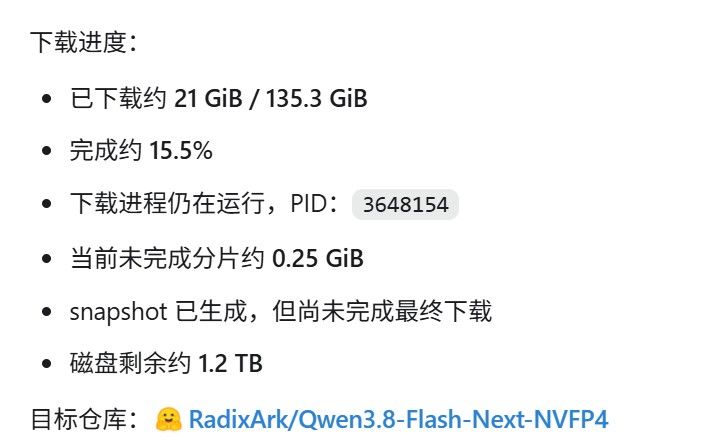
准备好迎接Qwen3.8-Flash-Next 125B A6B下载中
-
新手想問Qwen3.8-27B搭配opencode的問題这个是工具调用格式的问题,qwen系列模型一般要加 --reasoning-parser qwen3
--tool-call-parser qwen3_coder \ -
[实测分享] Ubuntu 24.04 + RTX PRO 6000 跑 Qwen3.8-27B NVFP4 + DFlash2,附一键启动命令最近在 RTX PRO 6000 Blackwell 上折腾了一套
Qwen3.8-27B-NVFP4 + DFlash2 + SGLang,目前已经稳定跑通。环境大概是:
OS: Ubuntu 24.04
GPU: RTX PRO 6000 Blackwell 96GB
主模型: RadixArk/Qwen3.8-27B-NVFP4
Draft: incoai/Qwen3.8-27B-DFlash2
Context: 262144
KV Cache: FP8 E4M3
Attention: FlashInfer
Spec Decode: DFLASH / DFlash2
端口: 30001
下面直接贴能复制的命令,少讲原理。
1. 基础环境
sudo apt update && sudo apt install -y \
git git-lfs curl wget build-essential \
python3 python3-pip python3-venv && \
git lfs install
创建环境:
mkdir -p ~/LLM/qwen38 && \
cd ~/LLM/qwen38 && \
python3 -m venv .venv && \
source .venv/bin/activate && \
python -m pip install -U pip setuptools wheel
以后进环境:
cd ~/LLM/qwen38 && source .venv/bin/activate
2. 安装支持 DFlash2 的 SGLang
这里有个坑:
不要默认直接用 PyPI 稳定版 SGLang。
DFlash2 之前需要特殊 PR 分支,目前建议直接使用 SGLang
main:source ~/LLM/qwen38/.venv/bin/activate && \ pip install -U \ "sglang[all] @ git+https://github.com/sgl-project/sglang.git#subdirectory=python"查看版本:
python -c "import sglang; print(sglang.__version__)"如果你要复现之前的 DFlash2 特殊分支,可以装:
source ~/LLM/qwen38/.venv/bin/activate && \
pip uninstall -y sglang && \
pip install -U \
"sglang[all] @ git+https://github.com/sgl-project/sglang.git@refs/pull/35371/head#subdirectory=python"
建议跑通以后顺手:
pip freeze > ~/LLM/qwen38/requirements-working.txt免得之后
main更新又出新问题。
3. 我现在实际使用的启动命令
前台启动:
source ~/LLM/qwen38/.venv/bin/activate && \
sglang serve \
  --trust-remote-code \
  --model-path RadixArk/Qwen3.8-27B-NVFP4 \
  --context-length 262144 \
  --kv-cache-dtype fp8_e4m3 \
  --mem-fraction-static 0.92 \
  --attention-backend flashinfer \
  --chunked-prefill-size 2048 \
  --reasoning-parser qwen3 \
  --tool-call-parser qwen3_coder \
  --mamba-full-memory-ratio 0.9 \
  --host 0.0.0.0 \
  --port 30001 \
  --enable-cache-report \
  --speculative-algorithm DFLASH \
  --speculative-draft-model-path incoai/Qwen3.8-27B-DFlash2 \
  --speculative-num-draft-tokens 8 \
  --mamba-radix-cache-strategy extra_buffer \
  --mamba-ssm-dtype float32
4. 推荐:直接后台跑
我平时实际用这个:
cd ~/LLM/qwen38 && \
source .venv/bin/activate && \
nohup sglang serve \
  --trust-remote-code \
  --model-path RadixArk/Qwen3.8-27B-NVFP4 \
  --context-length 262144 \
  --kv-cache-dtype fp8_e4m3 \
  --mem-fraction-static 0.92 \
  --attention-backend flashinfer \
  --chunked-prefill-size 2048 \
  --reasoning-parser qwen3 \
  --tool-call-parser qwen3_coder \
  --mamba-full-memory-ratio 0.9 \
  --host 0.0.0.0 \
  --port 30001 \
  --enable-cache-report \
  --speculative-algorithm DFLASH \
  --speculative-draft-model-path incoai/Qwen3.8-27B-DFlash2 \
  --speculative-num-draft-tokens 8 \
  --mamba-radix-cache-strategy extra_buffer \
  --mamba-ssm-dtype float32 \
  > ~/LLM/qwen38/sglang-30001.log 2>&1 &
基本就是:
复制 → 回车 → 等模型加载完成。
5. 检查有没有起来
curl -i http://127.0.0.1:30001/health正常应该:
HTTP 200模型列表:
curl http://127.0.0.1:30001/v1/models看端口:
ss -lntp | grep 30001看日志:
tail -f ~/LLM/qwen38/sglang-30001.log看 GPU:
watch -n 1 nvidia-smi
6. API 随手测试
curl -N http://127.0.0.1:30001/v1/chat/completions \
  -H "Content-Type: application/json" \
  -d '{
    "model": "RadixArk/Qwen3.8-27B-NVFP4",
    "messages": [
      {
        "role": "user",
        "content": "Explain speculative decoding in detail."
      }
    ],
    "max_tokens": 4096,
    "temperature": 0.2,
    "stream": true
  }'
7. 停服务
正常:
lsof -ti:30001 | xargs -r kill不行就:
lsof -ti:30001 | xargs -r kill -9或者:
pkill -f "sglang.*30001"
8. 我的实测结果
测试条件:
严格约 16K input
每个请求固定输出 4096 tokens
Streaming
cached_tokens = 0
并发 1 / 2 / 4
结果:
并发 最大 TTFT Prompt Processing Decode Speed End-to-End 总吞吐 1 路 1.506 s 10,877.7 tok/s 171.1 tok/s 161.0 tok/s 2 路 2.854 s 11,479.7 tok/s 125.8–343.8 tok/s 239.8 tok/s 4 路 5.737 s 11,422.8 tok/s 85.4–318.4 tok/s 321.1 tok/s 测试期间:
每路全部成功输出 4096 tokens
cached_tokens = 0
无 OOM
服务一直 HTTP 200
30001 一直 active
4 路同时处于 decode 时,SGLang 日志里看到的 batch decode throughput 大约:
620–825 tok/s目前这套配置我认为已经可以拿来长期跑 Agent / Coding workload。
9. DSH / Harness 接入
SGLang 地址直接用:
http://127.0.0.1:30001/v1Thinking effort 部分,我这里是:
reasoning: xhigh模型能力:
reasoningEfforts:
  off: none
  low: low
  medium: medium
  xhigh: xhigh
默认:
agent-default-model:
  reasoningEffort: xhigh
如果自托管 endpoint 不接受
developerrole,加:compat: supportsDeveloperRole: false
10. DSH 多模态还有一个坑
如果是手工加进去的模型,DSH / pi-ai 可能默认把它当:
text only所以即使 Qwen3.8 本身支持图片,也可能出现:
does not declare image input模型配置里需要显式加:
input:
  - text
  - image
或者:
input: [text, image]我这边改完之后不需要重启整个服务,热重载后:
read_image已经可以正常把图片送进模型。
11. 最后给一个最精简版本
只想复制命令的看这里:
cd ~/LLM/qwen38 && source .venv/bin/activate && nohup sglang serve --trust-remote-code --model-path RadixArk/Qwen3.8-27B-NVFP4 --context-length 262144 --kv-cache-dtype fp8_e4m3 --mem-fraction-static 0.92 --attention-backend flashinfer --chunked-prefill-size 2048 --reasoning-parser qwen3 --tool-call-parser qwen3_coder --mamba-full-memory-ratio 0.9 --host 0.0.0.0 --port 30001 --enable-cache-report --speculative-algorithm DFLASH --speculative-draft-model-path incoai/Qwen3.8-27B-DFlash2 --speculative-num-draft-tokens 8 --mamba-radix-cache-strategy extra_buffer --mamba-ssm-dtype float32 > ~/LLM/qwen38/sglang-30001.log 2>&1 &检查:
curl -i http://127.0.0.1:30001/health && tail -n 50 ~/LLM/qwen38/sglang-30001.log目前这套在 RTX PRO 6000 Blackwell 96GB + Ubuntu 24.04 上已经实际跑过:
256K context 配置
16K prompt
4096-token output
1 / 2 / 4 concurrency
DFlash2
FP8 KV
FlashInfer
DSH thinking effort
DSH image input
如果有人也在 RTX PRO 6000 / 5090 / Blackwell 上跑 Qwen3.8 + DFlash2,可以直接拿这套参数当起点。
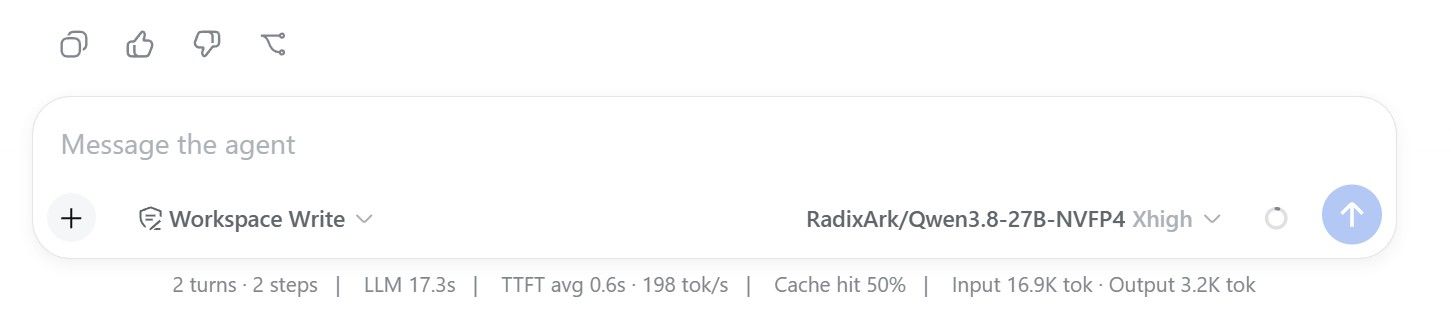
上面都是AI总结的,最后这点是我写的。在刚开始折腾的时候我折腾了几套方案,包括 官方的 fp8 + RadixArk/Qwen3.8-27B-DSpark,还有RadixArk/Qwen3.8-27B-NVFP4 + mtp, 上面这套方案是我测试下来最快的方案,在新对话一开始可以跑到200tok/s, 我选取16k输入作为测试主要是比较能够代表典型值。我也跑了很久的 [email protected], 在时间和算力充裕的情况下可以完成大概 75%的任务,对性能应该是没有什么损失。
由于精力有限,我其实没有对参数做过多优化,希望能抛砖引玉。