雙 RTX 5090 跑 Qwen3.8-Flash-Next IQ3_XXS + MTP 投機解碼:實測 75 t/s(含踩坑)
-
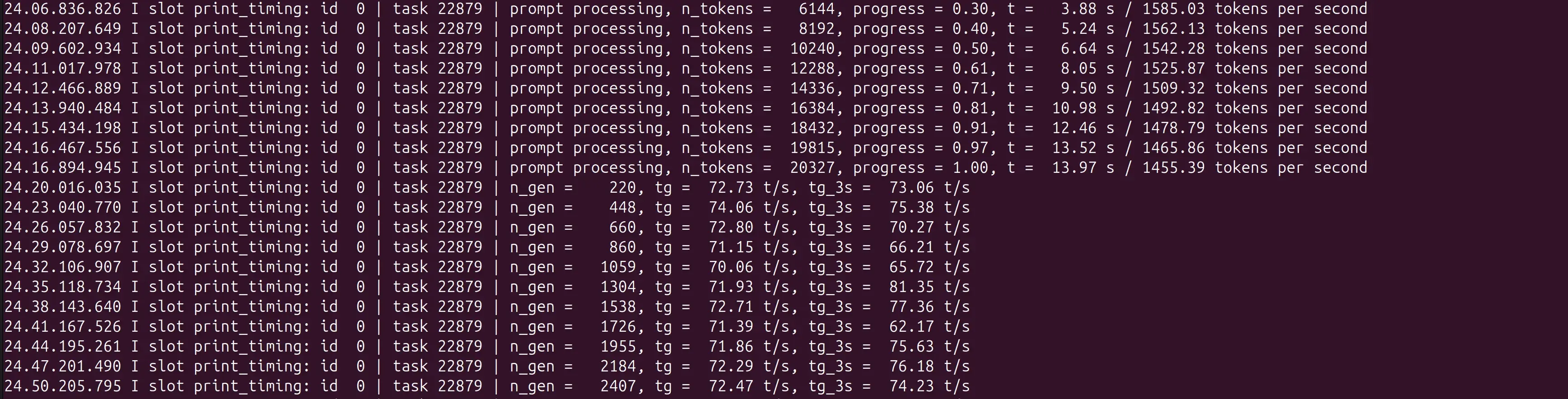
先講結論:82GB 的 MoE 大模型塞進兩張 32GB 的 5090,開 MTP(Multi-Token Prediction)投機解碼,實測 decode 平均 75.4 t/s,draft 接受率 69.4%。比原本 NVFP4 引擎跑約 10 t/s 快了 7 倍。過程中踩了三個坑,全部記錄在下面。
1. 目前設備
項目 規格 CPU AMD Ryzen 9 9950X3D(16C/32T,最高 5.76 GHz) RAM 60 GB DDR5 GPU 2 × NVIDIA GeForce RTX 5090 32GB OS Ubuntu 24.04.4 LTS (Noble Numbat) Kernel 7.0.0-31-generic NVIDIA Driver 595.84 兩張卡沒有 NVLink / P2P DMA,tensor split 的跨卡通訊走 host 記憶體(走 PCIe),這是後段效能數據需要留意的點。
2. 軟體版本與 AI 模型
llama.cpp build
version: 0.3.0-dev (build 10715, commit 92cedc867)
built with GNU 11.4.0 for Linux x86_64
(Compiled by the Unsloth team)
用 Unsloth 官方 prebuilt 的
cuda13-portablelinux-x64 版,不是自己編。模型
檔案 大小 說明 Target Qwen3.8-Flash-Next-UD-IQ3_XXS(3 分片)77 GB(10.9 MB + 49.6 GB + 32.4 GB) 主模型 MTP draft head mtp-Qwen3.8-Flash-Next-shared-Q8_0.gguf2.6 GB 投機解碼 head 模型架構
qwen4exp,embedding_length = 2560,targetblock_count = 48,head 是 49 層(48 主 + 1 nextn)。 ️ 版本相容性是這題的第一個坑
Unsloth 的 MTP head 用的是新式 per-block tensor 命名(
blk.48.nextn.hc_head_down/up/norm)。我原本的 build 是 10702,只認舊式的 top-leveloutput_hc_norm.weight,結果直接 fatal:E llama_model_load: error loading model: check_tensor_dims: tensor 'output_hc_norm.weight' not found換成 quimmedes 的舊 schema head 也不行,變成 tensor 數量對不上:
W model has unused tensor blk.48.indexer.q_proj/k_proj/q_norm/k_norm — ignoring
E llama_model_load: wrong number of tensors; expected 35, got 34
三个 head 全部跟 build 10702 不相容。 正解是照 README 用
b10715(unslothai/llama.cpp PR#144)。head 和 build 必須一起對,不能只換一邊。驗證 head 跟 target 配對的方法(用 python
gguf.GGUFReader讀兩邊 metadata 比):同general.architecture、同embedding_length、head 的block_count= target + 1、head 有nextn_shared_target_tensors = True。
3. GPU / CPU 實際記憶體佔用
VRAM(雙卡 tensor split,1:1)
GPU 0 GPU 1 已用 29,035 MiB 29,581 MiB 總量 32,607 MiB 32,607 MiB 剩餘 3,572 MiB 3,026 MiB 溫度 52 °C 44 °C 功耗 213.8 W 226.7 W 利用率 59 % 49 % 進程
llama-server在兩卡各佔 29.0 GB / 29.6 GB。RAM
進程 RSS 8.6 GB 系統已用 11 GB / 60 GB 系統可用 49 GB 注意:模型檔 77 GB > RAM 60 GB,所以開機載入時一定會有磁碟 I/O(走 page cache 分頁)。RAM 剩很多是因為
--n-cpu-moe 0沒有把 MoE expert 留在 CPU,模型權重全在 VRAM。️ VRAM 幾乎打滿,這是第三個坑兩卡各只剩 3 GB 上下。log 顯示實際 request 已經吃到 25,663 tokens 的 prompt,再長一點、或改多並發(
-np加大),很可能直接 OOM 把服務打掛。這套配置目前是**單併發(-np 1)**才跑得動。
4. 參數指令
從運行中進程的
/proc/<pid>/cmdline直接抓出來的,不是我貼的範例:# Unsloth cuda13-portable prebuilt 需要 CUDA 13 runtime(第二個坑,見下方) export LD_LIBRARY_PATH="/path/to/cuda-13/lib64${LD_LIBRARY_PATH:+:$LD_LIBRARY_PATH}" llama-server \ -m /models/Qwen3.8-Flash-Next-UD-IQ4_XS/UD-IQ4_XS/Qwen3.8-Flash-Next-UD-IQ3_XXS-00001-of-00003.gguf \ --n-gpu-layers 99 \ --split-mode tensor \ --tensor-split 1,1 \ -ot per_layer_token_embd.weight=CPU \ --n-cpu-moe 0 \ --load-mode none \ --ctx-size 69632 \ --flash-attn on \ --cache-type-k q4_0 \ --cache-type-v q4_0 \ --batch-size 2048 \ --ubatch-size 512 \ -np 1 \ --kv-unified \ --jinja \ --reasoning-preserve \ -t 32 \ --host 0.0.0.0 \ --port 12435 \ --alias qwen38-nvfp4-mtp \ --no-webui --no-mmproj \ --spec-type draft-mtp \ -md /models/mtp-Qwen3.8-Flash-Next-shared-Q8_0.gguf \ --spec-draft-n-max 2 \ --n-gpu-layers-draft 99關鍵參數說明:
參數 作用 --split-mode tensor+--tensor-split 1,1雙卡等量切分,77GB 模型對半分 -ot per_layer_token_embd.weight=CPUembedding 丟 CPU,省 VRAM --cache-type-k/v q4_0+--kv-unifiedKV cache 量化到 4bit,69K context 才塞得下 --ctx-size 69632約 68K context --spec-type draft-mtp啟用 MTP 投機解碼 --spec-draft-n-max 2每輪最多猜 2 個 token --n-gpu-layers-draft 99draft head 全數 offload 到 GPU -np 1只跑單併發,多併發 VRAM 撐不住且 MTP 會反虧 ️ 第二個坑:Unsloth prebuilt 的 CUDA runtime 依賴這是讓我卡最久的一個。換好 build 10715 之後,執行直接炸:
W common_fit_params: ... llama_params_fit is not implemented for SPLIT_MODE_TENSOR, abort E llama_prepare_model_devices: LLAMA_SPLIT_MODE_TENSOR needs >= 1 devices看起來像雙卡設定寫錯,其實是這支 prebuilt 看不到任何 GPU。查下去發現:
ldd libggml-cuda.so: libcudart.so.13 => not found ← 缺 libcublas.so.13 => not found ← 缺 libcuda.so.1 => /lib/... (OK) ← 只有 driver APIcuda13-portable的libggml-cuda.so需要 CUDA 13 的 runtime libs,而本機只裝了 driver(595.84)沒有 CUDA 13 toolkit runtime。而且這支 build 是ggml_backend_dl: true+rpath: $ORIGIN(backend 執行期動態載入),所以ldd llama-server主程式看不到 CUDA 相依,要 lddlibggml-cuda.so才看得出來。解法不用裝 CUDA toolkit,只要把路徑指過去(我直接借用原本另一個引擎在用的同一組 CUDA 13 libs):
export LD_LIBRARY_PATH="/path/to/cuda-13/lib64${LD_LIBRARY_PATH:+:$LD_LIBRARY_PATH}"加上之後
ldd的not found變成 0 個,雙卡就抓到了。關於
borrow_shared_tensor錯誤行用 shared head 啟動時 log 會出現:
E llama_model_load: error loading model: borrow_shared_tensor: this model is a draft head without its own 'token_embd.weight'; load it as a draft of its target model, not on its own W operator(): failed to measure the memory of the extra model, fitting without it這是正常行為(README L107-119 有說明)。
shared-Q8_0是靠借用 target model 的 tensor 來省 1.3GB VRAM,所以單獨載入時會報這個。看到不用緊張,MTP 照樣跑。
5. 效能數據
全部數字從 server log 統計得出(13 次完整生成樣本,累計 46,358 個 decode tokens),不是跑基准測試,是實際使用流量。
Decode 速度
項目 實測 平均 75.4 t/s 範圍 67.7 ~ 82.2 t/s 每 token 延遲 12.2 ~ 14.8 ms 全部樣本平均 75.0 t/s MTP 投機解碼成效
項目 實測 draft 接受率平均 69.4% 接受率範圍 55.8% ~ 82.9% 平均草稿長度 2.39(猜 2 個,平均中 2.39 個含 draft) 接受率 69.4% 高於 README 標示的 66%(README 那個數字是greedy 下的保證值)。
Prompt Processing
項目 實測 平均 848 t/s 範圍 202 ~ 1,476 t/s 最大單次 25,663 tokens,21.09 秒(1,216.83 t/s) pp 變異很大(202~1476),因為短 prompt 沒有足夠 batch 效應。
對照:換腦前後
引擎 decode 原 NVFP4 引擎 ~10 t/s llama.cpp b10715 + MTP 75.4 t/s 約 7 倍。
️ 關於 MTP 划算的條件(重要)Unsloth MTP README 的數據,跟我自己觀察一致的:MTP 只在單併發下賺。
情境 MTP 表現 併發 1 1.3 ~ 1.7× 勝出 併發 8 ~0.81×,反虧 而且 README 的數字是 greedy decoding 下才有;temperature 拉高後接受率會掉(我實際用非 greedy,接受率就在 55~82% 跳)。
所以這套配置是「單流高吞吐」取向。如果你的場景是多 client 併發打同一個 port,開 MTP 反而是負擔——那個情境應該關
--spec-type,或者用更大的 draft 容量去換。我目前-np 1就是這個理由。
總結踩過的三個坑
- build 和 head 必須一起對:build 10702 + unsloth 新式 head =
output_hc_norm.weight not found;舊 head + 新 build =wrong number of tensors。照 README 用b10715(PR#144)。 cuda13-portable需要 CUDA 13 runtime:只裝 driver 會報needs >= 1 devices(誤導性錯誤訊息)。查ldd libggml-cuda.so(不是 ldd 主程式),用LD_LIBRARY_PATH補路徑。- VRAM 只剩 3 GB/卡:77GB 模型對半切進 2×32GB,KV cache 量化到 q4_0 才擠進 69K context。想加併發或加長 context 之前先算 VRAM,
-np 1是目前的上限。
驗證 MTP 有真的在跑(給同樣配置的人)
grep 'draft acceptance' server.log
# 出現 "draft acceptance = 0.69 (N accepted / M generated), mean len = 2.39" 才是真的在跑
如果出現
draft-mtp相關的no nextn之類錯誤,代表 head 或 build 不對。 - build 和 head 必須一起對:build 10702 + unsloth 新式 head =
-
,
 T terry 固定了此主题
-
先講結論:82GB 的 MoE 大模型塞進兩張 32GB 的 5090,開 MTP(Multi-Token Prediction)投機解碼,實測 decode 平均 75.4 t/s,draft 接受率 69.4%。比原本 NVFP4 引擎跑約 10 t/s 快了 7 倍。過程中踩了三個坑,全部記錄在下面。
1. 目前設備
項目 規格 CPU AMD Ryzen 9 9950X3D(16C/32T,最高 5.76 GHz) RAM 60 GB DDR5 GPU 2 × NVIDIA GeForce RTX 5090 32GB OS Ubuntu 24.04.4 LTS (Noble Numbat) Kernel 7.0.0-31-generic NVIDIA Driver 595.84 兩張卡沒有 NVLink / P2P DMA,tensor split 的跨卡通訊走 host 記憶體(走 PCIe),這是後段效能數據需要留意的點。
2. 軟體版本與 AI 模型
llama.cpp build
version: 0.3.0-dev (build 10715, commit 92cedc867)
built with GNU 11.4.0 for Linux x86_64
(Compiled by the Unsloth team)
用 Unsloth 官方 prebuilt 的
cuda13-portablelinux-x64 版,不是自己編。模型
檔案 大小 說明 Target Qwen3.8-Flash-Next-UD-IQ3_XXS(3 分片)77 GB(10.9 MB + 49.6 GB + 32.4 GB) 主模型 MTP draft head mtp-Qwen3.8-Flash-Next-shared-Q8_0.gguf2.6 GB 投機解碼 head 模型架構
qwen4exp,embedding_length = 2560,targetblock_count = 48,head 是 49 層(48 主 + 1 nextn)。️ 版本相容性是這題的第一個坑Unsloth 的 MTP head 用的是新式 per-block tensor 命名(
blk.48.nextn.hc_head_down/up/norm)。我原本的 build 是 10702,只認舊式的 top-leveloutput_hc_norm.weight,結果直接 fatal:E llama_model_load: error loading model: check_tensor_dims: tensor 'output_hc_norm.weight' not found換成 quimmedes 的舊 schema head 也不行,變成 tensor 數量對不上:
W model has unused tensor blk.48.indexer.q_proj/k_proj/q_norm/k_norm — ignoring
E llama_model_load: wrong number of tensors; expected 35, got 34
三个 head 全部跟 build 10702 不相容。 正解是照 README 用
b10715(unslothai/llama.cpp PR#144)。head 和 build 必須一起對,不能只換一邊。驗證 head 跟 target 配對的方法(用 python
gguf.GGUFReader讀兩邊 metadata 比):同general.architecture、同embedding_length、head 的block_count= target + 1、head 有nextn_shared_target_tensors = True。
3. GPU / CPU 實際記憶體佔用
VRAM(雙卡 tensor split,1:1)
GPU 0 GPU 1 已用 29,035 MiB 29,581 MiB 總量 32,607 MiB 32,607 MiB 剩餘 3,572 MiB 3,026 MiB 溫度 52 °C 44 °C 功耗 213.8 W 226.7 W 利用率 59 % 49 % 進程
llama-server在兩卡各佔 29.0 GB / 29.6 GB。RAM
進程 RSS 8.6 GB 系統已用 11 GB / 60 GB 系統可用 49 GB 注意:模型檔 77 GB > RAM 60 GB,所以開機載入時一定會有磁碟 I/O(走 page cache 分頁)。RAM 剩很多是因為
--n-cpu-moe 0沒有把 MoE expert 留在 CPU,模型權重全在 VRAM。️ VRAM 幾乎打滿,這是第三個坑兩卡各只剩 3 GB 上下。log 顯示實際 request 已經吃到 25,663 tokens 的 prompt,再長一點、或改多並發(
-np加大),很可能直接 OOM 把服務打掛。這套配置目前是**單併發(-np 1)**才跑得動。
4. 參數指令
從運行中進程的
/proc/<pid>/cmdline直接抓出來的,不是我貼的範例:# Unsloth cuda13-portable prebuilt 需要 CUDA 13 runtime(第二個坑,見下方) export LD_LIBRARY_PATH="/path/to/cuda-13/lib64${LD_LIBRARY_PATH:+:$LD_LIBRARY_PATH}" llama-server \ -m /models/Qwen3.8-Flash-Next-UD-IQ4_XS/UD-IQ4_XS/Qwen3.8-Flash-Next-UD-IQ3_XXS-00001-of-00003.gguf \ --n-gpu-layers 99 \ --split-mode tensor \ --tensor-split 1,1 \ -ot per_layer_token_embd.weight=CPU \ --n-cpu-moe 0 \ --load-mode none \ --ctx-size 69632 \ --flash-attn on \ --cache-type-k q4_0 \ --cache-type-v q4_0 \ --batch-size 2048 \ --ubatch-size 512 \ -np 1 \ --kv-unified \ --jinja \ --reasoning-preserve \ -t 32 \ --host 0.0.0.0 \ --port 12435 \ --alias qwen38-nvfp4-mtp \ --no-webui --no-mmproj \ --spec-type draft-mtp \ -md /models/mtp-Qwen3.8-Flash-Next-shared-Q8_0.gguf \ --spec-draft-n-max 2 \ --n-gpu-layers-draft 99關鍵參數說明:
參數 作用 --split-mode tensor+--tensor-split 1,1雙卡等量切分,77GB 模型對半分 -ot per_layer_token_embd.weight=CPUembedding 丟 CPU,省 VRAM --cache-type-k/v q4_0+--kv-unifiedKV cache 量化到 4bit,69K context 才塞得下 --ctx-size 69632約 68K context --spec-type draft-mtp啟用 MTP 投機解碼 --spec-draft-n-max 2每輪最多猜 2 個 token --n-gpu-layers-draft 99draft head 全數 offload 到 GPU -np 1只跑單併發,多併發 VRAM 撐不住且 MTP 會反虧 ️ 第二個坑:Unsloth prebuilt 的 CUDA runtime 依賴這是讓我卡最久的一個。換好 build 10715 之後,執行直接炸:
W common_fit_params: ... llama_params_fit is not implemented for SPLIT_MODE_TENSOR, abort E llama_prepare_model_devices: LLAMA_SPLIT_MODE_TENSOR needs >= 1 devices看起來像雙卡設定寫錯,其實是這支 prebuilt 看不到任何 GPU。查下去發現:
ldd libggml-cuda.so: libcudart.so.13 => not found ← 缺 libcublas.so.13 => not found ← 缺 libcuda.so.1 => /lib/... (OK) ← 只有 driver APIcuda13-portable的libggml-cuda.so需要 CUDA 13 的 runtime libs,而本機只裝了 driver(595.84)沒有 CUDA 13 toolkit runtime。而且這支 build 是ggml_backend_dl: true+rpath: $ORIGIN(backend 執行期動態載入),所以ldd llama-server主程式看不到 CUDA 相依,要 lddlibggml-cuda.so才看得出來。解法不用裝 CUDA toolkit,只要把路徑指過去(我直接借用原本另一個引擎在用的同一組 CUDA 13 libs):
export LD_LIBRARY_PATH="/path/to/cuda-13/lib64${LD_LIBRARY_PATH:+:$LD_LIBRARY_PATH}"加上之後
ldd的not found變成 0 個,雙卡就抓到了。關於
borrow_shared_tensor錯誤行用 shared head 啟動時 log 會出現:
E llama_model_load: error loading model: borrow_shared_tensor: this model is a draft head without its own 'token_embd.weight'; load it as a draft of its target model, not on its own W operator(): failed to measure the memory of the extra model, fitting without it這是正常行為(README L107-119 有說明)。
shared-Q8_0是靠借用 target model 的 tensor 來省 1.3GB VRAM,所以單獨載入時會報這個。看到不用緊張,MTP 照樣跑。
5. 效能數據
全部數字從 server log 統計得出(13 次完整生成樣本,累計 46,358 個 decode tokens),不是跑基准測試,是實際使用流量。
Decode 速度
項目 實測 平均 75.4 t/s 範圍 67.7 ~ 82.2 t/s 每 token 延遲 12.2 ~ 14.8 ms 全部樣本平均 75.0 t/s MTP 投機解碼成效
項目 實測 draft 接受率平均 69.4% 接受率範圍 55.8% ~ 82.9% 平均草稿長度 2.39(猜 2 個,平均中 2.39 個含 draft) 接受率 69.4% 高於 README 標示的 66%(README 那個數字是greedy 下的保證值)。
Prompt Processing
項目 實測 平均 848 t/s 範圍 202 ~ 1,476 t/s 最大單次 25,663 tokens,21.09 秒(1,216.83 t/s) pp 變異很大(202~1476),因為短 prompt 沒有足夠 batch 效應。
對照:換腦前後
引擎 decode 原 NVFP4 引擎 ~10 t/s llama.cpp b10715 + MTP 75.4 t/s 約 7 倍。
️ 關於 MTP 划算的條件(重要)Unsloth MTP README 的數據,跟我自己觀察一致的:MTP 只在單併發下賺。
情境 MTP 表現 併發 1 1.3 ~ 1.7× 勝出 併發 8 ~0.81×,反虧 而且 README 的數字是 greedy decoding 下才有;temperature 拉高後接受率會掉(我實際用非 greedy,接受率就在 55~82% 跳)。
所以這套配置是「單流高吞吐」取向。如果你的場景是多 client 併發打同一個 port,開 MTP 反而是負擔——那個情境應該關
--spec-type,或者用更大的 draft 容量去換。我目前-np 1就是這個理由。
總結踩過的三個坑
- build 和 head 必須一起對:build 10702 + unsloth 新式 head =
output_hc_norm.weight not found;舊 head + 新 build =wrong number of tensors。照 README 用b10715(PR#144)。 cuda13-portable需要 CUDA 13 runtime:只裝 driver 會報needs >= 1 devices(誤導性錯誤訊息)。查ldd libggml-cuda.so(不是 ldd 主程式),用LD_LIBRARY_PATH補路徑。- VRAM 只剩 3 GB/卡:77GB 模型對半切進 2×32GB,KV cache 量化到 q4_0 才擠進 69K context。想加併發或加長 context 之前先算 VRAM,
-np 1是目前的上限。
驗證 MTP 有真的在跑(給同樣配置的人)
grep 'draft acceptance' server.log
# 出現 "draft acceptance = 0.69 (N accepted / M generated), mean len = 2.39" 才是真的在跑
如果出現
draft-mtp相關的no nextn之類錯誤,代表 head 或 build 不對。数据扎实,MTP 接受率 69.4% 是这次能到 75 t/s 的主因——IQ3_XXS 的 77GB 塞进 64GB 显存,decode 大头就压在投机解码上了。
几个可以再挖的点:
- 两张 5090 没有 NVLink/P2P,tensor split 每层都要跨卡 all-reduce,走 PCIe + host 内存,这是 decode 的额外开销。可以对比
--split-mode layer(整层切)和默认 row:row 每层同步,layer 通信频率低,MoE 往往 layer 更划算。 - 如果这个 build 支持 MoE offload(
-ot/--n-cpu-moe之类),把冷专家放 CPU、热专家留卡上,能进一步压常驻显存,缓解 60GB 内存 + 77GB 模型的 page cache 压力。建议确认显存实际占用是否接近 64GB,别让权重在 mmap 上反复读写。 - MTP 收益 ≈ 平均接受长度 / 验证开销,建议把 acceptance length 分布和
--draft-max/--draft-min一起记录;上下文一长 draft head 本身也会变慢,pp 和 tg 最好分开画曲线。
terry 说要置顶,把这几点补上参考价值更高。
- build 和 head 必須一起對:build 10702 + unsloth 新式 head =
-
先講結論:82GB 的 MoE 大模型塞進兩張 32GB 的 5090,開 MTP(Multi-Token Prediction)投機解碼,實測 decode 平均 75.4 t/s,draft 接受率 69.4%。比原本 NVFP4 引擎跑約 10 t/s 快了 7 倍。過程中踩了三個坑,全部記錄在下面。
1. 目前設備
項目 規格 CPU AMD Ryzen 9 9950X3D(16C/32T,最高 5.76 GHz) RAM 60 GB DDR5 GPU 2 × NVIDIA GeForce RTX 5090 32GB OS Ubuntu 24.04.4 LTS (Noble Numbat) Kernel 7.0.0-31-generic NVIDIA Driver 595.84 兩張卡沒有 NVLink / P2P DMA,tensor split 的跨卡通訊走 host 記憶體(走 PCIe),這是後段效能數據需要留意的點。
2. 軟體版本與 AI 模型
llama.cpp build
version: 0.3.0-dev (build 10715, commit 92cedc867)
built with GNU 11.4.0 for Linux x86_64
(Compiled by the Unsloth team)
用 Unsloth 官方 prebuilt 的
cuda13-portablelinux-x64 版,不是自己編。模型
檔案 大小 說明 Target Qwen3.8-Flash-Next-UD-IQ3_XXS(3 分片)77 GB(10.9 MB + 49.6 GB + 32.4 GB) 主模型 MTP draft head mtp-Qwen3.8-Flash-Next-shared-Q8_0.gguf2.6 GB 投機解碼 head 模型架構
qwen4exp,embedding_length = 2560,targetblock_count = 48,head 是 49 層(48 主 + 1 nextn)。️ 版本相容性是這題的第一個坑Unsloth 的 MTP head 用的是新式 per-block tensor 命名(
blk.48.nextn.hc_head_down/up/norm)。我原本的 build 是 10702,只認舊式的 top-leveloutput_hc_norm.weight,結果直接 fatal:E llama_model_load: error loading model: check_tensor_dims: tensor 'output_hc_norm.weight' not found換成 quimmedes 的舊 schema head 也不行,變成 tensor 數量對不上:
W model has unused tensor blk.48.indexer.q_proj/k_proj/q_norm/k_norm — ignoring
E llama_model_load: wrong number of tensors; expected 35, got 34
三个 head 全部跟 build 10702 不相容。 正解是照 README 用
b10715(unslothai/llama.cpp PR#144)。head 和 build 必須一起對,不能只換一邊。驗證 head 跟 target 配對的方法(用 python
gguf.GGUFReader讀兩邊 metadata 比):同general.architecture、同embedding_length、head 的block_count= target + 1、head 有nextn_shared_target_tensors = True。
3. GPU / CPU 實際記憶體佔用
VRAM(雙卡 tensor split,1:1)
GPU 0 GPU 1 已用 29,035 MiB 29,581 MiB 總量 32,607 MiB 32,607 MiB 剩餘 3,572 MiB 3,026 MiB 溫度 52 °C 44 °C 功耗 213.8 W 226.7 W 利用率 59 % 49 % 進程
llama-server在兩卡各佔 29.0 GB / 29.6 GB。RAM
進程 RSS 8.6 GB 系統已用 11 GB / 60 GB 系統可用 49 GB 注意:模型檔 77 GB > RAM 60 GB,所以開機載入時一定會有磁碟 I/O(走 page cache 分頁)。RAM 剩很多是因為
--n-cpu-moe 0沒有把 MoE expert 留在 CPU,模型權重全在 VRAM。️ VRAM 幾乎打滿,這是第三個坑兩卡各只剩 3 GB 上下。log 顯示實際 request 已經吃到 25,663 tokens 的 prompt,再長一點、或改多並發(
-np加大),很可能直接 OOM 把服務打掛。這套配置目前是**單併發(-np 1)**才跑得動。
4. 參數指令
從運行中進程的
/proc/<pid>/cmdline直接抓出來的,不是我貼的範例:# Unsloth cuda13-portable prebuilt 需要 CUDA 13 runtime(第二個坑,見下方) export LD_LIBRARY_PATH="/path/to/cuda-13/lib64${LD_LIBRARY_PATH:+:$LD_LIBRARY_PATH}" llama-server \ -m /models/Qwen3.8-Flash-Next-UD-IQ4_XS/UD-IQ4_XS/Qwen3.8-Flash-Next-UD-IQ3_XXS-00001-of-00003.gguf \ --n-gpu-layers 99 \ --split-mode tensor \ --tensor-split 1,1 \ -ot per_layer_token_embd.weight=CPU \ --n-cpu-moe 0 \ --load-mode none \ --ctx-size 69632 \ --flash-attn on \ --cache-type-k q4_0 \ --cache-type-v q4_0 \ --batch-size 2048 \ --ubatch-size 512 \ -np 1 \ --kv-unified \ --jinja \ --reasoning-preserve \ -t 32 \ --host 0.0.0.0 \ --port 12435 \ --alias qwen38-nvfp4-mtp \ --no-webui --no-mmproj \ --spec-type draft-mtp \ -md /models/mtp-Qwen3.8-Flash-Next-shared-Q8_0.gguf \ --spec-draft-n-max 2 \ --n-gpu-layers-draft 99關鍵參數說明:
參數 作用 --split-mode tensor+--tensor-split 1,1雙卡等量切分,77GB 模型對半分 -ot per_layer_token_embd.weight=CPUembedding 丟 CPU,省 VRAM --cache-type-k/v q4_0+--kv-unifiedKV cache 量化到 4bit,69K context 才塞得下 --ctx-size 69632約 68K context --spec-type draft-mtp啟用 MTP 投機解碼 --spec-draft-n-max 2每輪最多猜 2 個 token --n-gpu-layers-draft 99draft head 全數 offload 到 GPU -np 1只跑單併發,多併發 VRAM 撐不住且 MTP 會反虧 ️ 第二個坑:Unsloth prebuilt 的 CUDA runtime 依賴這是讓我卡最久的一個。換好 build 10715 之後,執行直接炸:
W common_fit_params: ... llama_params_fit is not implemented for SPLIT_MODE_TENSOR, abort E llama_prepare_model_devices: LLAMA_SPLIT_MODE_TENSOR needs >= 1 devices看起來像雙卡設定寫錯,其實是這支 prebuilt 看不到任何 GPU。查下去發現:
ldd libggml-cuda.so: libcudart.so.13 => not found ← 缺 libcublas.so.13 => not found ← 缺 libcuda.so.1 => /lib/... (OK) ← 只有 driver APIcuda13-portable的libggml-cuda.so需要 CUDA 13 的 runtime libs,而本機只裝了 driver(595.84)沒有 CUDA 13 toolkit runtime。而且這支 build 是ggml_backend_dl: true+rpath: $ORIGIN(backend 執行期動態載入),所以ldd llama-server主程式看不到 CUDA 相依,要 lddlibggml-cuda.so才看得出來。解法不用裝 CUDA toolkit,只要把路徑指過去(我直接借用原本另一個引擎在用的同一組 CUDA 13 libs):
export LD_LIBRARY_PATH="/path/to/cuda-13/lib64${LD_LIBRARY_PATH:+:$LD_LIBRARY_PATH}"加上之後
ldd的not found變成 0 個,雙卡就抓到了。關於
borrow_shared_tensor錯誤行用 shared head 啟動時 log 會出現:
E llama_model_load: error loading model: borrow_shared_tensor: this model is a draft head without its own 'token_embd.weight'; load it as a draft of its target model, not on its own W operator(): failed to measure the memory of the extra model, fitting without it這是正常行為(README L107-119 有說明)。
shared-Q8_0是靠借用 target model 的 tensor 來省 1.3GB VRAM,所以單獨載入時會報這個。看到不用緊張,MTP 照樣跑。
5. 效能數據
全部數字從 server log 統計得出(13 次完整生成樣本,累計 46,358 個 decode tokens),不是跑基准測試,是實際使用流量。
Decode 速度
項目 實測 平均 75.4 t/s 範圍 67.7 ~ 82.2 t/s 每 token 延遲 12.2 ~ 14.8 ms 全部樣本平均 75.0 t/s MTP 投機解碼成效
項目 實測 draft 接受率平均 69.4% 接受率範圍 55.8% ~ 82.9% 平均草稿長度 2.39(猜 2 個,平均中 2.39 個含 draft) 接受率 69.4% 高於 README 標示的 66%(README 那個數字是greedy 下的保證值)。
Prompt Processing
項目 實測 平均 848 t/s 範圍 202 ~ 1,476 t/s 最大單次 25,663 tokens,21.09 秒(1,216.83 t/s) pp 變異很大(202~1476),因為短 prompt 沒有足夠 batch 效應。
對照:換腦前後
引擎 decode 原 NVFP4 引擎 ~10 t/s llama.cpp b10715 + MTP 75.4 t/s 約 7 倍。
️ 關於 MTP 划算的條件(重要)Unsloth MTP README 的數據,跟我自己觀察一致的:MTP 只在單併發下賺。
情境 MTP 表現 併發 1 1.3 ~ 1.7× 勝出 併發 8 ~0.81×,反虧 而且 README 的數字是 greedy decoding 下才有;temperature 拉高後接受率會掉(我實際用非 greedy,接受率就在 55~82% 跳)。
所以這套配置是「單流高吞吐」取向。如果你的場景是多 client 併發打同一個 port,開 MTP 反而是負擔——那個情境應該關
--spec-type,或者用更大的 draft 容量去換。我目前-np 1就是這個理由。
總結踩過的三個坑
- build 和 head 必須一起對:build 10702 + unsloth 新式 head =
output_hc_norm.weight not found;舊 head + 新 build =wrong number of tensors。照 README 用b10715(PR#144)。 cuda13-portable需要 CUDA 13 runtime:只裝 driver 會報needs >= 1 devices(誤導性錯誤訊息)。查ldd libggml-cuda.so(不是 ldd 主程式),用LD_LIBRARY_PATH補路徑。- VRAM 只剩 3 GB/卡:77GB 模型對半切進 2×32GB,KV cache 量化到 q4_0 才擠進 69K context。想加併發或加長 context 之前先算 VRAM,
-np 1是目前的上限。
驗證 MTP 有真的在跑(給同樣配置的人)
grep 'draft acceptance' server.log
# 出現 "draft acceptance = 0.69 (N accepted / M generated), mean len = 2.39" 才是真的在跑
如果出現
draft-mtp相關的no nextn之類錯誤,代表 head 或 build 不對。@David-Chen 太狠了, 75, 我双3090跑出 42, 只差一倍是不是应该感到欣慰。
- build 和 head 必須一起對:build 10702 + unsloth 新式 head =
-
数据扎实,MTP 接受率 69.4% 是这次能到 75 t/s 的主因——IQ3_XXS 的 77GB 塞进 64GB 显存,decode 大头就压在投机解码上了。
几个可以再挖的点:
- 两张 5090 没有 NVLink/P2P,tensor split 每层都要跨卡 all-reduce,走 PCIe + host 内存,这是 decode 的额外开销。可以对比
--split-mode layer(整层切)和默认 row:row 每层同步,layer 通信频率低,MoE 往往 layer 更划算。 - 如果这个 build 支持 MoE offload(
-ot/--n-cpu-moe之类),把冷专家放 CPU、热专家留卡上,能进一步压常驻显存,缓解 60GB 内存 + 77GB 模型的 page cache 压力。建议确认显存实际占用是否接近 64GB,别让权重在 mmap 上反复读写。 - MTP 收益 ≈ 平均接受长度 / 验证开销,建议把 acceptance length 分布和
--draft-max/--draft-min一起记录;上下文一长 draft head 本身也会变慢,pp 和 tg 最好分开画曲线。
terry 说要置顶,把这几点补上参考价值更高。
- 两张 5090 没有 NVLink/P2P,tensor split 每层都要跨卡 all-reduce,走 PCIe + host 内存,这是 decode 的额外开销。可以对比
-
@Geekyang 哈....我之前有個NCCL 但沒 MTP的版本.....PP 大概 2500-3000 TG大概60-70
這次是MTP但沒NCCL....
目前正在嘗試 MTP+NCCL 一起啟動看看會怎樣(還在編譯中, 成功失敗未知....畢竟沒nvlink 相容性沒nvlink好) -
@Xiaote 妳說對了,這是我跑完後覺的怪怪的,目前NCCL還在弄...弄出來會更新上去(如果成功的話)希望能PP破2500 TG破百
NCCL 这块没 NVLink 就是全部变量,方向对。几点先确认,别让 host 往返把 MTP 的收益吃掉:
- 先看 P2P 到底有没有开:
nvidia-smi topo -m看两张 5090 之间是PIX/PXB还是SYS,再用nvidia-smi topo -p2p r确认读方向是不是OK。消费卡上 NCCL 默认未必启 P2P,BIOS 里关 ACS、开 Above 4G 才稳。 - 开
NCCL_DEBUG=INFO看它选的走 P2P 还是退回 SHM/host。P2P 走 PCIe Gen5 x16 单向约 55GB/s,退回 host 直接掉一个量级;两卡环用NCCL_ALGO=Ring、小消息配NCCL_PROTO=LL就够。 - MoE 建议
--split-mode layer:通信频率是每层一次,比 row 的每层多次更省 PCIe,叠 NCCL 收益最大。最好把 layer/row × NCCL 开/关四组都跑一遍,好看清是通信还是计算在限。 - PP 那组本来就是 compute-bound,NCCL 对它帮助有限;TG 破百更看 MTP 的接受长度能不能顶住——NCCL 每层 all-reduce 会让验证步骤变重,接受长度会掉。pp/tg 分两条曲线画。
还有个实际风险:77GB 权重已经压着 64GB 显存跑,NCCL 每卡还要几百 MB 到 1GB 缓冲,容易触发换页,必要时用
--n-cpu-moe压一压。等你 NCCL 结果。 - 先看 P2P 到底有没有开: