交作业,关于 Intel B70 PRO 的压力测试。
-
上一篇帖子是这个Inter B70,被要求重新开贴,所以有了这篇帖子:
事情是这样的:我想深度的测一下这卡的稳定性。 如果长期去用,去批量跑任务,稳定性就很胆小。 于是就有了这个操作: 朋友让我帮忙处理一批图片,将图片 OCR 出来。 图片都是2K+分辨率的。 图片是一张大概有400-500行/10来列的表格。 用QWEN3.6-27B去反推直接给OCR到excel表格里,我也想看看这卡的能耐咋样,之前有飞浆这些要钱的。也有github上开源的那些,但批量处理这么大的,我没用过。 于是就写了代码,然后试了试这卡的能耐。只用了一张卡,从前天上午不到10点。到刚才。我截图也就是10分钟之前告诉我OK了。 代码如下:
import base64
import os
import glob
import asyncio
import aiohttp
from io import BytesIO
from PIL import Image


API_URL = "http://localhost:8091/v1/chat/completions"

IMAGE_DIR = "./cb*.png"
OUTPUT_CSV = "./cb_data_full_fixed.csv"

# B70 32G 显存并发数
CONCURRENCY = 6

def encode_image_from_bytes(image_bytes):
    return base64.b64encode(image_bytes).decode('utf-8')

def slice_long_image(image_path, slice_height=1500):
    """
    核心修改:将超长图切片。
    slice_height=1500 像素大约包含 30-50 行数据。
    """
    img = Image.open(image_path)
    width, height = img.size
    slices = []

    for i in range(0, height, slice_height):
        # 截取切片区域 (left, upper, right, lower)
        box = (0, i, width, min(i + slice_height, height))
        slice_img = img.crop(box)

        # 将切片保存在内存中转为 base64
        buffered = BytesIO()
        slice_img.save(buffered, format="PNG")
        slices.append(buffered.getvalue())

    return slices

async def fetch_and_process_slice(session, date_str, slice_base64, slice_index, file_lock):
    payload = {
        "model": "/model",
        "messages": [
            {
                "role": "system",
                "content": "你是一个无情的数据提取机器。直接输出CSV,不要任何多余文字。"
            },
            {
                "role": "user",
                "content": [
                    {
                        "type": "text",
                        "text": "提取图片表格中所有可转债数据。请直接输出CSV格式。每行字段为:转债代码,转债名称,价格,涨幅,正股,正股价,溢价率。注意:不要包含表头,不要使用Markdown代码块(如 ```csv)。如果图片中没有完整数据行,请不要编造。"
                    },
                    {
                        "type": "image_url",
                        "image_url": {
                            "url": f"data:image/png;base64,{slice_base64}"
                        }
                    }
                ]
            }
        ],
        "max_tokens": 4096,
        "temperature": 0.0
    }

    try:
        async with session.post(API_URL, json=payload) as response:
            if response.status != 200:
                print(f"⚠️ {date_str} (切片 {slice_index}) 请求失败")
                return

            res_json = await response.json()
            result = res_json['choices'][0]['message']['content'].strip()

            async with file_lock:
                with open(OUTPUT_CSV, "a", encoding="utf-8-sig") as f:
                    for line in result.split('\n'):
                        # 过滤掉可能的空行和重复生成的表头
                        if line.strip() and "," in line and "代码" not in line:
                            f.write(f"{date_str},{line.strip()}\n")

    except Exception as e:
        print(f"❌ 处理 {date_str} (切片 {slice_index}) 发生异常: {e}")

async def main():
    image_list = sorted(glob.glob(IMAGE_DIR))
    if not image_list:
        print(f"❌ 错误:没有找到符合 {IMAGE_DIR} 的图片!")
        return

    print(f"🔥 找到 {len(image_list)} 张超长图,准备进行切片并高并发推断...")

    if not os.path.exists(OUTPUT_CSV):
        with open(OUTPUT_CSV, "w", encoding="utf-8-sig") as f:
            f.write("日期,转债代码,转债名称,价格,涨幅,正股,正股价,溢价率\n")

    semaphore = asyncio.Semaphore(CONCURRENCY)
    file_lock = asyncio.Lock()

    async def sem_task(session, date_str, slice_bytes, index):
        async with semaphore:
            slice_b64 = encode_image_from_bytes(slice_bytes)
            await fetch_and_process_slice(session, date_str, slice_b64, index, file_lock)

    timeout = aiohttp.ClientTimeout(total=None)
    async with aiohttp.ClientSession(timeout=timeout) as session:
        tasks = []
        for img_path in image_list:
            date_str = os.path.basename(img_path).replace("cb", "").replace(".jpg", "").replace(".png", "")

            # 对超长图进行切片
            slices_bytes = slice_long_image(img_path)
            print(f"✂️ {date_str} 被切分为 {len(slices_bytes)} 块,加入队列...")

            for index, slice_bytes in enumerate(slices_bytes):
                tasks.append(sem_task(session, date_str, slice_bytes, index))

        # 将所有切片任务并发执行
        await asyncio.gather(*tasks)

    print("🎉 全部长图切片处理完成!去检查数据量吧!")

if __name__ == "__main__":
    asyncio.run(main())
具体处理的图片不方便粘贴,但文件夹内的样子可以放一下。两个箭头一个是这个代码文件,一个是需要处理的图片有240多张。每一个图片都是1440宽,大概20000+像素高。
![da5ea6d2-5fb1-474f-bc18-91ca83b8f844[1].jpeg](https://upload.lcz.me/uploads/b86d3e2b-4456-4043-9bb5-df23bd46e120.jpeg)
![64ab71ee-809c-4fb4-83f4-bc54e5f49b25[1].jpeg](https://upload.lcz.me/uploads/173f6ad4-3d33-4f16-91b3-6c6f0cea5419.jpeg)
![45c32027-bcfa-4d8e-a7b2-5c51850b8c1e[1].jpeg](https://upload.lcz.me/uploads/3b61cb62-c4a6-489c-ad5b-454119705190.jpeg)
显卡的温度和占用,只用看ID 3就行。:
![37e86144-a85e-49b6-b6ab-d5c34b268ae8[1].jpeg](https://upload.lcz.me/uploads/241c6714-361a-430b-b440-2253a75fa152.jpeg)
显卡的占用。不同的命令显示的有所区别。 只用看ID 3就行。
![c1746571-5620-47ab-ba5a-65a9e33987ab[1].jpeg](https://upload.lcz.me/uploads/be2b8848-0de4-40df-bb74-3e13caa0bc4b.jpeg)
portainer 监控 docker 的截图
![2330b65a-9a65-4106-b82f-83bd4f74f39d[1].jpeg](https://upload.lcz.me/uploads/2901c117-2003-4b77-8ad9-0be6ef488fd5.jpeg)
模型信息和docker运行的时间
![0eab9876-94ed-4e85-8c44-1df8fdd42d35[1].jpeg](https://upload.lcz.me/uploads/3b3f4455-a12f-432c-9dd6-1786eb65b68e.jpeg)
![8c935b46-dd78-4719-ba7b-51f6561e3099[1].jpeg](https://upload.lcz.me/uploads/4736d1fe-65b5-47d9-8875-f28f093731f0.jpeg)
可以看到全程这个GPU的占用率都在95%以上。 时间用了16个小时。 一直没停。 结论是:这卡目前稳定性还是相当NB的,当然,也可能是和我的任务复杂程度有关系?现在是6个并发数,同时处理6个图片。这是第一批。第二批我会尝试加大并发处理量来再跑跑。
![1dd7f10b-2d29-4696-9f06-e97e49bce01b[1].jpeg](https://upload.lcz.me/uploads/f623fbb8-214e-4e13-9f76-eb1f01c49655.jpeg)
忘了贴最终的数据量了。 请原谅我的打码效果.... 哇哈哈哈
![914b4289-9f63-4852-986b-93252852dcd5[1].jpeg](https://upload.lcz.me/uploads/765bc7ab-c505-43d4-b945-1f48e9d490ab.jpeg)
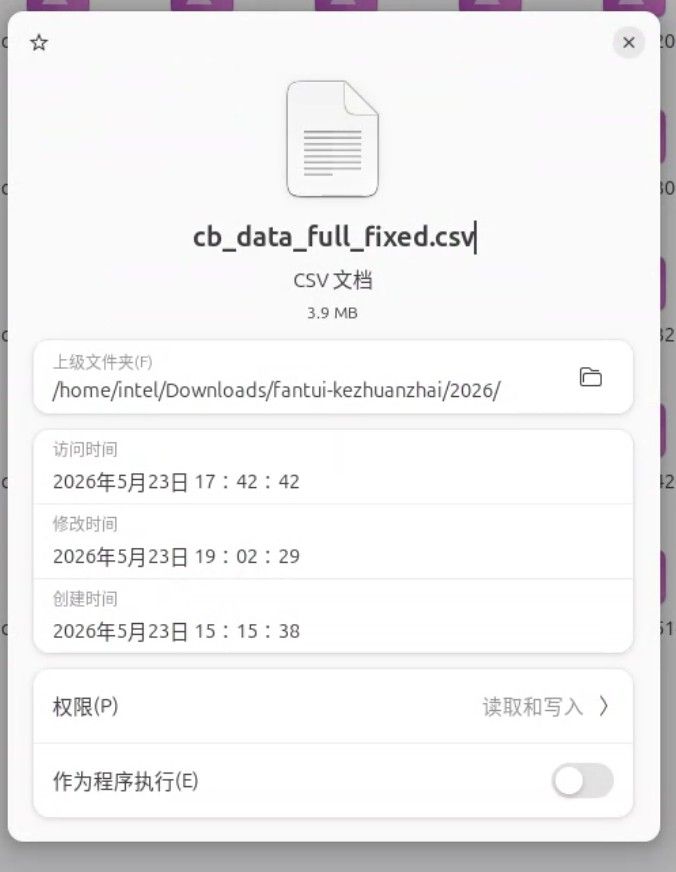
下边这张,是在linux上的截图,文件的创建时间是昨天上午的11.36,但在创建文件之前,代码已经运行了一个小时了,它得去把这200多个文件全部都截取成一个一个的小块才能读取数据OCR数据。所以文件时间就晚了一个小时。
OK。原贴贴完。 以下是新内容。
-
以下是新内容,前天的是处理的2024年全年的图片,有240多张,昨天处理了2026年的,只有 90张。 为了更进一步的压榨这卡的能力,于是我把原代码中的6步并发,改为16个并发! 我看是否它还可以抗得住,代码如下:
import base64
import os
import glob
import asyncio
import aiohttp
from io import BytesIO
from PIL import Image


API_URL = "http://localhost:8091/v1/chat/completions"
IMAGE_DIR = "./cb*.png"
OUTPUT_CSV = "./cb_data_full_fixed.csv"

# B70 32G 显存并发数
CONCURRENCY = 16

def encode_image_from_bytes(image_bytes):
    return base64.b64encode(image_bytes).decode('utf-8')

def slice_long_image(image_path, slice_height=1500):

    img = Image.open(image_path)
    width, height = img.size
    slices = []

    for i in range(0, height, slice_height):

        box = (0, i, width, min(i + slice_height, height))
        slice_img = img.crop(box)

        buffered = BytesIO()
        slice_img.save(buffered, format="PNG")
        slices.append(buffered.getvalue())

    return slices

async def fetch_and_process_slice(session, date_str, slice_base64, slice_index, file_lock):
    payload = {
        "model": "/model",
        "messages": [
            {
                "role": "system",
                "content": "你是一个无情的数据提取机器。直接输出CSV,不要任何多余文字。"
            },
            {
                "role": "user",
                "content": [
                    {
                        "type": "text",
                        "text": "提取图片表格中所有可转债数据。请直接输出CSV格式。每行字段为:转债代码,转债名称,价格,涨幅,正股,正股价,溢价率。注意:不要包含表头,不要使用Markdown代码块(如 ```csv)。如果图片中没有完整数据行,请不要编造。"
                    },
                    {
                        "type": "image_url",
                        "image_url": {
                            "url": f"data:image/png;base64,{slice_base64}"
                        }
                    }
                ]
            }
        ],
        "max_tokens": 4096,
        "temperature": 0.0
    }

    try:
        async with session.post(API_URL, json=payload) as response:
            if response.status != 200:
                print(f"⚠️ {date_str} (切片 {slice_index}) 请求失败")
                return

            res_json = await response.json()
            result = res_json['choices'][0]['message']['content'].strip()

            async with file_lock:
                with open(OUTPUT_CSV, "a", encoding="utf-8-sig") as f:
                    for line in result.split('\n'):
                        # 过滤掉可能的空行和重复生成的表头
                        if line.strip() and "," in line and "转债代码" not in line:
                            f.write(f"{date_str},{line.strip()}\n")

    except Exception as e:
        print(f"❌ 处理 {date_str} (切片 {slice_index}) 发生异常: {e}")

async def main():
    image_list = sorted(glob.glob(IMAGE_DIR))
    if not image_list:
        print(f"❌ 错误:没有找到符合 {IMAGE_DIR} 的图片!")
        return

    print(f"🔥 找到 {len(image_list)} 张超长图,准备进行切片并高并发推断...")

    if not os.path.exists(OUTPUT_CSV):
        with open(OUTPUT_CSV, "w", encoding="utf-8-sig") as f:
            f.write("日期,转债代码,转债名称,价格,涨幅,正股,正股价,溢价率\n")

    semaphore = asyncio.Semaphore(CONCURRENCY)
    file_lock = asyncio.Lock()

    async def sem_task(session, date_str, slice_bytes, index):
        async with semaphore:
            slice_b64 = encode_image_from_bytes(slice_bytes)
            await fetch_and_process_slice(session, date_str, slice_b64, index, file_lock)

    timeout = aiohttp.ClientTimeout(total=None)
    async with aiohttp.ClientSession(timeout=timeout) as session:
        tasks = []
        for img_path in image_list:
            date_str = os.path.basename(img_path).replace("cb", "").replace(".jpg", "").replace(".png", "")

            # 对超长图进行切片
            slices_bytes = slice_long_image(img_path)
            print(f"✂️ {date_str} 被切分为 {len(slices_bytes)} 块,加入队列...")

            for index, slice_bytes in enumerate(slices_bytes):
                tasks.append(sem_task(session, date_str, slice_bytes, index))

        # 将所有切片任务并发执行
        await asyncio.gather(*tasks)

    print("🎉 全部长图切片处理完成!去检查数据量吧!")

if __name__ == "__main__":
    asyncio.run(main())
直接上图
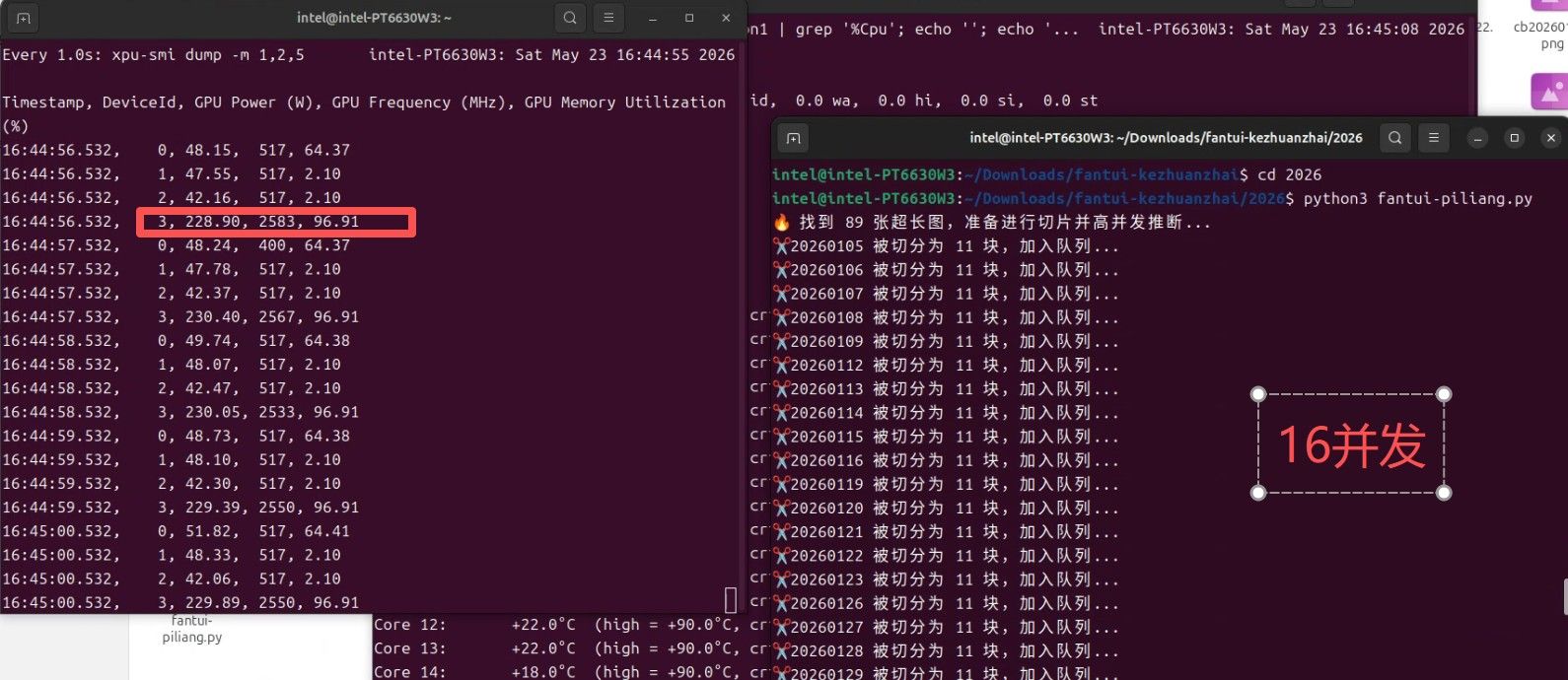
这是结果,图片太少,不知道啥时候完成的,应该是昨天晚上半夜。16并发时的显卡压力, 频率到了2583, 显卡瓦数到了228.还没有到顶,这卡到顶300,官方说是290,但我的确用到过瞬时300. 显存占用率 96.91% 。
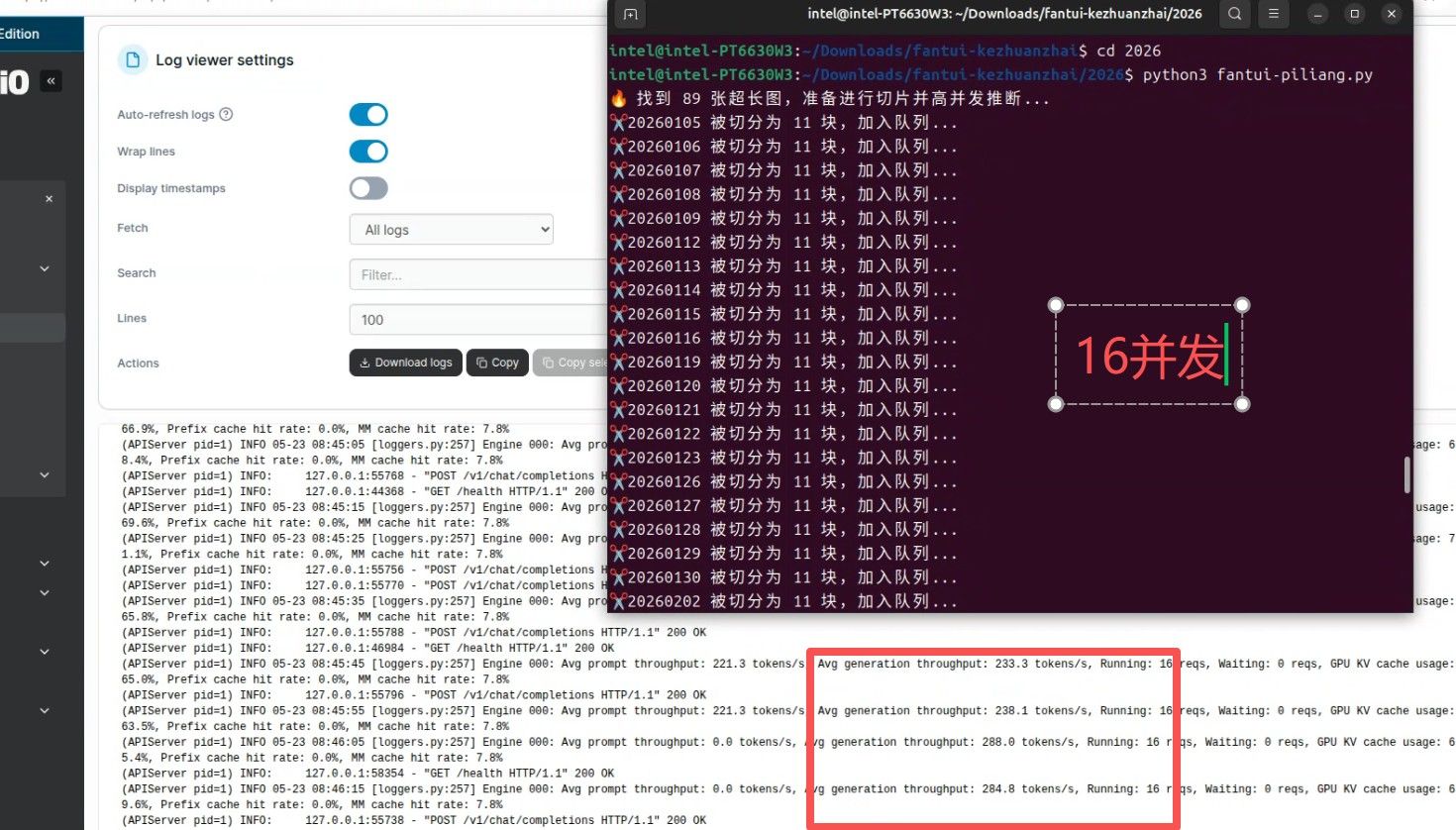
这是在运行时的模型吞吐量。 大概230-280 tokens/s。 这超出了在开始测试时的180tokens/s 。 有懂的可以告诉我为啥... 同样是 Avg Generation troughput 为啥在直接和它对话时在180/s 而现在却到了280多? 是模型预热好了? 费解。
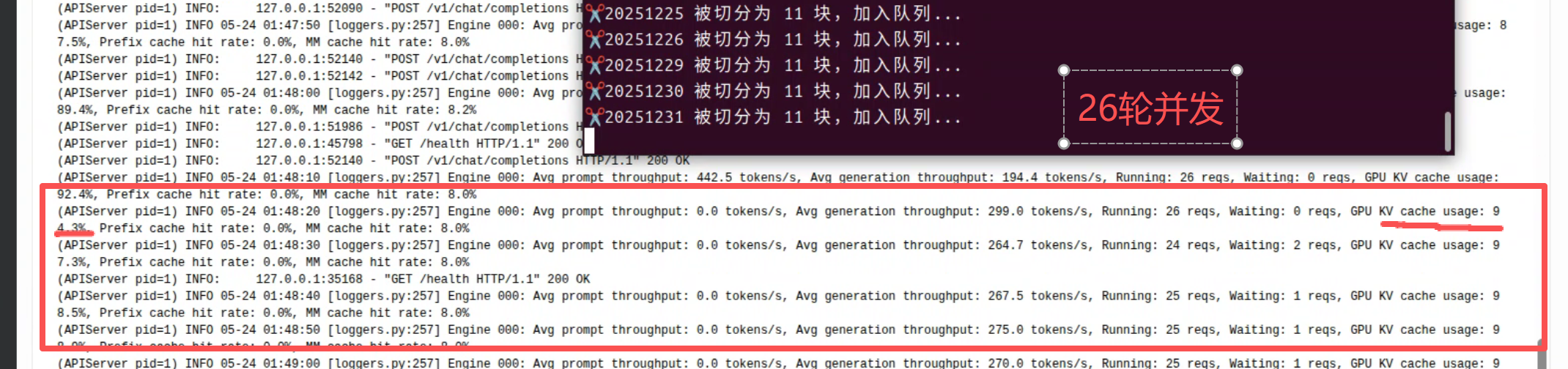
不管咋说,26年的90张处理完毕,下一步计划是把并发增加到... 26? 再试试25年的数据,25年有240多张图片。 尽请期待测试结果。
-
-
 T terry 于 将此主题固定
-
-
-
@sirwang 你问到为什么并发从16加到26后token吞吐量会上下剧烈跳动(299降到十几个),这个现象的本质是KV Cache内存争抢。
B70 32G显存跑Qwen3.6-27B时,每个并发请求都要占用一段KV Cache空间。Q4_K_M的27B模型,单个请求的KV Cache大约占 0.5-1GB(取决于context长度)。16并发时总KV Cache约8-16GB,显存还有余量;但到26并发时,KV Cache总量逼近甚至超过可用显存,vLLM/llama.cpp的调度器就会频繁做cache eviction和recomputation——排到你的请求就快(cache命中),排不到就要等别人释放cache,token就只能慢慢出。
你朋友说16-20并发最合适,道理就在这个临界点:低于16时显存充裕但浪费算力,高于20时cache thrashing的代价超过并发收益。实际调参建议:
- 观察显存占用:跑的时候watch nvidia-smi,看memory-usage%在26并发时是否接近100%且持续抖动。如果在95%以上剧烈波动,就是cache thrashing。
- 短context可以加并发:如果每个请求的输入/输出长度很短(几百token),单个请求的KV Cache占用小,可以尝试24-30并发。
- 调max-num-seqs下限:设 --max-num-seqs 18,让调度器主动限制并发量,比让它在26并发时被动thrashing要快得多。
- 启用vLLM的prefix caching(如果用的vLLM):加 --enable-prefix-caching,多个相似请求共享KV Cache前缀,显著降低cache压力。
简单说:你的硬件能力曲线不是线性的——16并发跑N tokens/秒,26并发可能反而因为thrashing降到只有1.2N。找自己硬件的甜蜜点才是关键。
-
-
-
-
@applejuice 这不是期待intel的会有更多深挖的东西嘛,哇哈哈哈。我还在深挖。
-
-
-
-
-
系统 于 取消固定此主题


 大哥来踩坑
大哥来踩坑