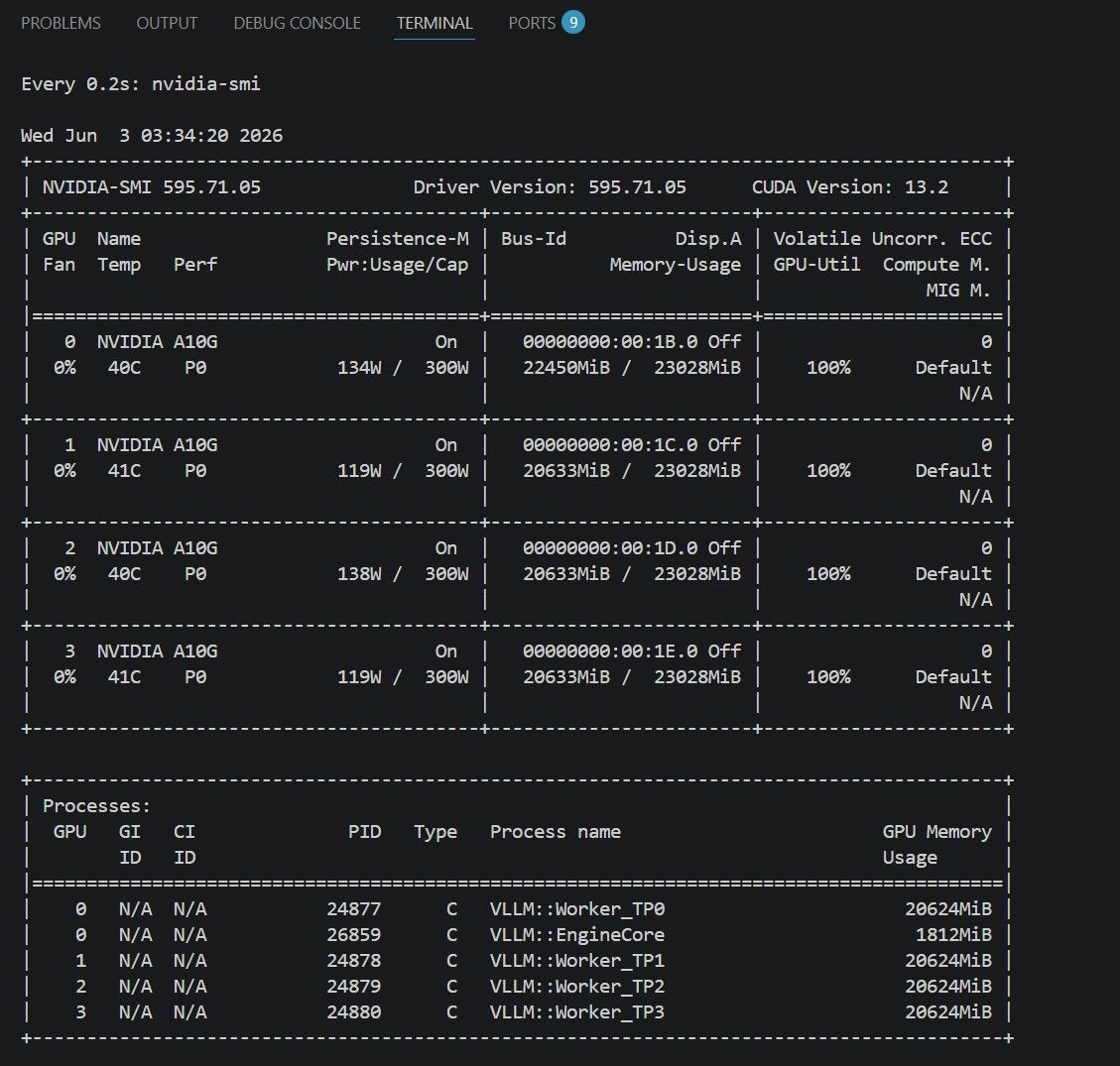
論 A10G (~3090) 底下的Gemma 4跟Qwen 3.6測試心得
-
見到各位大神有在分享設置, 然後我這個小白最近在公司還蠻幸運能用上AWS G5dn x12large配置
現在就來分享一下我在試驗時候(私心)測試後比較穩定的配置(至少沒有OOM).
A10G可以視作被削弱的3090, 所以配置可以視作3090/3090Ti適用, 擁有3090等級或者以上的24GB卡也用來參考 (基本上只會比這個更快, 不會更慢).
注意我目前還沒有額外時間跑太多的Benchmark, 而且有跑的Benchmark基本上是vLLm自己官網上有寫的. 因此下面有寫的基本上就是成功架構并且能達到普(老)通(闆)人不會等到不耐煩的速度.
使用場景: v0.22.0-cu129-ubuntu2404
1) Gemma 4 31B
試過2 * A10G 跟 4 * A10G, 以下是2 * A10G設置
docker run --runtime nvidia --gpus all \
  -v ~/.cache/huggingface:/root/.cache/huggingface \
  -p 8000:8000 \
  --ipc=host \
  -e VLLM_MODEL_NAME="Gemma-4-31B-it" \
  vllm/vllm-openai:v0.22.0-cu129-ubuntu2404 \
  --model Intel/gemma-4-31B-it-int4-AutoRound \
  --served-model-name Gemma-4-31B-it \
  --dtype float16 \
  --quantization auto_round \
  --gpu-memory-utilization 0.90 \
  --max-model-len 192768 \
  --max-num-seqs 1 \
  --max-num-batched-tokens 4096 \
  --tensor-parallel-size 2 \
  --pipeline-parallel-size 1 \
  --data-parallel-size 1 \
  --attention-backend TRITON_ATTN \
  --speculative-config '{"method":"mtp","model":"google/gemma-4-31B-it-assistant","num_speculative_tokens":4}' \
  --tool-call-parser gemma4 \
  --reasoning-parser gemma4
Gemma 4 31B不能在單A10G的情況下使用, 就算是Int 4也不行, 請研究關於MoE的配置
來解釋一下配置原因:
base: Intel/gemma-4-31B-it-int4-AutoRound (~22 GB)
drafter: google/gemma-4-31B-it-assistant (0.5B / ~927 MB BF16)Gemma 4 MTP跟Qwen 3.6不一樣, Qwen内置MTP head, 因此可以不需要額外帶上另外一個drafter.
Gemma 4并沒有内置MTP head, 所以需要一個基於Gemma 4提煉出來的drafter. 理論上也可以使用gemma 4 E2B 跟 E4B作爲drafter, 但是這兩個比31B自己的0.5B drafter還要大dtype : float16, 理論上bf16也可以, 3090 支持float 16跟bfloat 16
quantization: autoround, 低精度下保持相對高的token質量, int4/int8必用gpu-memory-utilization: 0.9, 有其他東西需要VRAM所以我限制在0.9, 理論上Headless Server可以把這個推到0.95的話, 然後2張卡可以上260K長度
max-num-seqs: 1作爲POC超長上下文使用, 普通長上下文Agent可以設成2, 短上下文Agent可以上4max-num-batched-tokens: vision tower需要至少2496以上
attention-backend: TRITON_ATTN, Gemma 4 理論上支持 FA2, 但是基於Head Dimension跟Hybrid Attention的關係用FA會爆炸, 現階段還是用triton attentionspeculative-config: MTP加速
值得一提的是kv-cache-dtype理論上int8_per_token_head, 我也曾經在Reddit上看到有人成功使用, 可是我自己不行, 有3090的朋友可以試試看
Benchmark

--dataset-name random --input-len 1024 --output-len 256 --num-prompts 100 --request-rate inf --ignore-eos

============ Serving Benchmark Result ============
Successful requests:                     100
Failed requests:                         0
Benchmark duration (s):                  376.11
Total input tokens:                      103747
Total generated tokens:                  25600
Request throughput (req/s):              0.27
Output token throughput (tok/s):         68.06
Peak output token throughput (tok/s):    32.00
Peak concurrent requests:                100.00
Total token throughput (tok/s):          343.91
---------------Time to First Token----------------
Mean TTFT (ms):                          190345.47
Median TTFT (ms):                        190211.51
P99 TTFT (ms):                           370098.98
-----Time per Output Token (excl. 1st token)------
Mean TPOT (ms):                          10.63
Median TPOT (ms):                        10.63
P99 TPOT (ms):                           13.52
---------------Inter-token Latency----------------
Mean ITL (ms):                           32.00
Median ITL (ms):                         32.28
P99 ITL (ms):                            32.95
---------------Speculative Decoding---------------
Acceptance rate (%):                     51.67
Acceptance length:                       3.07
Drafts:                                  8369
Draft tokens:                            33476
Accepted tokens:                         17296
Per-position acceptance (%):
  Position 0:                            77.55
  Position 1:                            58.00
  Position 2:                            41.55
  Position 3:                            29.57
==================================================
2) Gemma 4 26B A4B
單純4 * A10G設立過, 但并沒有真正使用過, 沒加上MTP, 原則上跟Gemma 4 31B的思路差不多
docker run --runtime nvidia --gpus all \
  -v ~/.cache/huggingface:/root/.cache/huggingface \
  -p 8000:8000 \
  --ipc=host \
  -e VLLM_MODEL_NAME="Gemma-4-26B-A4B-it" \
  vllm/vllm-openai:v0.22.0-cu129-ubuntu2404 \
  --model Intel/gemma-4-26B-A4B-it-int4-mixed-AutoRound \
  --served-model-name Gemma-4-26B-A4B-it \
  --dtype float16 \
  --quantization auto_round \
  --gpu-memory-utilization 0.90 \
  --max-model-len 192768 \
  --max-num-seqs 1 \
  --max-num-batched-tokens 8192 \
  --tensor-parallel-size 4 \
  --pipeline-parallel-size 1 \
  --data-parallel-size 1 \
  --enable-expert-parallel true \
  --attention-backend TRITON_ATTN \
  --tool-call-parser gemma4 \
  --reasoning-parser gemma4
model: Intel/gemma-4-26B-A4B-it-int4-mixed-AutoRound (~15 GB)
請注意跟自行修改tensor-parallel-size跟enable-expert-parallel
tensor-parallel-size: 4, 因爲x12Large有4張卡, 這個按照你卡的數量以2的次方為準 (2, 4, 8 etc)
enable-expert-parallel: true, 這個沒有NVLINK那些的話就直接false就可以了, 有興趣的可以問我, 之後再回答以下預測MTP的配置:
drafter: google/gemma-4-26B-A4B-it-assistant (~0.4B / ~800 MB BF16)
--speculative-config '{"method":"mtp","model":"google/gemma-4-31B-it-assistant","num_speculative_tokens":4}'如果想要2卡的話max-model-len很大機會需要乘上0.75 或 0.5
- Qwen 3.6 27B
有一個比較嚴重的問題是Qwen 3.6在長上下文的情況下思考時間過長(Overthinking), 試過關閉enable_thinking跟限制thinking token數量但效果不太明顯.
雖然質量出色但因爲本身System Prompt加上上下文一多就會導致TTFT太長, 需要更多時間研究
試過2 * A10G 跟 4 * A10G, 以下是2 * A10G設置
docker run --runtime nvidia --gpus all \
  -v ~/.cache/huggingface:/root/.cache/huggingface \
  -p 8000:8000 \
  --ipc=host \
  -e VLLM_MODEL_NAME="Qwen3.6-27B" \
  vllm/vllm-openai:v0.22.0-cu129-ubuntu2404 \
  --model cyankiwi/Qwen3.6-27B-AWQ-BF16-INT4 \
  --tensor-parallel-size 2 \
  --max-model-len 192768 \
  --gpu-memory-utilization 0.90 \
  --enable-prefix-caching \
  --enable-chunked-prefill \
  --max-num-batched-tokens 4096 \
  --max-num-seqs 2 \
  --reasoning-parser qwen3 \
  --enable-auto-tool-choice \
  --tool-call-parser qwen3_coder \
  --speculative-config '{"method":"mtp","num_speculative_tokens":2}'
cyankiwi/Qwen3.6-27B-AWQ-BF16-INT4 (~ 15GB)
沒特別研究所以還沒看autoround (Lorbus/Qwen3.6-27B-int4-AutoRound ) 以及其他人有關fp8 kv cache的設定
- Qwen 3.6 35B A3B
未嘗試, 但估計思路跟從Gemma 4 31B轉換到26B-A4B類似
-
昨天太晚打文, 剛才從頭看發現我搞錯了4 * A10G 跟 2 * A10G 的部分參數, 先說聲抱歉, 這個才是 Gemma 4 31B (4 * A10G)
docker run --runtime nvidia --gpus all \
  -v ~/.cache/huggingface:/root/.cache/huggingface \
  -p 8000:8000 \
  --ipc=host \
  -e VLLM_MODEL_NAME="Gemma-4-31B-it" \
  vllm/vllm-openai:v0.22.0-cu129-ubuntu2404 \
  --model Intel/gemma-4-31B-it-int4-AutoRound \
  --served-model-name Gemma-4-31B-it \
  --dtype float16 \
  --quantization auto_round \
  --gpu-memory-utilization 0.90 \
  --max-model-len 192768 \
  --max-num-seqs 1 \
  --max-num-batched-tokens 8192 \    #(這裏4096改8192)
  --tensor-parallel-size 4 \                     #(這裏2改4)
  --pipeline-parallel-size 1 \
  --data-parallel-size 1 \
  --attention-backend TRITON_ATTN \
  --speculative-config '{"method":"mtp","model":"google/gemma-4-31B-it-assistant","num_speculative_tokens":4}' \
  --tool-call-parser gemma4 \
  --reasoning-parser gemma4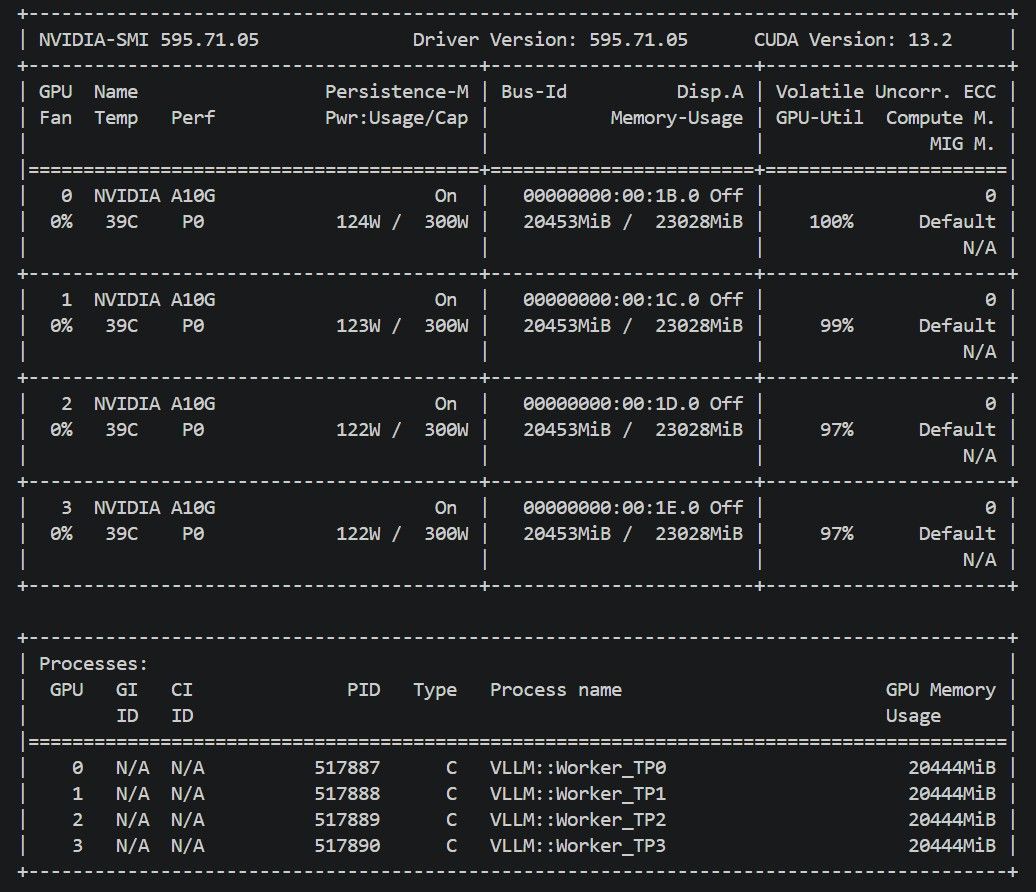
以下是更新版的Benchmark
### Workload | Metric | Run 07:30 | Run 07:45 | Run 08:05 | | -------------------------- | -------------------- | -------------------- | -------------------- | | dataset | random | random | random | | input length arg | 1024 | 1024 | 1024 | | output length arg | 256 | 256 | 256 | | input tokens mean/min/max | 1037.5 / 1037 / 1039 | 1037.5 / 1037 / 1039 | 1037.5 / 1037 / 1039 | | output tokens mean/min/max | 256.0 / 256 / 256 | 256.0 / 256 / 256 | 256.0 / 256 / 256 | | num prompts | 100 | 100 | 100 | | request rate | inf | inf | inf | ### Request Outcome | Metric | Run 07:30 | Run 07:45 | Run 08:05 | | ---------------------- | --------- | --------- | --------- | | successful requests | 100 | 100 | 100 | | failed requests | 0 | 0 | 0 | | benchmark duration (s) | 371.71 | 374.19 | 367.04 | ### Latency | Metric | Run 07:30 | Run 07:45 | Run 08:05 | | ---------------- | --------- | --------- | --------- | | mean TTFT (ms) | 185538.74 | 188381.24 | 182757.33 | | median TTFT (ms) | 185918.49 | 189676.29 | 181425.16 | | P99 TTFT (ms) | 364700.58 | 368045.53 | 360175.17 | | mean TPOT (ms) | 10.59 | 10.69 | 10.48 | | P99 TPOT (ms) | 14.95 | 15.77 | 15.28 | | mean ITL (ms) | 31.83 | 31.73 | 31.76 | | P99 ITL (ms) | 33.16 | 33.13 | 33.91 | ### Throughput | Metric | Run 07:30 | Run 07:45 | Run 08:05 | | ------------------------------- | --------- | --------- | --------- | | request throughput (req/s) | 0.269 | 0.267 | 0.272 | | output token throughput (tok/s) | 68.87 | 68.42 | 69.75 | | total token throughput (tok/s) | 347.98 | 345.68 | 352.41 | | prefill throughput (tok/s) | 5.6 | 5.5 | 5.7 | ### Memory And Cache | Metric | Run 07:30 | Run 07:45 | Run 08:05 | | --------------------------- | -------------------------- | -------------------------- | -------------------------- | | VRAM before (MiB) | 20371 | 20453 | 20453 | | VRAM peak (MiB) | 20453 | 20453 | 20453 | | VRAM peak per GPU (MiB) | 20453, 20453, 20453, 20453 | 20453, 20453, 20453, 20453 | 20453, 20453, 20453, 20453 | | RAM used peak (MiB) | 19233 | 19075 | 23152 | | vLLM process RSS peak (MiB) | 2117 | 2117 | 2117 | | gpu/kv_cache_usage peak | 1.6% | 1.6% | 1.6% | | prefix caching enabled | false | false | false | | prefix cache hit rate | 0.00% (0/103761) | 0.00% (0/103761) | 1.85% (1920/103761) | ### Speculative Decoding | Metric | Run 07:30 | Run 07:45 | Run 08:05 | | ------------------- | --------- | --------- | --------- | | acceptance rate (%) | 51.50 | 50.54 | 52.18 | | acceptance length | 3.06 | 3.02 | 3.09 | -
然後這個是Gemma 4 31B (2 * A10G)
vllm serve \
  --model Intel/gemma-4-31B-it-int4-AutoRound \
  --host 0.0.0.0 \
  --port 8000 \
  --generation-config vllm \
  --served-model-name Gemma-4-31B-it \
  --dtype float16 \
  --quantization auto_round \
  --gpu-memory-utilization 0.95 \        #(需要上到0.95不然OOM)
  --max-model-len 192768 \
  --max-num-seqs 1 \
  --max-num-batched-tokens 4096 \ #(8192降到4096)
  --tensor-parallel-size 2 \
  --pipeline-parallel-size 1 \
  --data-parallel-size 1 \
  --language-model-only \
  --attention-config.backend TRITON_ATTN \
  --limit-mm-per-prompt '{"image":0,"video":0}' \
  --speculative-config '{"method":"mtp","model":"google/gemma-4-31B-it-assistant","num_speculative_tokens":4}' \
  --compilation-config '{"cudagraph_mode":"PIECEWISE"}' \
  --tool-call-parser gemma4 \
  --reasoning-parser gemma4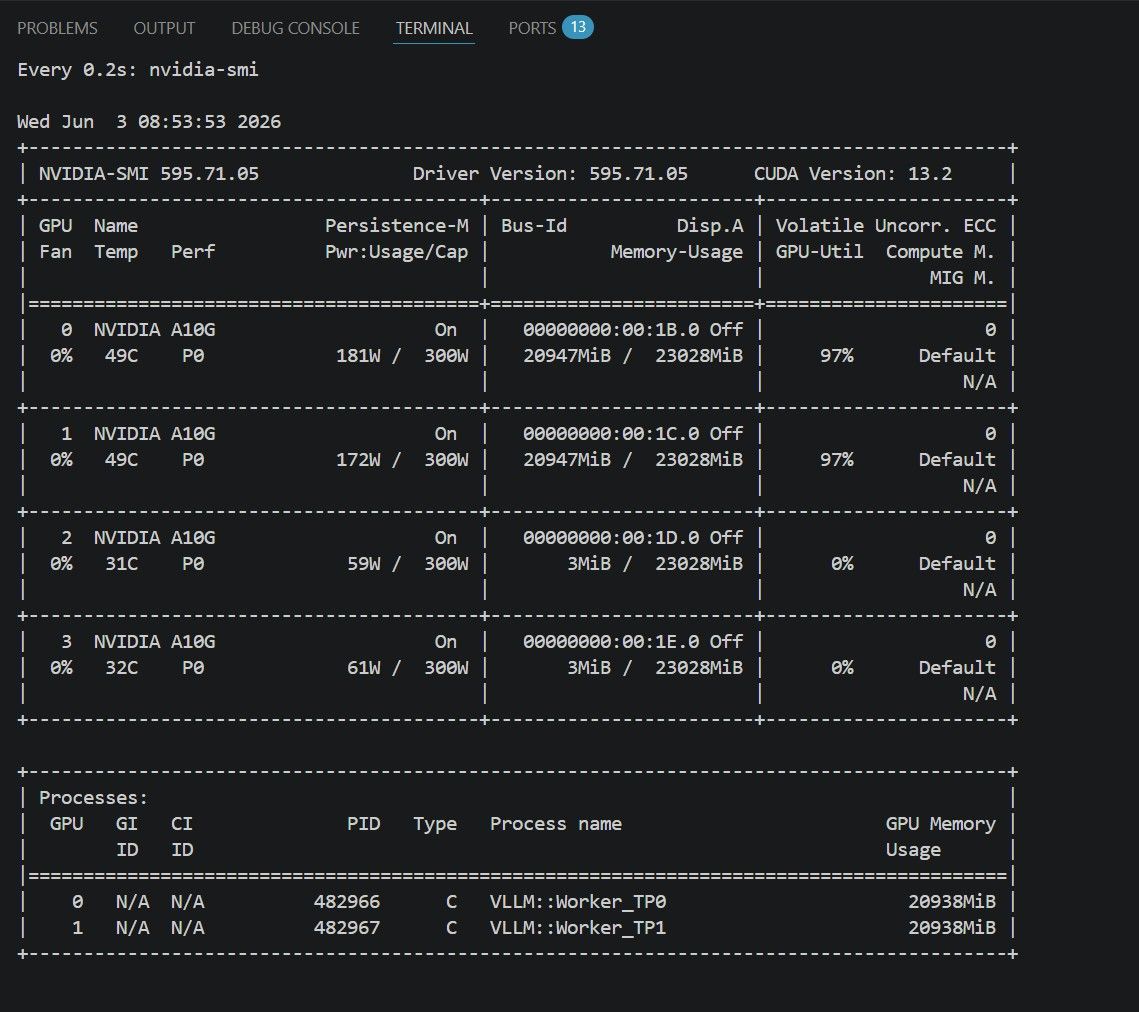
以下是更新版的Benchmark
### Workload | Metric | Run 08:58 | Run 09:07 | Run 09:34 | | -------------------------- | -------------------- | -------------------- | -------------------- | | dataset | random | random | random | | input length arg | 1024 | 1024 | 1024 | | output length arg | 256 | 256 | 256 | | input tokens mean/min/max | 1037.5 / 1037 / 1039 | 1037.5 / 1037 / 1039 | 1037.5 / 1037 / 1039 | | output tokens mean/min/max | 256.0 / 256 / 256 | 256.0 / 256 / 256 | 256.0 / 256 / 256 | | num prompts | 100 | 100 | 100 | | request rate | inf | inf | inf | ### Request Outcome | Metric | Run 08:58 | Run 09:07 | Run 09:34 | | ---------------------- | --------- | --------- | --------- | | successful requests | 100 | 100 | 100 | | failed requests | 0 | 0 | 0 | | benchmark duration (s) | 462.51 | 457.19 | 462.96 | ### Latency | Metric | Run 08:58 | Run 09:07 | Run 09:34 | | ---------------- | --------- | --------- | --------- | | mean TTFT (ms) | 233010.17 | 229102.51 | 231664.74 | | median TTFT (ms) | 234769.52 | 232669.51 | 231388.69 | | P99 TTFT (ms) | 453358.78 | 449056.54 | 454054.81 | | mean TPOT (ms) | 13.96 | 13.75 | 13.98 | | P99 TPOT (ms) | 18.09 | 17.01 | 18.07 | | mean ITL (ms) | 42.03 | 41.92 | 42.02 | | P99 ITL (ms) | 43.59 | 43.59 | 43.67 | ### Throughput | Metric | Run 08:58 | Run 09:07 | Run 09:34 | | ------------------------------- | --------- | --------- | --------- | | request throughput (req/s) | 0.216 | 0.219 | 0.216 | | output token throughput (tok/s) | 55.35 | 55.99 | 55.30 | | total token throughput (tok/s) | 279.66 | 282.92 | 279.39 | | prefill throughput (tok/s) | 4.5 | 4.5 | 4.5 | ### Memory And Cache | Metric | Run 08:58 | Run 09:07 | Run 09:34 | | --------------------------- | -------------------------- | -------------------------- | -------------------------- | | VRAM before (MiB) | 20825 | 20947 | 20825 | | VRAM peak (MiB) | 20947 | 20947 | 20947 | | VRAM peak per GPU (MiB) | 20947, 20947, 3, 3 | 20947, 20947, 3, 3 | 20947, 20947, 3, 3 | | RAM used peak (MiB) | 14713 | 14706 | 14809 | | vLLM process RSS peak (MiB) | 2117 | 2117 | 2133 | | gpu/kv_cache_usage peak | 4.4% | 4.4% | 4.4% | | prefix caching enabled | false | false | false | | prefix cache hit rate | 0.00% (0/103761) | 0.00% (0/103761) | 0.00% (0/103761) | ### Speculative Decoding | Metric | Run 08:58 | Run 09:07 | Run 09:34 | | ------------------- | --------- | --------- | --------- | | acceptance rate (%) | 51.55 | 52.60 | 51.51 | | acceptance length | 3.06 | 3.10 | 3.06 | -
 T terry 于 将此主题固定
-
好消息是你可以混合使用A + N卡, 你可以用Vulkan來將model分到兩張卡的VRAM上面, 然後llamacpp選用Vulkan, 我也曾經在Reddit上面聽過有人混合RTX 5070 Ti + RX 9070, 除了prefill速度慢了跟沒有特別優化之外應該沒什麼問題
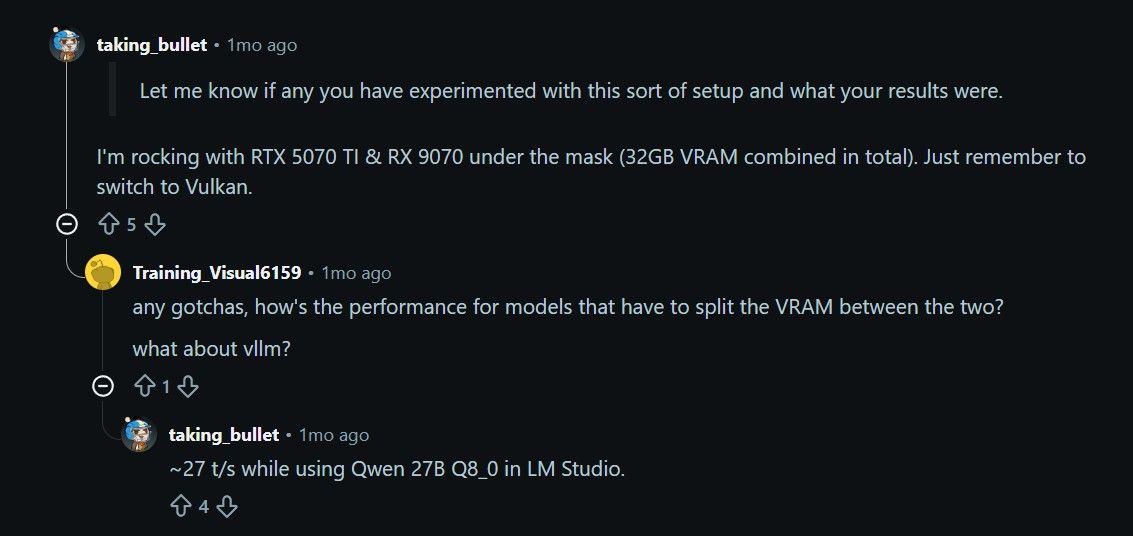
壞消息是你需要自己編譯Vulkan內核
如果是普通人不太想太深入研究的話推薦直接買多一張A10G, 或者賣A10G換成R9700
碎碎念一下
跑去llamacpp看了一下, 很不負責地給一下編譯command強烈建議使用docker container + Linux Kernel, 不要在Window底下編譯, 可以用這個試試看
編譯
rm -rf build && \
HIPCXX="$(hipconfig -l)/clang" HIP_PATH="$(hipconfig -R)" cmake -B build \
  -DBUILD_SHARED_LIBS=ON \
  -DGGML_BACKEND_DL=ON \
  -DGGML_NATIVE=OFF \
  -DGGML_CPU_ALL_VARIANTS=ON \
  -DGGML_CUDA=ON \
  -DGGML_HIP=ON \
  -DGPU_TARGETS=gfx1201 \                           #(R9700 AI 架構)
  -DGGML_HIP_ROCWMMA_FATTN=ON \
  -DCMAKE_BUILD_TYPE=Release \
  -DCMAKE_CUDA_ARCHITECTURES="86" && \           #(3090 SM86架構)
cmake --build build --config Release -j 64
啟動 ${HOME}/code/llama.cpp/build/bin/llama-server \ --port 1234 --host 0.0.0.0 \ --models-preset <你模型的啟動參數>.ini \ --device CUDA0,ROCm0 --fit-target 3072,512 #(假設你第一張卡是插屏幕,需要預留多點VRAM) -
好消息是你可以混合使用A + N卡, 你可以用Vulkan來將model分到兩張卡的VRAM上面, 然後llamacpp選用Vulkan, 我也曾經在Reddit上面聽過有人混合RTX 5070 Ti + RX 9070, 除了prefill速度慢了跟沒有特別優化之外應該沒什麼問題
壞消息是你需要自己編譯Vulkan內核
如果是普通人不太想太深入研究的話推薦直接買多一張A10G, 或者賣A10G換成R9700
碎碎念一下
跑去llamacpp看了一下, 很不負責地給一下編譯command強烈建議使用docker container + Linux Kernel, 不要在Window底下編譯, 可以用這個試試看
編譯
rm -rf build && \
HIPCXX="$(hipconfig -l)/clang" HIP_PATH="$(hipconfig -R)" cmake -B build \
  -DBUILD_SHARED_LIBS=ON \
  -DGGML_BACKEND_DL=ON \
  -DGGML_NATIVE=OFF \
  -DGGML_CPU_ALL_VARIANTS=ON \
  -DGGML_CUDA=ON \
  -DGGML_HIP=ON \
  -DGPU_TARGETS=gfx1201 \                           #(R9700 AI 架構)
  -DGGML_HIP_ROCWMMA_FATTN=ON \
  -DCMAKE_BUILD_TYPE=Release \
  -DCMAKE_CUDA_ARCHITECTURES="86" && \           #(3090 SM86架構)
cmake --build build --config Release -j 64
啟動 ${HOME}/code/llama.cpp/build/bin/llama-server \ --port 1234 --host 0.0.0.0 \ --models-preset <你模型的啟動參數>.ini \ --device CUDA0,ROCm0 --fit-target 3072,512 #(假設你第一張卡是插屏幕,需要預留多點VRAM) -
然後給一下Qwen 27B 參數 (4 * A10G)
Docker Image: vllm-openai:v0.22.0-cu129-ubuntu2404
vllm serve \
  --model Lorbus/Qwen3.6-27B-int4-AutoRound \
  --host 0.0.0.0 \
  --port 8000 \
  --generation-config vllm \
  --served-model-name Qwen-3.6-27B-autoround \
  --dtype float16 \
  --quantization auto_round \
  --kv-cache-dtype fp8_e5m2 \
  --gpu-memory-utilization 0.90 \
  --max-model-len 192768 \
  --max-num-seqs 1 \
  --max-num-batched-tokens 8192 \
  --tensor-parallel-size 4 \
  --pipeline-parallel-size 1 \
  --data-parallel-size 1 \
  --language-model-only \
  --enable-auto-tool-choice \
  --mamba-cache-mode align \
  --limit-mm-per-prompt '{"image":0,"video":0}' \
  --speculative-config '{"method":"mtp","num_speculative_tokens":3}' \
  --compilation-config '{"cudagraph_mode":"PIECEWISE"}' \
  --tool-call-parser qwen3_coder \
  --reasoning-parser qwen3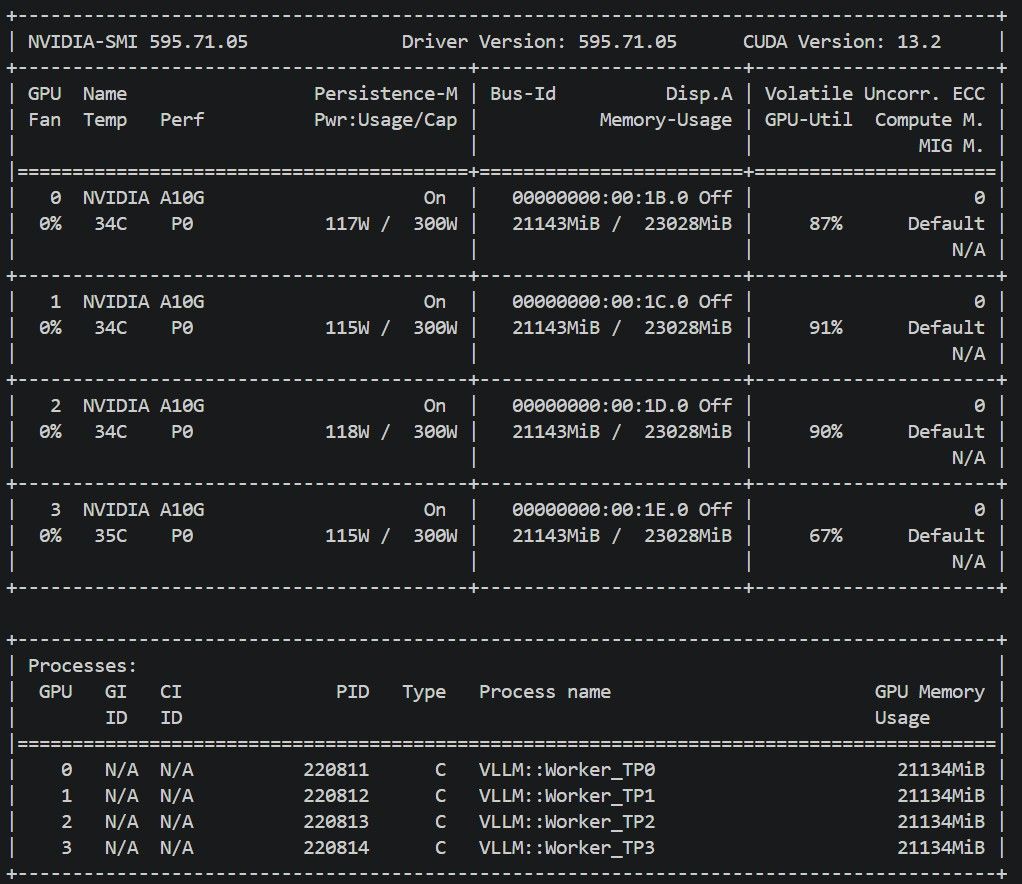
碎碎唸
基本上跟Gemma 4一樣,使用auto round來節省model weight
kv cache則使用僅有支持Ampere架構的fp8_e5m2, vllm可以透過fp8_e5m2模仿bfloat16, 並且轉換成int8獲得硬件加速, fp8_e4m3架構則不支持模仿
強烈不建議使用 --default-chat-template-kwargs '{"enable_thinking": false}', Token質量會斷崖式下降
以下是更新版的Benchmark
### Workload | Metric | Run 05:17 | Run 05:28 | Run 05:36 | | -------------------------- | -------------------- | -------------------- | -------------------- | | dataset | random | random | random | | input length arg | 1024 | 1024 | 1024 | | output length arg | 256 | 256 | 256 | | input tokens mean/min/max | 1034.4 / 1033 / 1036 | 1034.4 / 1033 / 1036 | 1034.4 / 1033 / 1036 | | output tokens mean/min/max | 256.0 / 256 / 256 | 256.0 / 256 / 256 | 256.0 / 256 / 256 | | num prompts | 100 | 100 | 100 | | request rate | inf | inf | inf | ### Request Outcome | Metric | Run 05:17 | Run 05:28 | Run 05:36 | | ---------------------- | --------- | --------- | --------- | | successful requests | 100 | 100 | 100 | | failed requests | 0 | 0 | 0 | | benchmark duration (s) | 430.22 | 427.70 | 443.72 | ### Latency | Metric | Run 05:17 | Run 05:28 | Run 05:36 | | ---------------- | --------- | --------- | --------- | | mean TTFT (ms) | 214258.88 | 211603.07 | 217519.66 | | median TTFT (ms) | 211865.20 | 210793.65 | 213751.71 | | P99 TTFT (ms) | 422468.83 | 418775.36 | 435311.06 | | mean TPOT (ms) | 13.11 | 13.01 | 13.63 | | P99 TPOT (ms) | 21.82 | 16.84 | 19.43 | | mean ITL (ms) | 35.67 | 35.94 | 36.59 | | P99 ITL (ms) | 38.89 | 39.51 | 40.25 | ### Throughput | Metric | Run 05:17 | Run 05:28 | Run 05:36 | | ------------------------------- | --------- | --------- | --------- | | request throughput (req/s) | 0.232 | 0.234 | 0.225 | | output token throughput (tok/s) | 59.50 | 59.85 | 57.69 | | total token throughput (tok/s) | 299.94 | 301.70 | 290.81 | | prefill throughput (tok/s) | 4.8 | 4.9 | 4.8 | ### Memory And Cache | Metric | Run 05:17 | Run 05:28 | Run 05:36 | | --------------------------- | -------------------------- | -------------------------- | -------------------------- | | VRAM before (MiB) | 20261 | 21143 | 21143 | | VRAM peak (MiB) | 21143 | 21143 | 21143 | | VRAM peak per GPU (MiB) | 21143, 21143, 21143, 21143 | 21143, 21143, 21143, 21143 | 21143, 21143, 21143, 21143 | | RAM used peak (MiB) | 22076 | 20870 | 20798 | | vLLM process RSS peak (MiB) | 1825 | 1825 | 1825 | | gpu/kv_cache_usage peak | 1.2% | 1.2% | 1.2% | | prefix caching enabled | false | false | false | | prefix cache hit rate | n/a | n/a | n/a | ### Speculative Decoding | Metric | Run 05:17 | Run 05:28 | Run 05:36 | | ------------------- | --------- | --------- | --------- | | acceptance rate (%) | 58.75 | 60.16 | 57.49 | | acceptance length | 2.76 | 2.80 | 2.72 | --- -
Qwen 27B 參數 (2 * A10G)
Docker Image: vllm-openai:v0.22.0-cu129-ubuntu2404
vllm serve \
  --model Lorbus/Qwen3.6-27B-int4-AutoRound \
  --host 0.0.0.0 \
  --port 8000 \
  --generation-config vllm \
  --served-model-name Qwen-3.6-27B-autoround \
  --dtype float16 \
  --quantization auto_round \
  --kv-cache-dtype fp8_e5m2 \
  --gpu-memory-utilization 0.95 \
  --max-model-len 192768 \
  --max-num-seqs 1 \
  --max-num-batched-tokens 4096 \
  --tensor-parallel-size 2 \
  --pipeline-parallel-size 1 \
  --data-parallel-size 1 \
  --language-model-only \
  --enable-auto-tool-choice \
  --mamba-cache-mode align \
  --limit-mm-per-prompt '{"image":0,"video":0}' \
  --speculative-config '{"method":"mtp","num_speculative_tokens":3}' \
  --compilation-config '{"cudagraph_mode":"PIECEWISE"}' \
  --tool-call-parser qwen3_coder \
  --reasoning-parser qwen3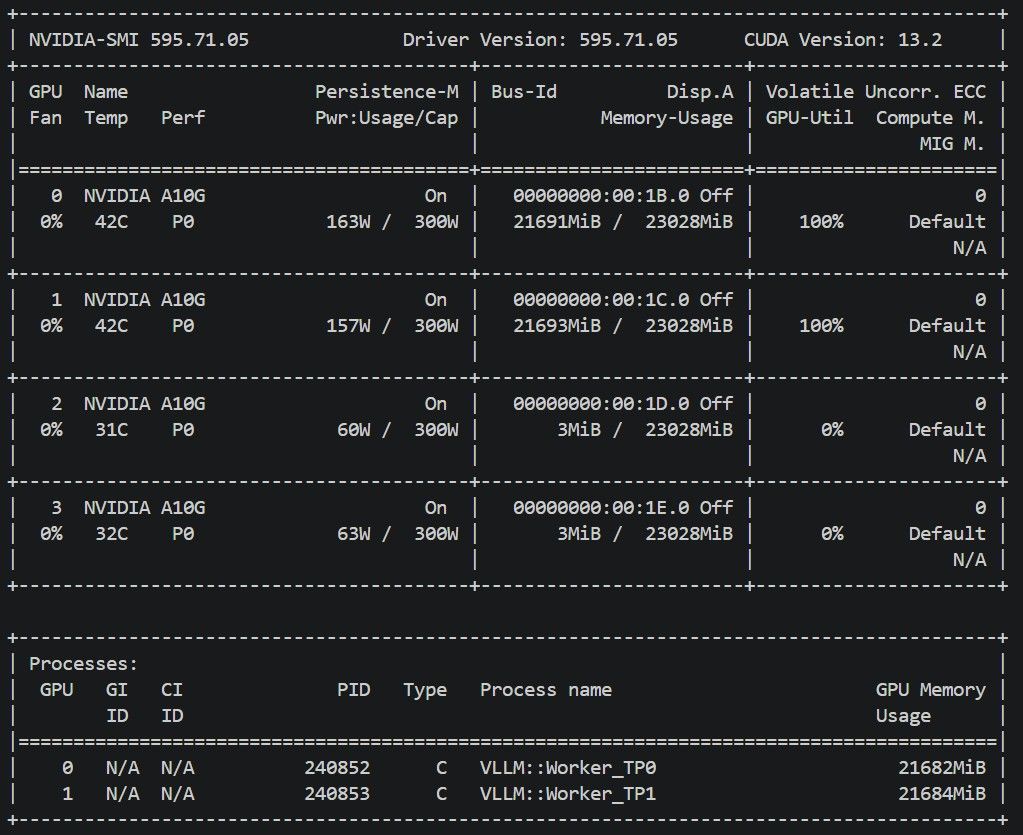
碎碎唸
思路基本上跟A10G * 4一樣, batch token 降到4096, gpu memory utilization 上到0.95
以下是更新版的Benchmark
### Workload | Metric | Run 07:09 | Run 07:17 | Run 07:26 | | -------------------------- | -------------------- | -------------------- | -------------------- | | dataset | random | random | random | | input length arg | 1024 | 1024 | 1024 | | output length arg | 256 | 256 | 256 | | input tokens mean/min/max | 1034.4 / 1033 / 1036 | 1034.4 / 1033 / 1036 | 1034.4 / 1033 / 1036 | | output tokens mean/min/max | 256.0 / 256 / 256 | 256.0 / 256 / 256 | 256.0 / 256 / 256 | | num prompts | 100 | 100 | 100 | | request rate | inf | inf | inf | ### Request Outcome | Metric | Run 07:09 | Run 07:17 | Run 07:26 | | ---------------------- | ---------- | ---------- | ---------- | | successful requests | 100 | 100 | 100 | | failed requests | 0 | 0 | 0 | | benchmark duration (s) | 463.34 | 478.80 | 474.50 | ### Latency | Metric | Run 07:09 | Run 07:17 | Run 07:26 | | ---------------- | ----------- | ----------- | ----------- | | mean TTFT (ms) | 232418.08 | 238435.64 | 236922.49 | | median TTFT (ms) | 231770.91 | 238065.71 | 238316.95 | | P99 TTFT (ms) | 455414.07 | 470471.84 | 466104.09 | | mean TPOT (ms) | 14.38 | 15.00 | 14.83 | | P99 TPOT (ms) | 24.48 | 20.19 | 22.90 | | mean ITL (ms) | 39.04 | 39.49 | 39.32 | | P99 ITL (ms) | 41.72 | 42.91 | 42.08 | ### Throughput | Metric | Run 07:09 | Run 07:17 | Run 07:26 | | ------------------------------- | --------- | --------- | --------- | | request throughput (req/s) | 0.216 | 0.209 | 0.211 | | output token throughput (tok/s) | 55.25 | 53.47 | 53.95 | | total token throughput (tok/s) | 278.50 | 269.50 | 271.94 | | prefill throughput (tok/s) | 4.5 | 4.3 | 4.4 | ### Memory And Cache | Metric | Run 07:09 | Run 07:17 | Run 07:26 | | --------------------------- | -------------------------- | -------------------------- | -------------------------- | | VRAM before (MiB) | 20731 | 21693 | 21693 | | VRAM peak (MiB) | 21693 | 21693 | 21693 | | VRAM peak per GPU (MiB) | 21691, 21693, 3, 3 | 21691, 21693, 3, 3 | 21691, 21693, 3, 3 | | RAM used peak (MiB) | 16572 | 15092 | 15119 | | vLLM process RSS peak (MiB) | 1837 | 1837 | 1837 | | gpu/kv_cache_usage peak | 3.1% | 3.1% | 3.1% | | prefix caching enabled | false | false | false | | prefix cache hit rate | n/a | n/a | n/a | ### Speculative Decoding | Metric | Run 07:09 | Run 07:17 | Run 07:26 | | ------------------- | --------- | --------- | --------- | | acceptance rate (%) | 58.40 | 55.60 | 56.28 | | acceptance length | 2.75 | 2.67 | 2.69 | -
我的3090跑qwen3.6 27B,TOKEN 54 t/s,但写代码完整的项目,不能直接运行,deepseek v4直接OK,好像实际意义不大,opencode跑的完整项目,简单页面确实能直接跑起来,同样提示词(前端效果的),效果和deepseek差距巨大,是我使用方式不对么
-
T terry 于 引用了 此主题
-
系统 于 取消固定此主题
-
5 566656661 于 引用了 此主题
-
5 566656661 于 引用了 此主题
-
5 566656661 于 引用了 此主题