跳转至内容
  • 版块
  • 最新
  • 标签
  • 热门
  • 用户
  • 群组
皮肤
  • 浅色
  • Brite
  • Cerulean
  • Cosmo
  • Flatly
  • Journal
  • Litera
  • Lumen
  • Lux
  • Materia
  • Minty
  • Morph
  • Pulse
  • Sandstone
  • Simplex
  • Sketchy
  • Spacelab
  • United
  • Yeti
  • Zephyr
  • 深色
  • Cyborg
  • Darkly
  • Quartz
  • Slate
  • Solar
  • Superhero
  • Vapor

  • 默认(LCZ-Blue)
  • 不使用皮肤
  • LCZ-Green
  • LCZ-Blue
  • LCZ-Black
折叠
品牌标识

抡锤者

首页 版块 标签 硬件 项目 AI 广场
  1. 主页
  2. 版块
  3. AI音视频画图
  4. 13700cpu 32g 1g 7900xtx

13700cpu 32g 1g 7900xtx

已定时 已固定 已锁定 已移动 AI音视频画图
7900xtx
23 帖子 3 发布者 906 浏览
  • 从旧到新
  • 从新到旧
  • 最多赞同
回复
  • 在新帖中回复
登录后回复
此主题已被删除。只有拥有主题管理权限的用户可以查看。
  • terryT 在线
    terryT 在线
    terry
    超级版主
    发表于 最后由 编辑
    #12

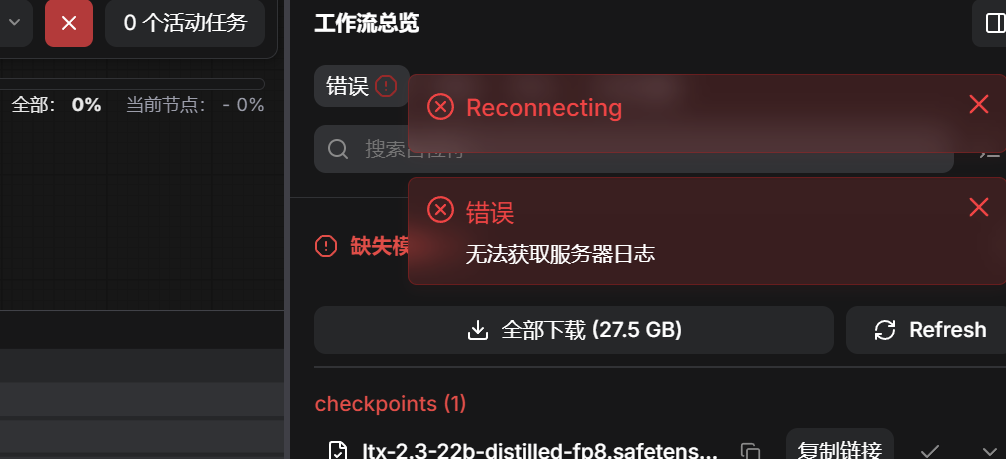
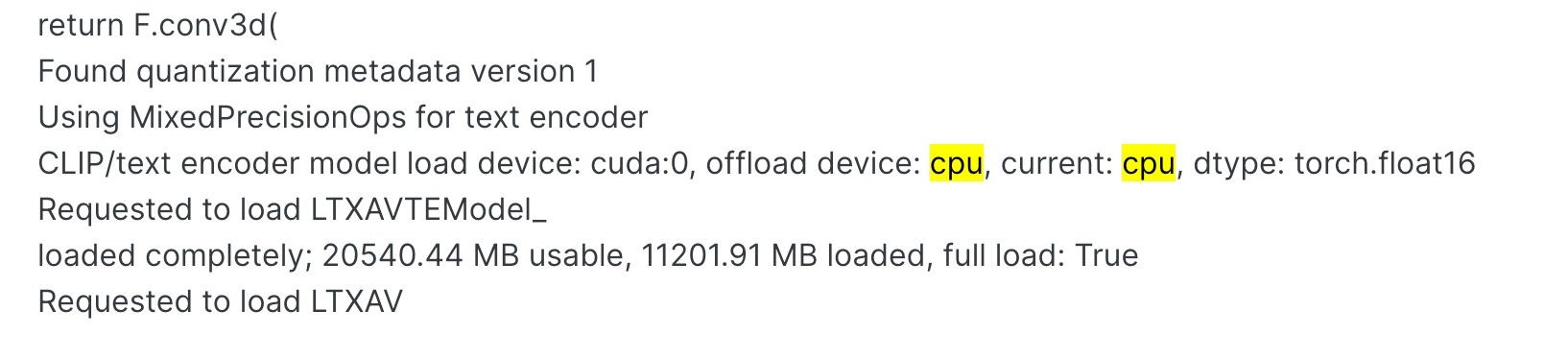
    ffc90904-e26c-4d4a-b5b3-0f2cd15c33e3-image.jpeg
    CLIP启用了CPU,你发日志给Gemini,它会教你怎么做的。就是你不要设置lowvram模式就好。

    油管:https://www.youtube.com/@抡锤者

    yongjun liuY 2 条回复 最后回复
    0
    • terryT terry

      ffc90904-e26c-4d4a-b5b3-0f2cd15c33e3-image.jpeg
      CLIP启用了CPU,你发日志给Gemini,它会教你怎么做的。就是你不要设置lowvram模式就好。

      yongjun liuY 离线
      yongjun liuY 离线
      yongjun liu
      发表于 最后由 编辑
      #13

      @terry 他说是加载了 Nvidia 的程序。

      1 条回复 最后回复
      0
      • terryT terry

        ffc90904-e26c-4d4a-b5b3-0f2cd15c33e3-image.jpeg
        CLIP启用了CPU,你发日志给Gemini,它会教你怎么做的。就是你不要设置lowvram模式就好。

        yongjun liuY 离线
        yongjun liuY 离线
        yongjun liu
        发表于 最后由 编辑
        #14

        @terry 跑 7% 就卡死了。

        1 条回复 最后回复
        0
        • terryT 在线
          terryT 在线
          terry
          超级版主
          发表于 最后由 编辑
          #15

          我都给你标注了,它Current,就是当前设备时CPU,你去骂Gemini煞笔。

          油管:https://www.youtube.com/@抡锤者

          williamlouisW yongjun liuY 2 条回复 最后回复
          0
          • terryT terry

            我都给你标注了,它Current,就是当前设备时CPU,你去骂Gemini煞笔。

            williamlouisW 离线
            williamlouisW 离线
            williamlouis
            超级版主
            发表于 最后由 编辑
            #16

            @terry 学习到了。驾驭 G mini大法了。
            这是核心教程啊。

            个人主页:xlkj.org Telegram https://t.me/xlkjorg

            1 条回复 最后回复
            0
            • terryT terry

              我都给你标注了,它Current,就是当前设备时CPU,你去骂Gemini煞笔。

              yongjun liuY 离线
              yongjun liuY 离线
              yongjun liu
              发表于 最后由 编辑
              #17

              @terry 他回答,CPU 正常,没问题。说是步数问题,操,指挥了半天,给我脑子指挥晕了。我休息两天吧。

              yongjun liuY 1 条回复 最后回复
              0
              • yongjun liuY yongjun liu

                @terry 他回答,CPU 正常,没问题。说是步数问题,操,指挥了半天,给我脑子指挥晕了。我休息两天吧。

                yongjun liuY 离线
                yongjun liuY 离线
                yongjun liu
                发表于 最后由 编辑
                #18

                我重装了Windows 11。comfyui 屏幕截图 2026-05-14 203519.png 结果是这个,晕死我了.

                yongjun liuY 1 条回复 最后回复
                0
                • yongjun liuY yongjun liu

                  我重装了Windows 11。comfyui 屏幕截图 2026-05-14 203519.png 结果是这个,晕死我了.

                  yongjun liuY 离线
                  yongjun liuY 离线
                  yongjun liu
                  发表于 最后由 编辑
                  #19

                  这是我新装系统的启动日志啊
                  Adding extra search path custom_nodes C:\Users\cnbjy\Documents\ComfyUI\custom_nodes
                  Adding extra search path download_model_base C:\Users\cnbjy\Documents\ComfyUI\models
                  Adding extra search path custom_nodes C:\Users\cnbjy\AppData\Local\Programs\ComfyUI\resources\ComfyUI\custom_nodes
                  Setting output directory to: C:\Users\cnbjy\Documents\ComfyUI\output
                  Setting input directory to: C:\Users\cnbjy\Documents\ComfyUI\input
                  Setting user directory to: C:\Users\cnbjy\Documents\ComfyUI\user
                  [START] Security scan
                  [DONE] Security scan
                  ** ComfyUI startup time: 2026-05-14 20:40:00.306
                  ** Platform: Windows
                  ** Python version: 3.12.11 (main, Aug 18 2025, 19:17:54) [MSC v.1944 64 bit (AMD64)]
                  ** Python executable: C:\Users\cnbjy\Documents\ComfyUI.venv\Scripts\python.exe
                  ** ComfyUI Path: C:\Users\cnbjy\AppData\Local\Programs\ComfyUI\resources\ComfyUI
                  ** ComfyUI Base Folder Path: C:\Users\cnbjy\AppData\Local\Programs\ComfyUI\resources\ComfyUI
                  ** User directory: C:\Users\cnbjy\Documents\ComfyUI\user
                  ** ComfyUI-Manager config path: C:\Users\cnbjy\Documents\ComfyUI\user__manager\config.ini
                  ** Log path: C:\Users\cnbjy\Documents\ComfyUI\user\comfyui.log
                  [ComfyUI-Manager] Skipped fixing the 'comfyui-frontend-package' dependency because the ComfyUI is outdated.
                  [PRE] ComfyUI-Manager
                  Found comfy_kitchen backend cuda: {'available': True, 'disabled': True, 'unavailable_reason': None, 'capabilities': ['apply_rope', 'apply_rope1', 'dequantize_nvfp4', 'dequantize_per_tensor_fp8', 'quantize_mxfp8', 'quantize_nvfp4', 'quantize_per_tensor_fp8']}
                  Found comfy_kitchen backend eager: {'available': True, 'disabled': False, 'unavailable_reason': None, 'capabilities': ['apply_rope', 'apply_rope1', 'dequantize_mxfp8', 'dequantize_nvfp4', 'dequantize_per_tensor_fp8', 'quantize_mxfp8', 'quantize_nvfp4', 'quantize_per_tensor_fp8', 'scaled_mm_mxfp8', 'scaled_mm_nvfp4']}
                  Found comfy_kitchen backend triton: {'available': False, 'disabled': True, 'unavailable_reason': "ImportError: No module named 'triton'", 'capabilities': []}
                  Checkpoint files will always be loaded safely.
                  Total VRAM 24560 MB, total RAM 32506 MB
                  pytorch version: 2.9.1+rocm7.2.1
                  Set: torch.backends.cudnn.enabled = False for better AMD performance.
                  AMD arch: gfx1100
                  ROCm version: (7, 2)
                  Set vram state to: NORMAL_VRAM
                  Device: cuda:0 AMD Radeon RX 7900 XTX : native
                  Using async weight offloading with 2 streams
                  Enabled pinned memory 13002.0
                  Using pytorch attention
                  Python version: 3.12.11 (main, Aug 18 2025, 19:17:54) [MSC v.1944 64 bit (AMD64)]
                  ComfyUI version: 0.21.1
                  comfy-aimdo version: 0.3.0
                  comfy-kitchen version: 0.2.8
                  [Prompt Server] web root: C:\Users\cnbjy\AppData\Local\Programs\ComfyUI\resources\ComfyUI\web_custom_versions\desktop_app
                  Asset seeder disabled
                  [START] ComfyUI-Manager
                  [ComfyUI-Manager] Using GitPython backend
                  [ComfyUI-Manager] network_mode: public
                  [ComfyUI-Manager] The matrix sharing feature has been disabled because the matrix-nio dependency is not installed.
                  To use this feature, please run the following command:
                  C:\Users\cnbjy\Documents\ComfyUI.venv\Scripts\python.exe -m pip install matrix-nio

                  Import times for custom nodes:
                  0.0 seconds: C:\Users\cnbjy\AppData\Local\Programs\ComfyUI\resources\ComfyUI\custom_nodes\websocket_image_save.py

                  Context impl SQLiteImpl.
                  Will assume non-transactional DDL.
                  Starting server

                  To see the GUI go to: http://127.0.0.1:8000

                  1 条回复 最后回复
                  0
                  • terryT 在线
                    terryT 在线
                    terry
                    超级版主
                    发表于 最后由 编辑
                    #20

                    不至于吧,我用xtx跑过啊,官方的包速度挺不错啊,你用的rocm7.2不至于慢。看你截图,你用的官方fp8模型,你想多了,你的卡跑不了这个模型,去换成社区的Q4量化的GGUF模型。

                    油管:https://www.youtube.com/@抡锤者

                    yongjun liuY 1 条回复 最后回复
                    0
                    • terryT terry

                      不至于吧,我用xtx跑过啊,官方的包速度挺不错啊,你用的rocm7.2不至于慢。看你截图,你用的官方fp8模型,你想多了,你的卡跑不了这个模型,去换成社区的Q4量化的GGUF模型。

                      yongjun liuY 离线
                      yongjun liuY 离线
                      yongjun liu
                      发表于 最后由 编辑
                      #21

                      @terry 刚才跑通了一段就用的是这个配置三秒钟720的视频用了13分钟.跑的鼠标都动不了。说的那个Q4的那个模型在哪啊您给个链接我去看看。多谢了啊哥们儿。

                      terryT 1 条回复 最后回复
                      0
                      • yongjun liuY yongjun liu

                        @terry 刚才跑通了一段就用的是这个配置三秒钟720的视频用了13分钟.跑的鼠标都动不了。说的那个Q4的那个模型在哪啊您给个链接我去看看。多谢了啊哥们儿。

                        terryT 在线
                        terryT 在线
                        terry
                        超级版主
                        发表于 最后由 编辑
                        #22

                        @yongjun-liu 大哥都说了你模型太大,用CPU计算了,没用显卡,卡的和锤子一样。你问AI去哪里下,不行去B站下载刘悦的整合包,它包里就带模型。b站,刘悦的技术博客。还不会就直接把电脑格式化,你不适合玩AI。

                        油管:https://www.youtube.com/@抡锤者

                        williamlouisW 1 条回复 最后回复
                        0
                        • terryT terry

                          @yongjun-liu 大哥都说了你模型太大,用CPU计算了,没用显卡,卡的和锤子一样。你问AI去哪里下,不行去B站下载刘悦的整合包,它包里就带模型。b站,刘悦的技术博客。还不会就直接把电脑格式化,你不适合玩AI。

                          williamlouisW 离线
                          williamlouisW 离线
                          williamlouis
                          超级版主
                          发表于 最后由 编辑
                          #23

                          @terry 顶。我也不喜欢解释。浪费时间。

                          个人主页:xlkj.org Telegram https://t.me/xlkjorg

                          1 条回复 最后回复
                          0

                          你好!看起来您对这段对话很感兴趣,但您还没有一个账号。

                          厌倦了每次访问都刷到同样的帖子?您注册账号后,您每次返回时都能精准定位到您上次浏览的位置,并可选择接收新回复通知(通过邮件或推送通知)。您还能收藏书签、为帖子顶,向社区成员表达您的欣赏。

                          有了你的建议,这篇帖子会更精彩哦 💗

                          注册 登录
                          回复
                          • 在新帖中回复
                          登录后回复
                          • 从旧到新
                          • 从新到旧
                          • 最多赞同


                          • 登录

                          • 登录或注册以进行搜索。
                          • 第一个帖子
                            最后一个帖子
                          0
                          • 版块
                          • 最新
                          • 标签
                          • 热门
                          • 用户
                          • 群组