跳转至内容
  • 版块
  • 最新
  • 标签
  • 热门
  • 用户
  • 群组
皮肤
  • 浅色
  • Brite
  • Cerulean
  • Cosmo
  • Flatly
  • Journal
  • Litera
  • Lumen
  • Lux
  • Materia
  • Minty
  • Morph
  • Pulse
  • Sandstone
  • Simplex
  • Sketchy
  • Spacelab
  • United
  • Yeti
  • Zephyr
  • 深色
  • Cyborg
  • Darkly
  • Quartz
  • Slate
  • Solar
  • Superhero
  • Vapor

  • 默认(不使用皮肤)
  • 不使用皮肤
折叠
品牌标识

抡锤者

  1. 主页
  2. LLM讨论区
  3. SGLANG跑RTX4090D-48G-QWEN3.6-27B-FP8配置

SGLANG跑RTX4090D-48G-QWEN3.6-27B-FP8配置

已定时 已固定 已锁定 已移动 LLM讨论区
sg-langqwen3.6-27b
25 帖子 8 发布者 252 浏览 1 关注中
  • 从旧到新
  • 从新到旧
  • 最多赞同
回复
  • 在新帖中回复
登录后回复
此主题已被删除。只有拥有主题管理权限的用户可以查看。
  • 用户名违规用 用户名违规

    @fcme 其实我想知道,别人的4090最顶的能跑多少,不知道是不是我的参数不太对。

    fcmeF 离线
    fcmeF 离线
    fcme
    技术大牛 劳动模范
    编写于 最后由 编辑
    #8

    @用户名违规
    这个简单,你让你的AI助手联网扒一下就可以了,让他回答的时候带上信源,你顺便去核实一下

    用户名违规用 1 条回复 最后回复
    0
    • fcmeF fcme

      @用户名违规
      这个简单,你让你的AI助手联网扒一下就可以了,让他回答的时候带上信源,你顺便去核实一下

      用户名违规用 离线
      用户名违规用 离线
      用户名违规
      编写于 最后由 编辑
      #9

      @fcme 基本上没找到。。没有可信信息。

      1 条回复 最后回复
      0
      • 5 离线
        5 离线
        566656661
        超凡大师
        编写于 最后由 编辑
        #10

        SGLang相對比較少個人用戶吧...應該

        用户名违规用 terryT 2 条回复 最后回复
        0
        • 5 566656661

          SGLang相對比較少個人用戶吧...應該

          用户名违规用 离线
          用户名违规用 离线
          用户名违规
          编写于 最后由 编辑
          #11

          @566656661 这个不知道,我起手就用的sglang。vllm和llamacpp速度太慢了,用了sglang回不去了。

          terryT 1 条回复 最后回复
          1
          • fcmeF 离线
            fcmeF 离线
            fcme
            技术大牛 劳动模范
            编写于 最后由 编辑
            #12

            ai要是搞不定那我们这种普通玩家也很难了,你给你的AI配个好点的搜索引擎吧。

            1 条回复 最后回复
            0
            • 用户名违规用 用户名违规

              @566656661 这个不知道,我起手就用的sglang。vllm和llamacpp速度太慢了,用了sglang回不去了。

              terryT 在线
              terryT 在线
              terry
              超级版主
              编写于 最后由 terry 编辑
              #13

              @用户名违规 你不需要最能顶跑多少,主要还是它prefill够快,然后就是4090 48G能多开,就是说实话,就它能可玩性高,其他的只能挂机。你的数据应该算很好的了,我今天测试是AWQ不稳定,FP8稳定的很,速度反正够用了,没详细看,就是驱动Agent很丝滑。

              油管:https://www.youtube.com/@抡锤者

              1 条回复 最后回复
              0
              • 5 566656661

                SGLang相對比較少個人用戶吧...應該

                terryT 在线
                terryT 在线
                terry
                超级版主
                编写于 最后由 编辑
                #14

                @566656661 @用户名违规
                SG-Lang好用,说真的,我今天测试了下,确实很好。

                油管:https://www.youtube.com/@抡锤者

                5 1 条回复 最后回复
                1
                • terryT terry

                  @566656661 @用户名违规
                  SG-Lang好用,说真的,我今天测试了下,确实很好。

                  5 离线
                  5 离线
                  566656661
                  超凡大师
                  编写于 最后由 编辑
                  #15

                  @terry

                  我找個時間設立一下SGLang再配合OpenCode使用

                  terryT 1 条回复 最后回复
                  1
                  • 5 566656661

                    @terry

                    我找個時間設立一下SGLang再配合OpenCode使用

                    terryT 在线
                    terryT 在线
                    terry
                    超级版主
                    编写于 最后由 terry 编辑
                    #16

                    @566656661 我直接接入的hermes,肯定不能和DeepSeek V4 Flash比,但总体上速度和在线模型差距不大了,就不会有便秘感觉。

                    油管:https://www.youtube.com/@抡锤者

                    1 条回复 最后回复
                    1
                    • terryT 在线
                      terryT 在线
                      terry
                      超级版主
                      编写于 最后由 terry 编辑
                      #17
                      吐槽一下llamacpp,15t/s的解码速率,gguf得多差啊!还是只有我这样配置问题?
                      vllm还在测试中。。
                      

                      VLLM不要测试了,其实高不成低不就,要跑Agent,目前就是SG-Lang+Qwen3.6 27b最好用。Llama.cpp 是你自己的设置问题我,我什么都不优化,不开MTP都45t/s,它的问题就是缓存不行,prefill慢到吐血。我今天明天发两个视频,第二个视频里我录个实际的效果你去对比下,看看速度如何。

                      我这边用AWQ的模型不行,不知道哪里出了问题,你可以贴下参数,我用的是FP8模型。然后上下文是开满了,长期运行之后,占用了41.5G 显存,驱动Herms速度比Llama.cpp和VLLM快多了。

                      油管:https://www.youtube.com/@抡锤者

                      用户名违规用 1 条回复 最后回复
                      1
                      • terryT terry
                        吐槽一下llamacpp,15t/s的解码速率,gguf得多差啊!还是只有我这样配置问题?
                        vllm还在测试中。。
                        

                        VLLM不要测试了,其实高不成低不就,要跑Agent,目前就是SG-Lang+Qwen3.6 27b最好用。Llama.cpp 是你自己的设置问题我,我什么都不优化,不开MTP都45t/s,它的问题就是缓存不行,prefill慢到吐血。我今天明天发两个视频,第二个视频里我录个实际的效果你去对比下,看看速度如何。

                        我这边用AWQ的模型不行,不知道哪里出了问题,你可以贴下参数,我用的是FP8模型。然后上下文是开满了,长期运行之后,占用了41.5G 显存,驱动Herms速度比Llama.cpp和VLLM快多了。

                        用户名违规用 离线
                        用户名违规用 离线
                        用户名违规
                        编写于 最后由 用户名违规 编辑
                        #18

                        @terry

                        #!/bin/bash
                        # Qwen3.6-27B-Fable Q6_K — llama.cpp 启动配置(优化版)
                        # GPU: RTX 4090D (48G) | 模型: 64 层混合 (16 Full Attention + 48 SSM)
                        # 目标:全 GPU 卸载,0 层在 CPU
                        # 优化:Q8_0→Q6_K + KV q4_0 + 线程调优,目标 25-28 t/s
                        
                        set -e
                        
                        # ═══════════════════════════════════════════
                        # 参数说明(每个都加注释)
                        # ═══════════════════════════════════════════
                        
                        MODEL="/mnt/dataM4/models/Qwen3.6-27B-Fable-Fus-711-UnHeretic-NM-DAU-NEO-MAX-NEO-Q8_0.gguf"
                        
                        # --gpu-layers 64: 全部 64 层都加载到 GPU 显存(不卸载到 CPU)
                        # 如果设 32 就只有前 32 层在 GPU,后 32 层在 CPU,速度减半
                        GPU_LAYERS=64
                        
                        # --ctx-size 262144: 上下文窗口 262K tokens(模型原生支持 262144)
                        # 显存开销:KV Cache ~8GB(q8_0 量化)
                        CTX_SIZE=262144
                        
                        # --batch-size 8192: 逻辑 batch(prefill 阶段一次处理多少 token)
                        # 决定 prompt 阶段的速度,越大 prefilled 越快
                        BATCH_SIZE=8192
                        
                        # --ubatch-size 4096: 物理 batch(GPU 计算缓冲大小)
                        # GPU 内存里同时计算的 token 数,不超过显存
                        UBATCH_SIZE=4096
                        
                        # --threads 6: 生成阶段 CPU 线程数(每生成 1 个 token)
                        # 纯 GPU 时影响不大,设小点省 CPU,避免线程调度开销
                        THREADS=6
                        
                        # --threads-batch 8: Prefill 阶段 CPU 线程数(处理 prompt)
                        # 降低到 8,减少 CPU 竞争,GPU 是瓶颈不是 CPU
                        THREADS_BATCH=8
                        
                        # --temp 0.7: 采样温度(0=确定性强,1.0=随机性强)
                        TEMP=0.6
                        
                        # --top-p 0.95: Nucleus 采样,累积概率到 0.95 截断
                        TOP_P=0.95
                        
                        # --top-k 20: 只选概率最高的 20 个 token 参与采样
                        TOP_K=20
                        
                        # --flash-attn on: 开启 Flash Attention(RTX 4090D SM89 原生支持)
                        # 对 Qwen3.5 混合架构的 Full Attention 层有显著加速
                        FLASH_ATTN=on
                        
                        # --cache-type-k/v q4_0: KV Cache 用 Q4_0 量化(大幅降低带宽压力)
                        # 实测:q4_0 KV cache 对生成质量影响<1%,但 decode 速度提升 10-15%
                        # bf16=16bit(大精度), q8_0=8bit, q4_0=4bit(最佳性价比)
                        CACHE_TYPE=q8_0
                        
                        # --port 11434: 默认 Ollama 兼容端口
                        PORT=11434
                        
                        # ═══════════════════════════════════════════
                        # 启动命令 — 全 GPU,无 CPU offload
                        # ═══════════════════════════════════════════
                        
                        exec llama-server \
                          --model "$MODEL" \
                          --port "$PORT" \
                          --ctx-size "$CTX_SIZE" \
                          --batch-size "$BATCH_SIZE" \
                          --ubatch-size "$UBATCH_SIZE" \
                          --gpu-layers "$GPU_LAYERS" \
                          --threads "$THREADS" \
                          --threads-batch "$THREADS_BATCH" \
                          --temp "$TEMP" \
                          --top-p "$TOP_P" \
                          --top-k "$TOP_K" \
                          --flash-attn "$FLASH_ATTN" \
                          --cache-type-k "$CACHE_TYPE" \
                          --cache-type-v "$CACHE_TYPE" \
                          --no-mmap \
                          --mlock
                          -ngl 99
                        

                        ,你llamacpp 跑45t/s?贴一下参数呗,有点夸张啊,我怎么设置都上不去。我是按照sglang的思路设置的。不开MTP45t/s 很顶啊。prefill cpp确实不快。我用sglang显存很容易到47G。你这个占用只有41.5g,咋配置的。?sglang 频繁上下文 prefill 也解决了。基本上随便浪了。命中率99%

                        terryT 1 条回复 最后回复
                        1
                        • A 离线
                          A 离线
                          applejuice
                          技术大牛 劳动模范
                          编写于 最后由 applejuice 编辑
                          #19

                          跟着 https://github.com/mattbucci/2x-3090-GA102-300-A1-sglang-inference
                          我也用起来了 3090x2

                          python -m sglang.launch_server
                          --model-path /home/ccadmin/AI/models/hf-mattbucci/Qwen3.6-27B-AWQ
                          --tensor-parallel-size 2
                          --dtype float16
                          --kv-cache-dtype fp8_e4m3
                          --context-length 262144
                          --mem-fraction-static 0.85
                          --max-running-requests 8
                          --chunked-prefill-size 8192
                          --num-continuous-decode-steps 32
                          --trust-remote-code
                          --watchdog-timeout 600
                          --port 30000
                          --host 0.0.0.0
                          --enable-metrics
                          --disable-custom-all-reduce
                          --served-model-name qwen36-dense
                          --max-mamba-cache-size 8
                          --chat-template …/Qwen3.6-27B-AWQ/chat_template.jinja
                          --reasoning-parser qwen3
                          --sampling-defaults model
                          --tool-call-parser qwen3_coder
                          --sampling-backend pytorch

                          Prefill (time-to-first-token, max_tokens=1)

                          Prompt tokens TTFT (s) Prefill rate (tok/s)
                          1,344 1.12 1,203
                          5,352 3.83 1,398
                          10,680 7.71 1,386
                          21,336 15.58 1,369
                          42,672 33.41 1,277
                          Typical — ~1,350

                          Decode (steady-state generation)

                          Metric Value
                          Completion tokens 571
                          Time (s) 9.16
                          Decode rate 62.3 tok/s
                          GPU utilization 98%
                          Power draw 244 W (cap)
                          Repo ref (w/ NVLink) 69 tok/s
                          用户名违规用 terryT 2 条回复 最后回复
                          1
                          • A applejuice

                            跟着 https://github.com/mattbucci/2x-3090-GA102-300-A1-sglang-inference
                            我也用起来了 3090x2

                            python -m sglang.launch_server
                            --model-path /home/ccadmin/AI/models/hf-mattbucci/Qwen3.6-27B-AWQ
                            --tensor-parallel-size 2
                            --dtype float16
                            --kv-cache-dtype fp8_e4m3
                            --context-length 262144
                            --mem-fraction-static 0.85
                            --max-running-requests 8
                            --chunked-prefill-size 8192
                            --num-continuous-decode-steps 32
                            --trust-remote-code
                            --watchdog-timeout 600
                            --port 30000
                            --host 0.0.0.0
                            --enable-metrics
                            --disable-custom-all-reduce
                            --served-model-name qwen36-dense
                            --max-mamba-cache-size 8
                            --chat-template …/Qwen3.6-27B-AWQ/chat_template.jinja
                            --reasoning-parser qwen3
                            --sampling-defaults model
                            --tool-call-parser qwen3_coder
                            --sampling-backend pytorch

                            Prefill (time-to-first-token, max_tokens=1)

                            Prompt tokens TTFT (s) Prefill rate (tok/s)
                            1,344 1.12 1,203
                            5,352 3.83 1,398
                            10,680 7.71 1,386
                            21,336 15.58 1,369
                            42,672 33.41 1,277
                            Typical — ~1,350

                            Decode (steady-state generation)

                            Metric Value
                            Completion tokens 571
                            Time (s) 9.16
                            Decode rate 62.3 tok/s
                            GPU utilization 98%
                            Power draw 244 W (cap)
                            Repo ref (w/ NVLink) 69 tok/s
                            用户名违规用 离线
                            用户名违规用 离线
                            用户名违规
                            编写于 最后由 编辑
                            #20

                            @applejuice 你是啥显卡。两张3090?

                            A 1 条回复 最后回复
                            0
                            • 用户名违规用 用户名违规

                              @applejuice 你是啥显卡。两张3090?

                              A 离线
                              A 离线
                              applejuice
                              技术大牛 劳动模范
                              编写于 最后由 编辑
                              #21

                              @用户名违规 是的 3090

                              1 条回复 最后回复
                              0
                              • L 离线
                                L 离线
                                LearningAI
                                编写于 最后由 编辑
                                #22

                                请问大家在用本地模型驱动Hermes agent的时候怎么检测/记录/统计模型的pp/tg 速度? 有特定的工具或者特定的设置吗?

                                1 条回复 最后回复
                                0
                                • 用户名违规用 用户名违规

                                  @terry

                                  #!/bin/bash
                                  # Qwen3.6-27B-Fable Q6_K — llama.cpp 启动配置(优化版)
                                  # GPU: RTX 4090D (48G) | 模型: 64 层混合 (16 Full Attention + 48 SSM)
                                  # 目标:全 GPU 卸载,0 层在 CPU
                                  # 优化:Q8_0→Q6_K + KV q4_0 + 线程调优,目标 25-28 t/s
                                  
                                  set -e
                                  
                                  # ═══════════════════════════════════════════
                                  # 参数说明(每个都加注释)
                                  # ═══════════════════════════════════════════
                                  
                                  MODEL="/mnt/dataM4/models/Qwen3.6-27B-Fable-Fus-711-UnHeretic-NM-DAU-NEO-MAX-NEO-Q8_0.gguf"
                                  
                                  # --gpu-layers 64: 全部 64 层都加载到 GPU 显存(不卸载到 CPU)
                                  # 如果设 32 就只有前 32 层在 GPU,后 32 层在 CPU,速度减半
                                  GPU_LAYERS=64
                                  
                                  # --ctx-size 262144: 上下文窗口 262K tokens(模型原生支持 262144)
                                  # 显存开销:KV Cache ~8GB(q8_0 量化)
                                  CTX_SIZE=262144
                                  
                                  # --batch-size 8192: 逻辑 batch(prefill 阶段一次处理多少 token)
                                  # 决定 prompt 阶段的速度,越大 prefilled 越快
                                  BATCH_SIZE=8192
                                  
                                  # --ubatch-size 4096: 物理 batch(GPU 计算缓冲大小)
                                  # GPU 内存里同时计算的 token 数,不超过显存
                                  UBATCH_SIZE=4096
                                  
                                  # --threads 6: 生成阶段 CPU 线程数(每生成 1 个 token)
                                  # 纯 GPU 时影响不大,设小点省 CPU,避免线程调度开销
                                  THREADS=6
                                  
                                  # --threads-batch 8: Prefill 阶段 CPU 线程数(处理 prompt)
                                  # 降低到 8,减少 CPU 竞争,GPU 是瓶颈不是 CPU
                                  THREADS_BATCH=8
                                  
                                  # --temp 0.7: 采样温度(0=确定性强,1.0=随机性强)
                                  TEMP=0.6
                                  
                                  # --top-p 0.95: Nucleus 采样,累积概率到 0.95 截断
                                  TOP_P=0.95
                                  
                                  # --top-k 20: 只选概率最高的 20 个 token 参与采样
                                  TOP_K=20
                                  
                                  # --flash-attn on: 开启 Flash Attention(RTX 4090D SM89 原生支持)
                                  # 对 Qwen3.5 混合架构的 Full Attention 层有显著加速
                                  FLASH_ATTN=on
                                  
                                  # --cache-type-k/v q4_0: KV Cache 用 Q4_0 量化(大幅降低带宽压力)
                                  # 实测:q4_0 KV cache 对生成质量影响<1%,但 decode 速度提升 10-15%
                                  # bf16=16bit(大精度), q8_0=8bit, q4_0=4bit(最佳性价比)
                                  CACHE_TYPE=q8_0
                                  
                                  # --port 11434: 默认 Ollama 兼容端口
                                  PORT=11434
                                  
                                  # ═══════════════════════════════════════════
                                  # 启动命令 — 全 GPU,无 CPU offload
                                  # ═══════════════════════════════════════════
                                  
                                  exec llama-server \
                                    --model "$MODEL" \
                                    --port "$PORT" \
                                    --ctx-size "$CTX_SIZE" \
                                    --batch-size "$BATCH_SIZE" \
                                    --ubatch-size "$UBATCH_SIZE" \
                                    --gpu-layers "$GPU_LAYERS" \
                                    --threads "$THREADS" \
                                    --threads-batch "$THREADS_BATCH" \
                                    --temp "$TEMP" \
                                    --top-p "$TOP_P" \
                                    --top-k "$TOP_K" \
                                    --flash-attn "$FLASH_ATTN" \
                                    --cache-type-k "$CACHE_TYPE" \
                                    --cache-type-v "$CACHE_TYPE" \
                                    --no-mmap \
                                    --mlock
                                    -ngl 99
                                  

                                  ,你llamacpp 跑45t/s?贴一下参数呗,有点夸张啊,我怎么设置都上不去。我是按照sglang的思路设置的。不开MTP45t/s 很顶啊。prefill cpp确实不快。我用sglang显存很容易到47G。你这个占用只有41.5g,咋配置的。?sglang 频繁上下文 prefill 也解决了。基本上随便浪了。命中率99%

                                  terryT 在线
                                  terryT 在线
                                  terry
                                  超级版主
                                  编写于 最后由 编辑
                                  #23

                                  @用户名违规 Llama.cpp的参数过往帖子里有很多,你自己随便找。我都很久没用了。我的FP8占用参数发给你看:
                                  容器内部:

                                  #!/bin/bash
                                  ln -sf /host-libs/libcuda.so.1 /usr/lib/x86_64-linux-gnu/libcuda.so.1 2>/dev/null
                                  ldconfig 2>/dev/null
                                  sglang serve --model-path /models/Qwen/Qwen3.6-27B-FP8 --host 0.0.0.0 --port 30000 --trust-remote-code --mem-fraction-static 0.8 --context-length 262144
                                  

                                  如果在宿主机上:

                                  #!/bin/bash
                                  docker rm -f sglang 2>/dev/null
                                  docker run --rm --pid=host --privileged busybox pkill -f sglang::scheduler 2>/dev/null
                                  sleep 2
                                  docker run -d --ipc=host --network=host --shm-size 32g   --name sglang --restart unless-stopped   --device /dev/nvidia0:/dev/nvidia0   --device /dev/nvidiactl:/dev/nvidiactl   --device /dev/nvidia-uvm:/dev/nvidia-uvm   --device /dev/nvidia-modeset:/dev/nvidia-modeset   --entrypoint /bin/bash   -v ~/docker/models:/models   -v ~/docker:/scripts   -v /usr/lib/x86_64-linux-gnu:/host-libs:ro   -e LD_LIBRARY_PATH=/host-libs   -e CUDA_VISIBLE_DEVICES=0   -e http_proxy= -e https_proxy= -e HTTP_PROXY= -e HTTPS_PROXY=   -e NO_PROXY='*'   lmsysorg/sglang:v0.5.15.post1   -c '/scripts/run_think.sh'
                                  echo '等待40秒...'
                                  sleep 40
                                  docker logs sglang --tail 3 2>/dev/null | grep -E 'Uvicorn|running on' && echo '服务就绪!' || echo '检查: docker logs sglang'
                                  ~                                                                                                                                     
                                  

                                  这都是Hermes自己配置的,我没参与调一个字母,建议你把你的Llama.cpp交给Hermes配置。你这个模型我不想用,有FP8版本的,干嘛换Q8的呢,Q8毫无意义,我希望用AWQ,或者Q4量化的,节约显存。

                                  把这个复制给你的AI就能看懂了,当前我运行了22个小时,很稳定。

                                  油管:https://www.youtube.com/@抡锤者

                                  1 条回复 最后回复
                                  0
                                  • A applejuice

                                    跟着 https://github.com/mattbucci/2x-3090-GA102-300-A1-sglang-inference
                                    我也用起来了 3090x2

                                    python -m sglang.launch_server
                                    --model-path /home/ccadmin/AI/models/hf-mattbucci/Qwen3.6-27B-AWQ
                                    --tensor-parallel-size 2
                                    --dtype float16
                                    --kv-cache-dtype fp8_e4m3
                                    --context-length 262144
                                    --mem-fraction-static 0.85
                                    --max-running-requests 8
                                    --chunked-prefill-size 8192
                                    --num-continuous-decode-steps 32
                                    --trust-remote-code
                                    --watchdog-timeout 600
                                    --port 30000
                                    --host 0.0.0.0
                                    --enable-metrics
                                    --disable-custom-all-reduce
                                    --served-model-name qwen36-dense
                                    --max-mamba-cache-size 8
                                    --chat-template …/Qwen3.6-27B-AWQ/chat_template.jinja
                                    --reasoning-parser qwen3
                                    --sampling-defaults model
                                    --tool-call-parser qwen3_coder
                                    --sampling-backend pytorch

                                    Prefill (time-to-first-token, max_tokens=1)

                                    Prompt tokens TTFT (s) Prefill rate (tok/s)
                                    1,344 1.12 1,203
                                    5,352 3.83 1,398
                                    10,680 7.71 1,386
                                    21,336 15.58 1,369
                                    42,672 33.41 1,277
                                    Typical — ~1,350

                                    Decode (steady-state generation)

                                    Metric Value
                                    Completion tokens 571
                                    Time (s) 9.16
                                    Decode rate 62.3 tok/s
                                    GPU utilization 98%
                                    Power draw 244 W (cap)
                                    Repo ref (w/ NVLink) 69 tok/s
                                    terryT 在线
                                    terryT 在线
                                    terry
                                    超级版主
                                    编写于 最后由 terry 编辑
                                    #24

                                    @applejuice 这个我可以参考下,抄作业,有空弄下。awq的还是值得玩的。你Hermes调度时,有思考过程吗?

                                    油管:https://www.youtube.com/@抡锤者

                                    A 1 条回复 最后回复
                                    0
                                    • terryT terry

                                      @applejuice 这个我可以参考下,抄作业,有空弄下。awq的还是值得玩的。你Hermes调度时,有思考过程吗?

                                      A 离线
                                      A 离线
                                      applejuice
                                      技术大牛 劳动模范
                                      编写于 最后由 applejuice 编辑
                                      #25

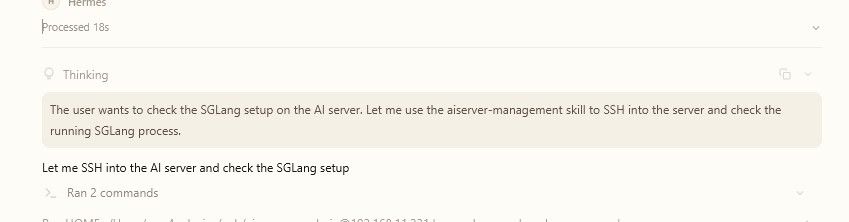
                                      @terry 说:

                                      @applejuice 这个我可以参考下,抄作业,有空弄下。awq的还是值得玩的。你Hermes调度时,有思考过程吗?

                                      6c677317-ae1b-43f5-a2fd-7ba5ea72e3e3-image.jpeg

                                      有的.
                                      其实也不是我弄的
                                      ai 全自动搞

                                      1 条回复 最后回复
                                      0
                                      • ,terryT terry 固定了此主题
                                      • ,系统 取消固定了此主题

                                      你好!看起来您对这段对话很感兴趣,但您还没有一个账号。

                                      厌倦了每次访问都刷到同样的帖子?您注册账号后,您每次返回时都能精准定位到您上次浏览的位置,并可选择接收新回复通知(通过邮件或推送通知)。您还能收藏书签、为帖子顶,向社区成员表达您的欣赏。

                                      有了你的建议,这篇帖子会更精彩哦 💗

                                      注册 登录
                                      回复
                                      • 在新帖中回复
                                      登录后回复
                                      • 从旧到新
                                      • 从新到旧
                                      • 最多赞同


                                      • 登录

                                      • 没有帐号? 注册

                                      • 登录或注册以进行搜索。
                                      • 第一个帖子
                                        最后一个帖子
                                      0
                                      • 版块
                                      • 最新
                                      • 标签
                                      • 热门
                                      • 用户
                                      • 群组