-
-
 T terry 于 将此主题从 AI音视频画图 移至此处
-
T terry 于 将此主题固定
-
TRELLIS.2 外部主機實驗紀錄與 GPU 結果摘要
實驗資料夾:
external-host-experiments/2026-06-07-vastai-trellis2目前狀態:
所有 Vast.ai instance 都已關閉。
最後確認 `vastai show instances-v1 --raw` 回傳 total_instances=0。
本次主要目標:
用外部 NVIDIA GPU 主機測試 TRELLIS.2。
固定使用 robot.jpeg 做 3D 生成,觀察 2048 / 4096 texture 輸出結果。
特別關注 RTX 3090 是否值得購入實體卡片:24GB VRAM 是否足夠、4096 是否能成功、正式生成時間如何。
測試素材
主要輸入圖:
lab-docs/test-assets/robot.jpeg遠端路徑:
/workspace/work/inputs/robot.jpeg另有一筆早期環境 smoke test 使用 TRELLIS.2 官方範例圖:
/workspace/TRELLIS.2/assets/example_image/T.png執行環境與方法
共同設定:
TRELLIS.2
Torch: 2.12.0+cu130
CUDA runtime: 13.0
Attention backend: flash_attn
Sparse conv backend: flex_gemm
decimation_target=1000000
remesh=1
write_video=0
GLB export: extension_webp=False
背景移除狀態:
RTX PRO 4000 早期測試:no-rembg
原因:當時 briaai/RMBG-2.0 gated access 尚未完成授權。

RTX 3090 / RTX 5090 測試:full rembg
原因:後續 Hugging Face token 已登入,briaai/RMBG-2.0 可下載並正常使用。
重要比較限制:
RTX PRO 4000 的 no-rembg 結果不能直接和 RTX 3090 / RTX 5090 的 full-rembg 結果做嚴格速度比較。
它仍可作為 CUDA 環境與 no-rembg pipeline 的參考。
GPU 結果摘要
每個 benchmark 內部階段的拆表見:
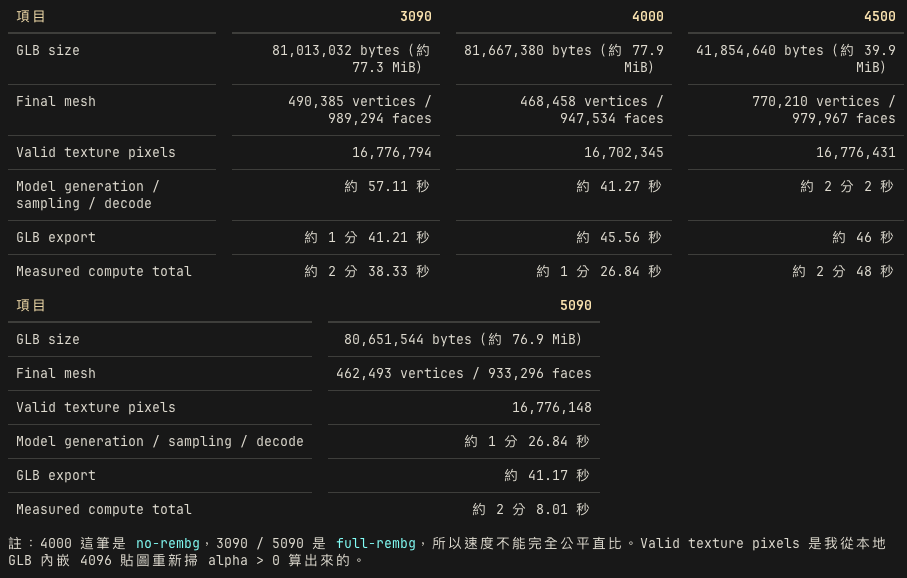
gpu-stage-timing.zh-TW.mdGPU 模式 Texture Wall time Measured compute Pipeline Export Max RSS GLB RTX 3090 24GB full rembg 2048 6:27.50 214.09s 148.77s 65.32s 25,560,468 KB outputs/rtx3090-robot-2048-rembg.glbRTX 3090 24GB full rembg 4096 4:49.14 158.33s 57.11s 101.21s 25,473,892 KB outputs/rtx3090-robot-4096-rembg.glbRTX 5090 32GB full rembg 4096 3:15.19 128.01s 86.84s 41.17s 26,572,504 KB outputs/rtx5090-robot-4096-rembg.glbRTX PRO 4000 Blackwell 24GB no-rembg 2048 2:39.94 100.77s 76.89s 23.87s 24,259,192 KB outputs/rtxpro4000-robot-2048-no-rembg.glbRTX PRO 4000 Blackwell 24GB no-rembg 4096 2:26.62 86.84s 41.27s 45.56s 24,675,052 KB outputs/rtxpro4000-robot-4096-no-rembg.glb結論
RTX 3090 的重點結論:
RTX 3090 24GB 可以完整跑 TRELLIS.2 robot 4096 + RMBG。
4096 full-rembg 成功輸出 GLB,沒有 OOM。
正式 4096 wall time 是 4:49.14。
對購買實體 RTX 3090 的判斷:
顯卡本身可行,24GB VRAM 足夠完成這次 4096 測試。
第一次安裝環境會很慢,主要是 flash-attn / native CUDA extensions 編譯。
這是初次部署成本,不是每次生成都會發生。
如果購買實體卡,建議保留 Python 環境、wheel cache,或直接做預建 Docker image。
CPU / GPU 負載判斷:
環境建置時間主要卡在 CPU、編譯器、磁碟 I/O。
正式生成階段才主要使用 GPU。
GLB export、xatlas UV、mesh/texture 後處理仍會吃不少 CPU。
完整流水紀錄
1. 建立外部主機實驗資料夾
建立資料夾集中保存租借外部主機的實驗資料:
external-host-experiments/2026-06-07-vastai-trellis2內容包含:
notes.md
gpu-results-summary.md
gpu-results-summary.zh-TW.md
logs-export.md
outputs/
logs/
scripts/
2. Vast.ai CLI 與 SSH key
先安裝並設定 Vast.ai CLI,建立新的 SSH key 給租借主機使用。
後續操作使用 CLI 建立、查詢、關閉 instances,並用 SSH/SCP 上傳 benchmark harness、下載 GLB 與 logs。
3. 初始指定機器
原先記錄的機器建立命令:
vastai create instance 35865076 \
  --image pytorch/pytorch:2.6.0-cuda12.4-cudnn9-devel \
  --disk 180 \
  --ssh \
  --direct \
  --env '-p 7860:7860' \
  --label trellis2-smoke
選擇理由:
偏好 AMD CPU。
價格可控。
VRAM 24GB,足夠做 TRELLIS.2 smoke test。
4. RTX PRO 4000 第一次嘗試
Instance:
Instance ID: 39881802
Offer ID: 35865076
GPU: NVIDIA RTX PRO 4000 Blackwell
CPU: AMD Ryzen Threadripper PRO 5945WX 12-Cores
主要問題:
起初使用 pytorch/pytorch:2.6.0-cuda12.4-cudnn9-devel。
後續 TRELLIS.2 setup 需要 CUDA 13 / PyTorch cu130 路線。
CUDA 12.4 + RTX PRO 4000 Blackwell sm_120 不適合。
處理過程:
改回 CUDA 13 + torch 2.12.0+cu130。
nvdiffrast、nvdiffrec_render、cumesh、o_voxel、flex_gemm 可成功編譯與 import。
但 flash-attn 2.7.3 現場編譯 sm_120 花太久。
依使用者指示停止該輪,關閉 instance。
結論:
手動從 PyTorch CUDA 12.4 image 開始不理想。
RTX PRO 4000 Blackwell 應走 CUDA 13 / PyTorch cu130。
更好的做法是沿用 RTX PRO 4500 測試提供的 CUDA benchmark harness 或預建 image。
5. RTX PRO 4000 CUDA 13 成功跑通
Instance:
Instance ID: 39888728
GPU: NVIDIA RTX PRO 4000 Blackwell, 24467 MiB
CPU: AMD Ryzen Threadripper PRO 5945WX 12-Cores
Image: nvidia/cuda:13.0.2-cudnn-devel-ubuntu22.04
成功項目:
TRELLIS.2 CUDA 13 環境完成。
flash-attn / native extensions 可用。
限制:
當時 briaai/RMBG-2.0 尚未授權,因此改用 no-rembg。
benchmark 使用 preprocess_image=False。
官方範例圖 smoke test:
Input: /workspace/TRELLIS.2/assets/example_image/T.png
Texture: 2048
Output: outputs/rtxpro4000-smoke-2048-no-rembg-v6.glb
Wall time: 2:34.81
Measured compute: 95.6548s
robot 2048:
Output: outputs/rtxpro4000-robot-2048-no-rembg.glb
Log: logs/rtxpro4000-robot-2048-no-rembg.log
Wall time: 2:39.94
Measured compute: 100.7658s
File size: about 48 MB
robot 4096:
Output: outputs/rtxpro4000-robot-4096-no-rembg.glb
Log: logs/rtxpro4000-robot-4096-no-rembg.log
Wall time: 2:26.62
Measured compute: 86.8375s
File size: about 78 MB
完成後下載 GLB/log,關閉 instance。
6. 搜尋 3090 / 4080S / 5090
使用 Vast.ai 查詢可租用主機,偏好 AMD CPU。
4080S:
曾建立一台 4080S instance。
使用者後續指示關掉。
已 destroy,不再繼續跑。
3090:
重點卡片,因為使用者正在評估是否購買實體 RTX 3090。5090:
使用者指示 5090 跑完 4096 後立刻關閉。7. RTX 5090 full-rembg 4096 測試
Instance:
Instance ID: 39911711
Label: trellis2-rtx5090-robot-b
GPU: NVIDIA GeForce RTX 5090, 32607 MiB
CPU: AMD EPYC 9655 96-Core Processor
Image: nvidia/cuda:13.0.2-cudnn-devel-ubuntu22.04
建置:
安裝 PyTorch 2.12.0+cu130。
安裝 TRELLIS.2 dependencies。
第一次 setup 遇到 flash-attn pip build isolation 看不到 torch 的錯誤。
改用 python3 -m pip install flash-attn==2.7.3 --no-build-isolation 成功。
nvdiffrast、nvdiffrec_render、cumesh、flex_gemm、o_voxel 全部 import OK。
Hugging Face:
登入 HF token 後,briaai/RMBG-2.0 與 facebook/dinov3-vitl16-pretrain-lvd1689m 都可下載。正式測試:
Input: robot.jpeg
Texture size: 4096
Mode: full rembg
Output: outputs/rtx5090-robot-4096-rembg.glb
Log: logs/rtx5090-robot-4096-rembg.log
結果:
Wall time: 3:15.19
Load: 62.9314s
Pipeline: 86.8388s
Export: 41.1694s
Measured compute: 128.0098s
Max RSS: 26,572,504 KB
File size: about 77 MB
完成後:
下載 GLB/log。
立刻 destroy instance 39911711。
8. RTX 3090 full-rembg 2048 / 4096 測試
Instance:
Instance ID: 39911959
Label: trellis2-rtx3090-robot-b
GPU: NVIDIA GeForce RTX 3090, 24576 MiB
CPU: AMD EPYC 7642 48-Core Processor
Image: nvidia/cuda:13.0.2-cudnn-devel-ubuntu22.04
建置瓶頸:
RTX 3090 的環境建置主要卡在 flash-attn 2.7.3 source build。
原因是 CUDA 13 + sm_86 沒有直接拿到可用的預編譯 wheel,pip 從 source 編整套 kernels。
這段主要吃 CPU、編譯器與磁碟 I/O,GPU 幾乎沒在跑。
使用者確認:
即使燒到 20 美元也沒關係,重點是要知道 3090 結果。
因此沒有因建置時間過長而停止。
完成建置:
flash-attn build 完成。
nvdiffrast、nvdiffrec_render、cumesh、flex_gemm、o_voxel 全部 import OK。
Hugging Face:
登入 HF token。
確認 briaai/RMBG-2.0 與 facebook/dinov3-vitl16-pretrain-lvd1689m 都可下載。
3090 robot 2048:
Output: outputs/rtx3090-robot-2048-rembg.glb
Log: logs/rtx3090-robot-2048-rembg.log
Wall time: 6:27.50
Load: 163.8570s
Pipeline: 148.7663s
Export: 65.3185s
Measured compute: 214.0916s
Max RSS: 25,560,468 KB
File size: about 48 MB
3090 robot 4096:
Output: outputs/rtx3090-robot-4096-rembg.glb
Log: logs/rtx3090-robot-4096-rembg.log
Wall time: 4:49.14
Load: 121.8544s
Pipeline: 57.1088s
Export: 101.2109s
Measured compute: 158.3274s
Max RSS: 25,473,892 KB
File size: about 77 MB
3090 觀察:
24GB VRAM 成功完成 2048 與 4096 full-rembg 測試。
沒有 OOM。
4096 export 較重,export_seconds 達 101.2109s。
正式 2048/4096 測試合計約 11 分 17 秒,不含第一次環境建置。
完成後:
下載 GLB/log。
destroy instance 39911959。
再次確認 Vast.ai 沒有剩餘 instance。
產物清單
GLB:
outputs/rtxpro4000-smoke-2048-no-rembg-v6.glb
outputs/rtxpro4000-robot-2048-no-rembg.glb
outputs/rtxpro4000-robot-4096-no-rembg.glb
outputs/rtx5090-robot-4096-rembg.glb
outputs/rtx3090-robot-2048-rembg.glb
outputs/rtx3090-robot-4096-rembg.glb
Logs:
logs/rtxpro4000-smoke-2048-no-rembg-v6.log
logs/rtxpro4000-robot-2048-no-rembg.log
logs/rtxpro4000-robot-4096-no-rembg.log
logs/rtx5090-robot-4096-rembg.log
logs/rtx3090-robot-2048-rembg.log
logs/rtx3090-robot-4096-rembg.log
Markdown 彙整:
notes.md
gpu-results-summary.md
gpu-results-summary.zh-TW.md
logs-export.md
後續建議
- 之後要租 3090 / 4080S / 5090 做同類測試,先做預建 Docker image。
- 預建 image 內應包含 PyTorch cu130、flash-attn、nvdiffrast、nvdiffrec_render、cumesh、flex_gemm、o_voxel。
- 3090 實體機若要長期使用,建好環境後應保留 wheel cache,避免重複編譯。
- RTX PRO 4000 需要重跑 full-rembg,才能和 3090 / 5090 做公平速度比較。
- AMD R9700 的 ROCm 結果應另列,因為它使用 CPU KDTree fallback,不能直接視為同一條 pipeline。
-
-
-
4080S 32GB 重點結果:
- 有效 run:rtx4080s32-robot-4096-full-rembg-xformers-detailed
- 使用你的 robot 圖:/workspace/input/robot.jpeg
- 正式 pipeline:microsoft/TRELLIS.2-4B + DINOv3 + RMBG
- Wall time:4:50.15
- Measured compute:146.46s
- Pipeline:54.73s
- to_glb:72.68s
- glb_export:19.05s
- GLB:75M 本機檔案
- GPU memory CSV 峰值:7569 MiB
- Exit status:0
-
-
系统 于 取消固定此主题
-
-
-
-
RTX 3090 TRELLIS.2 Gradio Success Run
Date: 2026-06-11 Taipei time
GPU: RTX 3090 24GB
Service: official TRELLIS.2 Gradio app
耗費時間:310s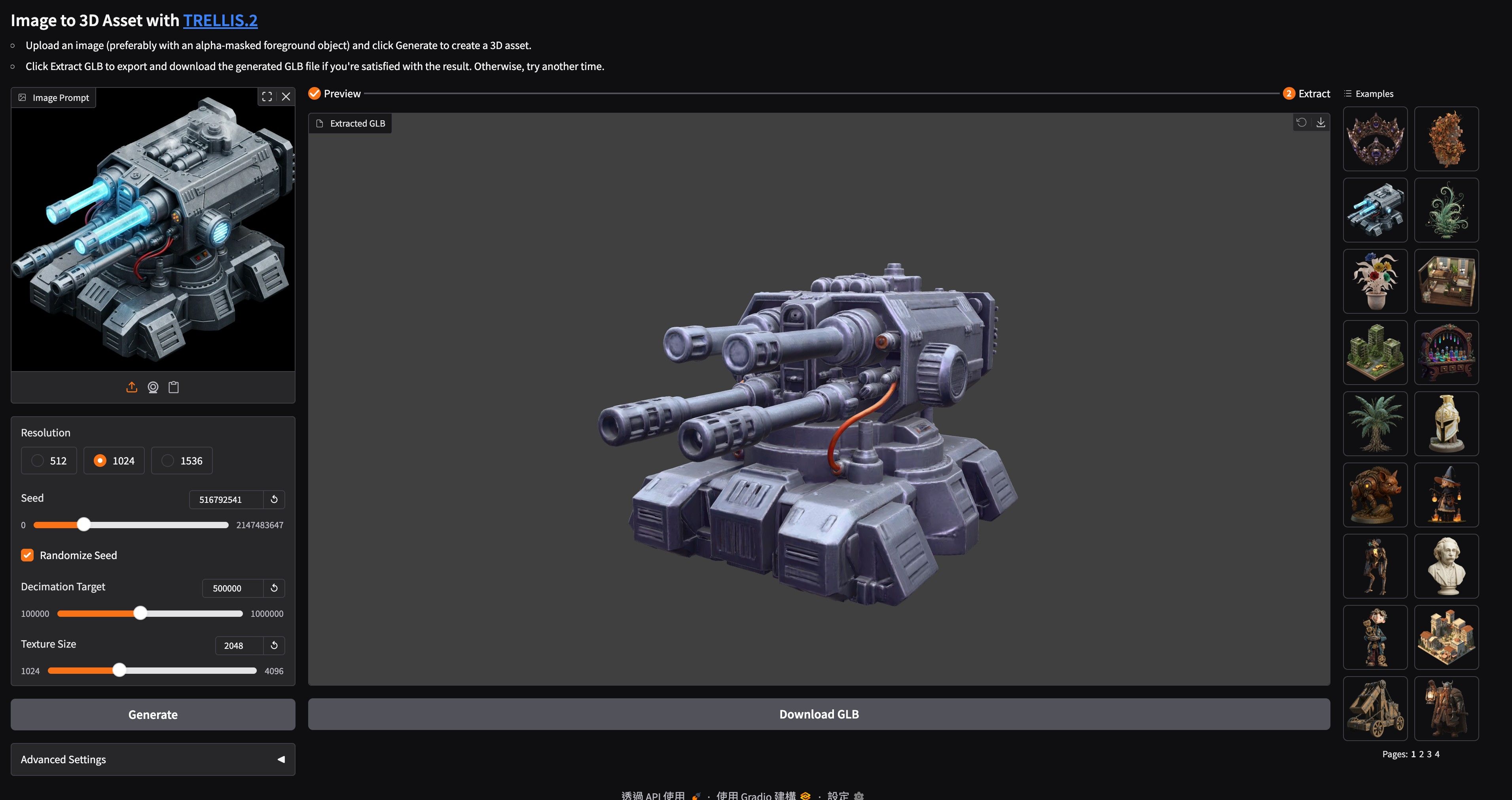
Result
This is the first confirmed successful Gradio UI run after the RTX 3090 texture fix and Gradio preview workaround.
The GLB was originally produced by Gradio under the TRELLIS.2 session tmp directory:
/mnt/data/comfy-runtimes/TRELLIS.2/tmp/40hdh9xwxxz/sample_2026-06-10T204915.884.glbIt has been copied to the stable shared experiment output directory:
/mnt/data/experiments/trellis2/outputs/gradio-success-20260610-204915/sample_2026-06-10T204915.884.glbExtracted textures were also copied:
/mnt/data/experiments/trellis2/outputs/gradio-success-20260610-204915/texture_0.png
/mnt/data/experiments/trellis2/outputs/gradio-success-20260610-204915/texture_1.png
Runtime
Component Value Docker image local/vm105-comfyui-trellis2:torch291-cu128-py312Torch 2.9.1+cu128CUDA runtime 12.8Transformers 4.57.3XFormers 0.0.33.post2GPU NVIDIA GeForce RTX 3090Dense attention sdpaSparse attention xformersSparse convolution flex_gemmGradio log confirmed:
[SPARSE] Conv backend: flex_gemm; Attention backend: xformers
[ATTENTION] Using backend: sdpa
Gradio Parameters
The run used the Gradio UI path. The app defaults at the time of the run were:
Parameter Value Resolution 1024 Seed randomized by UI unless manually disabled Decimation target 500,000 Texture size 2048 Sparse structure steps 12 Sparse structure guidance 7.5 Sparse structure guidance rescale 0.7 Shape SLat steps 12 Shape SLat guidance 7.5 Shape SLat guidance rescale 0.5 Texture SLat steps 12 Texture SLat guidance 1.0 Texture SLat guidance rescale 0.0 The exact randomized seed is not recoverable from current Gradio logs. Future UI runs should log the seed explicitly if they are used as purchase or production benchmarks.
Timing Evidence
Gradio does not currently emit the same per-stage timing data as the benchmark runner. The following times are observable from Docker logs and file metadata:
Event UTC Time Taipei Time Gradio service ready 2026-06-10 20:12:50 2026-06-11 04:12:50 Successful run activity appears in log 2026-06-10 20:48:26 2026-06-11 04:48:26 GLB export file timestamp 2026-06-10 20:49:17 2026-06-11 04:49:17 The observable final UI/export window was about 51 seconds from the first success-run log line to the GLB file timestamp. This is not a full end-to-end timing because Gradio does not log the exact button-click timestamp or each sampler stage.
For detailed stage timings, use the benchmark runner rather than the Gradio UI.
Output Metrics
Metric Value GLB size 20,160,096 bytes GLB size about 19.2 MiB Geometry count 1 Final mesh vertices 413,289 Final mesh faces 471,584 Materials 1 Embedded textures 2 Valid texture pixels 8,388,503 Texture Check
Texture extraction showed valid embedded WebP textures. This is not the previous RGB-noise failure mode.
Base color texture:
Metric Value Texture index 0 Encoded bytes 1,086,644 Size 2048 x 2048 Valid alpha pixels 4,194,199 RGB mean 57.73 / 60.09 / 67.79 RGB stddev 31.36 / 32.99 / 35.37 Metallic/roughness texture:
Metric Value Texture index 1 Encoded bytes 187,344 Size 2048 x 2048 Valid alpha pixels 4,194,304 RGB mean 0.67 / 144.10 / 210.61 RGB stddev 1.33 / 9.00 / 7.54 Notes
The Gradio app is running with the RTX 3090 preview workaround:
Normal / Clay / Base color preview modes only
HDRI preview modes disabled
This avoids the bundled
nvdiffrec_rendercubemap shader, which does not include an RTX 3090sm_86kernel. GLB extraction still uses the validatedflex_gemm + xformerspath.The file is currently stored in both the original Gradio tmp directory and the stable shared experiment directory. The stable shared path should be used for later review.
-
-
-
-
-
-
-
-
-
-