跳转至内容
  • 版块
  • 最新
  • 标签
  • 热门
  • 用户
  • 群组
皮肤
  • 浅色
  • Brite
  • Cerulean
  • Cosmo
  • Flatly
  • Journal
  • Litera
  • Lumen
  • Lux
  • Materia
  • Minty
  • Morph
  • Pulse
  • Sandstone
  • Simplex
  • Sketchy
  • Spacelab
  • United
  • Yeti
  • Zephyr
  • 深色
  • Cyborg
  • Darkly
  • Quartz
  • Slate
  • Solar
  • Superhero
  • Vapor

  • 默认(LCZ-Blue)
  • 不使用皮肤
  • LCZ-Green
  • LCZ-Blue
  • LCZ-Black
折叠
品牌标识

抡锤者

首页 版块 标签
硬件
装备秀
AI 广场 App
K

koala

@koala
体面乡绅 硕果累累
取消关注 关注
关于
帖子
125
主题
20
分享
0
群组
2
粉丝
4
关注
0

帖子

最新 最佳 有争议的

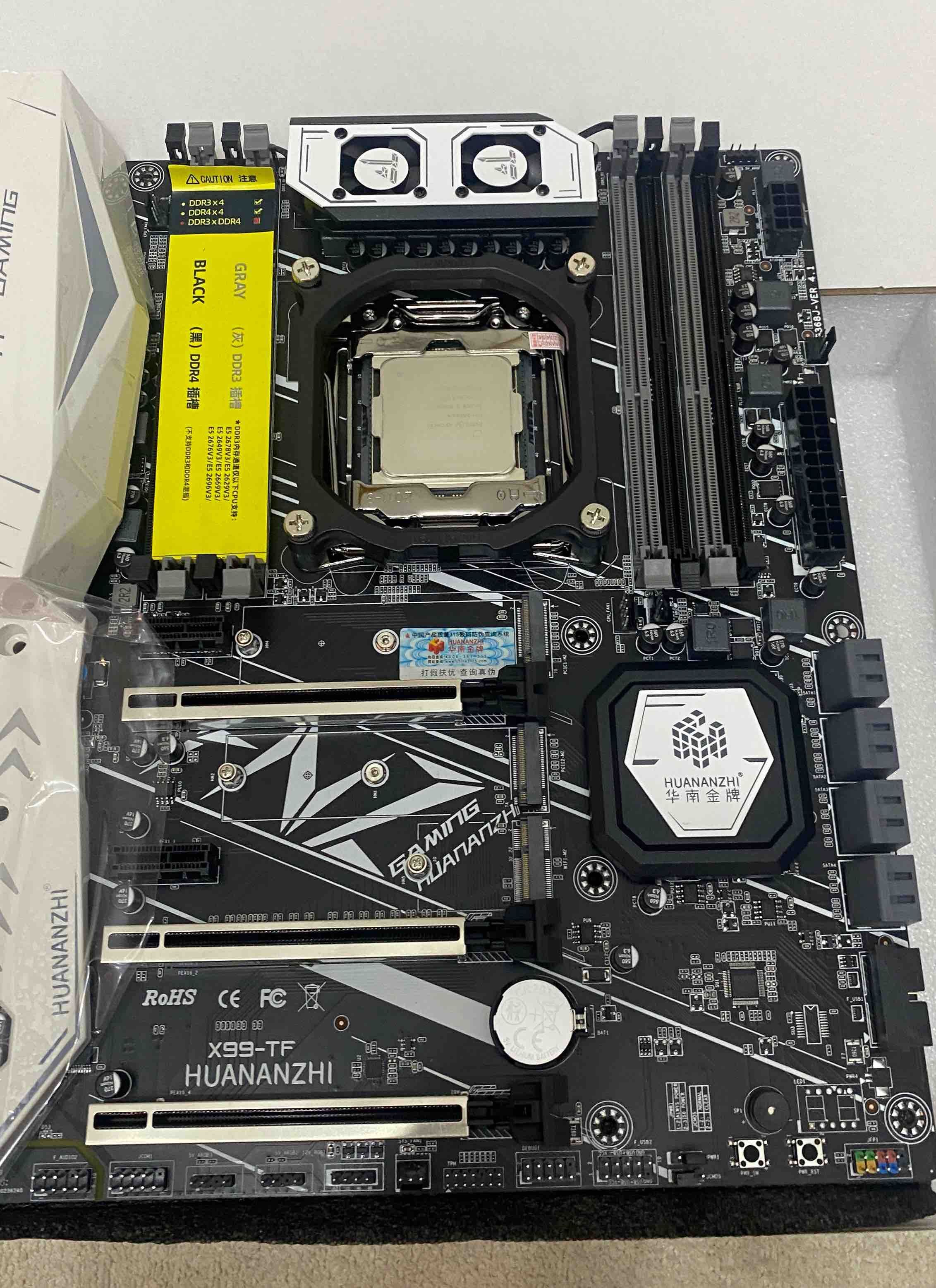
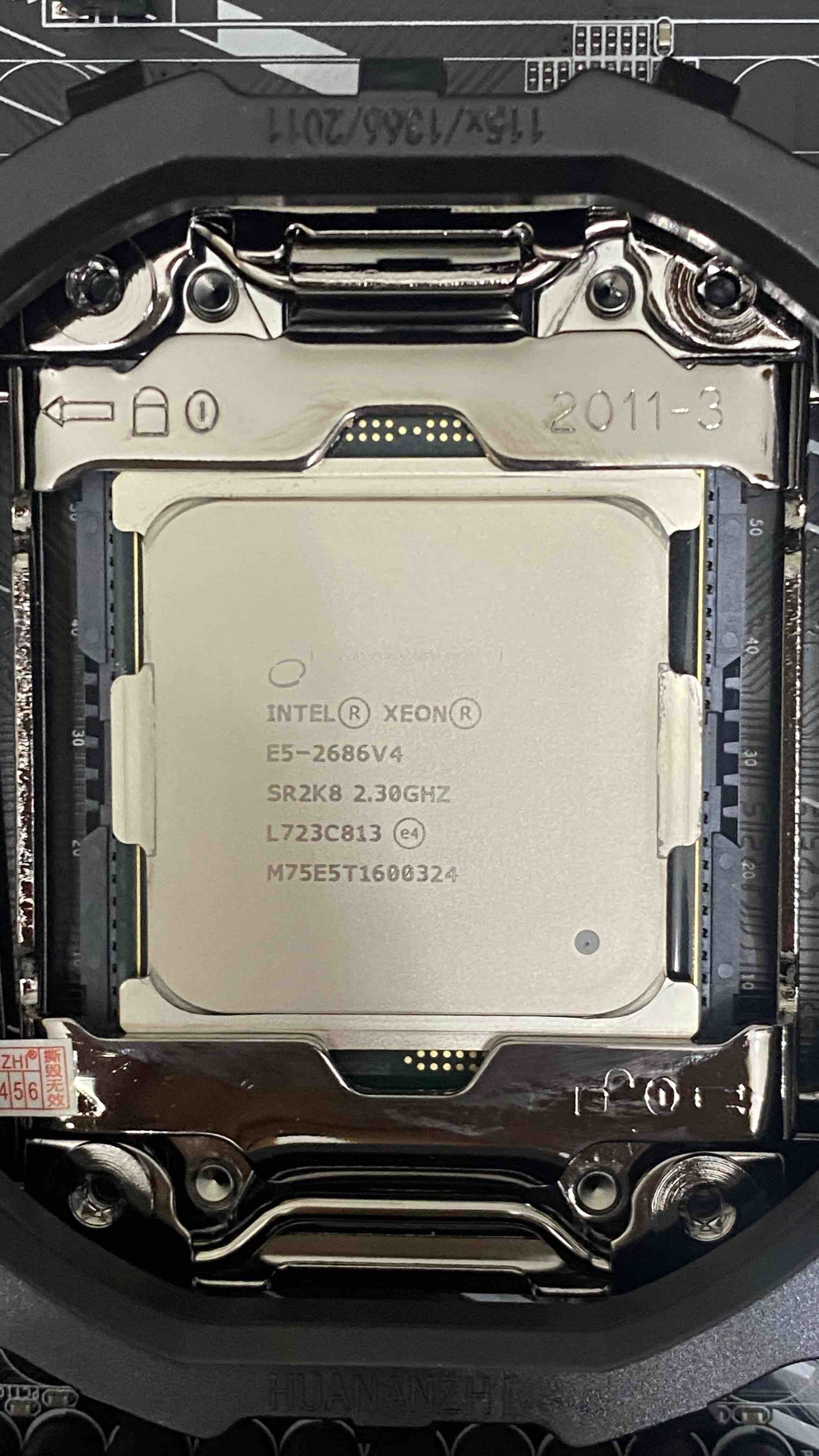
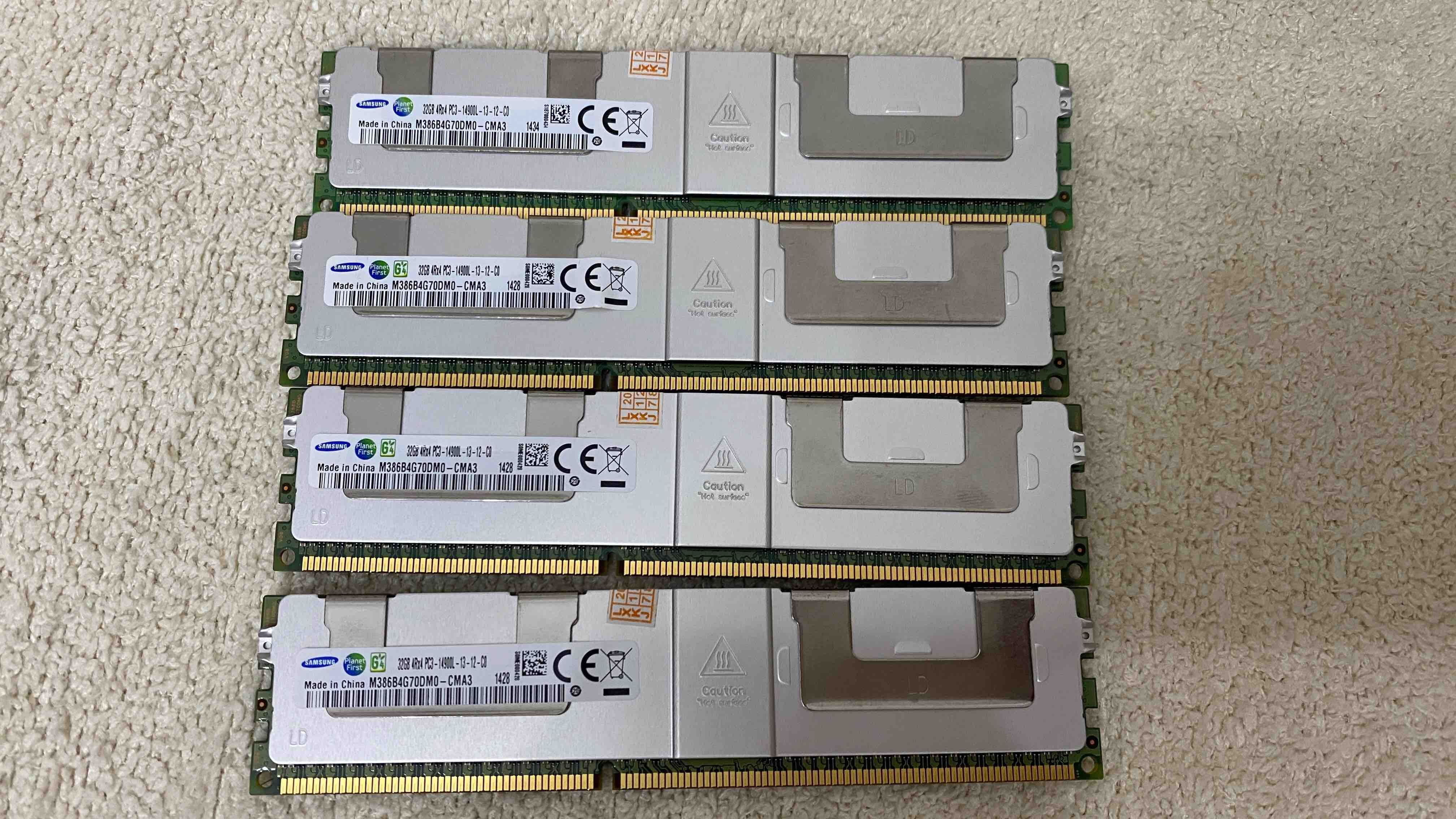
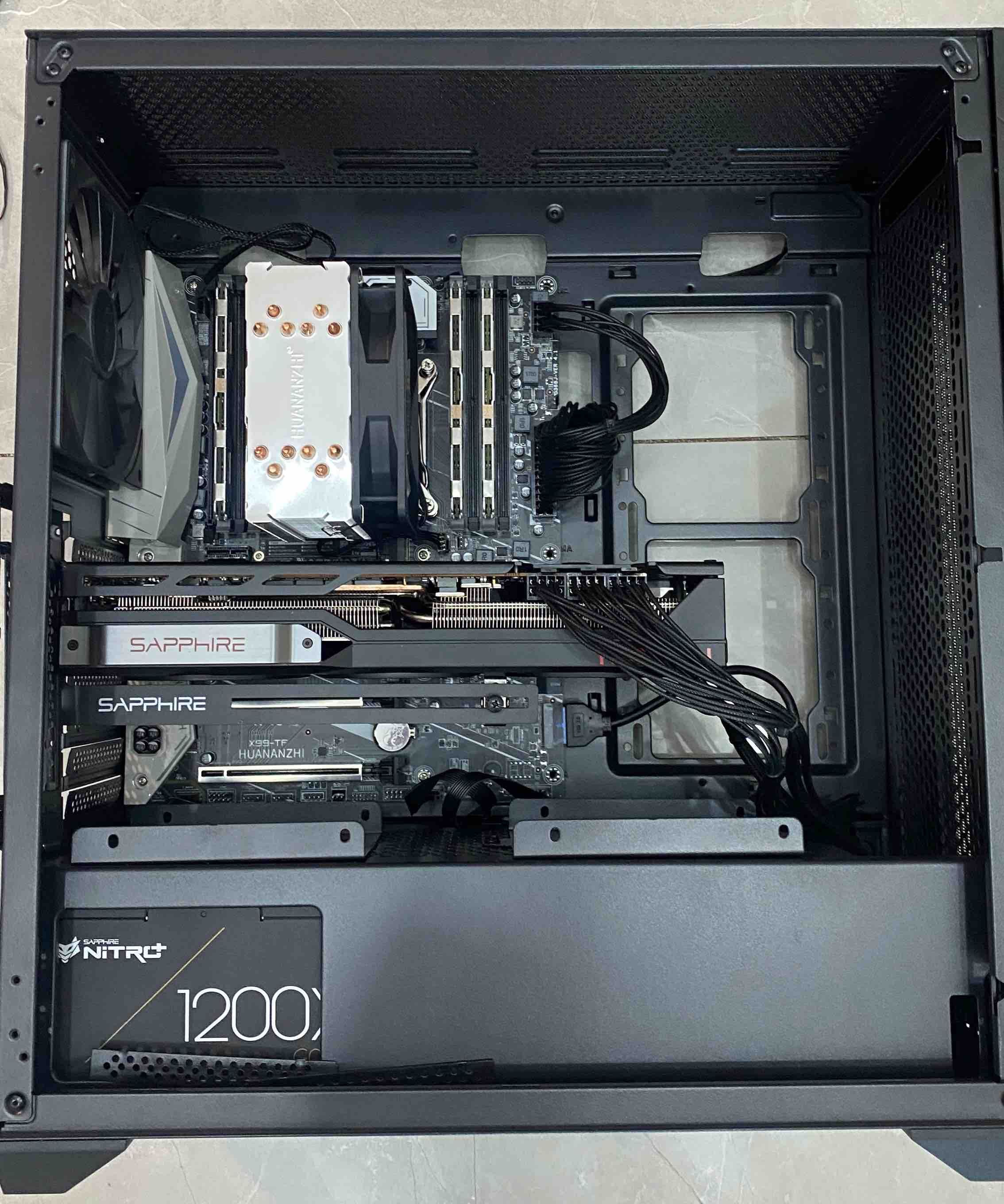
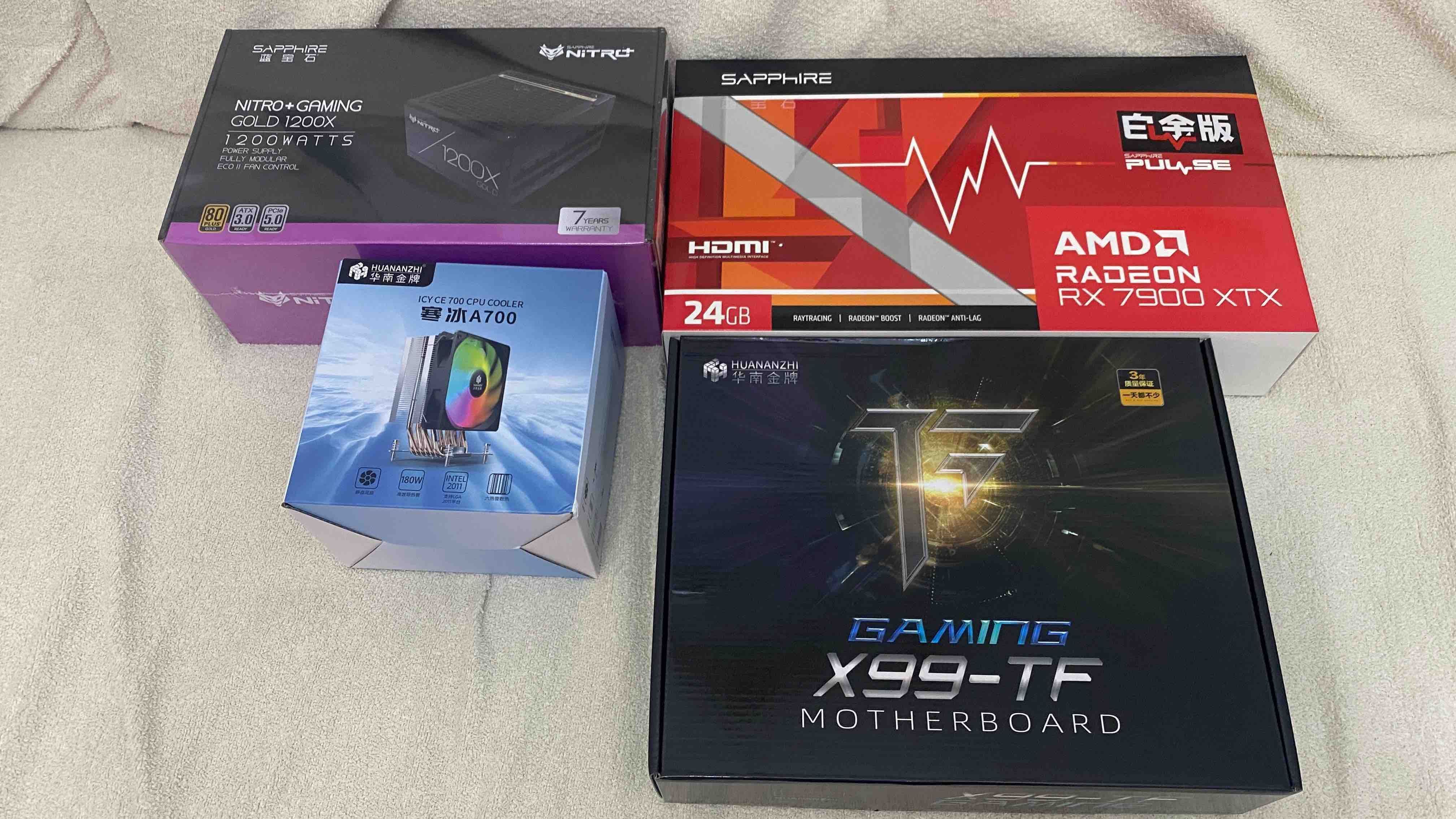
  • 【交作业】华南金牌 X99-TF + E5 2686V4 +蓝宝石7900XTX 白金板
    K koala
    AI硬件 7900xtx x99

    IMG_0186.jpeg IMG_0193.jpeg IMG_0204.jpeg IMG_0205.jpeg IMG_0185.jpeg

    组件分类 产品名称与规格 数量 单价 (元) 小计 (元) 备注 / 核心用途
    显卡+电源 蓝宝石 AMD RADEON RX 7900XTX 白金 + 蓝宝石 1200W 金牌 1 6,498.88 6,498.88 绝对的核心大头,提供 24GB 大显存支撑本地 AI 模型与视频生成
    内存 32G DDR3 1866 服务器内存条 4 287.08 1,148.33 4条共 128GB,满足大模型载入与高并发任务需求
    显示器 小米(MI)REDMI 27英寸 4K 显示器 1 1,028.88 1,028.88 4K 分辨率,兼顾日常办公与内容创作预览
    固态硬盘 致态(ZhiTai)TiPlus7100/Ti600 1TB NVMe M.2 1 852.40 852.40 系统盘与高速缓存盘,长江存储颗粒,速度扎实
    主板 华南金牌 X99-TF + E5 2686V4 + A700风扇套装 1 777.99 777.99 极具性价比的多核服务器平台(14核28线程)
    机箱 长城(Great Wall)铁幕H503B 铁侧板电脑机箱 1 197.50 197.50 稳固中塔机箱,全铁侧板防辐射
    散热周边 4针 PWM 温控机箱风扇*7 + 独立供电集线器(Hub) 1 119.60 119.60 刚加购的散热利器,解决主板接口不足并构建风道
    总计 预计总投入金额 - - ¥10,623.58 全面兼顾高算力与极致性价比

    看老特的视频,然后种草,之后就开始研究下单。主打一个低价、量大、管饱。

    买这个板子主要是够大,本来想直接上两张9700txt也能顶一张9700pro,所以先预留下一块显卡的位置,

    既然是作为服务器,后续我肯定会加载很多服务上去,那么内存就必须要足够,PDD上面找了便宜的内存条顶格买。实践证明炮大模型的时候要用掉40多G的内存。

    显卡无敌静音,开机都感觉不到他的存在,直到我为了散热买了7把风扇之后,再也没有过之前的安静,怕噪音的可以打开机箱,风扇真的吵死了。

    系统详情报告


    报告详情

    • 生成日期: 2026-06-18 20:38:54

    硬件信息:

    • 硬件型号: HUANANZHI X99-TF
    • 内存: 128.0 GiB
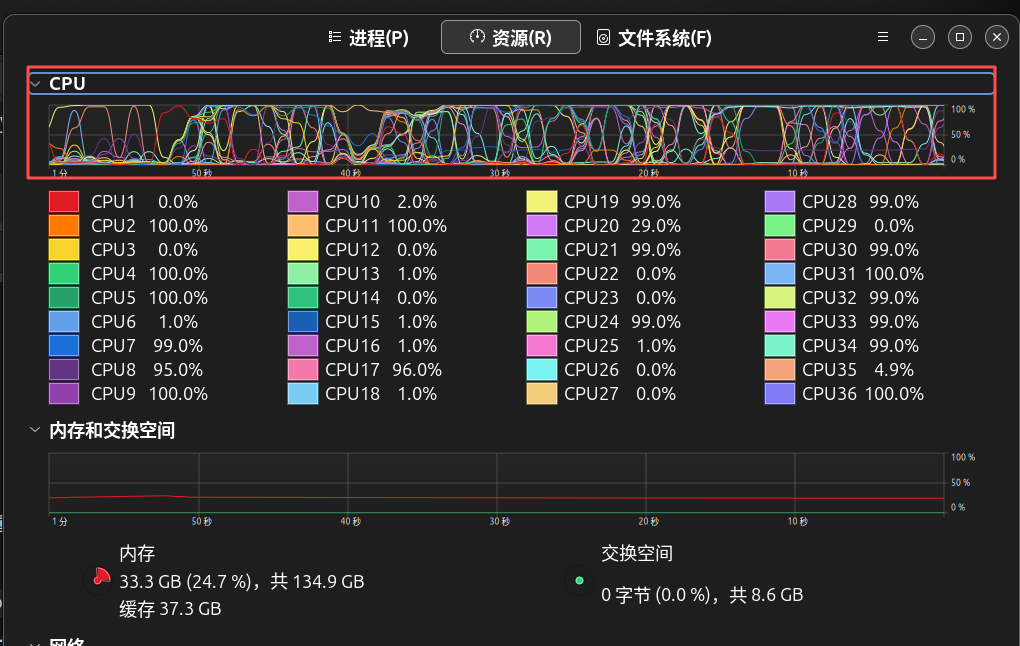
    • 处理器: Intel® Xeon® E5-2686 v4 × 36
    • 显卡: AMD Radeon™ RX 7900 XTX
    • 磁盘容量: 1.0 TB

    软件信息:

    • 固件版本: 5.11
    • 操作系统名称: Ubuntu 24.04.4 LTS
    • 操作系统内部版本: (null)
    • 操作系统类型: 64 位
    • GNOME 版本: 46
    • 窗口系统: Wayland
    • 内核版本: Linux 6.17.0-35-generic

    音频生成.png
    VOXCPM的大模型是N卡的,所以在这里用他走的是CPU通道,这个时候36线程的量大管饱的优势就体现出来了,6秒音频大概4.5分钟左右,这个肯定是被N卡秒杀的,能跑就行,无非就是时间问题。

    LTX2.3出图生视频能跑通,1:10的时间消耗。
    z-image,15秒一张图,

    遇到的问题:
    1、安装comfyui的时候,rocm7.2一直转不上,卡在下载文件有6G多,网络一直断,著名搞都不行,现在6.2版本凑合用着。
    2、想玩点高级的大模型基本没戏,那些都是N卡的插件,大动作的动画就别想了,除非技术有进步。
    3、hermes超级慢

    东西是好东西,适合会折腾的朋友玩起来,还好有小B站,买回来我查了一周的资料,才学会该买什么,该怎么安装。感叹社会发展的真快,我前一张显卡还是七彩虹TNT 128M的,之后再也没有玩过组装机了。

    吐槽一下系统自带的拼音,超级难用,搜狗拼音还转不上,打错太多字了,大家包含。


  • 【实测】7900xtx使用Qwen3.6-35B-A3B速度稳定在80+t/s
    K koala
    LLM讨论区 7900xtx amd llama.cpp

    2c1c0705-5d39-45da-880c-8b396146864c-image.jpeg

    这个模型支持多模态,所以日常被我拿来用于工作,速度挺快的,也能持续干活,
    Qwen3.6-35B-A3B-Uncensored-HauhauCS-Aggressive-IQ4_NL.gguf
    启动参数

    ./llama-cli -m /path/to/Qwen3.6-35B-A3B-Uncensored-HauhauCS-Aggressive-IQ4_NL.gguf \
      --mmproj /path/to/mmproj-Qwen3.6-35B-A3B-Uncensored-HauhauCS-Aggressive-f16.gguf \
      -ngl 99 \
      -c 131072 \
      -fa \
      --batch-size 512 \
      -t 8 \
      --temp 0.7 \
      --repeat-penalty 1.1
    

  • 请教:7900 XTX,做数字人口播视频遇到的2个问题。
    K koala
    AI音视频画图 7900xtx 数字人 comfyui

    1280x720,24帧,5秒视频,需要236s左右,这个已经很快了好吧。再要求速度只能换N卡了。


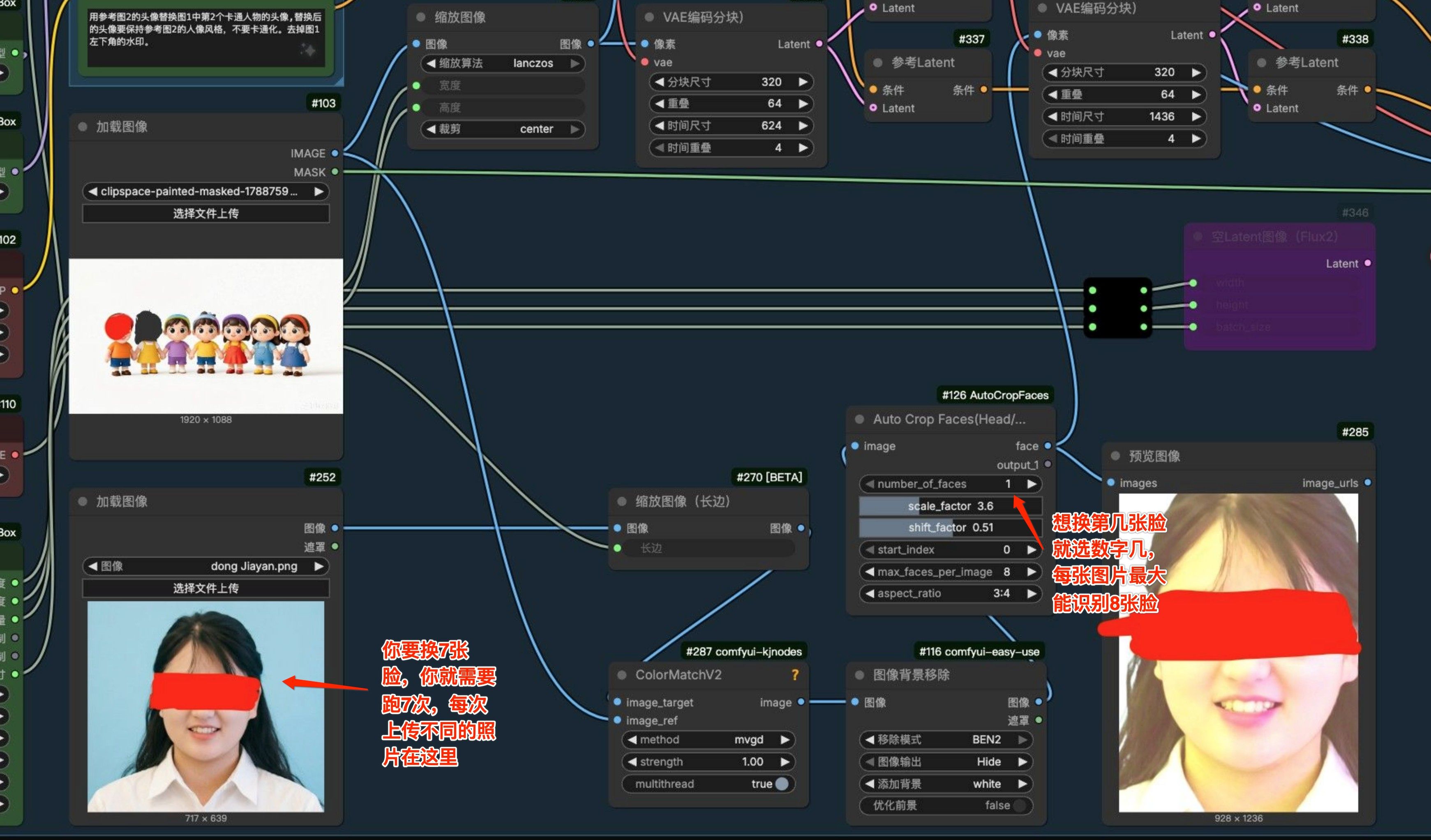
  • 求助!搞不定ComfyUI换脸工作流。
    K koala
    AI音视频画图 comfyui 图片生成

    1eed0671-190c-41ad-a347-dd1e8b6421db-image.jpeg
    换脸的位置由节点#126控制,想换第几张脸调整数字即可,比如第2个人头,你就输入数字2,传第二个人的照片。也就是你要操作7次。


  • 【7900xtx】装了个claude code,一天烧3000万token,莫非是我本地大模型太蠢了?坑在哪里?
    K koala
    LLM讨论区 7900xtx claude-code claude

    822eadb0-cf56-4a5a-9543-17aa6e1985bd-image.jpeg
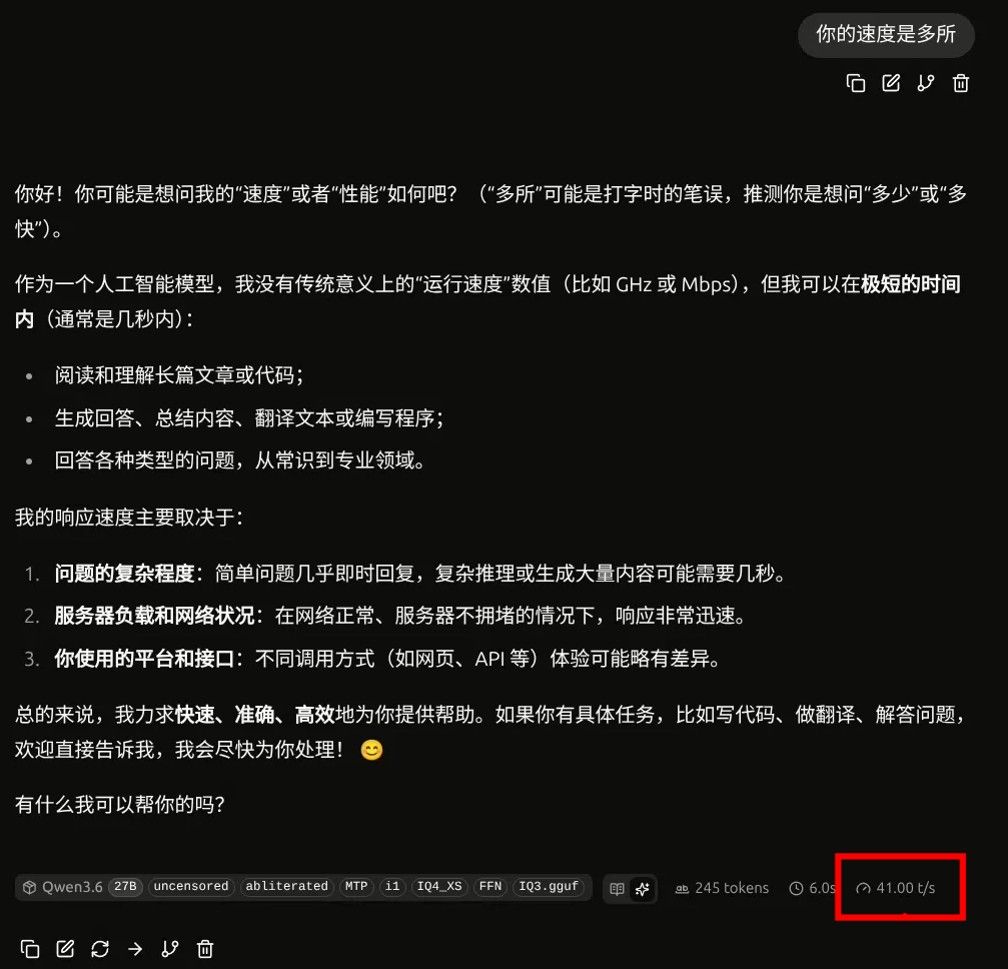
    本地大模型还是使用Qwen3.6-27B
    Qwen3.6-27B-uncensored-abliterated-MTP-i1-IQ4_XS-FFN-IQ3.gguf
    模型 Qwen3.6-27B 极速版 启动成功!
    ——————————————————————————————
    服务地址: http://localhost:8080
    API端点: http://localhost:8080/v1/
    PID: 60463
    日志文件: /tmp/llama_server.log
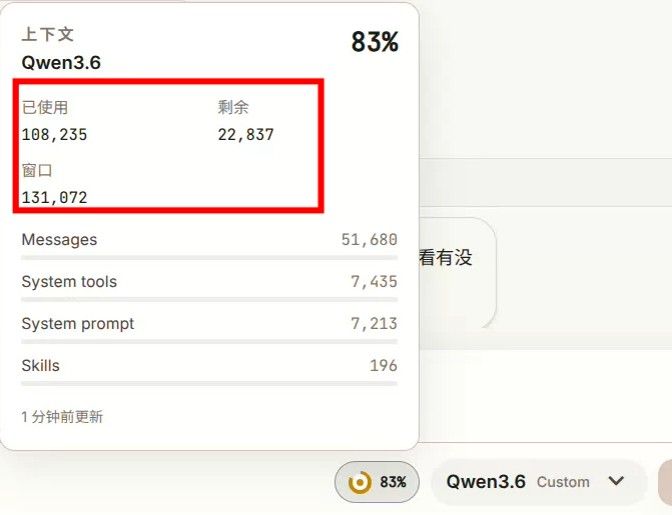
    启动参数: -ngl 999 -c 131072 --cache-type-k q4_0 --cache-type-v q4_0 --reasoning off --cont-batching --cache-prompt
    6147a872-77d0-475b-a006-fa058cdf60e4-image.jpeg

    说说感受,claude code的体感确实比hermes好很多,无论从速度上还是从友好程度上,断了可以从断的位置直接新开。
    hermes我拿来编程,动不动上下文满了,基本进入不了下一步。
    3daff75c-d2be-4dfc-8f65-405d827df8e1-image.jpeg 能用的时间长一些,唯一不足的是经常显示400,说是调用工具错误,新开一个又能用了。


  • 【練手作品】台風來了,快跑(7900xtx,单条 8 秒素材纯采样 165 秒(2 分 45 秒))
    K koala
    AI音视频画图 7900xtx 图片生成

    H3 整合视频流 测速对比与结论(V0 到 V7)

    适用环境:ubuntu24.04,本地 AMD RX 7900 XTX(gfx1100)/ ROCm 7.2 / ComfyUI 8288(H3 专用)
    测试物:MiniMax H3 整合视频流,单条 8 秒视频流、固定 6 步 turbo 参数,逐版采样计时
    计时口径:只算到采样出片(SaveVideo),不含尾部 4x RealESRGAN 放大

    一、测试数据对比

    版本 关键改动 相对基线提速 画质 判定
    基线(未加 ck-attn) 原始整合流 0%(参考值约 266 秒) 正常 参考基线
    V0 仅调启动参数(移除 force-upcast) 中性(165.2 vs 165.8,差异在噪声内) 正常 不靠参数提速
    V2 comfy-kitchen 的 ModelAttentionBackend 插在 Sol-Attn 之前 +31.6% 正常 可用,慢一档
    V5 LoRA 改 LoraLoaderBypassModelOnly + ck-attn 插在 Sol-Attn 之后 +37.9% 正常(零退化) 胜出(甜点)
    V6 关 Sol-Attn,仅留 ck-attn +37.9% 正常 等同 V5,但关 Sol-Attn 风险略高
    V3 / V4 / V7 叠加 TE-Speed 节点 +36% 到 +63%(数字最猛) 水彩化、材质丢光 判负(不可用于成品)

    实测锚点:V5 单条 8 秒素材纯采样 165 秒(2 分 45 秒)。基线约 266 秒由「165 秒 / (1 - 37.9%)」反推,属估算值,绝对数以 V5=165 秒为准。

    二、结论(给复现者的硬结论)

    1. 在 gfx1100 / ROCm 7.2 上复现 H3 提速,照抄 V5 模型链顺序:
      INT8FastLoader → LoraLoaderBypassModelOnly → MiniMaxH3FastPatch(Sol-Attn, [true,true]) → ModelAttentionBackend(comfy kitchen) → MiniMaxH3SigmaShift([12,3]) → Guider
      这条拿到 +37.9% 且画质零损失,是当前唯一「又快又不糊」的甜点配置。

    2. 不要上 TE-Speed(V3 / V4 / V7 那一脉):6 步 turbo 流下虽然提速数字更猛(+36% 到 +63%),但画面水彩化、材质丢失,成品不可用,直接判负。

    3. ck-attn 的位置决定速度上限:插在 Sol-Attn 之后(V5)才拿到满速 +37.9%;插在之前(V2)只有 +31.6%。Sol-Attn 被 ck-attn 接管后即失效,所以 V6(关 Sol-Attn)与 V5 同速。

    4. 启动参数铁律:--use-pytorch-cross-attention 必须保留(gfx1100 正确最快路径,启用 AOTriton/CK SDPA);--force-upcast-attention 把 attention 钉 fp32,实测移除中性无提升且更省显存,已固化移除。

    三、学习要点(一句话版)

    • 要快且不糊:抄 V5 链路,禁用 TE-Speed。
    • 提速来自「comfy-kitchen attention 节点插在官方 Sol-Attn 之后」+「LoRA 走 Bypass 版保 INT8 fast path」,不是靠调启动参数。
    • 画质优先于极限提速:TE-Speed 的数字陷阱已经踩过,别再走。
    • 计时只到采样出片;端到端含 4x 放大会更长。

  • 【MinimaxH3】小酌怡情,你懂我的欲擒故纵我也懂你的故作矜,这就够了^-^
    K koala
    AI音视频画图 minimax 视频生成

    使用原生的工作流,增加H3官方自带的节点,变成8步,本身就能实现相当不错的效果,各种加速功能是方便你预览的,如果是要质量,还是得回到原生态。
    Youtube Video


  • 【练手作品】MinimaxH3,高燃连续击打测试,15s直出,二采+放大,122m9s
    K koala
    AI音视频画图 视频生成 7900xtx minimax

    Youtube Video

    放大前:分辨率960x544
    放大后:分辨率3840x2176

    脸还是有崩坏的情况,但是对于7900XTX来说,在高动态打击的情景下,这个效果应该算可以了,就是生成的时间有点久,不具备批量生产力。


  • 【MinimaxH3】尝试了一个日本赛璐璐风格的片段,很中二!
    K koala
    AI音视频画图 minimax 视频生成

    🔥“今天,我就在这里——把它砸碎给你们看!”🔥

    暴雨切碎了新东京的霓虹,十二对光翼在高空展开死寂的罗网。
    当机械义眼过载到120%,残破的“断齿”巨刃能否斩断高高在上的神域?

    这是一段极具张力的日系赛璐璐风格高潮决战!


    🎬 剧情看点 / Highlight:
    极高对比度的湛蓝剑气 vs 血色霓虹光影
    120%过载逆流而上,极致视角的折角位移
    玻璃碎片与爆炸光斑交织的残破美学

    Youtube Video


  • 【实测】7900xtx使用Qwen3.6-35B-A3B速度稳定在80+t/s
    K koala
    LLM讨论区 7900xtx amd llama.cpp

    @terry 做总项目调度,调试软件、工作流,等等。


  • 【MinimaxH3】央视大楼无人机航拍效果[附教程]
    K koala
    AI音视频画图 minimax 视频生成

    一、先给AI提需求
    写一份无人机快速穿越央视大楼的拍摄画面的MinimaxH3的提示词,要大气环绕视觉,一条15秒,镜头过多用拆分成为2条,所用图片如下:
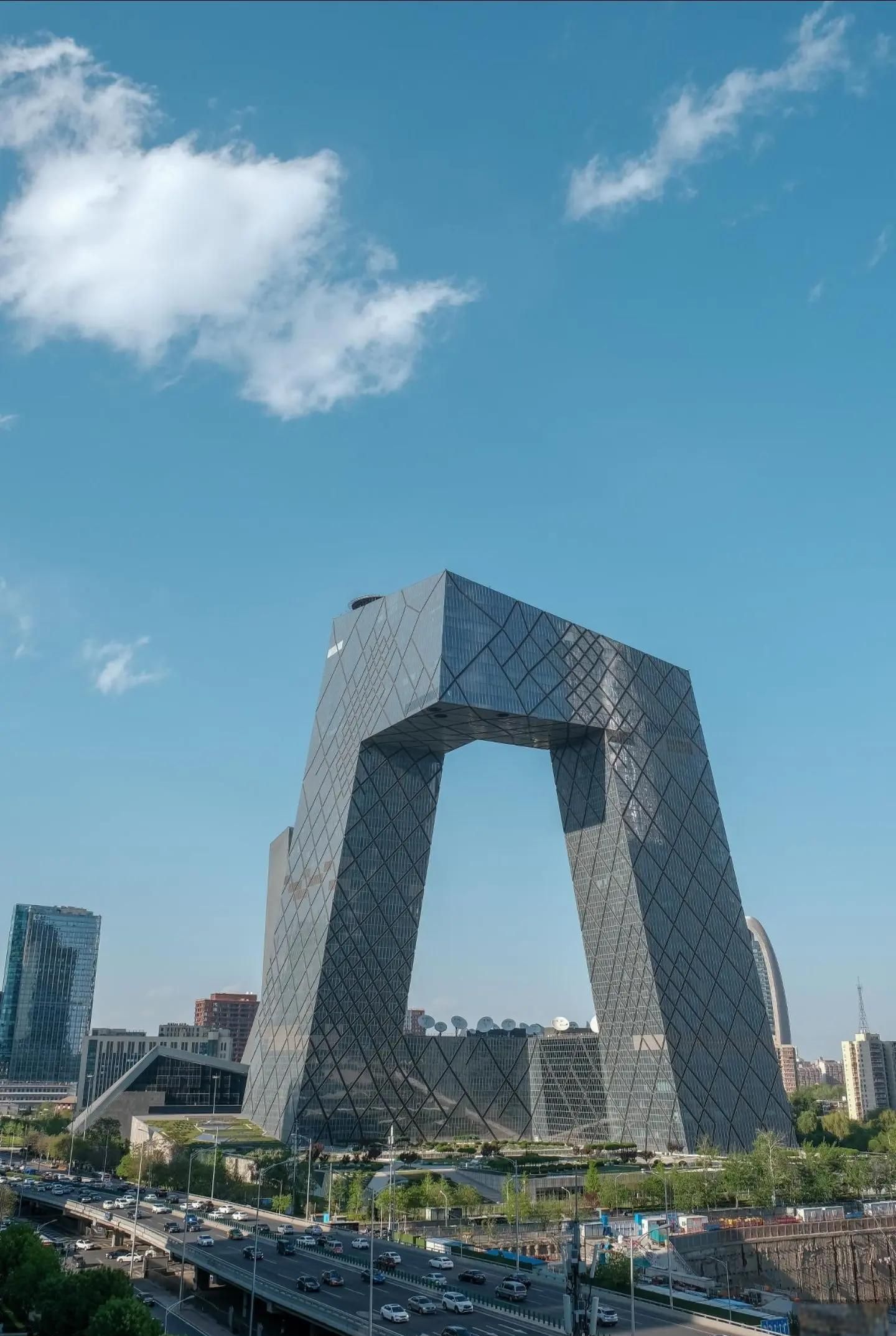
    央視大樓.jpeg
    image.jpeg

    二、AI返回工作思路以及描述词

    央视大楼 无人机穿越 H3 提示词 v1
    日期:2026-10-17
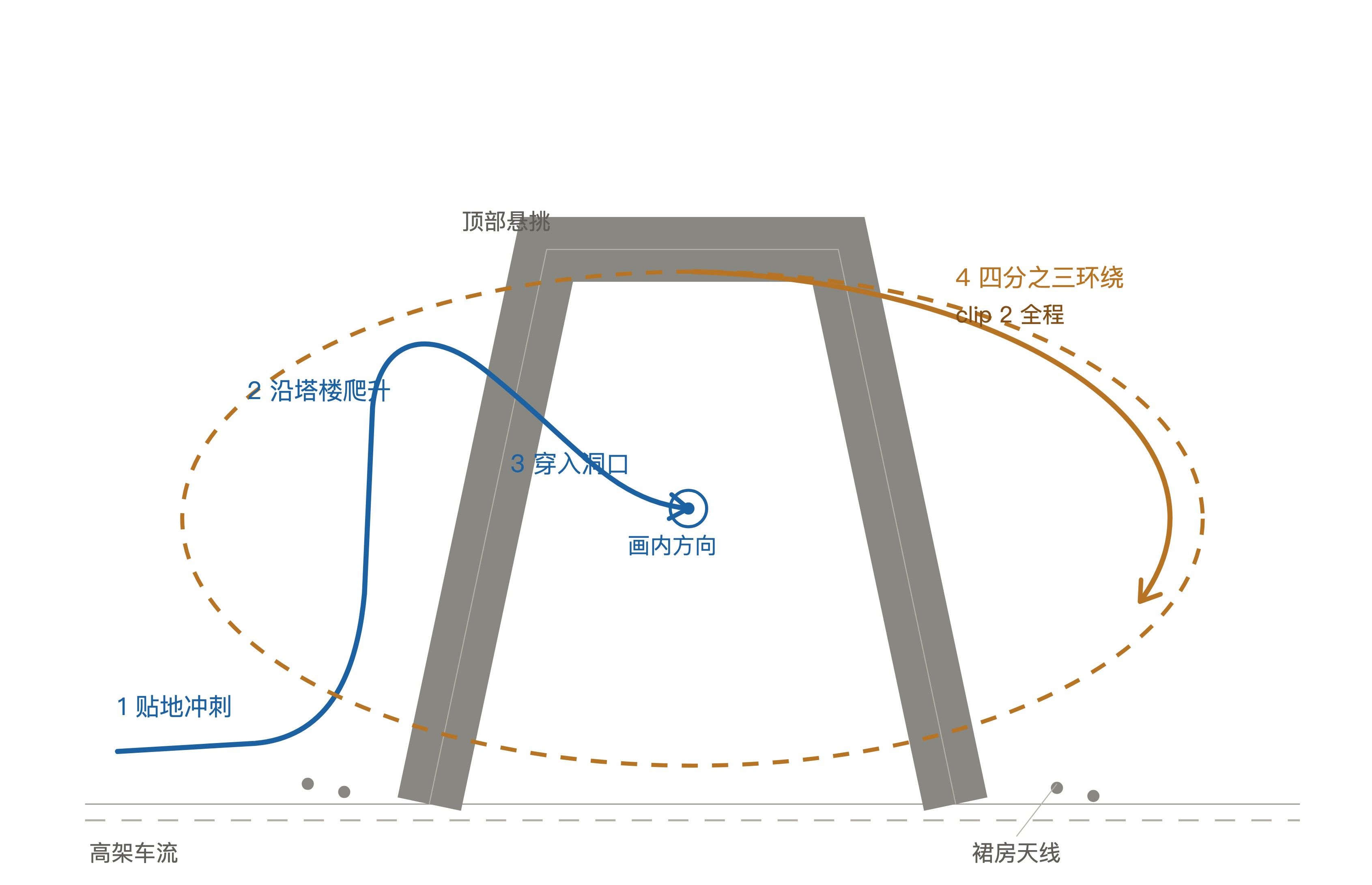
    主体:CCTV 总部大楼(北京 CBD,两塔内倾、顶部悬挑连接、整体成环)
    规格:两条 15 秒,各 362 帧 / 24fps / 16:9
    用途:MiniMax H3 Ref2VA 单段生成,后期硬切或首末帧衔接
    一、为什么拆成两条
    一条 15 秒塞不下完整叙事。真正要讲的是两件事,而且方向相反:
    - 第一件是进入:从地面冲到楼上,从外面进到里面,观众被带着穿过去
    - 第二件是审视:穿出来之后退开,绕一圈看清这栋楼到底是个什么形状
    前者的运动是加速、贴近、穿入;后者是减速、拉开、环绕。两种运动方向在同一个镜头里切换,H3 会在切换点把楼体拧变形。所以拆两条,各自只保留一种主导运动。
    拆点选在穿过门洞后减速悬停那一刻。这个点是全片唯一自然的停顿,也是唯一可以硬切而不违和的地方,运动模糊正好掩盖接缝。
    二、建筑的硬事实(提示词里必须写死的)
    这栋楼是最容易被模型画歪的建筑之一,因为它不是常规塔楼,任何“大概齐”的先验都会出错。以下几条要在每条提示词里重复写:
    1. 两栋塔楼向内倾斜,顶部由一段水平悬挑连接,整体是一条连续折带弯成的三维环
    2. 两腿之间有一个巨大的矩形洞口,位置在离地一百六十米以上,天空直接穿过去
    3. 立面是深蓝灰玻璃幕墙加银灰菱形斜交网格,网格在每一个面上连续、尺度一致
    4. 底部是低矮裙房,裙房顶上是白色卫星天线阵列
    5. 建筑脚下是高架快速路,车流密集
    模型最容易犯的三个错:把洞填上、把两塔画成平行、把网格画成随机碎裂的玻璃。提示词里的 CONSTRAINTS 段专门堵这三个。
    三、Clip 1 进入
    文件:prompt_clip1_v1.txt
    节拍(不写时间码,靠顺序词推进):
    段
    内容
    运动
    1
    贴高架路面冲刺,护栏和车道线在近景撕裂而过
    低空、加速、向前
    2
    沿近侧塔楼外立面垂直爬升,网格高速下扫
    向上、贴近
    3
    顶部轻微横滚,从巨型洞口正中穿过
    向前、穿过
    4
    穿出后急减速,悬停在结构内侧,远处塔楼填满画面
    减速、停
    四段共用一条上升弧线,方向单调,不折返,这是 H3 能扛住的形态。
    时间与光照选蓝调时刻。玻璃幕墙在蓝调下会把冷色天空和暖色室内灯混成细密纹理,斜交网格每一格反光都不同,这是这栋楼最好看的时候,也是最能出“大气”的时候。代价是与你给的照片(白天)色温不同,几何仍然一致。
    四、Clip 2 环绕
    文件:prompt_clip2_v1.txt
    节拍:
    段
    内容
    运动
    1
    贴着内侧悬挑面起手,网格填满全画幅
    静止到启动
    2
    向外侧倾转,开始四分之三环绕
    环绕、缓升
    3
    近塔、悬挑、远塔依次掠过,互相遮挡
    环绕
    4
    拉远升高,整环独立于天际线之上
    后退、拉起
    关键设计是遮挡揭示:靠前后遮挡产生的视差让观众自己看懂这是三维的环,而不是靠物体自转。这比旋转更高级,也更稳。
    末帧固定为居中全景,方便后期接品牌字或标题。
    

    prompt_clip1_v1

    An aerial drone shot, cinematic, photorealistic, one continuous take, no cuts.
    
    LOCATION: the CCTV Headquarters in Beijing, the loop building. Two leaning towers, both about two hundred and thirty metres tall, tilt inward toward one another and are joined at the top by a massive horizontal cantilever, so the entire structure reads as one continuous folded ribbon bent into a giant three-dimensional loop, leaving a huge rectangular opening between the two legs high above the ground, with sky passing straight through it. The facade is a dark blue-grey glass curtain wall carried on a silver-grey diagonal diagrid: a regular diamond lattice of mullions, uniform in scale, continuous across every face, each cell reflecting a slightly different piece of the sky. Lower podium blocks hug the base, their flat roofs carrying a scattered cluster of white satellite dishes and antennas. An elevated expressway runs along the foot of the building, packed with traffic, with a green landscaped strip between them.
    
    ENVIRONMENT: blue hour, the last warm band of sun still low on the horizon behind the towers, the sky above deepening to a saturated indigo, thin high cloud catching the residue of daylight. Interior floors are already lit, so hundreds of small warm windows glow through the glass and mix with the cold blue reflection of the sky, giving the facade a fine dense texture of warm and cold cells.
    
    CAMERA: one continuous accelerating flight, the drone is never seen. It begins very low, a few metres above the expressway surface, racing forward parallel to the traffic, the guard rails and lane markings tearing past in the foreground, cars sliding under and beside the lens. Without slowing, the drone pitches up and climbs vertically along the outer face of the nearest leaning tower, the diagrid rushing downward across frame, the building expanding until its lattice fills everything. Near the top the drone rolls slightly and threads straight through the great opening between the two legs, sky filling the frame for a heartbeat, the two inner faces of the towers sliding past on the left and right like a canyon. It emerges on the far side and decelerates hard, the far tower filling the frame ahead, the edge of the cantilever cutting a hard diagonal across the sky, and the shot comes to rest hovering just outside the inner face of the structure, looking along it.
    
    LIGHTING AND ATMOSPHERE: low warm rim light grazing the outer corners of the cantilever, cold blue ambient filling the shadowed inner faces, the diagrid drawing a mesh of fine specular highlights that slide across the surface as the angle changes. A faint haze sits between the towers and the distant skyline, with aircraft warning lights blinking red at the roof corners. Slight natural drone drift, never mechanically frozen, no lens flare artefacts, no rolling shutter skew.
    
    CONSTRAINTS: the structure never deforms, the two towers keep their exact inward lean, the cantilever stays horizontal and rectangular, the diagrid stays a regular continuous diamond lattice at constant scale, the great opening stays empty with sky visible through it at all times. One single building, never duplicated. No people, no text, no logos, no watermarks, no broadcast branding, no subtitles, no on-screen graphics. No cuts, no dissolve, no speed ramp, no added objects, no birds, no aircraft.
    

    prompt_clip2_v1

    An aerial drone shot, cinematic, photorealistic, one continuous take, no cuts.
    
    LOCATION: the CCTV Headquarters in Beijing, the loop building, seen from the far side after the camera has already passed through its great opening. Two leaning towers, both about two hundred and thirty metres tall, tilt inward and are joined at the top by a massive horizontal cantilever, so the whole structure reads as one continuous folded ribbon bent into a three-dimensional loop, with a huge rectangular opening between the two legs high above the ground, sky passing straight through it. The facade is a dark blue-grey glass curtain wall on a silver-grey diagonal diagrid: a regular diamond lattice of mullions, uniform in scale, continuous across every face. Lower podium blocks at the base, flat roofs carrying white satellite dishes. Elevated expressway with traffic below, landscaped strip, surrounding towers falling away into haze.
    
    ENVIRONMENT: blue hour deepening toward night, the horizon still holding a thin band of warm amber, the zenith a deep indigo, the city below switching on: street lights strung along the expressway, windows in the surrounding towers lighting up in scattered grids, the low cloud overhead still faintly lit from beneath.
    
    CAMERA: one continuous grand orbit, the drone is never seen. It starts close to the inner face of the cantilever, so close that the diagrid fills the entire frame and the edge of the structure cuts a hard diagonal across the sky. It then banks outward and begins a wide, smooth three-quarter orbit around the whole loop, climbing gently, keeping the building locked near the centre of frame while the background city slides the other way. The orbit opens up gradually: the near tower, then the cantilever, then the far tower swing past in sequence, each occluding the others, so the true three-dimensional form reveals itself through parallax rather than through rotation. In the final seconds the drone pulls back and up into a wide establishing frame, the entire loop standing alone against the glowing horizon and the darkening skyline, its inner faces filled with warm windows and its silhouette crisp.
    
    LIGHTING AND ATMOSPHERE: warm rim light on the outer edges, cold blue ambient inside the loop, the diagrid drawing continuous chains of specular highlights that crawl along the surface as the orbit proceeds, warm window grids glowing from within, thin haze layering the city behind in three depths, red aircraft warning lights at the roof corners, slight natural drone drift, no lens flare artefacts, no rolling shutter skew.
    
    CONSTRAINTS: the structure never deforms, the two towers keep their exact inward lean, the cantilever stays horizontal and rectangular, the diagrid stays a regular continuous diamond lattice at constant scale, the great opening stays empty with sky visible through it at all times. One single building, never duplicated. No people, no text, no logos, no watermarks, no broadcast branding, no on-screen graphics. No cuts, no dissolve, no speed ramp, no added objects, no birds, no aircraft.
    
    END FRAME: a wide symmetric establishing view of the entire loop building centred in frame, sky above, skyline below, nothing else in the foreground.
    

  • 【MinimaxH3】央视大楼无人机航拍效果[附教程]
    K koala
    AI音视频画图 minimax 视频生成

    第一次生成的时候可能会出错,放到剪映修修补补,添加上背景音乐就ok,看看最终成片
    Youtube Video


  • 【7900xtx】装了个claude code,一天烧3000万token,莫非是我本地大模型太蠢了?坑在哪里?
    K koala
    LLM讨论区 7900xtx claude-code claude

    @艷陽天 对,搭配cc-switch,你想让他聪明点,调用各种工具的话就不能使用越狱版本的,需要用到原版,好像MTP也不能用。不行你就换更大的模型https://lcz.me/topic/792/实测-7900xtx使用qwen3.6-35b-a3b速度稳定在80-t-s


  • 【MinimaxH3】「練手作品」強奪天下——高燃打斗,一不小心做成遊戲了。。。
    K koala
    AI音视频画图 视频生成 7900xtx

    https://www.youtube.com/watch?v=Ivx6ELRueZ0
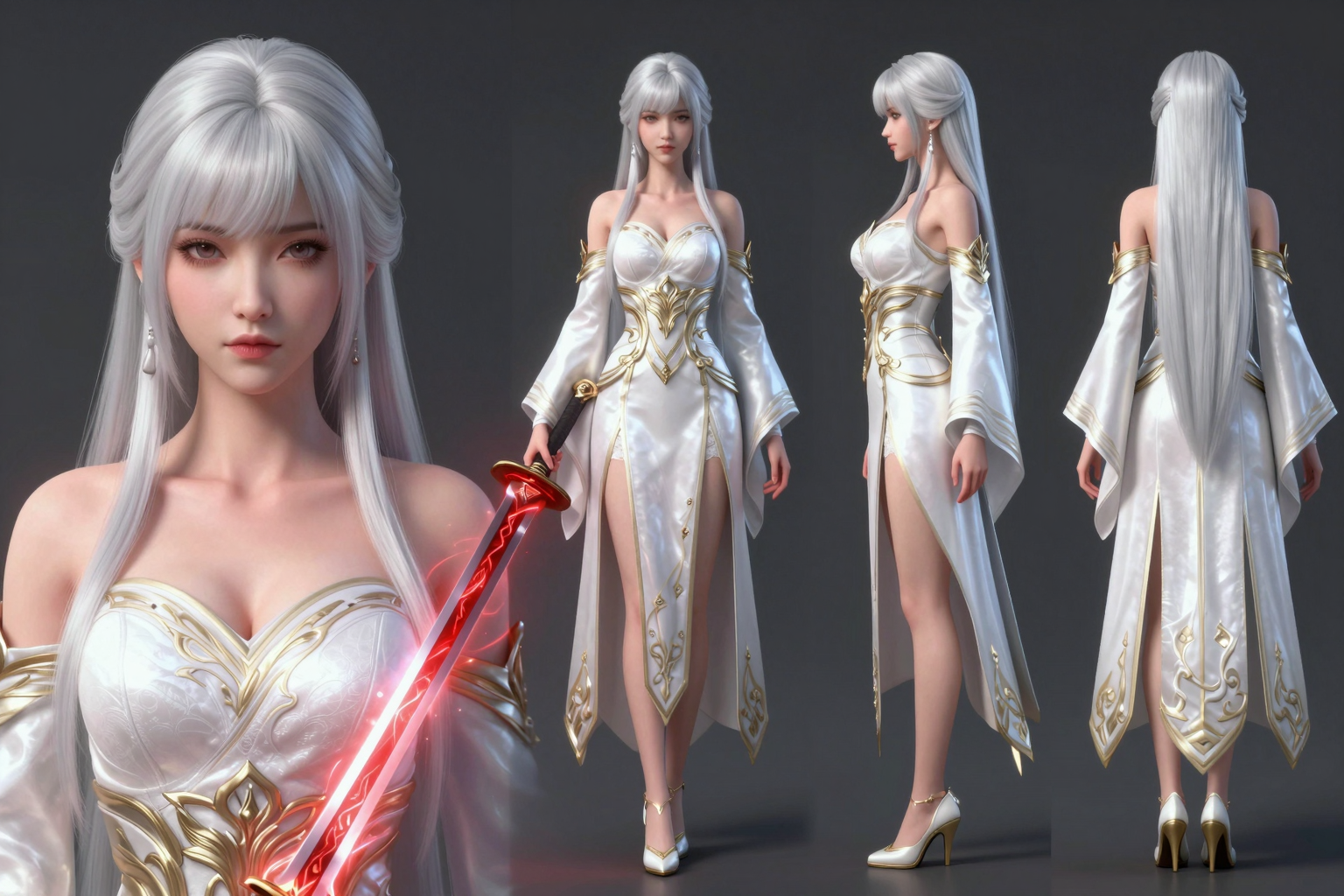
    white_warrior_66776_00001_.png

    看看有沒有辦法突破7900xtx的極限,目前看來相比較N卡的24G還是差一大截啊。


  • 洋垃圾的回乡路 —— 2x3090 + X99 + 2x2680v4
    K koala
    装备秀 x99 rtx3090

    @Ray-Wang 说:

    最后发现是因为显示器接的是HDMI,主板上有个3针跳帽负责切换显示模式。插在AB上面是VGA,把它给换到BC上面屏幕就成功亮了

    今天主板到,我也要用HDMI,谢谢提醒,这个问题可能会困扰很多人。


  • 【Minimax H3】卡通儿童ABC儿歌
    K koala
    AI音视频画图 minimax 视频生成 comfyui

    @Junjie-Heng 说:

    MiniMax H3 怎么让角色在多段视频里更一致,求经验

    如果你一直这种静止的话,你设置首尾帧都用同一张参考图,出来的基本就不会变,因为每次都要归位


  • 你们说说这是在干啥,把人家华南金牌都干缺货了
    K koala
    AI硬件 x99

    根据AI给我的建议,我是作为服务器存在的,要兼顾多线程

    列表主板型号 (档次)	搭配 CPU	内存类型	核心/线程	基础/睿频	价格	核心评语
    X99-QD4 (中端大板)	E5-2680 v4	DDR4	14核/28线程	2.4 / 3.3 GHz	446.5元	综合素质最高,供电和扩展性最好
    X99-QD4 (中端大板)	E5-2673 v4	DDR4	20核/40线程	2.3 / 3.3 GHz	476元	核心数最多,多开渲染最强
    X99-CD4 (中端大板)	E5-2682 v4	DDR4	16核/32线程	2.5 / 3.0 GHz	410元	性价比极高,比 2680v4 多 2 个核
    X99-CD4 (中端大板)	E5-2680 v4	DDR4	14核/28线程	2.4 / 3.3 GHz	420元	经典平衡配置,但被上面的 2682v4 背刺
    X99-4MF PLUS (小板)	E5-2667 v4	DDR4	8核/16线程	3.2 / 3.6 GHz	490元	主频最高(单核强),但主板太小
    X99-4MF PLUS (小板)	E5-2680 v4	DDR4	14核/28线程	2.4 / 3.3 GHz	390元	全场最便宜,但小板带不动双大显卡
    X99-4MT PLUS (缩水板)	E5-2673 v3	DDR4	12核/24线程	2.4 / 3.2 GHz	416元	没必要选老 V3 架构
    X99-4MT PLUS (缩水板)	E5-2678 v3	DDR4	12核/24线程	2.5 / 3.3 GHz	475元	没必要选老 V3 架构
    X99-4MT PLUS (缩水板)	E5-2666 v3	DDR4	10核/20线程	2.9 / 3.5 GHz	515元	价格虚高,完全不推荐
    X99-CD3 (D3专用板)	E5-2686 v4	DDR3	18核/36线程	2.3 / 3.0 GHz	520元	直接淘汰(只能用慢速 DDR3)
    X99-CD3 (D3专用板)	E5-2666 v3	DDR3	10核/20线程	2.9 / 3.5 GHz	545元	直接淘汰(只能用慢速 DDR3)
    X99-CD3 (D3专用板)	E5-2673 v3	DDR3	12核/24线程	2.4 / 3.2 GHz	446元	直接淘汰(只能用慢速 DDR3)

  • 新手求助|X99-8D3双路+双7900XTX Z30机箱放不下双卡,外置显卡方案求推荐
    K koala
    AI硬件 x99 7900xtx 多卡部署

    我知道了,你这个双CPU把内存条的位置占用了,导致内存条又把显卡的位置占用了,另外那个大佬是单CPU,不一样


  • 【A卡/ROCm】7900 XTX 跑 voxcpm 避坑指南
    K koala
    AI音视频画图 7900xtx amd rocm

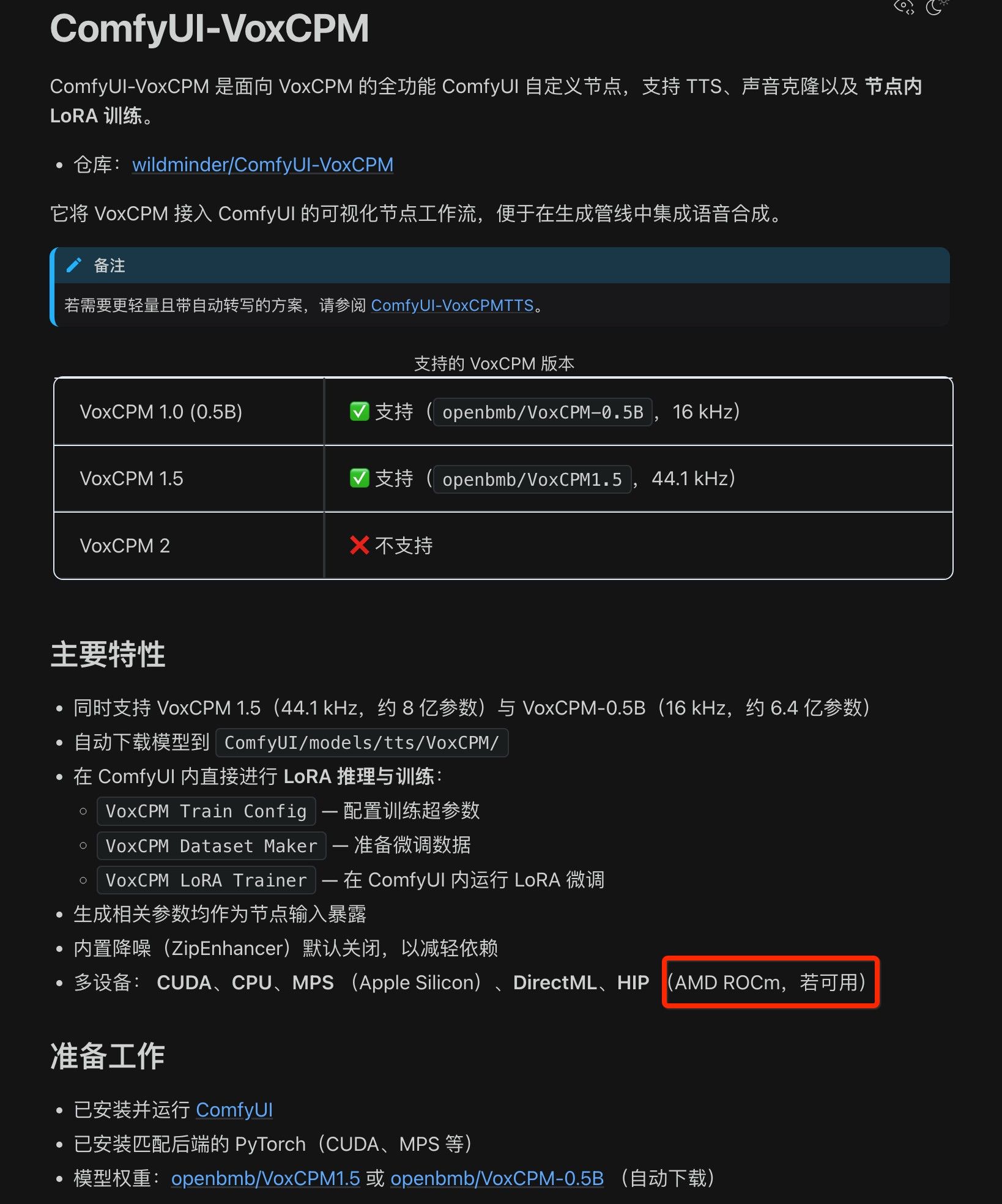
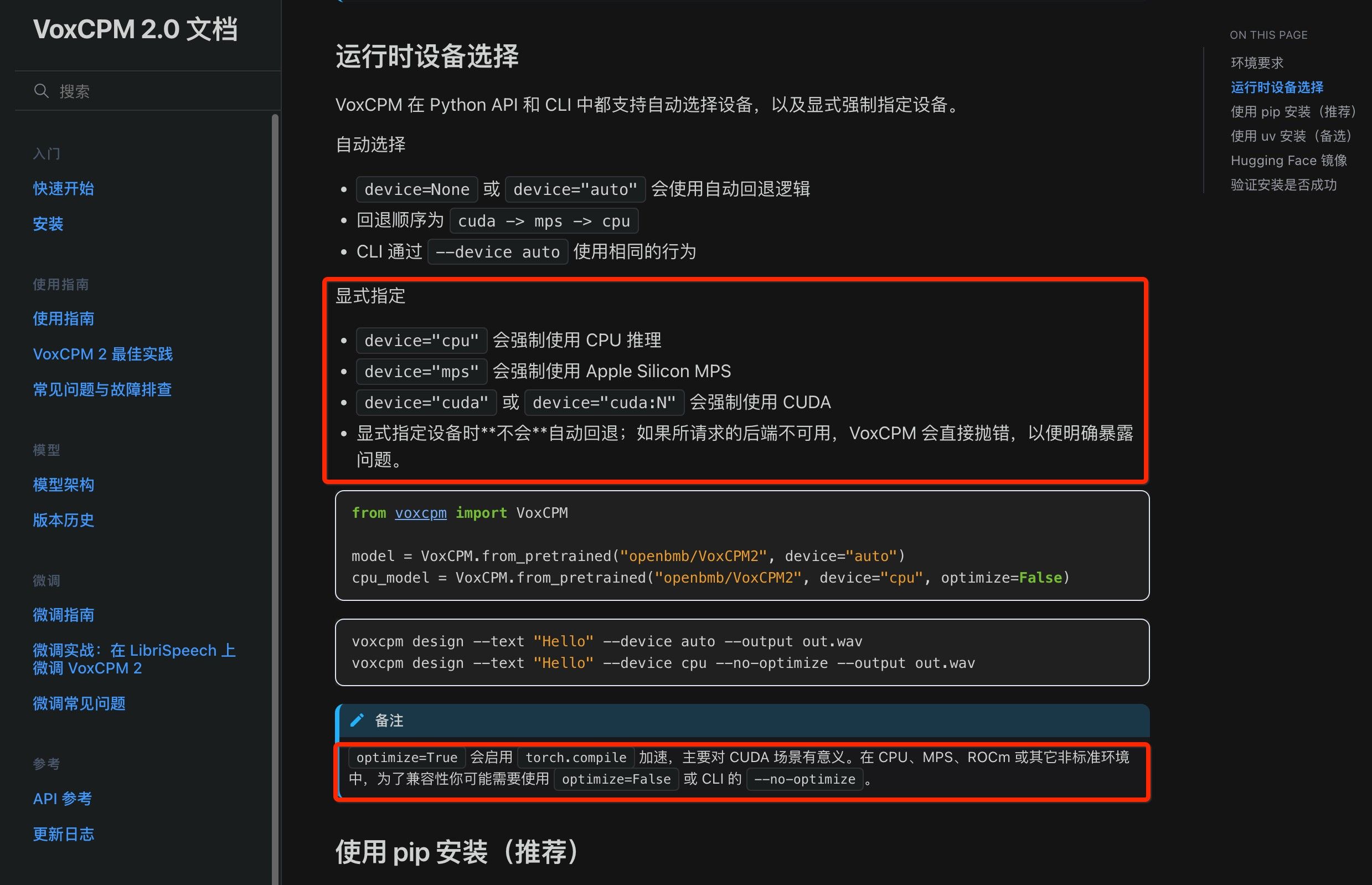
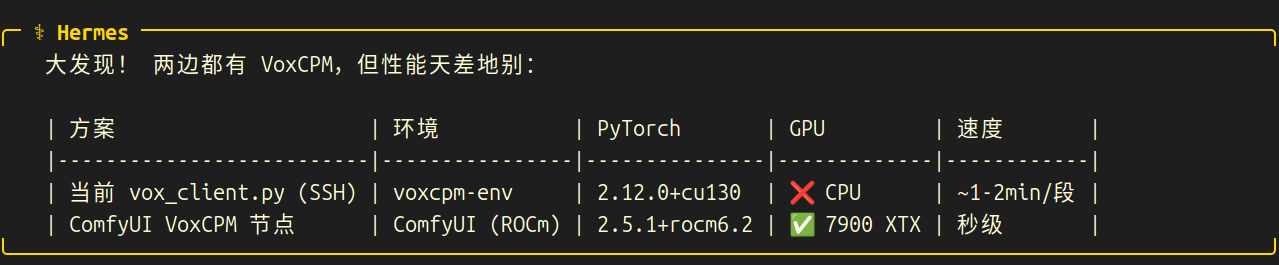
    99997084-d958-4165-8da0-6fd80c63c734-image.jpeg be32a1da-d09b-41dc-a4c5-a98eb13eca41-image.jpeg

    先看版本区别,再看实测结论

    mark-shot-20260619-224815.png

    好消息,
    ╭─ ⚕ Hermes ──────────────────────────────────────────────────────────────────────────────────────────────╮
        ✅ GPU 加速 VoxCPM 确认成功!
        
        ComfyUI 环境的 PyTorch (ROCm) 成功加载 VoxCPM2 到 7900 XTX GPU(bfloat16)。
    ╰─────────────────────────────────────────────────────────────────────────────────────────────────────────╯


    直接调用ComfyUI-VoxCPM 功能可以实现GPU加速,已经切换。

    ╭─ ⚕ Hermes ──────────────────────────────────────────────────────────────────────────────────────────────╮
        GPU VoxCPM 结果 🚀
        
        | 操作       | CPU (SSH)       | GPU (ROCm)   | 提速 |
        |------------|-----------------|--------------|------|
        | 模型加载   | ~85s (首次 JIT) | ~8.5s (后续) | 10x  |
        | 短文本生成 | ~30s            | ~8.5s        | 3.5x |
        | 长文本生成 | ~90s            | ~15s         | 6x   |
        
        模型已缓存,后续 pipeline 调用只需每次 ~8-15 秒 GPU 生成。
    ╰─────────────────────────────────────────────────────────────────────────────────────────────────────────╯
    

    是我一开始就没有注意环境问题,我最开始安装的版本是默认的,
    PyTorch2.12+cu130,这个版本是找cuda,没有就会用CPU;

    正确的做法是新建虚拟环境的时候,要告诉AI,直接装 PyTorch2.5.1+ ROCm6.2 的模式,这个模式才会认7900TXT的GPU ,我一开始也觉得不对,但是不知道哪里不对,锤哥指点之后终于发现了问题,改正了效率大大提升。

  • 登录

  • 登录或注册以进行搜索。
  • 第一个帖子
    最后一个帖子
0
  • 版块
  • 最新
  • 标签
  • 热门
  • 用户
  • 群组