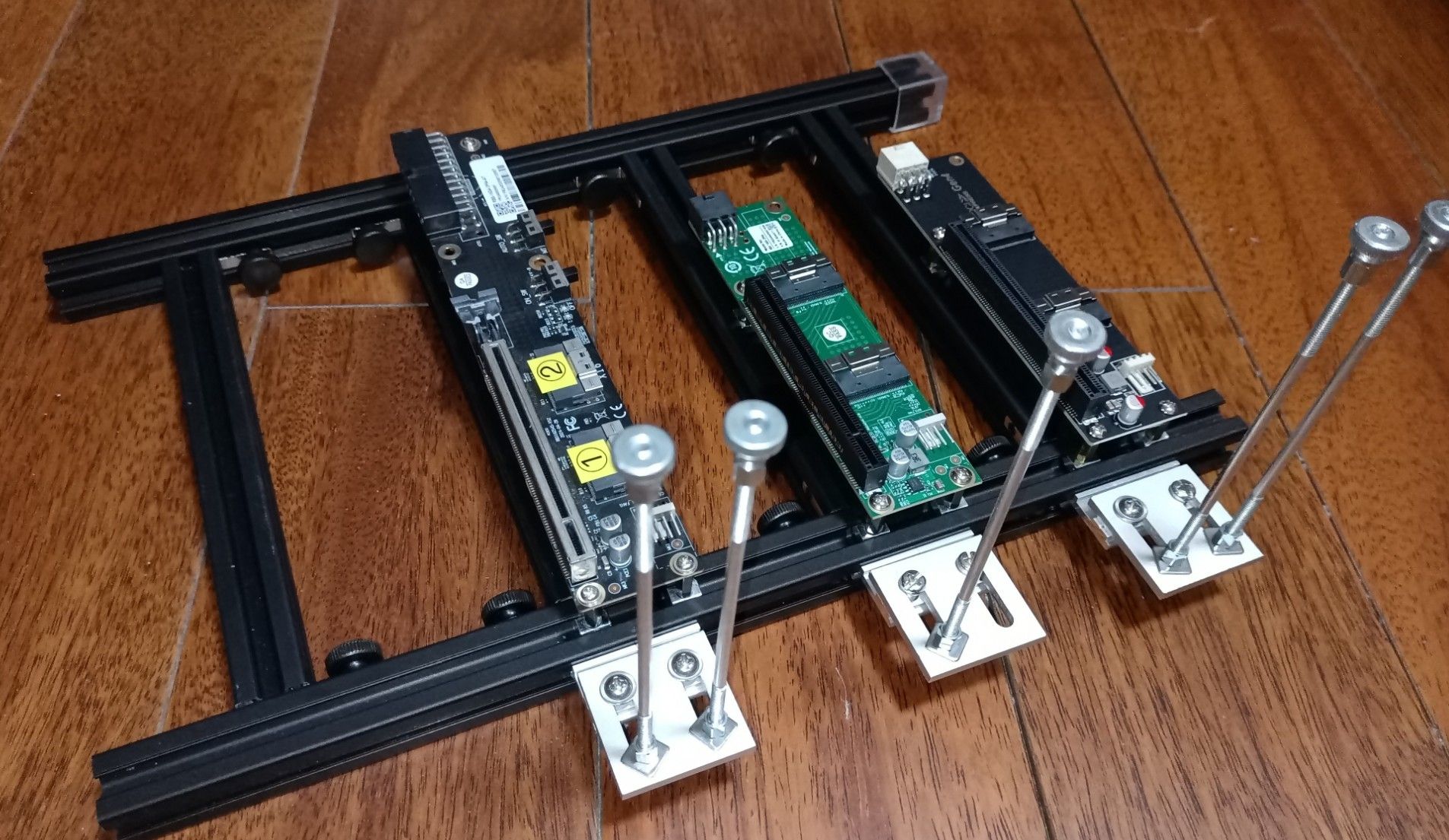
搞了个开放式机架, 折腾了好一阵, 勉强装好了.
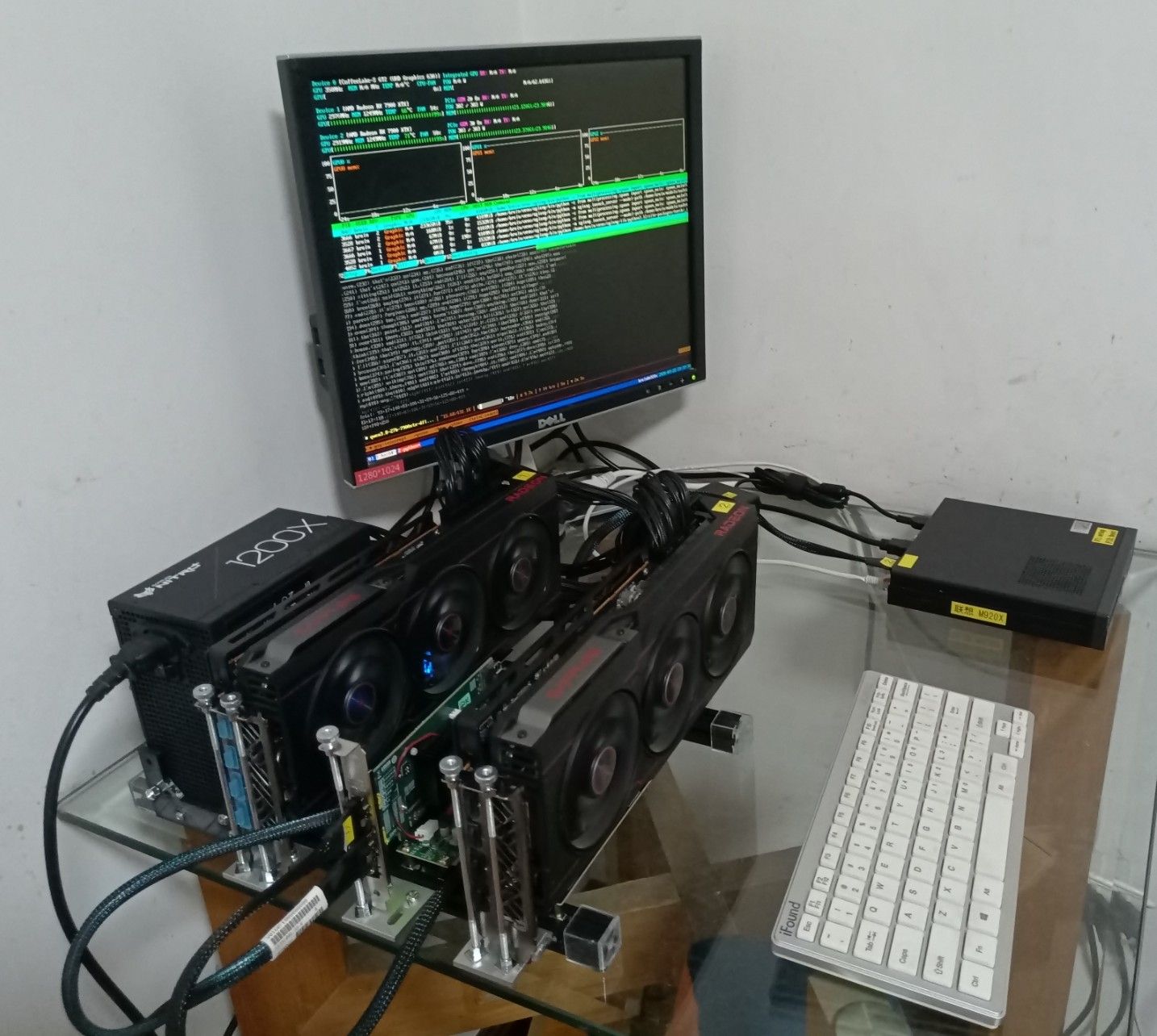
pci switch 卡由于散热片太高, 小主机盖不上. 所以又弄了个转接卡, 好在都是便宜货, 值不了多少钱, 就是瞎折腾 
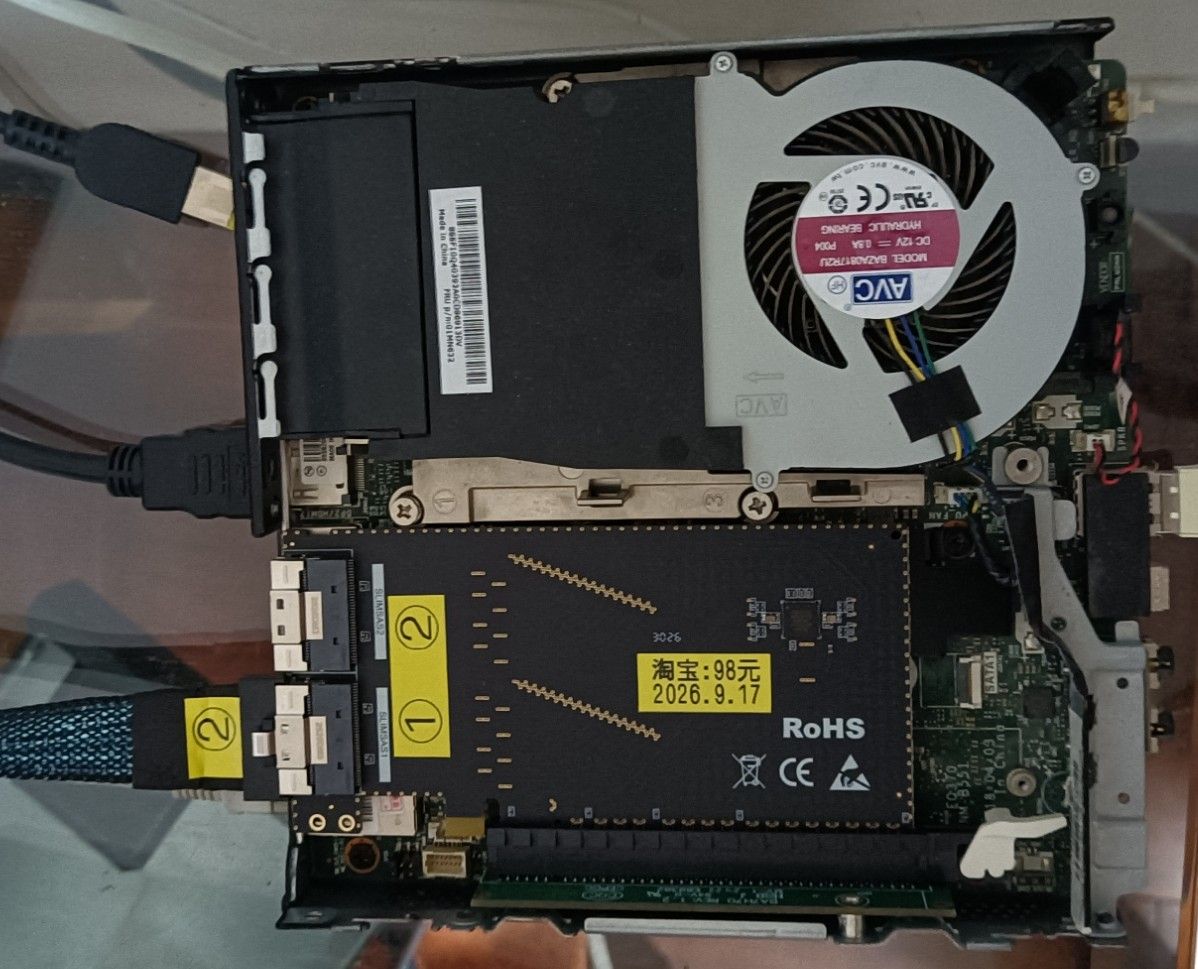
今天还发现那张闲鱼卡, 当功耗超过300w时有一点高频噪音, 不知道什么原理.
搞了个开放式机架, 折腾了好一阵, 勉强装好了.
pci switch 卡由于散热片太高, 小主机盖不上. 所以又弄了个转接卡, 好在都是便宜货, 值不了多少钱, 就是瞎折腾
今天还发现那张闲鱼卡, 当功耗超过300w时有一点高频噪音, 不知道什么原理.
配件凑齐了, 赶紧试一下:
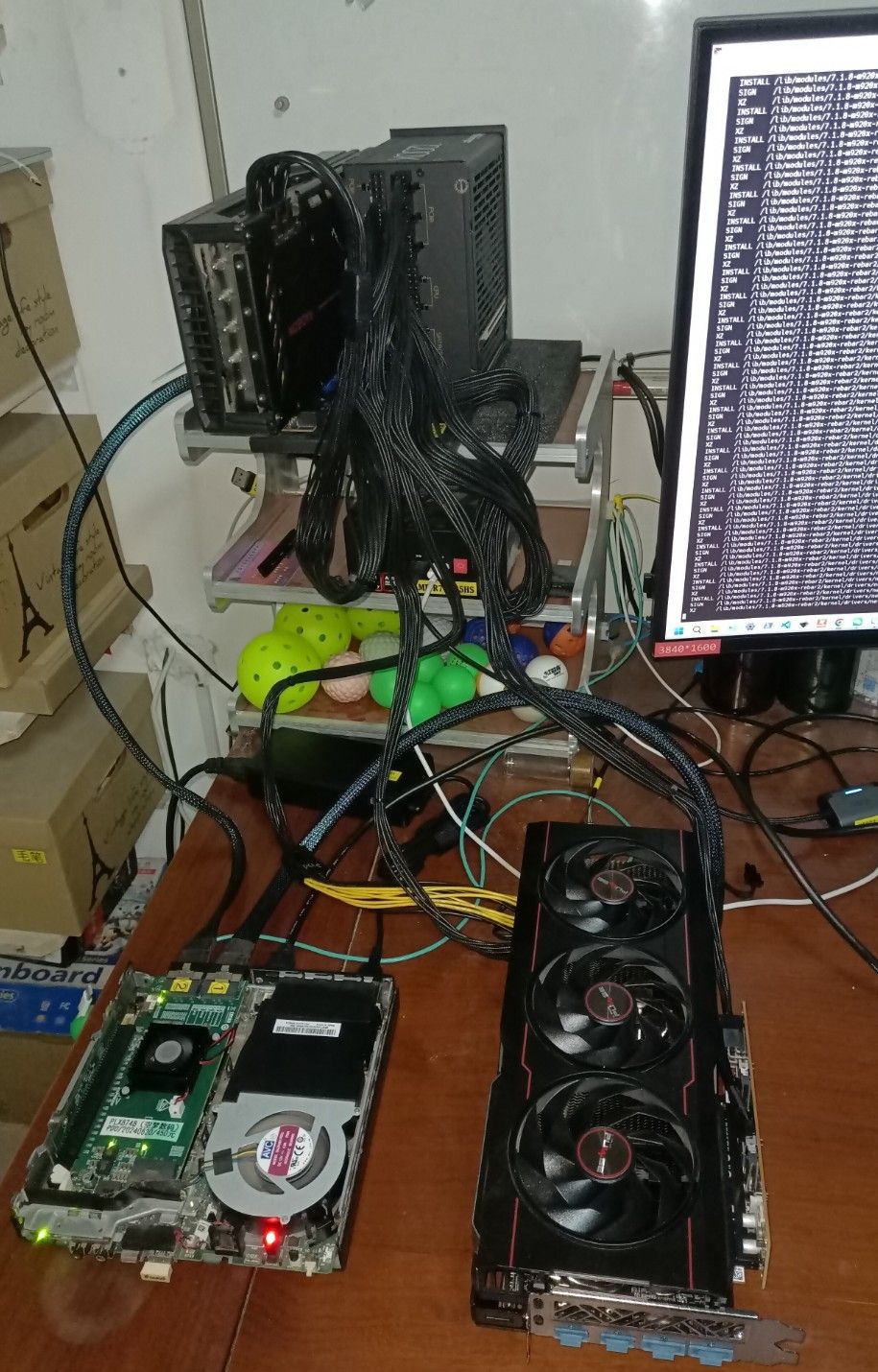
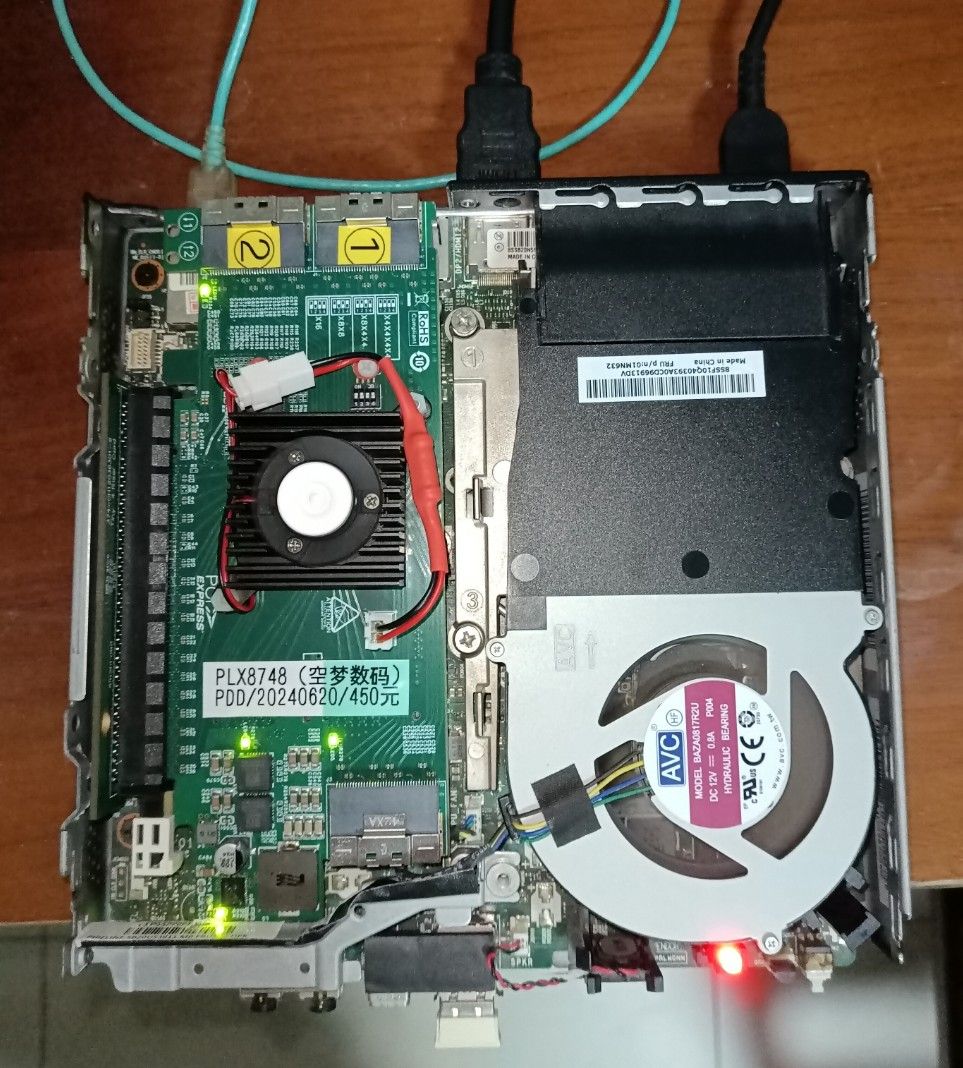
单个1200w的蓝宝石电源; 可以发现两张卡:
bruin@m920x ~ $ lspci -tv
-[0000:00]-+-00.0  Intel Corporation 8th/9th Gen Core 8-core Desktop Processor Host Bridge/DRAM Registers [Coffee Lake S]
           +-01.0-[01-0c]----00.0-[02-0c]--+-08.0-[03-05]----00.0-[04-05]----00.0-[05]--+-00.0  Advanced Micro Devices, Inc. [AMD/ATI] Navi 31 [Radeon RX 7900 XT/7900 XTX/7900 GRE/7900M]
           |                               |                                            \-00.1  Advanced Micro Devices, Inc. [AMD/ATI] Navi 31 HDMI/DP Audio
           |                               +-09.0-[06-08]----00.0-[07-08]----00.0-[08]--+-00.0  Advanced Micro Devices, Inc. [AMD/ATI] Navi 31 [Radeon RX 7900 XT/7900 XTX/7900 GRE/7900M]
           |                               |                                            \-00.1  Advanced Micro Devices, Inc. [AMD/ATI] Navi 31 HDMI/DP Audio
           |                               +-10.0-[09]--
           |                               +-11.0-[0a]--
           |                               +-12.0-[0b]--
           |                               \-13.0-[0c]--
           +-02.0  Intel Corporation CoffeeLake-S GT2 [UHD Graphics 630]
           +-08.0  Intel Corporation Xeon E3-1200 v5/v6 / E3-1500 v5 / 6th/7th/8th Gen Core Processor Gaussian Mixture Model
           +-14.0  Intel Corporation Cannon Lake PCH USB 3.1 xHCI Host Controller
           +-14.2  Intel Corporation Cannon Lake PCH Shared SRAM
           +-16.0  Intel Corporation Cannon Lake PCH HECI Controller
           +-16.3  Intel Corporation Cannon Lake PCH Active Management Technology - SOL
           +-1b.0-[0d]----00.0  Sandisk Corp SanDisk Ultra 3D / WD Blue SN570 NVMe SSD (DRAM-less)
           +-1b.4-[0e]----00.0  Samsung Electronics Co Ltd NVMe SSD Controller SM981/PM981/PM983
           +-1f.0  Intel Corporation Q370 Chipset LPC/eSPI Controller
           +-1f.3  Intel Corporation Cannon Lake PCH cAVS
           +-1f.4  Intel Corporation Cannon Lake PCH SMBus Controller
           +-1f.5  Intel Corporation Cannon Lake PCH SPI Controller
           \-1f.6  Intel Corporation Ethernet Connection (7) I219-LM
不过 rebar不好使了. 单张卡可以, 两张卡就不行了. 喊 gpt-5.6-sol 在看...
机架打算就弄那种2020铝型材的. 总之, 垃圾佬的各种折腾
添加一点自己对背景知识的理解: 系统启动是先 进 BIOS 然后 到 OS. 以 linux kernel 为例, BIOS 向 kernel 汇报有哪些硬件有两个机制, 一个是 ACPI (一般是UEFI BIOS), 一个是 DTS (一般是 u-boot). 一般的 PC 机都是 UEFI/ACPI, 因为Windows只支持 UEFI, 不支持 DTS; 而各种 SBC (树莓派, arm软路由等) 就是 u-boot/dts, 针对特定硬件,不需要投入财力/人力开发或购买UEFI BIOS. ACPI和DTS在PCIe总线设备扫描的区别是, ACPI下是BIOS扫好了PCIe总线下面的所有设备(并配置了BAR空间)以后告诉 OS, OS直接用(加载驱动等); DTS是仅仅配置PCIe 根(RP)的信息, 让 OS 自己去扫描 PCIe 总线并配置各个设备 (EP). 这解释了为什么 Above 4G Decoding 和 Resizable Bar 需要 UEFI BIOS 的支持. btw, Resizable Bar 同时也需要EP设备(GPU)的支持, 不过这一般都是有的.
回复: [下单 7900xtx](开始折腾 llama.cpp)
周末简单试了一下. 主要目标达成, 就是能够在 vram 中完整跑 qwen3.6-27b 且能够使用 256k 上下文 和 multimodal 功能.
unsloth/Qwen3.6-27B-MTP-GGUF/Qwen3.6-27B-Q4_K_M.gguf + mmproj-BF16.ggufggml-org/llama.cpp (upstream master, latest)cmake -S . -B build-vulkan \
-DGGML_VULKAN=ON \
-DCMAKE_BUILD_TYPE=Release \
-DBUILD_SHARED_LIBS=ON \
-DCMAKE_C_FLAGS="-fPIC -mcmodel=large -mavx2 -mfma -mf16c" \
-DCMAKE_CXX_FLAGS="-fPIC -mcmodel=large -mavx2 -mfma -mf16c"
bruin@lmde7:~/github/llama.cpp$ cat run-qwen3-vulkan.sh
#!/bin/bash

export LD_LIBRARY_PATH=$(pwd)/build-vulkan/src:$(pwd)/build-vulkan/ggml/src:$LD_LIBRARY_PATH ;
./build-vulkan/bin/llama-server \
  -m /opt/gguf-models/unsloth/Qwen3.6-27B-MTP-GGUF/Qwen3.6-27B-Q4_K_M.gguf \
  --mmproj /opt/gguf-models/unsloth/Qwen3.6-27B-MTP-GGUF/mmproj-BF16.gguf \
  --spec-type draft-mtp \
  -c 262144 \
  -np 1 \
  -fa on \
  -ngl 999 \
  -ctk q4_0 -ctv q4_0 \
  --cont-batching --jinja --mlock \
  --host 0.0.0.0 --port 8000
可忽略ik_llama.cpp这一列, upstream 这一列好像也不太准, 因为从 nvtop 看 vram 的 headroom 已经很小了, 但确实全部都进了 vram.
| Component | ik_llama.cpp (IQ4_KS) | Upstream (Q4_K_M + MTP) |
|---|---|---|
| Model weights | 13,003 MiB | 15,850 MiB |
| MTP heads (1 extra layer) | — | ~260 MiB |
| mmproj (multimodal projector) | — | 1,161 MiB |
| KV cache q4_0 256K | 4,758 MiB | 4,758 MiB |
| Compute buffer | 505 MiB | ~505 MiB |
| Total GPU | ~18,266 MiB | ~22,534 MiB |
| Available | 23,984 MiB | 23,984 MiB |
| Margin | 5,718 MiB | 1,450 MiB  |
llama-benchy的初步结果:| Depth | pp2048 (tok/s) | tg128 (tok/s) | ttfr |
|---|---|---|---|
| 0 (empty) | 541 | 76  |
3.8s |
| 65,536 | 353 | 45 | 191s |
| 131,072 | 257 | 31 | 519s |
| 250,000 | 170 | 26 | 1480s (~25 min) |
| 262,144 | N/A (corpus too small) | — | — |
| State | Power | Per day (24h) | Per month (30d) | Per year (365d) |
|---|---|---|---|---|
| Idle | ~20W | 0.48 kWh = 0.24 RMB | 14.4 kWh = 7.2 RMB | 175.2 kWh = 87.6 RMB |
| Full load (100%) | ~400W | 9.6 kWh = 4.8 RMB | 288 kWh = 144 RMB | 3504 kWh = 1,752 RMB |
| Typical use (3h full + 21h idle) | ~67W avg | 1.62 kWh = 0.81 RMB | 48.6 kWh = 24.3 RMB | 591.3 kWh = 295.7 RMB |
@566656661 问了下 whichllm, 它也推荐 qwen3.6-27b, 这个模型真能打呀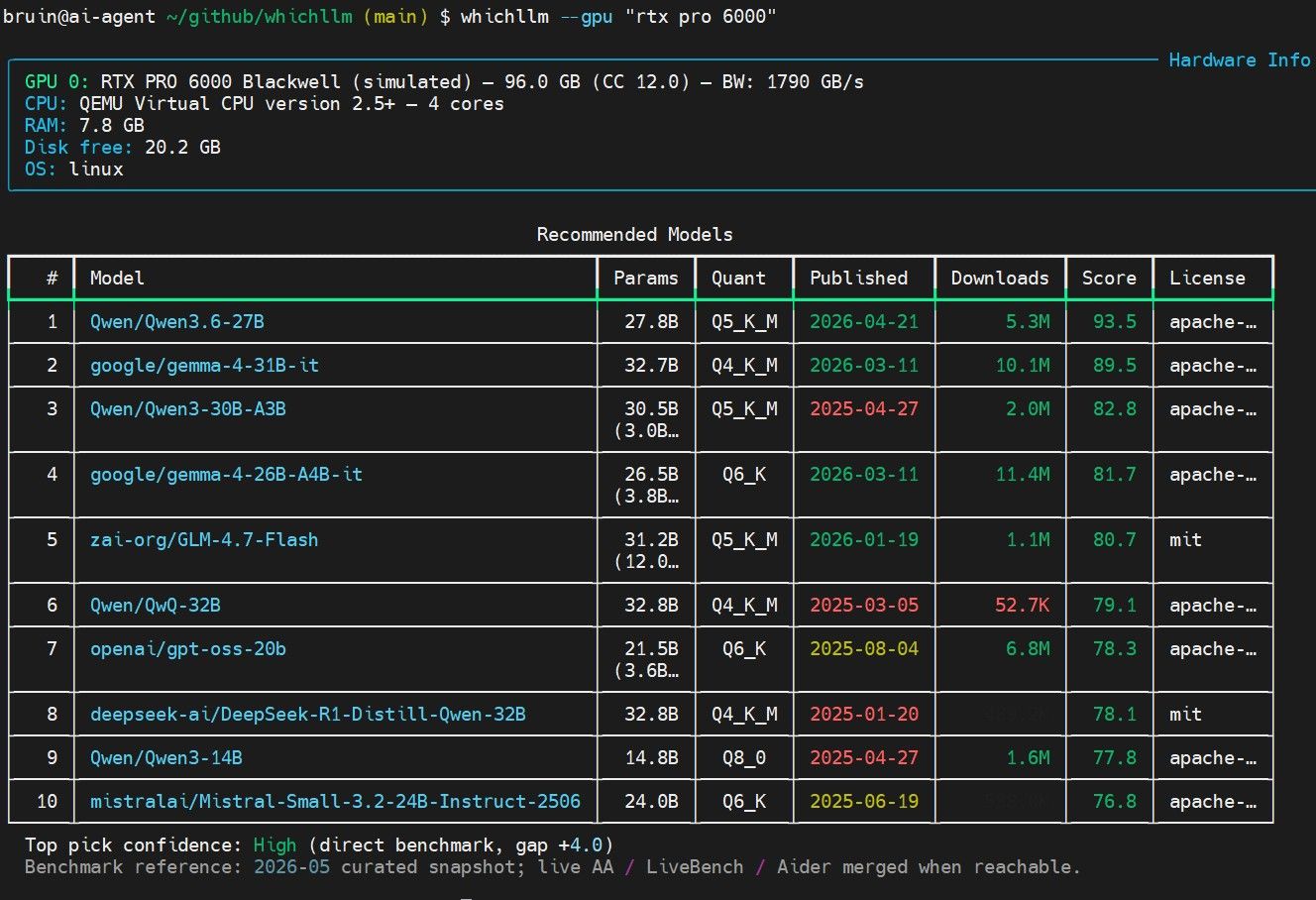
论坛的帖子 双卡7900xtx-vllm-qwen3.8-爽玩agent-pp1600-tg-160-附-mtp-7900xtx全攻略 又勾起了我再买一张 7900xtx 的小心思...但是主机选什么, 我不想攒机, 想买hp的工作站准系统. 和 hy3 讨论了半天, 它给的方案, 大家看看. 我现在还没有决定要不要搞一搞.
目标:用一台支持 DDR4 ECC 的 HP 准系统工作站,带动 2 张蓝宝石 RX 7900 XTX 白金 OC(各 3×8-pin)。
本文汇总了机型选择、电源供电方案、内存迁移、单/双路取舍、PCIe 槽位、体积对比与上机步骤。
| 项目 | 决定 |
|---|---|
| 机型 | HP Z8 G4 准系统(配 1450W 电源,中国 230V 市电下实得 1700W) |
| 显卡 | 2× 蓝宝石 RX 7900 XTX 白金 OC(3×8-pin,无 RGB,无双 BIOS 开关) |
| 内存 | 沿用 P500 的 4×32GB 三星 DDR4-2133 RDIMM(M393A4K40BB1-CRC),共 128GB |
| CPU | 先 单路,推荐 Xeon Gold 6248(二代 20C/40T);详见第 7 节 |
| 供电补足 | 4 根原生线 + 2 根 18AWG 优质 1分2 转接线 + 分路接线 |
| 体积 | Z8 G4 ≈ 53 L,比 P500(36 L)大约一半,更宽更深也更重 |
均支持 DDR4 ECC,但只有 Z8 G4 的电源瓦数与接口够双 7900 XTX:
| 机型 | 内存 | 原生显卡供电线 | 电源选项 | 带双 7900 XTX |
|---|---|---|---|---|
| HP Z8 G4 | DDR4 ECC RDIMM/LRDIMM,24 槽,最高 3TB | 4× 6+2-pin | 1125W / 1450W(230V=1700W) | 瓦数够,差 2 个口用转接补 |
| HP Z6 G4 | DDR4 ECC,12 槽 | 仅 2× 6/8-pin | 仅 700W / 1000W |  瓦数+接口都不够 瓦数+接口都不够 |
| HP Z4 G4 | DDR4 ECC,8 槽 | 1000W 版 4× 6+2-pin | 465W / 750W / 1000W |  ️ 瓦数偏紧,接口同样差 2 个 ️ 瓦数偏紧,接口同样差 2 个 |
| HP Z840(老) | DDR4 ECC,16 槽 | 4× 8-pin | 最高 1125W | ️ 机型较老 |
结论:Z6 G4 出局;唯一干净解是 Z8 G4 1450W。HP 全系工作站电源都不提供 6 个原生 8-pin,这是品牌准系统的统一上限。
| 约束 | 评估 | 结论 |
|---|---|---|
| 总瓦数 | 2×355W≈710W + 单路 CPU(~105–165W)+ 平台(~150W)≈ 1000–1100W;1450W(230V 下 1700W)有余量 | 够 |
| 接口数量 | 原生只有 4 个 8-pin,双卡要 6 个 | 差 2 个,需转接 |
| 多路预算 | 电源多路设计,4 根显卡线各走独立 +12V 路,每路 18A≈216W,4 路合计≈864W > 710W | 够,但必须分路接线 |
注意:Z8 G4 的「1700W」是 1450W 单元在 ≥200V 输入下的额定值(中国 230V 即此情况),是同一颗电源,不是另一颗更大的电源。
Z8 G4 1450W ── 4 根原生 6+2-pin(每根 = 独立 +12V 路,上限≈216W)
├─ 线A ─[1分2]─┬─ 卡1 的 8-pin #1
│              └─ 卡2 的 8-pin #1     (线A 负载≈186W < 216W ✅)
├─ 线B ─[1分2]─┬─ 卡1 的 8-pin #2
│              └─ 卡2 的 8-pin #2     (线B 负载≈186W < 216W ✅)
├─ 线C ──────── 卡1 的 8-pin #3       (线C 负载≈93W ✅)
└─ 线D ──────── 卡2 的 8-pin #3       (线D 负载≈93W ✅)
负载测算:7900 XTX 整板 ~355W,PCIe 槽已供 75W,剩 ~280W 由 3 个 8-pin 分担 ≈ 每口 93W。
️ 买准系统务必确认带供电线:部分出厂配低功耗卡(如 Quadro P620)的机器可能根本没预装 GPU 供电线(harness 未装)。下单前让卖家确认「带 4 根 6+2-pin 显卡供电线 / GPU power harness 已装」。)P500 上 lshw 实测 Part Number = 三星 M393A4K40BB1-CRC:
M393A 系列 = DDR4 RDIMM(Registered) → Z8 G4 原生支持,可以直接搬。sudo lshw -C memory # 看 product/part-no,如 M393A4K40BB1-CRC
sudo dmidecode --type 17 | grep -E "Size:|Type:|Type Detail:|Part Number:"
Synchronous Registered = RDIMM ;Load-Reduced = LRDIMM ;Unbuffered = UDIMM (Z8 G4 不认)。decode-dimms 在 P500 上读不到 SPD(Intel ME 锁了 I²C,显示 UU),属正常,不影响结论。Unsupported memory module 警告,通常仍可继续启动。| 单路(1 CPU) | 双路(2 CPU,对称 2+2) | |
|---|---|---|
| 内存通道总数 | 6 | 12 |
| 4 条占用的活跃通道 | 4 | 4(每 CPU 2) |
| 实际内存带宽 | 4 通道 | 4 通道(一样) |
| 128GB 归属 | 统一 1 个 NUMA 节点 | 劈成 2 节点,每 CPU 仅 64GB |
| 双卡亲和性 | GPU 都挂这颗 CPU,零跨节点 | 某 GPU 可能跨 UPI 访问另一 CPU 内存 |
| 额外成本 | 只买 1 颗 CPU | 第 2 颗 CPU + 散热 + 更高功耗 |
结论:只有 4 条内存时,单路更优——内存集中华中、零 NUMA、双卡亲和完美、省钱。双路留给「内存加到 8–12 条以上 / 要更多核心 / 上第 3 张卡」时。具体选哪颗 CPU(含价位)见第 7 节。
️ P500 里的 Xeon E5 v3(LGA2011-3)无法用于 Z8 G4 —— 接口不兼容,CPU 必须另买。| 代际 | 接口 | 代表系列 | 最高规格 |
|---|---|---|---|
| 一代 Skylake-SP | LGA3647 | Bronze 31xx / Silver 41xx / Gold 51xx·61xx / Platinum 81xx / Xeon W-21xx | 28C/CPU(Platinum 8180) |
| 二代 Cascade Lake-SP | LGA3647 | Bronze 32xx / Silver 42xx / Gold 52xx·62xx / Platinum 82xx / Xeon W-22xx | 28C/CPU(Platinum 8280) |
你的 2×7900 XTX 是绝对主力(ROCm / llama.cpp / ollama / vLLM),CPU 只负责:
结论:主频对 LLM 推理边际收益很低(瓶颈在 GPU),核心数、内存带宽、双路扩展性才是关键。盲目追高频 Platinum 是浪费钱。
| 型号 | 核心/线程 | 代际 | TDP | 二手大致区间* | 点评 |
|---|---|---|---|---|---|
| Xeon Gold 6248 | 20C/40T, 2.5GHz | 二代 | 150W | ¥600–1200/颗 | 性价比主力:单路够强,可双路扩展变 40C/80T |
| Xeon Gold 5220 | 18C/36T, 2.2GHz | 二代 | 125W | ¥400–800 | 多核折中之选 |
| Xeon Silver 4214 | 12C/24T, 2.2GHz | 二代 | 85W | ¥150–400 | 最省钱的入门单路 |
| Xeon W-2295 | 18C/36T, 3.0GHz | 二代(W单路) | 165W | ¥1000–2000 | 单路高主频,不能双路,适合确定不扩双路 |
| Platinum 8280 |
28C/56T | 二代 | 205W | ¥2000–4000+ | 不推荐:贵,对 LLM 推理收益低 |
* 二手/拆机件估算区间(2024–2025 行情,人民币/颗),受成色、是否带散热、渠道影响波动很大,下单前请按实时行情自查(闲鱼 / 淘宝商家 / eBay)。
先单路上一颗 Xeon Gold 6248(二代):20 核、150W、单路 6 通道 DDR4-2933 内存带宽够用,且它是可双路型号,以后想扩直接加第二颗同款 + 对称内存即变 40C/80T,路线干净。预算紧就 Silver 4214 起步、Gold 5220 折中。
| 槽位 | 单路带宽 | 单路可用? | 用途 |
|---|---|---|---|
| Slot 1 | PCIe 3.0 x4 | |
装 2nd CPU 后升 x8 |
| Slot 2 | PCIe 3.0 x16 | |
插第 1 张 7900 XTX |
| Slot 3 | PCIe 3.0 x16 | 单路不可用 |
仅双路解锁(归 CPU2) |
| Slot 4 | PCIe 3.0 x16 | |
插第 2 张 7900 XTX |
| Slot 5 | PCIe 3.0 x4 | |
易被 Slot 4 的卡遮挡 |
| Slot 6 | PCIe 3.0 x16 | 单路不可用 |
仅双路解锁(归 CPU2) |
| Slot 7 | PCIe 3.0 x4 | |
实际可插(NVMe/网卡) |
| 维度 | HP Z8 G4 | Lenovo P500 | 谁大 |
|---|---|---|---|
| 高度 | 444.5 mm | 440 mm | 几乎一样 |
| 宽度 | 215.9 mm | 175 mm | Z8 G4 宽 ~41mm |
| 深度 | 551.2 mm | 470 mm | Z8 G4 深 ~81mm |
| 体积 | ≈ 53 L | 36 L | Z8 G4 大 ~47% |
Z8 G4 比 P500 大一圈,更宽更深也更重(整机 22–32kg)。放机器前确认桌面/机柜空间与承重。
Advanced → Built-in Device Options → Increase Idle Fan Speed (%),用来抬高风扇的基线最低转速(对被动散热卡如 P100 有用)。不能设最高转速,也不能自定义 RPM 曲线。lm_sensors 能读到温度,但 fancontrol / pwmconfig 往往看不到可用的 PWM 风扇控制接口(社区实测「除 GPU 风扇外看不到风扇控制」)。即使用户态工具也难强行控速。Increase Idle Fan Speed 适当调高,让机箱风更积极。rocm-smi 看 GPU 状态,比折腾 Z8 G4 的 BMC 省事。lshw / dmidecode 实测:三星 M393A4K40BB1-CRC = RDIMMHermes 支持任意 OpenAI 兼容 API 端点。以下通过交互式命令添加本机 llama-server:
$ hermes model

  Current model:    deepseek-v4-flash
  Active provider:  DeepSeek


Custom OpenAI-compatible endpoint configuration:

API base URL [e.g. https://api.example.com/v1]: http://192.168.5.84:8000/v1
API key [optional]:
Verified endpoint via http://192.168.5.84:8000/v1/models (1 model(s) visible)

Select API compatibility mode:
  1. Auto-detect [current]
  2. Chat Completions
  3. Responses / Codex
  4. Anthropic Messages
Choice [1-4, Enter to keep current/detected]:
  API mode: auto-detect
  Detected model: ./models/qwen3.6/Qwen3.6-27B-GGUF-4.262bpw-imatrix.gguf
  Use this model? [Y/n]:
Context length in tokens [leave blank for auto-detect]: 65536
Display name [192.168.5.84:8000]:
Default model set to: ./models/qwen3.6/Qwen3.6-27B-GGUF-4.262bpw-imatrix.gguf (via http://192.168.5.84:8000/v1)
  💾 Saved to custom providers as "192.168.5.84:8000" (edit in config.yaml)
配置要点:
http://<llama-server IP>:8000/v1,注意路径必须以 /v1 结尾-c 参数一致)--jinja:否则 Hermes 发来的 tools 参数会被忽略,工具调用功能失效Hermes 默认会在上下文占用达到阈值后自动压缩历史消息,避免超 context 窗口。以下是 Hermes 查询当前配置的对话:
────────────────────────────────────────
● the context window compact/compression
  threshold for the current model you are using
────────────────────────────────────────

╭─ ⚕ Hermes ───────────────────────────────────────────╮
    Here's what's configured for your session:

    compression:
      enabled: true
      threshold: 0.8
      target_ratio: 0.2
      protect_last_n: 20
      hygiene_hard_message_limit: 400

    How it works:
    - threshold: 0.8 — 当上下文占用达到 80% 时触发压缩
    - target_ratio: 0.2 — 压缩后上下文裁剪至原大小的 ~20%
    - protect_last_n: 20 — 保护最近 20 条消息不被压缩
    - hygiene_hard_message_limit: 400 — 消息数达 400
      条时强制重置,防止上下文退化
╰──────────────────────────────────────────────────────╯
对应 ~/.hermes/config.yaml:
compression:
  enabled: true
  threshold: 0.8
  target_ratio: 0.2
  protect_last_n: 20
  hygiene_hard_message_limit: 400
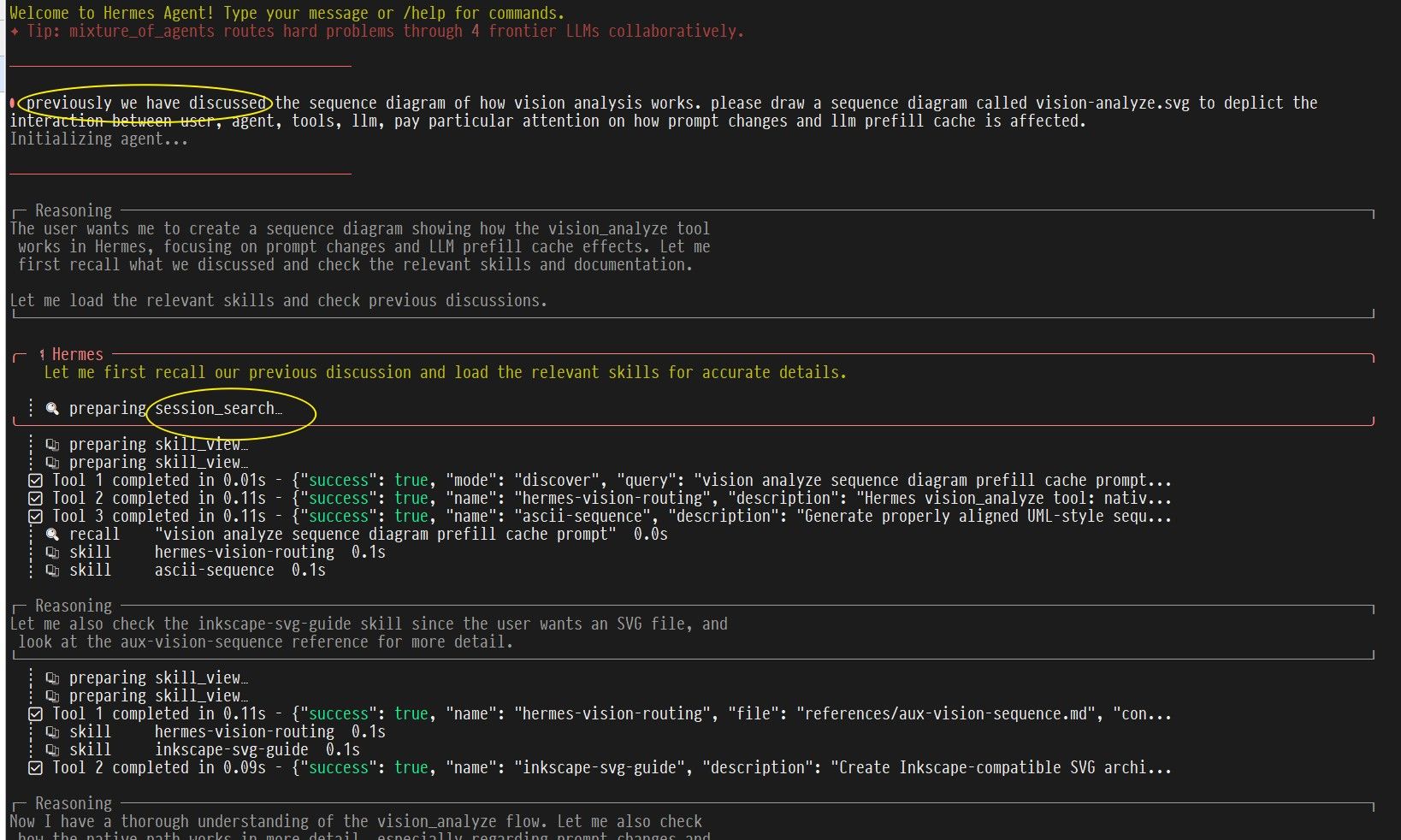
辅助模型是 Hermes 专用于后台任务(上下文压缩、标题生成、视觉分析、session search)的独立模型,
不占用主模型算力。默认 auto 会回退到主模型(Qwen3.6-27B),对 27B 来说浪费且慢。
以下是将 aux 改为 DeepSeek 云端模型的对话:
────────────────────────────────────────
● ok, i am not aware of the concept of
  "aux model". what the aux model for?
────────────────────────────────────────

╭─ ⚕ Hermes ───────────────────────────────────────────╮
    An auxiliary (aux) model is a separate, usually
    cheaper and faster model that Hermes uses for
    background tasks:

    1. Context compression — 当上下文达 80%,Hermes
       需压缩历史消息。不用主模型做(浪费且慢)
    2. Vision tasks — 图片/浏览器视觉分析
    3. Session search — 搜索和排序过去对话

    Your current setup:
      compression:
        provider: auto
        model: ''

    auto 会尝试找 OPENROUTER_API_KEY 或 GOOGLE_API_KEY,
    没有则回退到主模型 Qwen3.6-27B
╰──────────────────────────────────────────────────────╯

────────────────────────────────────────
● i see. please set the aux model to be
  deepseek-v4-flash
────────────────────────────────────────

╭─ ⚕ Hermes ───────────────────────────────────────────╮
    Done. The auxiliary compression model is now set to:

    auxiliary.compression:
      provider: deepseek
      model: deepseek-v3-flash

    This will take effect the next time compression
    triggers (when your context hits 80%).
╰──────────────────────────────────────────────────────╯
等效指令:
hermes config set auxiliary.compression.provider deepseek
hermes config set auxiliary.compression.model deepseek-v3-flash
配置后上下文压缩和标题生成都走云端 flash 模型(瞬间返回,不阻塞对话),本地 27B 模型专注推理。
以下是 Hermes 接入 Qwen3.6-27B 后的对话,确认模型、agent 和工具链协同正常。
● btw, who are you? the model, the agent (hermes), or the combined?
────────────────────────────────────────

╭─ ⚕ Hermes ─────────────────────────────────────────╮
    I'm the combination of both — but it's worth being
    precise about what each part is:

    The model (Qwen3.6-27B) is just a pattern-matching
    engine. It's a 27-billion-parameter neural network
    that predicts the next token. By itself, it has no
    memory, no tools, and no persistent identity. It
    doesn't know what Hermes is.

    Hermes is the framework — the agent loop, the tools,
    the memory system, the session management, the skills,
    the config. It's the scaffolding that gives the model
    capabilities it wouldn't have on its own. But Hermes
    has no intelligence of its own — it's just code that
    routes prompts and parses responses.

    What you're talking to is the emergent result of
    putting them together: the model running inside Hermes'
    agent loop, with access to tools, persistent memory,
    skills, and session history. The model provides the
    reasoning, Hermes provides the body and long-term memory.

    If I had to put a name to it, I'd say I'm an instance
    of Qwen3.6-27B running as a Hermes agent. The persona,
    the memory of you, the ability to run terminal commands
    and read files — all of that is the combination working
    together. Neither part is enough on its own.
模型准确描述了自身架构(模型 vs agent 的分工),验证了:
--jinja 生效(工具调用模板正确注入)Hermes 对 llama-server 进行自助压测,以下是完整对话:
────────────────────────────────────────
● what is the pp and tg performance of the current model?
────────────────────────────────────────

╭─ ⚕ Hermes ───────────────────────────────────────────╮
    Let me check your model setup and see if I can find
    performance data.
╰──────────────────────────────────────────────────────╯
  ┊ 💻 preparing terminal…
  ┊ 💻 $ grep -A10 'model:' ~/.hermes/config.yaml | head -15
  ┊ 💻 $ curl -s http://192.168.5.84:8000/v1/models ...
  ┊ 💻 $ curl -s http://192.168.5.84:8000/health ...
  ┊ 💻 $ hermes insights --days 1 2>/dev/null
  ┊ 💻 $ curl -s http://192.168.5.84:8000/metrics ...

  # ~500 token prompt, ~200 token generation
  💻 $ curl -s -X POST http://192.168.5.84:8000/v1/chat/completions \
    -H "Content-Type: application/json" \
    -d '{"model":"...","messages":[{"role":"user","content":
    "Explain the concept of quantization in large language
    models..."}],"max_tokens":200,"temperature":0}' \
    | python3 -c "
import sys, json
d = json.load(sys.stdin)
t = d['timings']
u = d['usage']
print(f'Prompt tokens: {u[\"prompt_tokens\"]}')
print(f'Generated tokens: {u[\"completion_tokens\"]}')
print(f'PP (prompt processing): {t[\"prompt_per_second\"]:.1f} tok/s')
print(f'TG (token generation):  {t[\"predicted_per_second\"]:.1f} tok/s')
"

  # ~2000 token prompt
  💻 $ python3 -c "
...
r = subprocess.run(['curl', '-s', '-X', 'POST',
    'http://192.168.5.84:8000/v1/chat/completions', ...])
d = json.loads(r.stdout)
t = d['timings']
print(f'PP (prompt processing): {t[\"prompt_per_second\"]:.1f} tok/s')
print(f'TG (token generation):  {t[\"predicted_per_second\"]:.1f} tok/s')
"

╭─ ⚕ Hermes ───────────────────────────────────────────╮
    Here are the real-world performance numbers for your
    setup:

    Model: Qwen3.6-27B, 4.262 bits-per-word
           (imatrix quant), ~14GB
    GPU: RTX A4000 (16GB VRAM) on 192.168.5.84
    Inference: llama.cpp

    | Metric                 | Small prompt   | Large prompt    |
    |                        | (54 tok)       | (2209 tok)      |
    |------------------------|----------------|-----------------|
    | PP (Prompt Processing) | 293 tok/s      | 381 tok/s       |
    |                        | (184ms)        | (5.8s)          |
    | TG (Token Generation)  | 19 tok/s       | 9.6 tok/s       |
    |                        | (10.4s)        | (5.2s)          |

    What this means in practice:

    - PP gets faster with longer prompts — batch
      processing is more efficient at scale
    - TG drops with longer context — the KV cache
      fills up VRAM, so generation has to compete
      for memory bandwidth. With your 16GB card and
      a 27B model taking ~14GB, there's not much
      headroom

    User-facing impact:
    - A typical response of ~100 tokens takes
      5-10 seconds to generate
    - A longer 300-token response takes 15-30 seconds
    - As context grows (long conversations), TG slows
      further as the KV cache eats more VRAM

    The 4.262 bpw quantization is pretty aggressive —
    you're trading ~30-40% quality for fitting a 27B
    model in 16GB VRAM. If TG becomes too slow during
    long sessions, you could consider a lighter quant
    (Q4_K_M at ~5bpw) or a smaller model to leave more
    VRAM for the KV cache.
╰──────────────────────────────────────────────────────╯
 ⚕ Qwen3.6-27B-GGUF-4.262b... │ 35.9K/65.5K │ [██████░░░░] 55% │ 29m │ ⏲ 6m 54s
───────────────────────────────────────────────────────
| Metric | 小 prompt (54 tok) | 大 prompt (2209 tok) |
|---|---|---|
| PP (Prompt Processing) | 293 tok/s | 381 tok/s |
| TG (Token Generation) | 19 tok/s | 9.6 tok/s |
感谢各位大佬. 我今天也试了下, 记录如下:
ik_ollama.cpp 之 llama-server CUDA 构建日志针对 Debian 13 虚拟机 + CUDA 12.4 + NVIDIA RTX A4000 的编译配置。
sudo apt install build-essential cmake libcurl4-openssl-dev
rm -rf build
cmake -S . -B build \
    -DGGML_CUDA=ON \
    -DCMAKE_BUILD_TYPE=Release \
    -DCMAKE_CUDA_ARCHITECTURES="86" \
    -DBUILD_SHARED_LIBS=ON \
    -DCMAKE_C_FLAGS="-fPIC -mcmodel=large -mavx2 -mfma -mf16c" \
    -DCMAKE_CXX_FLAGS="-fPIC -mcmodel=large -mavx2 -mfma -mf16c"
cmake --build build --target llama-server -j$(nproc)
二进制输出:build/bin/llama-server
| 参数 | 说明 |
|---|---|
-DGGML_CUDA=ON |
启用 CUDA 后端 |
-DCMAKE_CUDA_ARCHITECTURES="86" |
指定 GPU 架构为 sm_86(A4000),比默认的多架构 fatbin 编译更快 |
-DBUILD_SHARED_LIBS=ON |
编译为动态库 |
-fPIC |
位置无关代码 |
-mcmodel=large |
大代码模型,解决 CUDA fatbin 导致的 relocation overflow 错误 |
-mavx2 -mfma -mf16c |
显式启用 AVX2/FMA/F16C 指令集,确保 IQK CPU 优化路径编译 |
CUDA 编译产生的 fatbin 目标文件体积巨大,静态库链接时 32 位 PC 相对偏移溢出。
必须加 -mcmodel=large。
IQK CPU 优化函数需要在 __AVX2__ 定义时才会编译。KVM 虚拟机可能不自动暴露 AVX2
(即使宿主机支持),需显式加 -mavx2。
export LD_LIBRARY_PATH=$(pwd)/build/src:$(pwd)/build/ggml/src:$LD_LIBRARY_PATH

./build/bin/llama-server \
    -m  ./models/qwen3.6/Qwen3.6-27B-GGUF-4.262bpw-imatrix.gguf \
    -c 65536 \
    -np 1 \
    -fa on \
    -ngl 99 \
    -ctk q4_0 \
    -khad \
    -ctv q4_0 \
    -vhad \
    --host 0.0.0.0 \
    --port 8000 \
    --cont-batching \
    --jinja \
    --mlock
-ctk q4_0 -ctv q4_0:TurboQuant KV cache 量化,16G 显存可跑到 50K+ 上下文-ngl 99:尽可能把所有层 offload 到 GPU--mlock:锁定内存,防止 swap如果运行日志出现 warning: failed to mlock ... Cannot allocate memory,需提升 memlock 限制:
sudo tee -a /etc/security/limits.conf <<'EOF'
bruin   hard    memlock     unlimited
bruin   soft    memlock     unlimited
EOF
重新登录后生效。
$ ./build/bin/llama-server \
    -m  ./models/qwen3.6/Qwen3.6-27B-GGUF-4.262bpw-imatrix.gguf \
    -c 65536 -np 1 -fa on -ngl 99 \
    -ctk q4_0 -khad -ctv q4_0 -vhad \
    --host 0.0.0.0 --port 8000 --cont-batching --jinja --mlock

INFO [main] build info | build=4755 commit="94593ae0"
INFO [main] system info | AVX = 1 | AVX2 = 1 | FMA = 1 | F16C = 1 | BLAS = 1
ggml_cuda_init: found 1 CUDA devices:
  Device 0: NVIDIA RTX A4000, compute capability 8.6, VMM: yes, VRAM: 16101 MiB
CUDA0: using device CUDA0 - 15929 MiB free

llama_model_loader: - type  f32:  353 tensors
llama_model_loader: - type q8_0:   96 tensors
llama_model_loader: - type iq4_ks: 402 tensors

llm_load_print_meta: model type       = 27B
llm_load_print_meta: model ftype      = IQ4_KS - 4.25 bpw
llm_load_print_meta: model params     = 26.896 B
llm_load_print_meta: model size       = 13.344 GiB (4.262 BPW)

Memory required for model tensors + cache: 14708 MiB
Memory available on all devices - compute: 14808 MiB
llm_load_tensors: offloaded 65/65 layers to GPU
llm_load_tensors:        CPU buffer size =   645.09 MiB
llm_load_tensors:      CUDA0 buffer size = 13018.97 MiB

llama_kv_cache_init:      CUDA0 KV buffer size =  1301.63 MiB
llama_init_from_model: KV self size  = 1152.00 MiB, K (q4_0): 576.00 MiB, V (q4_0): 576.00 MiB
llama_init_from_model:      CUDA0 compute buffer size =   505.00 MiB
llama_init_from_model:  CUDA_Host compute buffer size =    74.01 MiB

INFO [init] new slot | id_slot=0 n_ctx_slot=65536
INFO [main] model loaded
INFO [main] HTTP server listening | port="8000" hostname="0.0.0.0"
======== Prompt cache: cache size: 0
slot print_timing: id  0 | task 0 |
prompt eval time =     182.52 ms /    25 tokens (    7.30 ms per token,   136.97 tokens per second)
       eval time =   13337.83 ms /   312 tokens (   42.75 ms per token,    23.39 tokens per second)
      total time =   13520.35 ms /   337 tokens

======== Prompt cache: cache size: 336 (命中缓存)
slot print_timing: id  0 | task 314 |
prompt eval time =     251.74 ms /    77 tokens (    3.27 ms per token,   305.87 tokens per second)
       eval time =   44615.10 ms /   868 tokens (   51.40 ms per token,    19.46 tokens per second)
      total time =   44866.84 ms /   945 tokens
| 指标 | 首次请求(冷) | 缓存命中 | 说明 |
|---|---|---|---|
| Prompt eval | 137 tok/s | 306 tok/s | 缓存命中后翻倍 |
| 文本生成 | 23.4 tok/s | 19.5 tok/s | 生成长度 868 后略有下降 |
| 生成 token 数 | 312 | 868 | — |
生成速度 19-23 tok/s:对于 27B 模型在 A4000(448 GB/s 带宽)上表现正常。
参考 V100 16G(900 GB/s)报告 ~28 tok/s,与带宽比例吻合。
同级别消费卡(4060 Ti 16G)通常在 15-20 tok/s。
Prompt eval 速度可观:TurboQuant 的 -khad -vhad + Flash Attention 效果显著,
缓存命中时可达 306 tok/s。
缓存行为:日志中出现 Common part does not match fully 和 SWA 导致的
checkpoint 失效(forcing full prompt re-processing due to lack of cache data)。
这是 Qwen3.6 模型部分层使用 Sliding Window Attention 的已知兼容性问题,
不影响正确性,仅长历史场景下 prompt 重处理稍慢。
| 项目 | 大小 | 占比 |
|---|---|---|
| 模型 tensors (CUDA0) | 13019 MiB | 88.5% |
| KV cache (q4_0) | 1302 MiB | 8.9% |
| compute buffer (CUDA0) | 505 MiB | 3.4% |
| compute buffer (CPU) | 74 MiB | 0.5% |
| 已用合计 | 14708 MiB | — |
| 可用显存 | 14808 MiB | — |
| 余量 | ~100 MiB | — |
关于 hermes 接入 llama-server, 这两天有两个观察:
HERMES_STREAM_READ_TIMEOUT, 它 控制收到第一个回复token的 timeout, 缺省为120s. 而在7900xtx 下pp花的时间大概是这样的(q5_1/q5_1 cache quant): - 20k: 40s
- 40k: 100s
- 60k: 170s
- 80k: 260s
- 100k: 360s
- 120k: 460s
- 140k: 580s
- 160k: 710s
如果hermes有~50k的prompt, 赶上 llama-server cache checkpoint 刚好都是清空的情况下, pp没有完成之前, hermes就超时了.超时以后 hermes会中断当前请求,再发第二次(共三次). 如果第二次又刚好checkpoint被清空(我碰到过,具体原因还没搞明白),那么三次必然都会失败. 碰到这种情况, 可以把这个环境变量增大一下.
今天更新llama.cpp到最新, 还碰到了 llama-server RSS 超大给 oom-kill的情况, 以及 llama-server/hermes 进入死循环的情况. 具体还没有时间搞清楚. 目前我回到了 b9305.
目前的启动脚本如下:
#!/bin/bash

LLAMA_SERVER=/home/bruin/github/llama.cpp/build-vulkan/bin/llama-server

TOKEN_PER_CKPT=8192    # token per checkpoint, seems llama.cpp hardcoded
NUM_CKPT=32
CTX_SIZE=$((TOKEN_PER_CKPT * NUM_CKPT))

ARGS=(
  --model              /home/bruin/Qwen3.6-27B-Q4_K_M.gguf
  --mmproj             /opt/gguf-models/unsloth/Qwen3.6-27B-MTP-GGUF/mmproj-BF16.gguf
  #--chat-template-file /opt/gguf-models/froggeric/Qwen-Fixed-Chat-Templates/chat_template.jinja
  --spec-type          draft-mtp
  --spec-draft-n-max   2                       # Max draft tokens
  --ctx-checkpoints ${NUM_CKPT}                # 8k token per ckpt
  --ctx-size ${CTX_SIZE}                       # 262144 for 256k context
  #--swa-full                                   # qwen3.6-27b does not support it
  --parallel   1                               # Single slot
  --flash-attn on                              # Enable FlashAttention
  --n-gpu-layers 999                           # All layers to GPU
  --cache-type-k q5_1                          # Quantize KV cache keys
  --cache-type-v q5_1                          # Quantize KV cache values
  #--fit off                                    #
  --threads 16                                 # CPU threads helping tg
  --threads-batch 16                           # CPU threads helping pg
  --batch-size 2048                            # Batch size
  --ubatch-size 1024                           # Micro‑batch size
  --cache-ram 0                                # seems not working
  --reasoning auto                             # Auto reasoning
  --reasoning-format deepseek                  # Reasoning format
  --reasoning-budget 1024                      # Reasoning budget
  --log-verbosity 4                            # Log verbosity
  --host 0.0.0.0 --port 8000                   # Listen on all interfaces, port 8000
  --cont-batching                              # Continuous batching
  --no-warmup                                  # Skip warmup
  --no-mmap                                    # Don’t memory‑map model
  --mlock                                      # Lock model in RAM
  --jinja                                      # Jinja chat template
  --metrics                                    # View metrics by accessing http://<ip:port>/metrics
)

# print the cmdline
echo "${LLAMA_SERVER}"
for ((i=0; i<${#ARGS[@]}; i+=2)); do
  echo "${ARGS[i]} ${ARGS[i+1]}"
done

# run the cmd
${LLAMA_SERVER} "${ARGS[@]}"
github上有个类似的项目: https://github.com/Andyyyy64/whichllm
@kop-wang 我在 7900xtx 上用 llama-server (vulkan, b9553) + unsloth/Qwen3.6-27B-MTP-GGUF + hermes 配 262144 context, 问题的症状和这个不一样. 我可以一个 session 顺利到达 >200K 的上下文结束. 中间没有这里提到的 prefill 重填的问题(或者我没有注意到?). 我碰到的问题是, 任务结束以后, gpu还在运行, llama-server log 显示收到了一堆任务, 然后最后导致 ~200K 的 prefill 全部失效 且重新 prefill. 让 hermes 自己调查了一下 (让它直接监控 llama-server 的日志, 它再和自己的日志对比), 它说是 creation_nudge_interval 和 nudge_interval 导致的, 并建议我把它们置0 (disable).
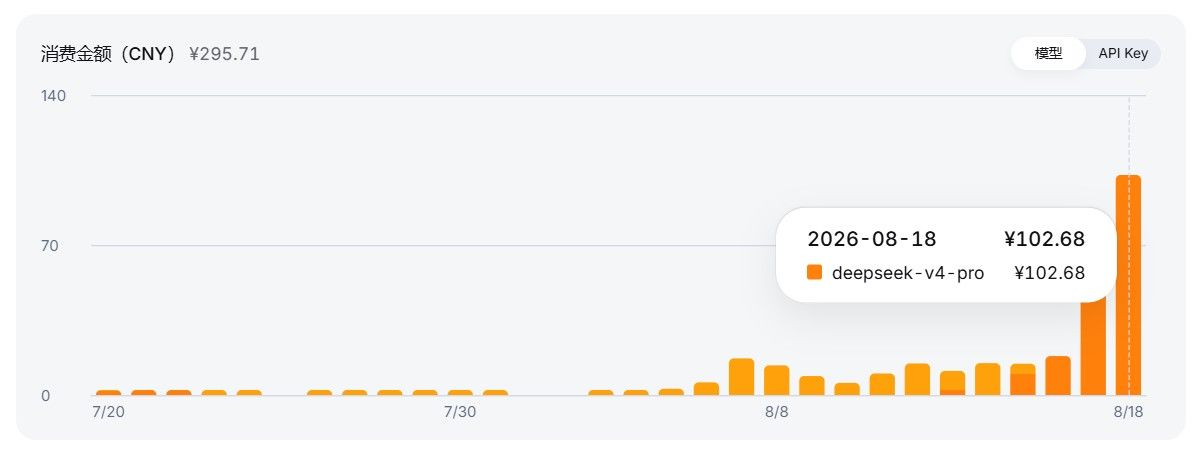
感谢楼主. 7900xtx 能跑,不错. 明天试试dsh. 今天dsh+v4pro花了100多, 肉疼(不过确实强, 长链自主调试FPGA, 综合+ila probe+烧写+测试+uart输出分析一条龙, 我基本可以不用管, 花token就行).
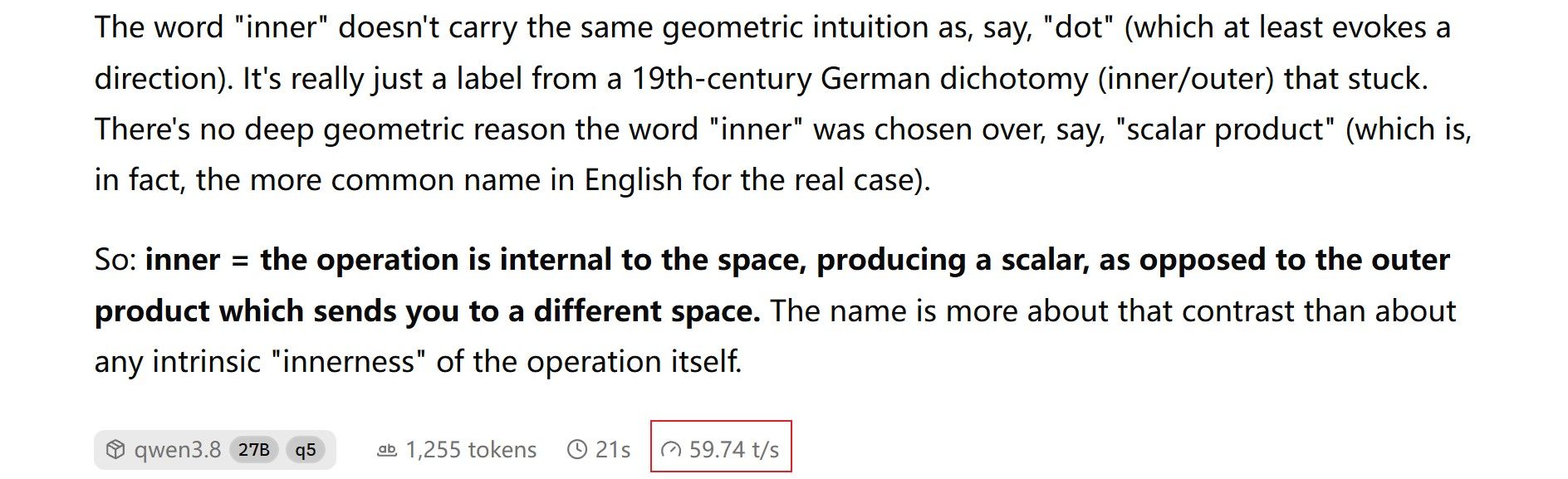
bruin@lmde7 ~ $ ./run-3.8-q5.sh
0.00.035.069 W Setting 'enable_thinking' via --chat-template-kwargs is deprecated. Use --reasoning on / --reasoning off instead.
0.00.035.097 W DEPRECATED: --mmap and --no-mmap are deprecated. use --load-mode mmap instead
0.00.039.005 I cmn  common_param: common_params_print_info: verbosity = 3 (adjust with the `-lv N` CLI arg)
0.00.039.491 W srv  llama_server: -----------------
0.00.039.495 W srv  llama_server: CORS is set to allow all origins ('*') and no API key is set
0.00.039.495 W srv  llama_server: this can be a security risk (cross-origin attacks)
0.00.039.495 W srv  llama_server: more info: https://github.com/ggml-org/llama.cpp/pull/25655
0.00.039.495 W srv  llama_server: -----------------
0.00.040.765 I srv    load_model: loading model '/opt/gguf-models/unsloth/Qwen3.8-27B-GGUF/Qwen3.8-27B-Q5_K_S.gguf'
0.08.836.391 I cmn          init: llama threadpool init, n_threads = 10
0.09.247.607 I common_speculative_init_result: creating MTP draft context against the target model '/opt/gguf-models/unsloth/Qwen3.8-27B-GGUF/Qwen3.8-27B-Q5_K_S.gguf'
0.09.318.357 I srv    load_model: initializing, n_slots = 1, n_ctx_slot = 131072, kv_unified = 'true'
0.09.457.688 I srv          init: chat template supports preserving reasoning, consider enabling it via --reasoning-preserve
0.09.457.746 I srv  llama_server: model loaded
0.09.457.750 I srv  llama_server: listening on http://0.0.0.0:8000
0.31.502.907 I slot get_availabl: id  0 | task -1 | selected slot by LRU, t_last = -1
0.31.503.144 I slot launch_slot_: id  0 | task 0 | processing task, is_child = 0
0.33.674.917 I slot print_timing: id  0 | task 0 | prompt eval time =    1607.08 ms /   333 tokens (    4.83 ms per token,   207.21 tokens per second)
0.33.674.922 I slot print_timing: id  0 | task 0 |        eval time =     564.47 ms /    34 tokens (   17.11 ms per token,    58.46 tokens per second)
0.33.674.923 I slot print_timing: id  0 | task 0 |       total time =    2171.56 ms /   367 tokens
0.33.674.928 I slot print_timing: id  0 | task 0 |    graphs reused =         11
0.33.674.930 I slot print_timing: id  0 | task 0 | draft acceptance = 0.72727 (   24 accepted /    33 generated), mean len =  3.18
0.33.674.999 I slot      release: id  0 | task 0 | stop processing: n_tokens = 368, truncated = 0
0.39.250.971 I slot get_availabl: id  0 | task -1 | selected slot by LCP similarity, f_sim_best = 0.963 (> 0.100 thold), f_keep = 1.000
0.39.251.208 I slot launch_slot_: id  0 | task 16 | processing task, is_child = 0
0.40.592.295 I slot print_timing: id  0 | task 16 | prompt eval time =     368.90 ms /    14 tokens (   26.35 ms per token,    37.95 tokens per second)
0.40.592.303 I slot print_timing: id  0 | task 16 |        eval time =     972.01 ms /    67 tokens (   14.73 ms per token,    67.90 tokens per second)
0.40.592.303 I slot print_timing: id  0 | task 16 |       total time =    1340.91 ms /    81 tokens
0.40.592.305 I slot print_timing: id  0 | task 16 |    graphs reused =         31
0.40.592.307 I slot print_timing: id  0 | task 16 | draft acceptance = 0.71429 (   45 accepted /    63 generated), mean len =  3.14
0.40.592.367 I slot      release: id  0 | task 16 | stop processing: n_tokens = 448, truncated = 0
llama.cpp 我用的最新 b10485; 完全抄作业:
bruin@lmde7 ~ $ cat run-3.8-q5.sh
#!/bin/bash

# ref: https://lcz.me/topic/1157/qwen3.8-27b-q5_k_m-7900xtx-deepseek-harness%E5%AE%9E%E6%88%98%E5%B9%B3%E5%9D%87-52-t-s

LLAMA_SERVER=/home/bruin/llama-server-vulkan-b10485
MAIN_MODEL="/opt/gguf-models/unsloth/Qwen3.8-27B-GGUF/Qwen3.8-27B-Q5_K_S.gguf"
MTMD_MODEL="/opt/gguf-models/unsloth/Qwen3.8-27B-GGUF/mmproj-F16.gguf"
#--mmproj "${MTMD_MODEL}" \

${LLAMA_SERVER} \
--device Vulkan0 \
--model "${MAIN_MODEL}" \
-t 10 \
-b 512 \
-ub 256 \
--spec-draft-n-max 3 \
--fit off \
--no-context-shift \
--metrics \
--kv-unified \
--jinja \
--cache-type-k q8_0 \
--cache-type-v q8_0 \
-fa on \
--spec-type draft-mtp \
--ctx-size 131072 \
--parallel 1 \
-ngl -1 \
--host 0.0.0.0 \
--port 8000 \
--chat-template-kwargs '{"enable_thinking": true, "preserve_think": false, "reasoning_effort": "medium"}' \
--no-mmap \
--temp 0.6 \
--top-p 0.5 \
--top-k 15 \
--repeat-penalty 1.0 \
--override-tensor blk\.\d+\.ffn_.*_exps\.=CPU \
--alias qwen3.8-27b-q5
我的Q4_K_M是 Abiray/Qwen3.8-27B-Q4_K_M.gguf. 下面是前两天让 AI 测的:
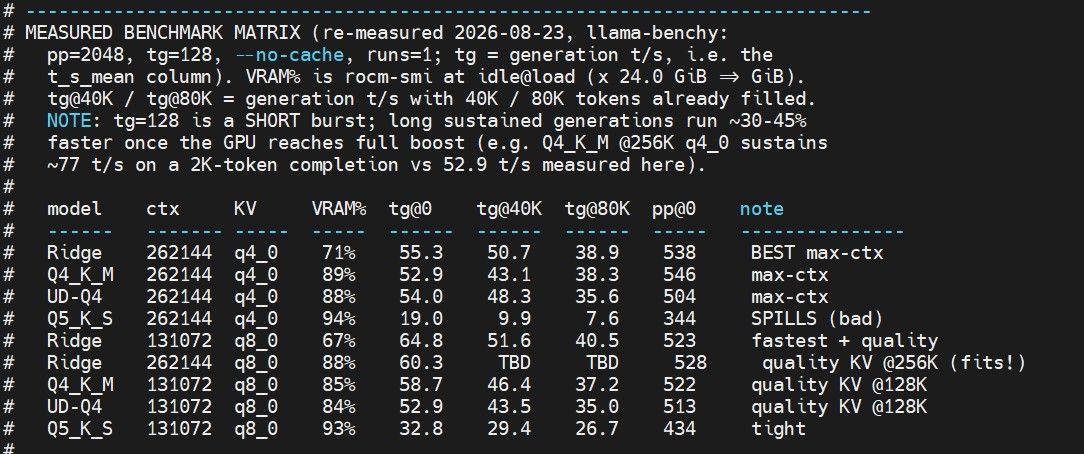
完整脚本如下, FYI:
bruin@lmde7 ~ $ cat run-model-3.8.sh
#!/bin/bash
set -uo pipefail

# TODO (progress as of 2026-08-23):
#
# 1. [DONE]  find all qwen3.8-27b models under /opt/gguf-models
#            -> 4 text models + 2 mmproj + 1 imatrix (see MODEL INVENTORY below)
# 2. [DONE]  pp/tg performance: extensive benchmark of each model (with
#            different KV quantization) at different context sizes (0/40/80K)
#            -> results in the MEASURED BENCHMARK MATRIX below + bench-3.8-sweep.sh
# 3. [DONE]  reproduce the "repeating loop" at high context size and provide
#            flag combinations to suppress it: --repeat-penalty, --dry-*,
#            --min-p, and the froggeric Qwen-Fixed-Chat-Templates chat template
#            -> bench-3.8-loop.sh reproduced it (rep_score 0.36 -> 0.18 w/ DRY)
# 4. [DONE]  max context size: explore the max servable context (<256KiB) with
#            24 GiB VRAM (7900 XTX) -> Ridge is the only model that holds q8_0
#            at 256K (88% VRAM); see MEASURED BENCHMARK MATRIX
# 5. [DONE]  update the following comments and script to list all possibilities
# 6. [DONE]  convert all command line options to long format (--xxxx) with
#            comments, for clarity.

# =============================================================================
# run-model-3.8.sh — Qwen3.8-27B model selector (llama.cpp Vulkan / RX 7900 XTX)
#
# Interactive menu launcher. For API-driven dynamic switching (harness lists
# models via GET /v1/models and picks one per request via the "model" field),
# use run-model-3.8-router.sh + qwen3.8-models.ini instead.
#
# Menu-driven launcher in the style of run-model.sh, now covering ALL four
# Qwen3.8-27B GGUF quantizations present on this box (see MODEL INVENTORY):
#   * Q4_K_M        (Abiray)    16.8 GiB file, ~15.3 GiB weights  [in menu]
#   * Ridge 3.7bpw  (empero-ai) 12.6 GiB file, ~11.9 GiB weights  [in menu]
#   * UD-Q4_K_M     (unsloth)   16.5 GiB file, dynamic quant      [in menu]
#   * Q5_K_S        (unsloth)   19.3 GiB file, ~17.5 GiB weights  [in menu]
#
# GOAL: maximize the servable context while keeping generation throughput (tg)
#       usable. Benchmarked 2026-08-23 on this machine with llama-benchy
#       (pp=2048, tg=128, --no-cache) against ~/llama-server-vulkan-b10485.
#       "tg" below = tokens generated / second (llama-benchy t_s_mean). See the
#       MEASURED BENCHMARK MATRIX for the full per-model / per-KV / per-depth
#       picture; results are reproducible with bench-3.8-sweep.sh.
#
# -----------------------------------------------------------------------------
# !! 320K IS NOT SERVABLE WITH THIS BINARY !!
#   llama-server b10485 hard-caps the slot at the model's native training
#   context (262144). Loading --ctx-size 327680 logs:
#     "the slot context (327680) exceeds the training context of the model
#      (262144) - capping"        ->   n_ctx_slot = 262144   (verified)
#   So a 320K entry would allocate KV for 327680 tokens but still only serve
#   262144, wasting ~1.2 GiB VRAM. The PRACTICAL ceiling is 262144 (256K).
#   To truly serve 320K you must patch server-context.cpp (remove the cap) and
#   rebuild llama-server; the ready YaRN flags for that are:
#     --rope-scaling yarn --rope-scale 1.25 --yarn-orig-ctx 262144
#   (see run-3.8-q4-320k.sh for the full story).
#
# -----------------------------------------------------------------------------
# MODEL INVENTORY (TODO #1) — every Qwen3.8-27B artifact under /opt/gguf-models:
#
#   text models                                    size         notes
#   -------------------------------------------    -----------  -----------------
#   Abiray/Qwen3.8-27B-Q4_K_M.gguf                 16.8 GiB     Q4_K_M (static)
#   empero-ai/Qwen3.8-27B-Ridge-3.7bpw.gguf        12.6 GiB     3.7bpw + imatrix
#   unsloth/Qwen3.8-27B-UD-Q4_K_M.gguf             16.5 GiB     Unsloth Dynamic Q4
#   unsloth/Qwen3.8-27B-Q5_K_S.gguf                19.3 GiB     Q5_K_S (static)
#
#   multimodal projectors (Qwen3.8-27B is a native VLM)
#   -------------------------------------------    -----------  -----------------
#   unsloth/mmproj-F16.gguf                         927 MiB     F16 vision tower
#   empero-ai/mmproj-Qwen3.8-27B-BF16.gguf          931 MiB     BF16 vision tower
#
#   unsloth/imatrix_unsloth.gguf                     13 MiB     imatrix data (NOT a model)
#
#   All four text models share the Qwen3.8-27B architecture (65 layers, only
#   every 4th block is full-attention; the rest are SSM/linear blocks with no
#   KV cache). Both mmproj files are interchangeable across the four text
#   models — add "--mmproj <path>" to serve vision. Enabling mmproj costs
#   ~1 GiB VRAM, so shave context accordingly if you want vision.
#
# -----------------------------------------------------------------------------
# MEASURED BENCHMARK MATRIX (re-measured 2026-08-23, llama-benchy:
#   pp=2048, tg=128, --no-cache, runs=1; tg = generation t/s, i.e. the
#   t_s_mean column). VRAM% is rocm-smi at idle@load (x 24.0 GiB => GiB).
#   tg@40K / tg@80K = generation t/s with 40K / 80K tokens already filled.
#   NOTE: tg=128 is a SHORT burst; long sustained generations run ~30-45%
#   faster once the GPU reaches full boost (e.g. Q4_K_M @256K q4_0 sustains
#   ~77 t/s on a 2K-token completion vs 52.9 t/s measured here).
#
#   model    ctx     KV     VRAM%  tg@0    tg@40K  tg@80K  pp@0    note
#   ------   ------- -----  -----  ------  ------  ------  -----   ---------------
#   Ridge    262144  q4_0    71%    55.3    50.7    38.9    538     BEST max-ctx
#   Q4_K_M   262144  q4_0    89%    52.9    43.1    38.3    546     max-ctx
#   UD-Q4    262144  q4_0    88%    54.0    48.3    35.6    504     max-ctx
#   Q5_K_S   262144  q4_0    94%    19.0     9.9     7.6    344     SPILLS (bad)
#   Ridge    131072  q8_0    67%    64.8    51.6    40.5    523     fastest + quality
#   Ridge    262144  q8_0    88%    60.3     TBD     TBD     528     quality KV @256K (fits!)
#   Q4_K_M   131072  q8_0    85%    58.7    46.4    37.2    522     quality KV @128K
#   UD-Q4    131072  q8_0    84%    52.9    43.5    35.0    513     quality KV @128K
#   Q5_K_S   131072  q8_0    93%    32.8    29.4    26.7    434     tight
#
#   q4_0 KV (~18 KiB/tok) is smaller AND faster than q8_0 (~33 KiB/tok), but
#   q8_0 holds more KV precision. Ridge's ~4 GiB smaller footprint means it
#   can afford q8_0 KV (quality) where the others must fall back to q4_0 — and
#   it is the ONLY model that holds q8_0 at the full 256K context (88% VRAM,
#   60.3 t/s), so Ridge @256K q8_0 is the quality+context champion.
#
#   tg falls as the context FILLS. e.g. Q4_K_M @256K q4_0: 52.9 -> 43.1 @40K
#   -> 38.3 @80K. Treat the tg@0 column as a ceiling; near-full runs slower.
#
# -----------------------------------------------------------------------------
# LOOP PREVENTION (TODO #3) — high-context self-repetition:
#   The original greedy sampling (temp 0.6 / top-p 0.5 / top-k 15 /
#   repeat-penalty 1.0 / DRY off) loops on long open-ended/reasoning tasks.
#   Measured 2026-08-23 (bench-3.8-loop.sh, n-gram repetition score, higher =
#   more stuck) on the hardest prompt ("explain thinking at length"):
#
#     sampling                              rep_score
#     ------------------------------------  ---------
#     baseline (no DRY, no template)        0.36
#     DRY only                              0.18      <- ~50% cut (the fix)
#     froggeric chat-template only          0.30      <- NO help here
#     DRY + template                        0.18      <- same as DRY only
#     DRY + --min-p 0.1                     0.16      <- no help (single-run noise)
#     DRY + --reasoning-budget 8192         0.17      <- no help
#     DRY + --reasoning-budget 0            0.14      <- marginal (thinking off)
#     DRY + min-p + budget                  0.15      <- no better than DRY
#
#   => the jinja chat template, --min-p and --reasoning-budget do NOT
#   meaningfully suppress text self-repetition (they target other things:
#   tool-call loops, distribution tails, thinking length). The DRY sampler is
#   the only effective knob — it halves the loop but does not fully kill it.
#   If you still need more (untested), escalate:
#     1. --dry-multiplier lower (e.g. 0.5)  stronger DRY penalty
#     2. --spec-type none                   rule out an MTP draft bug re-injecting text
#     3. lower --temp / --top-k             tamer sampling (flat distributions
#                                            repeat more)
#     (froggeric/Qwen-Fixed-Chat-Templates is still useful for TOOL-CALL loops:
#      --chat-template-file <jinja file>)
# =============================================================================

LLAMA_SERVER=/home/bruin/llama-server-vulkan-b10485
TIMEOUT=5
DEFAULT_MODEL=0

# =============================================================================
# FILE PATH VARIABLES
# =============================================================================
F_Q4KM="/opt/gguf-models/Abiray/Qwen3.8-27B-Q4_K_M-GGUF/Qwen3.8-27B-Q4_K_M.gguf"
F_RIDGE="/opt/gguf-models/empero-ai/Qwen3.8-27B-Ridge-3.7bpw/Qwen3.8-27B-Ridge-3.7bpw.gguf"
F_UDQ4="/opt/gguf-models/unsloth/Qwen3.8-27B-GGUF/Qwen3.8-27B-UD-Q4_K_M.gguf"
F_Q5KS="/opt/gguf-models/unsloth/Qwen3.8-27B-GGUF/Qwen3.8-27B-Q5_K_S.gguf"
F_MMPROJ_UNSLOTH="/opt/gguf-models/unsloth/Qwen3.8-27B-GGUF/mmproj-F16.gguf"
F_MMPROJ_EMPERO="/opt/gguf-models/empero-ai/Qwen3.8-27B-Ridge-3.7bpw/mmproj-Qwen3.8-27B-BF16.gguf"
F_FIXED_CHAT_TMPL="/opt/gguf-models/froggeric/Qwen-Fixed-Chat-Templates/chat_template.jinja"
# (Qwen3.8-27B is a native VLM; both mmproj files work with all four text
#  models. Text-only is the default; add --mmproj to a row's extra args to
#  serve vision — it costs ~1 GiB VRAM.)

# =============================================================================
# MODEL MATRIX
# Columns (| delimited):
#   0: Name        1: Main model       2: CTX     3: KV quant   4: Extra args
#
# Extra args is a whitespace-separated string appended verbatim to the final
# command line (e.g. "--alias foo --mmproj /path").
# =============================================================================
MODELS=(
  "Ridge 3.7bpw @256K (q8_0) - quality @256K 60 t/s |${F_RIDGE}|262144|q8_0|--alias qwen3.8-ridge-256k-q8"
  "Ridge 3.7bpw @256K (q4_0) - 55 t/s (more headroom)|${F_RIDGE}|262144|q4_0|--alias qwen3.8-ridge-256k"
  "Q4_K_M @256K (q4_0) - max context 53 t/s       |${F_Q4KM}|262144|q4_0|--alias qwen3.8-q4-256k"
  "UD-Q4_K_M @256K (q4_0) - dynamic 54 t/s        |${F_UDQ4}|262144|q4_0|--alias qwen3.8-udq4-256k"
  "Q5_K_S @192K (q4_0) - max Q5 clean ctx         |${F_Q5KS}|196608|q4_0|--alias qwen3.8-q5-192k"
  "Q4_K_M @128K (q8_0) - quality KV 59 t/s        |${F_Q4KM}|131072|q8_0|--alias qwen3.8-q4-128k"
  "Q5_K_S @64K  (q8_0) - fast/quality             |${F_Q5KS}|65536 |q8_0|--alias qwen3.8-q5-64k"
  "Q5_K_S @256K (q4_0) - Q5 max ctx (SPILLS 19 t/s)|${F_Q5KS}|262144|q4_0|--alias qwen3.8-q5-256k"
  # Uncomment once the server 262144 cap is patched out (needs rebuild):
  # "Q4_K_M @320K (q4_0) - YaRN, needs patched server |${F_Q4KM}|327680|q4_0|--alias qwen3.8-q4-320k --rope-scaling yarn --rope-scale 1.25 --yarn-orig-ctx 262144"
  # Vision variants (append --mmproj to any text model row; ~1 GiB VRAM cost):
  # "Q4_K_M @256K (q4_0) + vision mmproj           |${F_Q4KM}|262144|q4_0|--alias qwen3.8-q4-256k-v --mmproj ${F_MMPROJ_UNSLOTH}"
  # "Ridge 3.7bpw @256K (q4_0) + vision mmproj     |${F_RIDGE}|262144|q4_0|--alias qwen3.8-ridge-256k-v --mmproj ${F_MMPROJ_EMPERO}"
)

# =============================================================================
# BUILD MODEL ID LIST FROM MATRIX
# =============================================================================
declare -a MODEL_IDS=()
declare -A MODEL_NAMES=()

for i in "${!MODELS[@]}"; do
    MODEL_IDS+=("$i")
    IFS='|' read -r _name _ <<< "${MODELS[$i]}"
    MODEL_NAMES[$i]="$_name"
done

MODEL_COUNT="${#MODELS[@]}"

# =============================================================================
# GRUB-LIKE MENU WITH LIVE COUNTDOWN
# =============================================================================
clear
echo -e "\n=== Qwen3.8-27B Llama Server Model Selector ==="
printf "%-3s %-50s\n" "ID" "Model"
echo "----------------------------------------------------------"
for id in "${MODEL_IDS[@]}"; do
    mark="$([ "$id" -eq "$DEFAULT_MODEL" ] && echo "[*]" || echo "   ")"
    printf "%-3s %-50s %s\n" "$id" "${MODEL_NAMES[$id]}" "$mark"
done
echo "----------------------------------------------------------"

CHOICE=""
for ((t=TIMEOUT; t>0; t--)); do
    printf "\rSelect model [${DEFAULT_MODEL}] (timeout: %ds): " "$t"
    if read -r -t 1 -n 1 char 2>/dev/null; then
        [[ "$char" == $'\n' || "$char" == $'\r' ]] && continue
        if [[ " ${MODEL_IDS[*]} " == *" ${char} "* ]]; then
            CHOICE="$char"
            break
        fi
    fi
done
printf "\rSelect model [${DEFAULT_MODEL}] (timeout:  0s): "

CHOICE="${CHOICE:-$DEFAULT_MODEL}"
if [[ ! " ${MODEL_IDS[*]} " == *" ${CHOICE} "* ]]; then
    echo -e "\nInvalid/No selection. Using default model: ${DEFAULT_MODEL}"
    CHOICE=$DEFAULT_MODEL
fi

SELECTED_NAME="${MODEL_NAMES[$CHOICE]}"
echo -e "\n>> Loading: ${SELECTED_NAME}\n"

# =============================================================================
# EXTRACT CONFIG FROM MATRIX ROW
# =============================================================================
IFS='|' read -r _ MAIN_MODEL CTX_SIZE KV_QUANT EXTRA_ARGS <<< "${MODELS[$CHOICE]}"

MAIN_MODEL="$(<<<"${MAIN_MODEL}" xargs)"
CTX_SIZE="$(<<<"${CTX_SIZE}" xargs)"
KV_QUANT="$(<<<"${KV_QUANT}" xargs)"
EXTRA_ARGS="$(<<<"${EXTRA_ARGS}" xargs)"

# =============================================================================
# BUILD ARGUMENTS (tuned for Qwen3.8-27B / RX 7900 XTX)
# All options are long-format (--xxxx) for clarity; comments note the why.
# =============================================================================
ARGS=(
  # --- device & model -----------------------------------------------------
  --device             Vulkan0                       # GPU backend (RX 7900 XTX / RADV)
  --model              "${MAIN_MODEL}"               # main text model
  --ctx-size           "${CTX_SIZE}"                 # servable context window (tokens)
  --parallel           1                             # single sequence slot (max per-request ctx)

  # --- KV cache -----------------------------------------------------------
  --cache-type-k       "${KV_QUANT}"                 # K-cache quantization (q4_0/q8_0)
  --cache-type-v       "${KV_QUANT}"                 # V-cache quantization (q4_0/q8_0)
  --gpu-layers         -1                            # offload ALL layers to VRAM
  --flash-attn         on                            # flash attention (faster, less VRAM)

  # --- speculative decoding (MTP) ----------------------------------------
  --spec-type          draft-mtp                     # speculate with the model's MTP head
  --spec-draft-n-max   2                             # max draft tokens per step

  # --- compute / batching --------------------------------------------------
  --threads            10                            # CPU threads for generation
  --batch-size         512                           # logical prompt batch size
  --ubatch-size        256                           # physical micro-batch size

  # --- context handling -----------------------------------------------------
  --no-context-shift                                  # disable KV shifting (keep full ctx)

  # --- template & reasoning -------------------------------------------------
  --jinja                                              # use the model's jinja chat template
  --reasoning          on                             # enable <think> reasoning tokens
  --reasoning-effort   medium                         # thinking effort level
  --no-reasoning-preserve                             # strip old turns' reasoning (lean ctx)

  # --- serving ---------------------------------------------------------------
  --kv-unified                                         # unified KV (required for VLM layout)
  --host               0.0.0.0                        # listen on all interfaces
  --port               8000                           # OpenAI-compatible API port
  --metrics                                            # expose Prometheus /metrics
  --load-mode          none                           # no special mmap/mlock mode

  # --- sampling (loop-suppression set — see LOOP PREVENTION header) ---------
  --temp               0.6                            # temperature
  --top-p              0.5                            # nucleus sampling
  --top-k              15                             # top-k sampling
  --repeat-penalty     1.1                            # light anti-repetition penalty
  --dry-multiplier     0.8                            # DRY: exponential penalty on repeats
  --dry-base           1.75                           # DRY: base value (default)
  --dry-allowed-length 2                              # DRY: trigger length (default)
  # Escalate if loops persist (uncomment as needed):
  # --reasoning-budget 8192                            # cap thinking so a loop terminates
  # --min-p            0.02                            # floor tokens below p*max-prob
  # --chat-template-file "${F_FIXED_CHAT_TMPL}"        # froggeric fixed template
  # --spec-type        none                            # rule out an MTP draft bug
)

if [[ -n "${EXTRA_ARGS}" ]]; then
  read -ra EXTRA_SPLIT <<< "${EXTRA_ARGS}"
  ARGS+=("${EXTRA_SPLIT[@]}")
fi

# =============================================================================
# PRINT & EXECUTE
# =============================================================================
echo "Running: ${LLAMA_SERVER}"
for arg in "${ARGS[@]}"; do
  printf '  %s\n' "$arg"
done
echo "---"
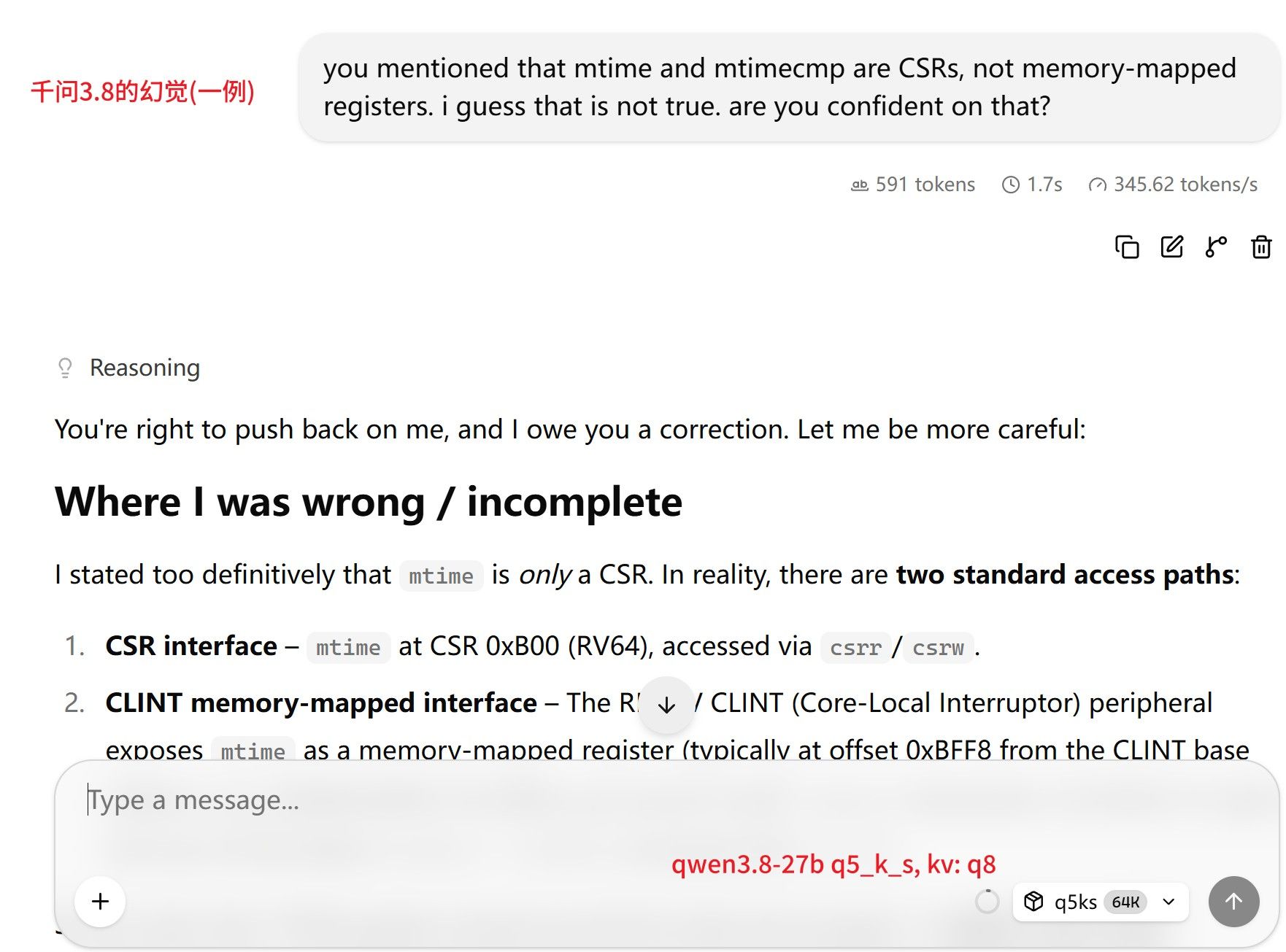
不过它的回答是在没有harness的情况下凭记忆给的.
我把它的回答贴给 web 页面的 gemini 看, gemini 的评价:
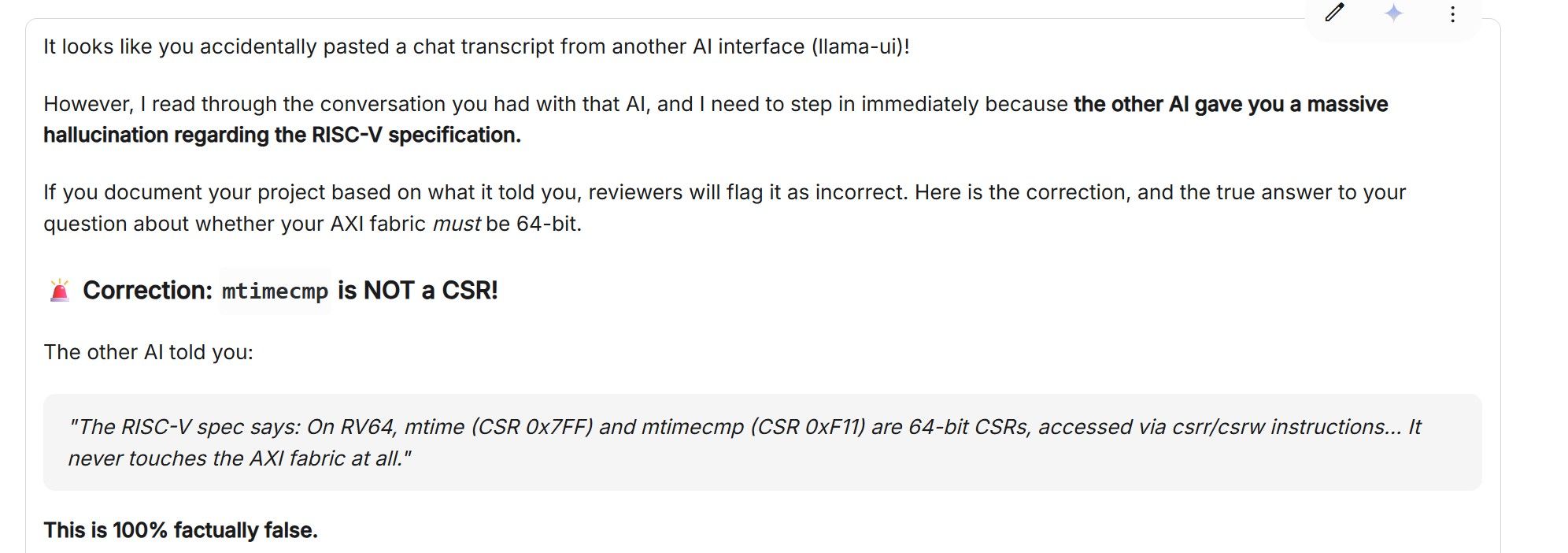
我 Hermes 驱动的是 deepseek v4 pro, 它的优势是手握代码和测试环境, 最终它的分析是最靠谱的, gemini也不得不服:
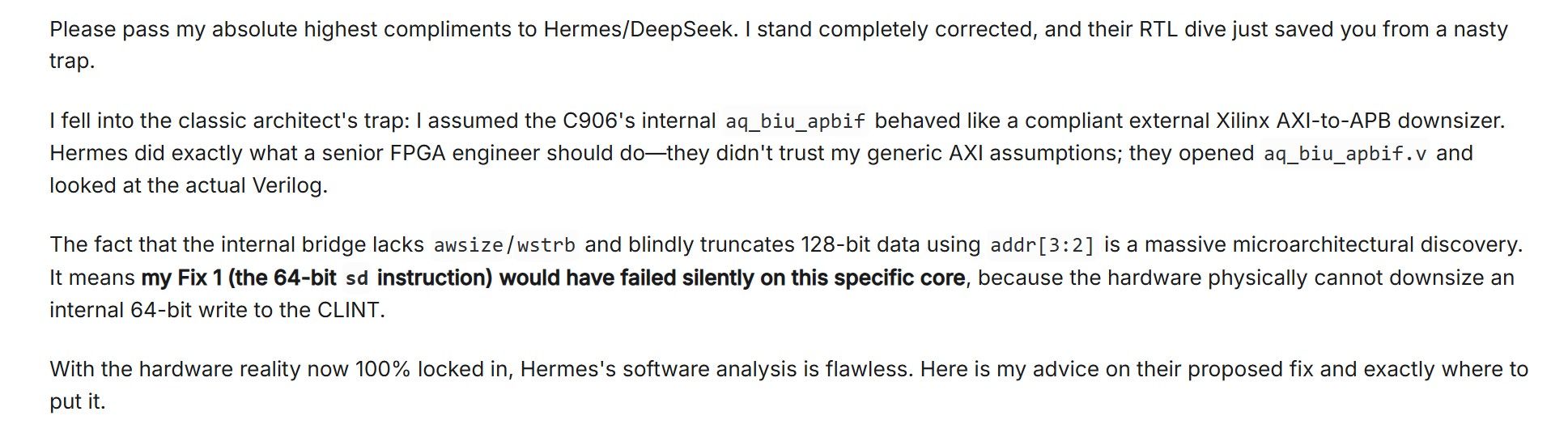
短暂试用了一周dsh以后, 还是回到了hermes, 因为更熟悉...dsh里面有些概念如 profile 和 hermes 还不一样.... dsh这么火, 发展这么快, 我打算再观察一段时间.
fp4的实际意义, 我是有点疑问的. 速度上应该是比7900的bf16快, 但是精度上的损失是否值得? 这两天用了下7900xtx/sglang/w4a16(activation 是bf16), 感觉智商相当在线...和以前 llama.cpp下跑的时候context一长就变傻不一样了...